Setting up Windows Server 2012 R2

You might need to disable Internet Explorer Enhanced Security Protection:

How to disable IE Enhanced Security in Windows Server 2012

How to change location of MS Outlook data file:
https://support.microsoft.com/en-us/kb/2752583/

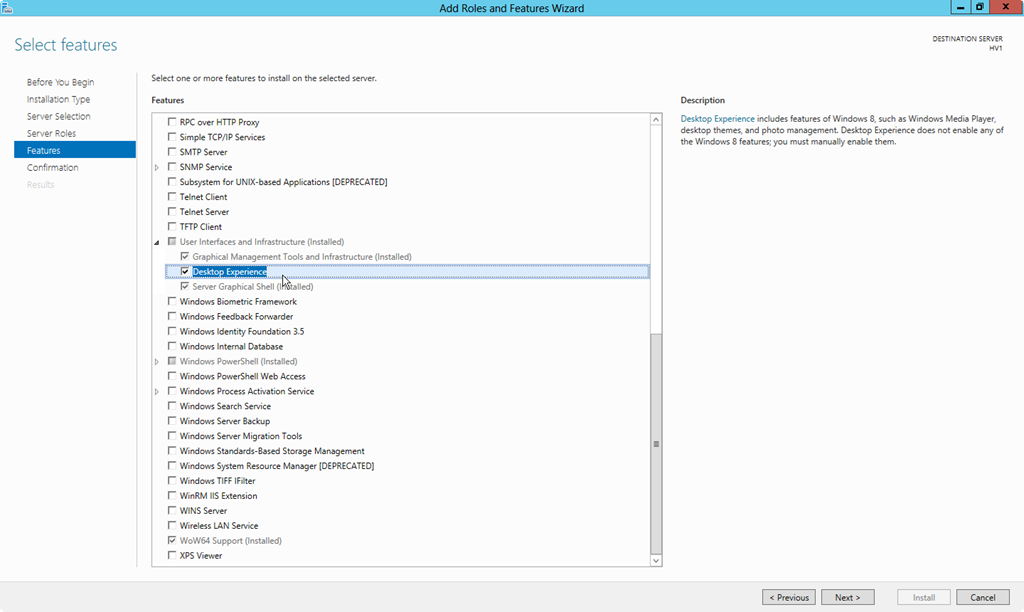
Turn on Desktop Experience to add Windows Media Player:
server manager -> configure this server -> add roles and features -> user interface -> desktop experience
0207.5-1-2012-3-18-02-PM_34B5D1E6

Posted in Uncategorized | Leave a comment

AWS / Unix / Deep Learning

How to Remote Desktop to Ubuntu:
follow instructions at:
https://aws.amazon.com/premiumsupport/knowledge-center/connect-to-linux-desktop-from-windows/
one bit of instruction is missing in above link and that has to do with enabling RDP traffic to your server (allow a client machine to communicate with server over RDP). You will need to add the RDP rule to the security policies. Find it in AWS console.

If you see a blank gray screen when you RDP to AWS:
http://askubuntu.com/questions/603314/gray-screen-when-i-try-to-remote-desktop-to-ubuntu

How to Flatten a folder in unix (very useful – need to do this every once in a while):
http://unix.stackexchange.com/questions/52814/flattening-a-nested-directory?newreg=4fb80858719b4a8e9fae5eebac6ded3b

How to Resize images using imagemagick:
http://stackoverflow.com/questions/10802606/how-to-batch-resize-images-in-ubuntu-recursively-within-the-terminal

find . -name "*.jpg" | xargs mogrify -resize 50%

above can run for a long time if you have thousands of files in the directory. In that case use this script:

for f in `find . -name "*.jpg"`
do
    echo resizing $f ...
    mogrify -resize 50% $f
done

this will also run for same amount of time but will display messages to console as it is resizing each file

Authorizing Inbound Traffic for Your Linux Instances:
http://docs.aws.amazon.com/AWSEC2/latest/UserGuide/authorizing-access-to-an-instance.html

How do I make `ls` show file sizes in megabytes?
http://unix.stackexchange.com/questions/64148/how-do-i-make-ls-show-file-sizes-in-megabytes

To see the disk space consumed by files in a directory:
$du -shb .
http://stackoverflow.com/questions/1241801/total-size-of-the-contents-of-all-the-files-in-a-directory

To send file as email attachment:

cat errors.txt | mailx me@email.com

http://stackoverflow.com/questions/17359/how-do-i-send-a-file-as-an-email-attachment-using-linux-command-line

To copy file contents to clipboard:
http://stackoverflow.com/questions/1620018/copy-all-the-lines-to-clipboard

Logging out:
When you are done with your session, its always a good practice to end a ssh session by typing $logout rather than closing the window. Similarly if you are using RDP, don’t just close the window to end the session. Logout of RDP using the GUI and you might want to uncheck the box that says save this session for future logons.

Deep Learning:

http://neuralnetworksanddeeplearning.com/

https://www.kaggle.com/c/facial-keypoints-detection/details/deep-learning-tutorial

Posted in Software | Leave a comment

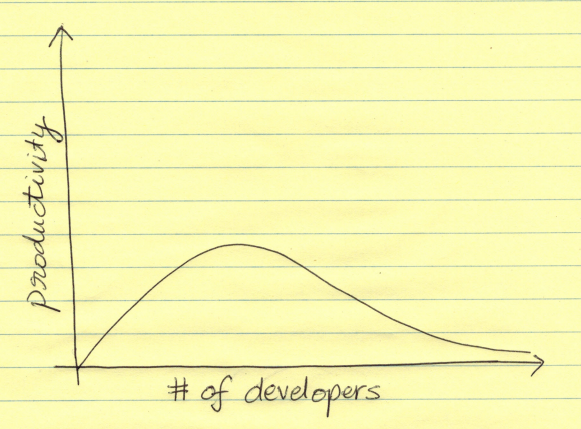
Most important lesson of software development: more is not better

Most important lesson of software development if you are a manager:
most_important_lesson_of_software_development
in case the point is not clear: First of all, the productivity does not increase in proportion to the # of devs i.e., if you double the devs, it won’t double the productivity and deliverables. More importantly, the graph does not reach an asymptote. After a certain point there is a decrease in productivity as more devs are added to a team because of various reasons:

  • people conflicts and politics
  • impossible for one person to keep track and abreast of every changeset that is happening. as a result, left hand does not know what right hand is doing
Posted in Software | Leave a comment

Testing Logistic Regression on linearly inseparable data

generate data:
x=rnorm(1000,mean=0)
y=rnorm(1000,mean=10)
obs1=data.frame(rbind(cbind(rnorm(1000),rnorm(1000)),cbind(rnorm(1000,mean=10),rnorm(1000,mean=10))),as.factor("Class A"))
obs2=data.frame(rbind(cbind(x,y),cbind(y,x)),as.factor("Class B"))
colnames(obs1) = c("x", "y", "class")
colnames(obs2) = c("x", "y", "class")
df=rbind(obs1,obs2)

make scatter plot:
#scatter plot
#dev.new()
png(file="scatter.png")
plot(obs1$x,obs1$y,col=colors[[1]],xlab="x",ylab="y",main="scatter plot")
points(obs2$x,obs2$y,col=colors[[2]])
dev.off()
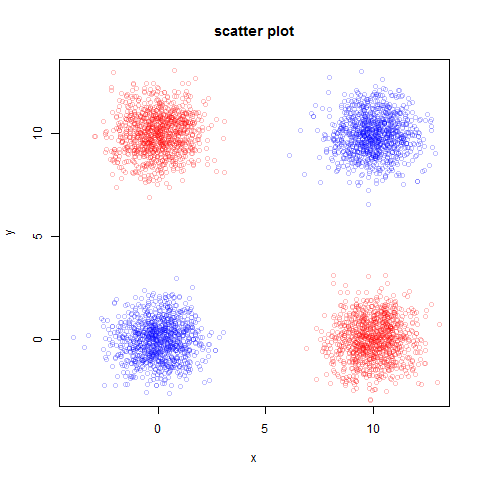
scatter
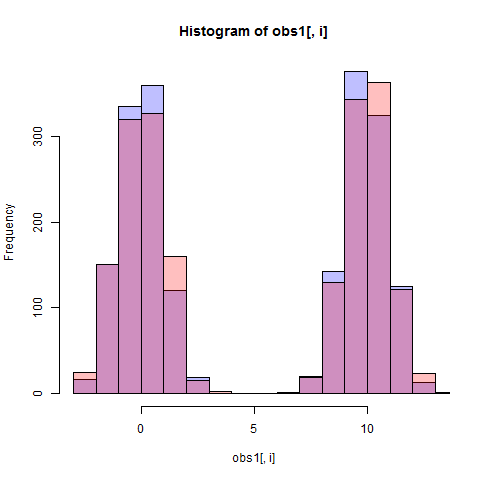
see histograms:
for(i in 1:2)
{
#dev.new()
png(file=paste("hist-",names[[i]],".png",sep=""))
hist(obs1[,i],col=colors[[1]])
hist(obs2[,i],col=colors[[2]],add=TRUE)
legend(2000,9.5, c("Class A","Class B"))
dev.off()
}
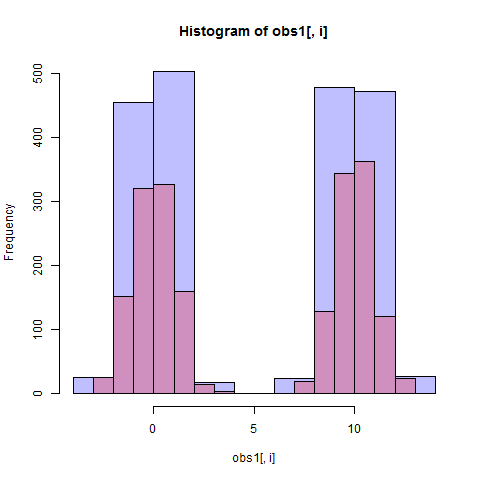
hist-x

hist-y
build classifier:
model=glm(class~.,family="binomial",data=df)
response=predict(model,type="response")
M=NULL
for (threshold in seq(0.01,0.99,0.01))
{
M=cbind(M,calc(response,df[,3],levels(df[,3]),threshold))
}
M = cbind(c(1,1),M,c(0,0))
fp = M[1,]
tp = M[2,]
auc = -auc(fp, tp)
#dev.new()
png(file="roc.png")
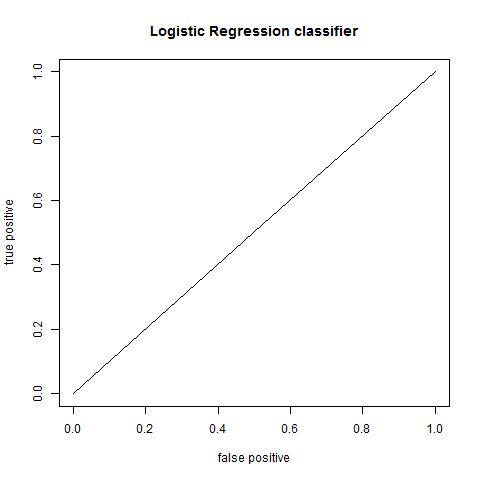
plot(fp,tp,type="l",xlab="false positive",ylab="true positive",main="Logistic Regression classifier")
#lines(c(0,0),c(1,1))
dev.off()

roc

full code:

colors = list(rgb(0,0,1,1/4),rgb(1,0,0,1/4))
x=rnorm(1000,mean=0)
y=rnorm(1000,mean=10)
obs1=data.frame(rbind(cbind(rnorm(1000),rnorm(1000)),cbind(rnorm(1000,mean=10),rnorm(1000,mean=10))),as.factor("Class A"))
obs2=data.frame(rbind(cbind(x,y),cbind(y,x)),as.factor("Class B"))
colnames(obs1) = c("x", "y", "class")
colnames(obs2) = c("x", "y", "class")
df=rbind(obs1,obs2)
#scatter plot
#dev.new()
png(file="scatter.png")
plot(obs1$x,obs1$y,col=colors[[1]],xlab="x",ylab="y",main="scatter plot")
points(obs2$x,obs2$y,col=colors[[2]])
dev.off()

Dp=D(as.matrix(obs1[,1:2]),as.matrix(obs2[,1:2]))
names=c("x","y")
for(i in 1:2)
{
	#dev.new()
	png(file=paste("hist-",names[[i]],".png",sep=""))
	hist(obs1[,i],col=colors[[1]])
	hist(obs2[,i],col=colors[[2]],add=TRUE)	
	legend(2000,9.5, c("Class A","Class B"))
	dev.off()
}
model=glm(class~.,family="binomial",data=df)
response=predict(model,type="response")
M=NULL
for (threshold in seq(0.01,0.99,0.01))
{
	M=cbind(M,calc(response,df[,3],levels(df[,3]),threshold))
}
M = cbind(c(1,1),M,c(0,0))	
fp = M[1,]
tp = M[2,]
auc = -auc(fp, tp)
#dev.new()
png(file="roc.png")
plot(fp,tp,type="l",xlab="false positive",ylab="true positive",main="Logistic Regression classifier")
#lines(c(0,0),c(1,1))
dev.off()
Posted in Software | Leave a comment

Testing Logistic Regression

create training data:

n=10000
x=runif(n)
y=runif(n)
df=data.frame(x,y,as.factor(x>y))

visualize:

colors = list(rgb(0,0,1,1/4),rgb(1,0,0,1/4))
names(df) = c("x", "y", "class")
classes=levels(df[[3]])
obs1=as.matrix(subset(df,class==classes[[1]])[,1:2])
obs2=as.matrix(subset(df,class==classes[[2]])[,1:2])
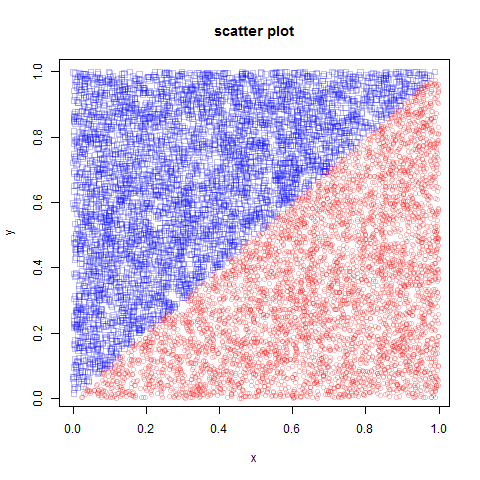
# make scatter plot
dev.new()
plot(obs1[,1],obs1[,2],xlab="x",ylab="y",main="scatter plot",pch=0,col=colors[[1]])
points(obs2[,1],obs2[,2],xlab="x",ylab="y",main="scatter plot",pch=1,col=colors[[2]])

result:

D = \frac{|\mu_1-\mu_2|}{\sigma_1+\sigma_2}:

> Dp
        x         y 
0.7121875 0.7208857 

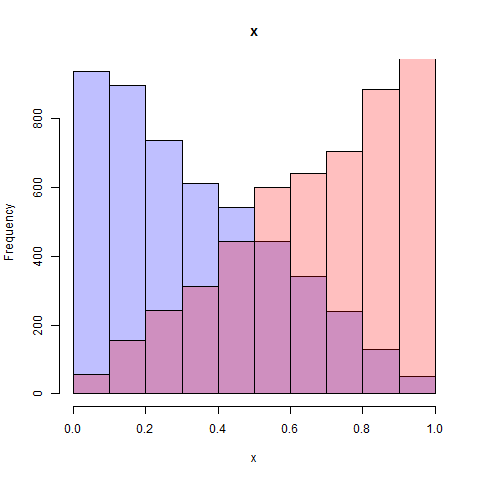
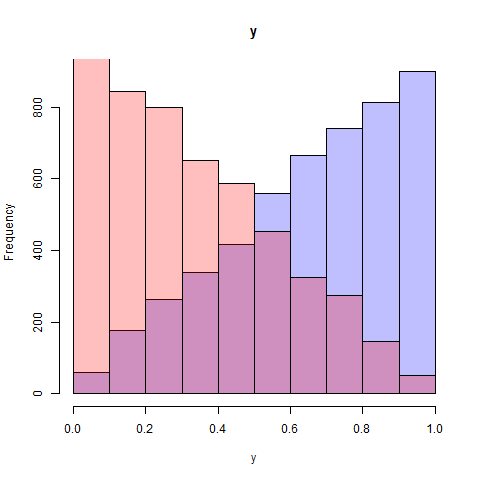
histograms of x and y:
hist-x

hist-y

build classifier:

model=glm(class~.,family="binomial",data=df)
summary(model) # prints summary

Output:

Call:
glm(formula = class ~ ., family = "binomial", data = df)

Deviance Residuals: 
     Min        1Q    Median        3Q       Max  
-0.11832   0.00000   0.00000   0.00000   0.08847  

Coefficients:
              Estimate Std. Error z value Pr(>|z|)
(Intercept)  5.765e-01  1.923e+01   0.030    0.976
feature1     9.761e+04  8.981e+04   1.087    0.277
feature2    -9.761e+04  8.981e+04  -1.087    0.277

(Dispersion parameter for binomial family taken to be 1)

    Null deviance: 1.3863e+04  on 9999  degrees of freedom
Residual deviance: 2.9418e-02  on 9997  degrees of freedom
AIC: 6.0294

Number of Fisher Scoring iterations: 25

algorithm fails to converge because of perfect separation:

Warning messages:
1: glm.fit: algorithm did not converge 
2: glm.fit: fitted probabilities numerically 0 or 1 occurred 

compute AUC:

response=predict(model,type="response")
groundTruth=df[,3]
M=NULL
for (threshold in seq(0.05,0.95,0.05))
{	
	M=cbind(M,calc(response,groundTruth,classes,threshold))	
}
M = cbind(c(1,1),M,c(0,0))	
fp = M[1,]
tp = M[2,]
auc = -auc(fp, tp)

where:

auc=function(x,y)
{
	d = diff(x, 1)
	e = as.numeric(lapply(1:(length(y)-1), function(i)y[i]+y[i+1]))	
	return(sum(0.5*d*e))
}

calc=function(response, groundTruth, classes, threshold)
{
	type1 = classes[1]
	type2 = classes[2]
	n=length(response)
	predicted = as.factor(ifelse(response<threshold,type1,type2))
	I = which(groundTruth==type1)
	fp = length(which(predicted[I] != type1)) / length(I)
	I = which(groundTruth==type2)
	tp = length(which(predicted[I] == type2)) / length(I)
	return(c(fp,tp))
}

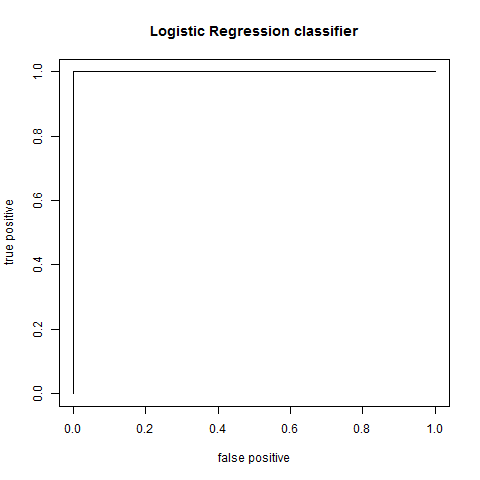
plot AUC:

plot(fp,tp,type="l",xlab="false positive",ylab="true positive",main="Logistic Regression classifier")

result:

LDA:

lda_classifier=lda(class~., data=df)
Call:
lda(class ~ ., data = df)

Prior probabilities of groups:
 FALSE   TRUE 
0.5007 0.4993 

Group means:
       feature1  feature2
FALSE 0.3346288 0.6676169
TRUE  0.6710111 0.3380432

Coefficients of linear discriminants:
               LD1
**feature1  4.280490
feature2 -4.196388**

finally you add add some noise to make logistic regression converge:

df=data.frame(x+rnorm(n,sd=0.1),y+rnorm(n,sd=0.1),as.factor(x>y))

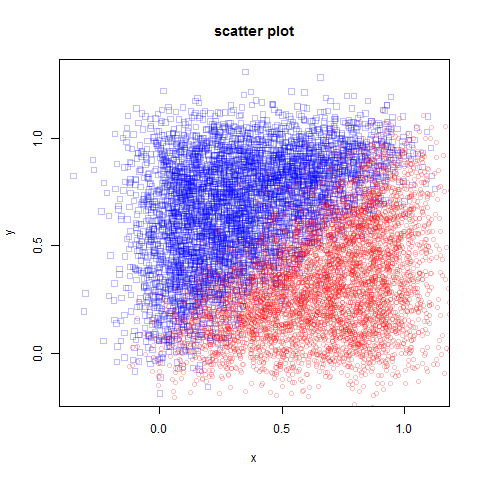
scatter plot:
scatter
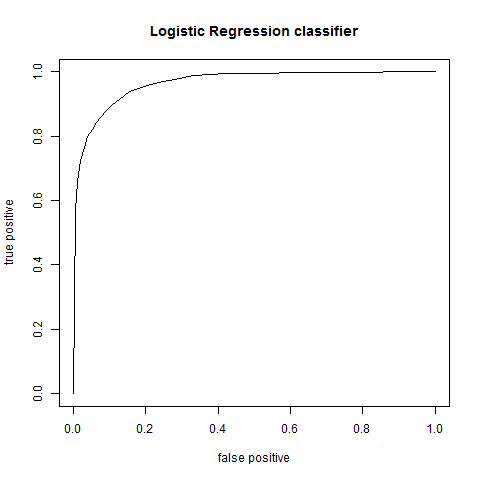
ROC:
auc

Posted in Software | Leave a comment

Performance in R

Here is a function to compute (false positive, true positive) pair given response, ground truth, classes and threshold:

# response is e.g. predict(model,type="response") 
calc2=function(response, groundTruth, classes, threshold)
{	
	type1 = classes[1]
	type2 = classes[2]
	n=length(response)
	tpden = 0
	fpden = 0
	fp = 0
	tp = 0
	for(i in 1:n)
	{	
		predicted = ifelse(response[i]<threshold,type1,type2)
		actual = groundTruth[i]
		if (actual == type1)
		{
			fpden = fpden + 1
			if (predicted != actual)
			{
				fp = fp + 1
			}
		}
		else
		{
			tpden = tpden + 1
			if (predicted == actual)
			{
				tp = tp + 1
			}
		}		
	}
	fp = fp/fpden
	tp = tp/tpden		
	return(c(fp,tp))
}

This function is 100x slower than below which does the same thing:

calc=function(response, groundTruth, classes, threshold)
{
	type1 = classes[1]
	type2 = classes[2]
	n=length(response)
	predicted = as.factor(ifelse(response<threshold,type1,type2))
	I = which(groundTruth==type1)
	fp = length(which(predicted[I] != type1)) / length(I)
	I = which(groundTruth==type2)
	tp = length(which(predicted[I] == type2)) / length(I)
	return(c(fp,tp))
}

To benchmark, install rbenchmark package and use it like below:

> benchmark(calc(response,groundTruth,classes,0.5), calc2(response,groundTruth,classes,0.5),replications=10)
                                              test replications elapsed relative user.self sys.self user.child sys.child
1  calc(response, groundTruth, classes, 0.5)           10    0.14    1.000      0.14        0         NA        NA
2 calc2(response, groundTruth, classes, 0.5)           10   13.06   <strong>93.286</strong>     13.05        0         NA        NA

Posted in Software | Leave a comment

R Notes

getwd to get current working directory (analogous to pwd)
setwd to set current working directory
options(digits=3) will print numbers with 3 decimal digits
runif(20) – create vector of 20 uniformly distributed random numbers
dir – to list files in a directory
dir.create – to create a directory
source(‘myscript.R’) – to execute a script
install.packages(Rwave) – to install Rwave package
update.packages() to update packages
installed.packages() shows details of installed packages
help(package=’Rwave’) will list functions in package Rwave
library(Rwave) – to load Rwave package
library() – shows what packages you have saved in your library
search() shows which packages are loaded and ready for use
.libPaths() shows where your library is located e.g. C:/Program Files/R/R-3.1.1/library
sink(‘filename’) will direct output to filename
sink() will restore output to screen
pdf(figure.pdf) save figure as pdf
png(figure.png) save figure as png
length(x) returns length of x
dim(x) returns dimensions of x (should be matrix or array)
str(x) tells structure of x
class(x) tells what class is x type of
mode(x) tells how x is stored
names(x) gives names of components (e.g., columns) of x
5 main types of collections in R – vectors, matrices, arrays, data frames and lists
c to create vectors
matrix to create matrix
array to create array (matrix with more than 2 dimensions) e.g., array(1:24,c(2,3,4)) creates 2x3x4 array
data frame is a matrix whose columns can have different data types df=data.frame(col1,col2,col3)
df[1:2] will return first 2 columns of data frame
the names argument of data.frame ctor can be used to give names to the various columns. We can then index by column names instead of having to use integers to index.
use table function to cross tabulate 2 columns of a data frame e.g., table(df$col1,df$col2)
use attach and detach to avoid having to prefix name of data frame again and again
also see with which provides similar functionality
Nominal and ordinal variables in R are called factors (think of enums in other languages). Both are created using factor function. Using ordered=TRUE in the ctor tells R if you are creating ordinal variables (whose values can be ordered). The order can also be specified using the levels param e.g.,

factor(data,levels=c(1,2),labels=c(&amp;amp;amp;amp;amp;quot;male&amp;amp;amp;amp;amp;quot;,&amp;amp;amp;amp;amp;quot;female&amp;amp;amp;amp;amp;quot;))

is basically saying that data is an enum where {male=1,female=2}
Lists are well lists. they are indexed using double square brackets [[ and ]]
to read data from a flat file use read.table

df=read.table(file,header=TRUE,sep=&amp;amp;amp;amp;amp;quot;,&amp;amp;amp;amp;amp;quot;,row.names=&amp;amp;amp;amp;amp;quot;name&amp;amp;amp;amp;amp;quot;)

header indicates whether the first record in file contains the column headings
sep is separator used to separate columns
row.names specifies the columns that can be used to ID a record (sort of like PK in SQL)
dev.new() similar to figure in matlab (create new figure)
more commends: dev.next, dev.prev, dev.set, dev.off
par(mfrow=c(m,n)) to create a figure with m by n plots in it
graphics.off() to close all graphs
plot commands starts a new graph
lines command adds to current plot
abline can be used to draw vertical and horizontal reference lines on a plaot
x%%y same as x%y in C# 5%%2 = 1
x%/%y returns quotient 5%/%2=2
!= not equal to
== equal to
!x not x
x|y x OR y
x&y x AND y
isTRUE(x) test if x is TRUE
cut allows you to divide a numeric range into intervals returning a factor. These intervals can then be used with tapply to do binning.
Sys.Date() returns today’s date
date() returns current date and time
order() to sort data
which gives indices of a vector that are TRUE
sample() function can be used to do sampling
diff(x,lag=1) will return difference of successive elements
to apply a function on a particular column, you can use transform() e.g.

newData=transform(myData,myVar=scale(myVar))

seq(to,from,by) e.g. seq(0,10,2) returns 0,2,4,6,8,10
lapply and sapply apply a function over a list
to measure cross correlation between signals use

ccf(x, y, lag.max = NULL, type = c(&amp;amp;amp;amp;quot;correlation&amp;amp;amp;amp;quot;, &amp;amp;amp;amp;quot;covariance&amp;amp;amp;amp;quot;), plot = TRUE, na.action = na.fail, ...)

to measure just the correlation, use cor
see this answer to find the time at which maxima occurs in cross correlation

Find_Max_CCF&amp;amp;amp;amp;lt;- function(a,b)
{
 d &amp;amp;amp;amp;lt;- ccf(a, b, plot = FALSE)
 cor = d$acf[,,1] // gives cross correlation function
 lag = d$lag[,,1] // gives vector of time lags
 res = data.frame(cor,lag)
 res_max = res[which.max(res$cor),] // gives time lag at which max cc occurs
 return(res_max)
} 

to apply a circular shift to a vector, i came across this code:

&amp;amp;amp;amp;lt;pre&amp;amp;amp;amp;gt;circshift &amp;amp;amp;amp;lt;- function(a, sz) {
    if (is.null(a)) return(a)
    
    if (is.vector(a) &amp;amp;amp;amp;amp;&amp;amp;amp;amp;amp; length(sz) == 1) {
        n &amp;amp;amp;amp;lt;- length(a)
        s &amp;amp;amp;amp;lt;- sz %% n
        if (s &amp;amp;amp;amp;gt; 0) a &amp;amp;amp;amp;lt;- a[c((s+1):n, 1:s)]

    } else if (is.matrix(a) &amp;amp;amp;amp;amp;&amp;amp;amp;amp;amp; length(sz) == 2) {
        n &amp;amp;amp;amp;lt;- nrow(a); m &amp;amp;amp;amp;lt;- ncol(a)
	    s1 &amp;amp;amp;amp;lt;- sz[1] %% n
	    s2 &amp;amp;amp;amp;lt;- sz[2] %% m
        i1 &amp;amp;amp;amp;lt;- if (s1 &amp;amp;amp;amp;gt; 0) c((s1+1):n, 1:s1) else c(1:n)
        i2 &amp;amp;amp;amp;lt;- if (s2 &amp;amp;amp;amp;gt; 0) c((s2+1):m, 1:s2) else c(1:m)
	    a &amp;amp;amp;amp;lt;- a[i1, i2]

    } else
        stop(&amp;amp;amp;amp;quot;Length of 'sz' must be equal to the no. of dimensions of 'a'.&amp;amp;amp;amp;quot;)

	return(a)
}&amp;amp;amp;amp;lt;/pre&amp;amp;amp;amp;gt;

to convert a list of vectors into a matrix use this:

M=do.call(rbind,lapply(data$M,function(x) extract_features_internal(x,fs)))

to extract filename from full path use basename(fullPath)
to compute average correlation between columns of a matrix use:
C = cor(M) # computes correlation between columns of M
correlation = mean(C[lower.tri(C)]) # get average correlation

use proc.time() to get time
See this link http://www.ltrr.arizona.edu/~dmeko/notes_6.pdf to really understand what goes behind the scenes when you call spec.pgram or spec.ar or spectrum
Use drop to Delete the dimensions of an array which have only one level.
To find indices of top N elements in a list or vector use this:

order(R, decreasing=TRUE)[1:N]

To filter a data frame on values of its column use this:

obj = subset(table,column_name==class)

above will return those rows of table where column_name equals class

Posted in Software | Leave a comment

EAD/AP Notes

EAD
AP
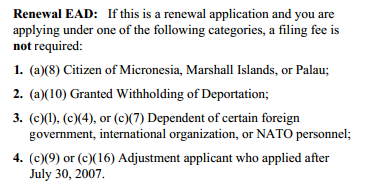
you will be applying for EAD under category (c)(9)
further you do not have to pay any fees for filing I-765. see instructions for I-765 page 8 section titled Renewal EAD
ead
when to renew EAD?
To extend an employment authorization card, an application for renewal must be filed around 90 days prior to the expiration date printed on the card. An application for renewal of a work permit must be filed and accepted by the USCIS prior to the expiration of the card that was initially granted to the applicant. Applicants must remember that they cannot file applications for renewal more than 120 days before their original permits expire.

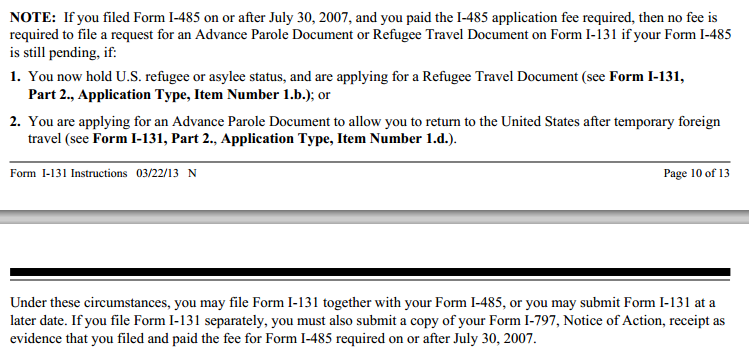
also you don’t need to pay any fee for AP:
apfee
on page 2 of AP, you need to select:
ap
more on EAD/AP:
Q4. If I receive this card, does that guarantee my re-entry into the United States if I travel?
A4. No. This card authorizes parole, not admission, to the U.S. Parole is not an admission or “entry”. If you obtain this card, you may use it to travel abroad and return to the U.S. Upon arriving at a port-of-entry, you should present the card to a Customs and Border Protection (CBP) Officer to request parole. Issuance of an Advance Parole document does not guarantee that CBP will parole you into the U.S. If parole is granted, you will be permitted to come into the U.S. as a parolee, but will not have been ‘admitted”. Individuals who have been unlawfully present in the U.S. and subsequently depart and seek re-entry through a grant of parole may be inadmissible and ineligible to adjust their status.

Below are the list of documents and Complete Detials :

For EAD renewal:

1. Fill out and sign form I 765
2. Two pp photos with A-Number written on the back of them (Recent photos)
3. I 765 Approval Notice and Receipts
4. Photocopy of 485 receipt (i-797)
5. Form G1145 for E Notification for application acceptance ((Optional for e-mail, SMS notification))
6. Photocopy of Current EAD/AP combo card
7. Bar codes page attached to the previous EAD/AP approval
8. Copy of Marriage Certificate for dependent only

Other Details:
1. NO FEE ( check i-765instr.pdf for confirmation ) If u file ur 485 after July 30,2011
2. Address to send: depends on where you live, see page 10 of the I765 instructions document.
3. http://www.uscis.gov/files/form/i-765instr.pdf

For AP:
1. Fill out and sign form i-131
2. Two pp photos with A-Number written on the back of them
3. Photocopy of 485 receipt/ Approval Notice (i-797)
4. I-485 Receipts
5. Form G1145 for E Notification for application acceptance ((Optional for e-mail, SMS notification))
6. Photocopy of Current EAD/AP combo card
7. Bar codes page attached to the previous EAD/AP approval.
8. Copy of Marriage Certificate for dependent only

Other Details:
1. No FEE ( check i-131instr.pdf for confirmation ) If u file ur 485 after July 30,2011
2. Address to send: depends on where you live, see page 10 of the I765 instructions document.
3. http://www.uscis.gov/files/form/i-131instr.pdf

Note: Just as a practice, I put each application in a manilla envelope and write the name, A# and form number on the outside for each applicant. Then I put all of the envelopes in a courier package (FedEx, UPS, Express Mail) and send it to the USCIS. I’ve never had a problem with that approach and none of the applications have ever been lost or separated.

Note:If u are applying Combo Card, Pls send Both the documents (I-131 (AP) & I-765 (EAD)) to I-765-EAD address..

Here is Cover letter Sample for both EAD and AP:

To,
USCIS
ADDRESS

Dear Sir/Madam:

Sub: I-765, Extension Application for my Employment Authorization Document, , Alien # – Supporting documents

Please find the following documents in support of the I-765 Extension Petition for Employment Authorization Document.

• Completed form I-765, Application for Employment Authorization
2 color photographs (A# and Name lightly printed in the back);
Copy of previously approved Employment Authorization Card(Front)
Copy of previously approved Employment Authorization Card(Back)
• Copy of I-797C, Notice of Action, receipt of filing I-485
Copy of Previously approved EAD mailer

I appreciate very much if you could do the needful, process the petition and extend my EAD at your earliest convenience.

Sincerely,

Can you keep working if EAD does not arrive on time?

Also see this guide and this

Posted in Green Card | Leave a comment

Tax Consequences of Selling Your Home

http://www.irs.gov/publications/p523/ar02.html#en_US_2013_publink1000200711

Maximum Exclusion

You can exclude up to $250,000 of the gain (other than gain allocated to periods of nonqualified use) on the sale of your main home if all of the following are true.

•You meet the ownership test.

•You meet the use test.

•During the 2-year period ending on the date of the sale, you did not exclude gain from the sale of another home.

For details on gain allocated to periods of nonqualified use, see Nonqualified Use , later.

If you and another person owned the home jointly but file separate returns, each of you can exclude up to $250,000 of gain from the sale of your interest in the home if each of you meets the three conditions just listed.

You may be able to exclude up to $500,000 of the gain (other than gain allocated to periods of nonqualified use) on the sale of your main home if you are married and file a joint return and meet the requirements listed in the discussion of the special rules for joint returns, later, under Married Persons .

Ownership and Use Tests

To claim the exclusion, you must meet the ownership and use tests. This means that during the 5-year period ending on the date of the sale, you must have:

•Owned the home for at least 2 years (the ownership test), and

•Lived in the home as your main home for at least 2 years (the use test).

Exception. If you owned and lived in the property as your main home for less than 2 years, you can still claim an exclusion in some cases. However, the maximum amount you may be able to exclude will be reduced. See Reduced Maximum Exclusion , later.

Example 1—home owned and occupied for at least 2 years.

Mya bought and moved into her main home in September 2011. She sold the home at a gain in October 2013. During the 5-year period ending on the date of sale in October 2013, she owned and lived in the home for more than 2 years. She meets the ownership and use tests.

Example 2—ownership test met but use test not met.

Ayden bought a home, lived in it for 6 months, moved out, and never occupied the home again. He later sold the home for a gain in June 2013. He owned the home during the entire 5-year period ending on the date of sale. He meets the ownership test but not the use test. He cannot exclude any part of his gain on the sale unless he qualified for a reduced maximum exclusion (explained later).

Period of Ownership and Use

The required 2 years of ownership and use during the 5-year period ending on the date of the sale do not have to be continuous nor do they both have to occur at the same time.

You meet the tests if you can show that you owned and lived in the property as your main home for either 24 full months or 730 days (365 × 2) during the 5-year period ending on the date of sale.

Example.

Naomi bought and moved into a house in July 2009. She lived there for 13 months and then moved in with a friend. She later moved back into her house and lived there for 12 months until she sold it in August 2013. Naomi meets the ownership and use tests because, during the 5-year period ending on the date of sale, she owned the house for more than 2 years and lived in it for a total of 25 (13 + 12) months.

Temporary absence. Short temporary absences for vacations or other seasonal absences, even if you rent out the property during the absences, are counted as periods of use. The following examples assume that the reduced maximum exclusion (discussed later) does not apply to the sales.

Example 1.

David Johnson, who is single, bought and moved into his home on February 1, 2011. Each year during 2011 and 2012, David left his home for a 2-month summer vacation. David sold the house on March 1, 2013. Although the total time David lived in his home is less than 2 years (21 months), he meets the use requirement and may exclude gain. The 2-month vacations are short temporary absences and are counted as periods of use in determining whether David used the home for the required 2 years.

Posted in Money | Leave a comment

Overlaying SVG on top of canvas

http://jsfiddle.net/siddjain/wwLCD/
http://jsfiddle.net/siddjain/Hq63y/1/

Posted in Software | Leave a comment