
Canvas and SVG Continued

Sample 1: measure text in canvas using context.measureText

var text = 'हिन्दी में लिखना बहुत आसान है';
var font = '30pt Arial';
var metrics = getTextHeight(font, text);
var canvas = document.getElementById('canvas1');
var ctx = canvas.getContext('2d');
ctx.font = font;
ctx.textBaseline = 'top';
ctx.fillText(text, 10, 100);
ctx.strokeRect(10,100,ctx.measureText(text).width,metrics.height);
function getTextHeight(font, s) {
    debugger;
  s = s || 'Hg';
  var text = $('<span>'+s+'</span>').css({ font: font });
  var block = $('<div style="display: inline-block; width: 1px; height: 0px;"></div>');

  var div = $('<div></div>');
  div.append(text, block);

  var body = $('body');
  body.append(div);

  try {

    var result = {};

    block.css({ verticalAlign: 'baseline' });
    result.ascent = block.offset().top - text.offset().top;

    block.css({ verticalAlign: 'bottom' });
    result.height = block.offset().top - text.offset().top;

    result.descent = result.height - result.ascent;

  } finally {
    div.remove();
  }

  return result;
};

Sample 2: bounding box calculation for SVG using getBBox method. SVG also provides getComputedTextLength method to calculate text width

var string = 'हिन्दी में लिखना बहुत आसान है';
var draw = SVG("drawing");
var text = draw.text(function(add)
                     {
                         add.tspan(string).dy(100);
                     }).font(
    {
        family: "Verdana",
        size: 20
    });
var bbox = text.bbox();
var rect = draw.rect(bbox.width,bbox.height)
.center(bbox.cx,bbox.cy)
.stroke('#f06')
.fill('none');

Sample 3: breaking up hindi text into constituent characters in javascript

var text = 'हिंदी में लिखना बहुत आसान है क्रांतिकारी';
var symbols = getSymbols(text);
var canvas = document.getElementById('canvas1');
var ctx = canvas.getContext('2d');
ctx.font = '30pt Arial';
ctx.fillText(text, 10, 100);

var canvas2 = document.getElementById('canvas2');
var ctx2 = canvas2.getContext('2d');
ctx2.font = '30pt Arial';
var x = 10;
for(var i = 0; i < symbols.length; i++)
{
    var sym = symbols[i];
    ctx2.fillText(sym, x, 100);
    x += ctx2.measureText(sym).width;    
}

var div = document.getElementById('div');
for(var i = 0; i < symbols.length; i++)
{
    var node = document.createTextNode(symbols[i]);
    div.appendChild(node);
}

function getSymbols(text)
{
    var i = 0;
    var symbols = [];
    while(i < text.length)
    {
        var x = getSymbol(text, i);
        symbols.push(x.symbol);
        i = x.next;
    }
    return symbols;
}

function getSymbol(text, i)
{
    var N = text.length;
    var answer = i < N ? text[i] : '';
    var j = i + 1;
    while (j < N && isDiacritic(text.charCodeAt(j)))
    {
        answer += text[j++];        
    }
    return  { symbol: answer, next: j };
}


function isDiacritic(unicode)
{
    // diacritics for hindi from http://en.wikipedia.org/wiki/Devanagari#Devanagari_in_Unicode
    return (unicode >= 2366 && unicode <= 2388)
           || (unicode >= 0x901 && unicode <= 0x903);
}

Sample 4: rasterizing SVG on top of canvas

var draw = SVG(document.createElement('div'));
var font = { family: 'verdana', size: 36 };
var text = draw.text('Hello World!').font(font);
// Create a Data URI.
var mySVG = draw.node.outerHTML;
var mySrc = 'data:image/svg+xml;base64,'+window.btoa(mySVG);
var img = new Image();
img.src = mySrc;
var img2 = new Image();
img2.src = 'http://svgjs.com/images/filter.jpg';
// Get drawing context for the Canvas
var canvas = document.getElementById('canvas');
var context = canvas.getContext('2d');
context.drawImage(img2,0,0);
context.drawImage(img,0,0);

Another Sample

Posted in Software | Leave a comment

Performance Testing SVG & Canvas

SVG:
Sample 1: Create 100 SVG labels, put them in a group, and apply a translate transform to the group in each frame
Sample 2: Same as sample 1, except that no group is created, and a translate transform is applied to each label. IE slows down by 2x.
Sample 3: Creates 100 SVG labels and gives an independent initial motion (x,y) to each of the label
Sample 4:Creates a group containing 100 SVG labels and applies a zoom animation to the group
Sample 5:Same as sample 4 except that each label is individually animated with same transform. IE slows down by 2x
Sample 6: Infinite Scroll. This was really difficult to get it right, and still has some bugs in it.
Sample 7: Similar to Sample 6 but uses a different and better algorithm. The idea behind the algorithm is explained here. Alas, I realized there is a bug in this sample also. See if you can spot it using this hint

Canvas:
Sample 7:Similar to Sample 7 of SVG. The FPS will be independent of the number of labels drawn, because we use drawImage in each animation frame which takes constant time.

Follow this link to access the samples as stand alone html pages

Posted in Software | Leave a comment

Drawing curved text in canvas and svg

Understanding Canvas Transformations

http://jsfiddle.net/LJLpZ/1/

Test your understanding. WAP (write a program) to display circular text:
http://jsfiddle.net/Keuy6/
http://jsfiddle.net/3cKN3/

Draw text along a curved path:
http://jsfiddle.net/ymrdb/
f1
Problems:
1. The characters are not equidistant. This is because the points on the polyline are not equidistant.
2. There can be too much variation in orientation from character to character

The fix is to interpolate or resample the polyline along equidistant points. This should fix both problems above. Here is the new code:
http://jsfiddle.net/siddjain/6X3An/ (also see this fiddle which also displays the bounding box)
I also added rotating animation to above fiddle. The line and text need to be redrawn each frame. If we just have a single line and label, this is ok, but if we have many labels and lines, the many draw operations can slow down the performance. The fix will be to copy the zeroth frame into an offscreen canvas, and in order to animate draw the offscreen canvas onto onscreen one and set a transform on the onscreen canvas. Below code does this:
http://jsfiddle.net/siddjain/LQ4Uy/
Note the use of drawImage method in this code. Some important points:

  • To set the size of the offscreen canvas, the code has to be exactly like this:
    cvs = document.createElement('canvas'); // in memory canvas for animation
    cvs.width = 300;
    cvs.height = 300;

If you try to set the width and height on the canvas context or try to set width and height using css or style.width and style.height, you will see problems.

Next step, is to do the same thing using SVG. This sample renders text using SVG. The textPath used is same as path of the polyline traced by the user:
http://jsfiddle.net/DFKav/1/
We can see similar issues as we had with canvas. To fix it, again I interpolated the polyline along equispaced points and use this as the new textPath. The result is as shown by this sample:
http://jsfiddle.net/bJgs9/1/
Note the difference in text rendering between this and the canvas. In case of canvas, we render character by character and the whole text ends up occupying the full path. In case of SVG, the path gives the path of the text, but the text does not necessarily fill the whole path.

Problem with SVG fiddle:
1. text is rendered below the curve, not above it
2. when i animate, the text and the polyline rotate about their respective centers, not wrt center of the drawing
following sample fixes these problems:
http://jsfiddle.net/siddjain/DFKav/3/

Appendix: this is the code that does interpolation to convert user traced polyline into an equispaced polyline:

function doTextDrawCalculations()
{
    var e = document.getElementById('input');    
    text = e.value || 'Hello World!';
    text = ' ' + text + ' ';
    var x = [];
    var y = [];    
    var N = path.length;
    var M = text.length;    
    for(var i = 0; i < path.length; i++)
    {
        x[i] = path[i][0];
        y[i] = path[i][1];
    }
    var d = [0];
    for(var ctr = 1; ctr < N; ctr++)
    {
        var x1 = x[ctr - 1];
        var y1 = y[ctr - 1];
        var x2 = x[ctr];
        var y2 = y[ctr];
        var dx = (x2 - x1);
        var dy = (y2 - y1);
        d[ctr] = d[ctr - 1] + Math.sqrt(dx * dx + dy * dy);
    }
    var j = scale(d[N - 1] / (M - 1), range(0, M - 1));
    var ans = [];
    ans.push(interpolate(x, d, j));
    ans.push(interpolate(y, d, j));    
    return ans;
}

function scale(k, x)
{
    var y = [];
    for(var i = 0; i < x.length; i++)
    {
        y.push(k * x[i]);
    }
    return y;
}

    function range(start, end) {
    var foo = [];
    for (var i = start; i <= end; i++) {
        foo.push(i);
    }
    return foo;
}    

// this method interpolates f. it can also be thought of as resampling f. 
// f: the function to interpolate e.g. f = [10, -10, 10]
// x: the points at which function values are known. it is assumed that x is sorted e.g. [0, 1, 5]
// y: the points at which the function value is desired. it is assumed that y is sorted e.g. [0, 1, 2, 3, 4, 5]. it is further assumed that y[0] >= x[0] and y[end] <= x[end]; these conditions mean we will be interpolating f, not extrapolating it
// returns f interpolated along y
function interpolate(f, x, y)
{
    var ans = [];
    var k = 0;
    for(var i = 0; i < y.length; i++)
    {
        var w = y[i];
        var m = 0;
        var n = x.length - 1;
        for(var j = k; j < x.length; j++)
        {
            if (x[j] <= w)
            {
                m = j;
            }
            if (x[j] >= w)
            {
                n = j;
                break;
            }
        }
        k = m;
        if (x[m] === x[n])
        {
            ans.push((f[m] + f[n]) / 2);
        }
        else
        {
            ans.push(f[m] + (f[n] - f[m])/(x[n] - x[m]) * (w - x[m]));
        }
    }
    return ans;
}

canvas code to draw curved text:

function drawText()
{    
    var M = text.length;    
    for(var k = 1; k < M - 1; k++)
    {
        var du = u[k + 1] - u[k - 1]; // u & v are obtained after call to interpolation method
        var dv = v[k + 1] - v[k - 1];
        var angle = Math.atan2(dv, du); 
        context.save();
        context.translate(u[k], v[k]);
        context.rotate(angle);
        context.fillText(text[k], 0, 0);
        context.restore();
    }
}

some perf optimizations are possible. Math.atan2(dv, du) this will result in a trig call, followed by another trig call to calculate sines and cosines when context.rotate is called. we can directly compute sines and cosines using the tangent, and call setTransform to set the transform directly.

Measuring text width & height in canvas:
http://jsfiddle.net/siddjain/6vURk/

Posted in Software | Leave a comment

What if the universe is simpler than physicists think?

I think theoretical physicists have an overactive imagination. Maybe the universe is not so bizarre as they would like it to be.

Posted in Science | Leave a comment

Debugging BadImageFormatException

This is an exception that I dread and that has cost me countless hours of debugging.

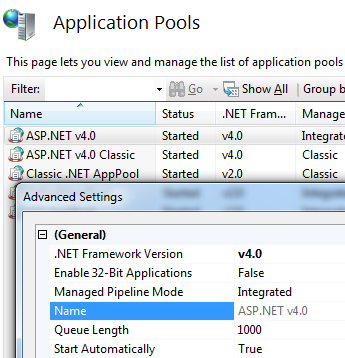
If this exception is happening in context of a web app, and your web app is 64 bit application, check that Enable 32 bit is set to false in IIS Manager.
apppool

from this page http://blogs.msdn.com/b/rakkimk/archive/2007/11/03/iis7-running-32-bit-and-64-bit-asp-net-versions-at-the-same-time-on-different-worker-processes.aspx:
Most of you may already know how to see if the process is really spun in a 32-bit mode in 64-bit OS. Yes, simple way is to open the Task Manager and go to Processes tab – you would see the below:
clip_image002_2

To know exactly what is happening, enable following registry keys (see http://stackoverflow.com/a/1527249/147530):
HKEY_LOCAL_MACHINE\SOFTWARE\Microsoft\Fusion
Add:
DWORD ForceLog set value to 1
DWORD LogFailures set value to 1
DWORD LogResourceBinds set value to 1
String LogPath set value to folder for logs (e.g. C:\FusionLog\)

badimageformatexception

Now you will see what is going on.

Some more links:
http://www.hanselman.com/blog/BackToBasicsUsingFusionLogViewerToDebugObscureLoaderErrors.aspx
http://msdn.microsoft.com/en-us/library/e74a18c4(v=vs.110).aspx
http://msdn.microsoft.com/en-us/library/ms164699(v=vs.110).aspx

Posted in Software | Leave a comment

Husband and Wife

Husband: (Calls up hotel manager, from room) – Please come fast, I am having an argument with my wife and she says she will jump from your hotel window.

Manager: Sir, I am sorry, this is your personal issue, we cannot interfere.

Husband : You idiot, the windows are not opening. This is your maintenance issue

Posted in Jokes | Leave a comment

Herbs and Ayurvedic Remedies for Cholesterol Treatment

The buildup of cholesterol can be reduced by several Ayurvedic treatments. Cholesterol reduction means safety from the various cardiovascular diseases, which are the leading causes of deaths in the world today.

* * *

Cholesterol buildup in the coronary arteries leads to the condition known as Hridaya roga in Ayurveda, which literally means heart disease.

This is similar to atherosclerosis. When the cholesterol collects in the arteries leading to the heart, their lumen becomes narrow and the amount of blood entering the heart is insufficient. Due to this the heart needs to pump harder, causing several kinds of cardiovascular diseases, the worst of which is the fatal angina pectoris.

Cholesterol is present in fatty acids. Some cholesterol is needed for the proper utilization of foods in the body, formation of the hormones and the bile, etc. This is known as the high-density cholesterol, or simply, the useful cholesterol. The rest of the cholesterol simply builds up in the arteries without any apparent function. This is the low-density cholesterol, or the bad cholesterol.

The buildup of cholesterol can be reduced by several Ayurvedic treatments. Cholesterol reduction means safety from the various cardiovascular diseases, which are the leading causes of deaths in the world today.

(1) Useful Herbs in the Treatment of Cholesterol

Alfalfa (Medicago satina) Alfalfa is effective in treating problems of the arteries. It helps in clearing arteries congested with cholesterol.

Arjuna (Terminalia arjuna) Arjuna has been used since centuries in the treatment of heart related problems such as heart attacks. The bark of the arjuna when taken in powder form has beneficial properties. This can dissolve the cholesterol that accumulates in the coronary artery and reduce the possibility of heart attacks.

Coriander (Coriandrum sativum) Coriander is a very good diuretic. It makes the kidneys perform their functions of excretion better. Therefore the kidneys flush out the excess unneeded cholesterols from the body.

Garlic (Allium cepa) Garlic is very beneficial to people with cholesterol problems that affect the heart. Eating two to three cloves of garlic a day helps to reduce or even completely eliminate the harmful cholesterol in the blood. Garlic can disintegrate the blood cholesterol and hence free up the arteries.

Guggulu (Commiphora mukul) This is a traditional Indian herb which has become very popular in the Ayurvedic treatment of cholesterol-related heart problems. It contains guggulsterones which have been proven to reduce the levels of cholesterol on regular use. 25 mg of these guggulsterones are prescribed for intake thrice a day.

Holy Basil (Ocimum sanctum) Holy basil has the capacity to dissolve the accumulated cholesterol from the arteries into the person’s bloodstream. From here they are eliminated by the kidneys.

(2) Dietary Treatments for Cholesterol

The various dietary regimes which will help you to reduce the buildup of cholesterol in the arteries are as follows:-

Keep a careful watch on the amount of calories you are consuming. Say no to chocolates, ice creams, red meats and all such foods that can increase the calorie count.

Sources of fats such as fried foods are to be avoided. Groundnut oil must be strictly prohibited. But fat sources such as cow’s milk, cow’s ghee and cow’s butter are recommended. Buffalo dairy products are to be avoided.

Consume more fresh vegetables and fruits. Green leafy vegetables are needed since they would provide roughage for the elimination of the waste materials.

Soy and soy products are very beneficial for the proper utilization of cholesterol.

Drink lots of water. Water will help to remove the toxic buildup in the arteries.

Smoking and alcoholism must be avoided as they interfere with the proper utilization of cholesterol in the body.

(3) Ayurvedic Treatment for Cholesterol

Ayurvedic treatment for high level of cholesterol is to prescribe the various herbs that have properties to reduce the buildup.

One popular herb in Ayurvedic medicine is arjuna. It is prescribed in several forms such as Arjunarishta and Arjuna Ghritam. Other popular medicines are Hridayarnava Rasa and Prabhakara Vati. If the cholesterol amount is very profuse, then Mrigamadasava is prescribed.

Yoga is also very beneficial in proper circulation and elimination of the cholesterol buildup in the body. Some of the useful asanas are:- a) Ardhamatsyendrasana b) Shalabhasana c) Padmasana d) Vajrasana

(4) Home Medications

Drinking coriander in water everyday helps in the reduction of cholesterol in the body. This regime must be continued for about a month. Then the cholesterol levels must be checked again.

Boil a glassful of milk with a piece of garlic in it. This will reduce the cholesterol and take care of cardiac pains. It has to be continued for a few days before the method begins to show its effects.

Have cold hipbaths twice daily. These have been shown to have positive effects in the reduction of cholesterol when taken on a regular basis.

A simple remedy is to have a single piece of garlic every morning. This takes time to show results, but the results are positive.

Consume some almonds and walnuts on a daily basis.

Read More on Cholesterol Treatment by Ayurveda and Cholesterol Home Remedies at ayushveda.com – The Free Ayurvedic Encyclopedia.

Disabled World – Disability News for all the Family: http://www.disabled-world.com/artman/publish/herbsforcholesterol.shtml#ixzz2JJT44i9A

Posted in Health | Leave a comment

EfGen.exe – a command line tool for automatic generation of Entity Framework DLL

Download

EfGen.exe is a command line tool to automate the EDM Wizard in Visual Studio.

While working with Entity Framework, I consider it a best practice to create a stand-alone dll that contains all the code Entity Framework (EF) generates to communicate with the database. I would use the EDM Wizard in Visual Studio to point EF to a database, let it generate the code, and then compile it into a dll. This dll would then be referenced by my project(s) that would like to use EF to communicate with my database. I wanted a tool to automate this process of generating the EF dll, and this is where EfGen comes in. You give it a connection string, and it outputs a dll named efmodel.dll by default. You can then reference this dll in your projects, and create an instance of following class to query the database:

    // use the --context option (see usage) to change the name of the class
    // use the --namespace option (see usage) to change the namespace
var db = new EFModel.EFContext(); // inherits DbContext

Comparison with edmgen.exe:

  • edmgen does not allow you to select which of the following database objects to include in the EF model: tables, views, functions (aka stored procedures). By default, efgen is designed to include all of the tables, views, and stored procedures in the generated model. However, you can customize it to exclude tables, views, stored procedures by using the --noTables, --noViews, --noFunc flags respectively.
  • The latest version of Visual Studio (2012 at time of this writing) and EF (EF 5.0) generates code based on T4 templates. Older versions used some kind of custom tool. One of the differences between the code generated by the two methods is that the latest method generates a class that inherits from DbContext whereas the older method generated a class that inherited ObjectContext. Edmgen uses the old method, while EfGen uses the new method
  • edmgen does not output a dll

Another point worth mentioning is that if you are using the EDM Wizard, it generates a class like below:

        public partial class MyEntities : DbContext
    {
        public MyEntities()
            : base("name=MyEntities")
        {
        }
        

and adds a ConnectionString named MyEntities to the config file (app.config or web.config). This is very annoying to me for several reasons:

  • If I am going to compile the EF code into a separate stand-alone dll, then the connection string has to be copied to the config file of the executable assembly or web application. If there are 10 projects that are going to use EF to communicate with the db, this connection string has to be copied 10 times.
  • What if I don’t want to pass the connection string from the config file? You are out-of-luck. You will have to extend the partial class generated by EF, and add a constructor
    that takes input the connection string.

EfGen has been designed so that it exposes a parameterless and a parameterized constructor:

            public partial class EFContext : DbContext
    {
        public EFContext()
        public EFContext(string nameOrConnectionString)
        

There is no connection string generated in the config file, and no connection string to copy from one config file to another. When you run efgen, you supply it a connection string,
and the parameterless constructor uses that same connection string to connect to the database. If you want to override the connection string, you can use the other constructor, but make sure it contains the CSDL, SSDL, MSL metadata needed by EF to query the database. Refer msdn for details.

Using the tool

  1. Install Entity Framework, if you don’t have it already. See http://msdn.microsoft.com/en-us/data/ee712906
  2. Download zipped files containing precompiled binaries, and unzip.
  3. Note down the folder where EntityFramework.dll is located. This folder needs to be input to efgen using the --efPath switch. I installed EntityFramework.dll in my GAC and it got installed under C:\Windows\Microsoft.NET\assembly\GAC_MSIL\EntityFramework\v4.0_5.0.0.0__b77a5c561934e089. The --efPath variable has been set to this value by default. You will most likely need to override it, with your own location where EntityFramework.dll is located.
  4. Run the tool like this:
                        EfGen -c "data source=machine-name;initial catalog=database-name;integrated security=True;MultipleActiveResultSets=True" --noViews --noFunc
                    

    In above, we are only including the database tables in our model. We are not including the views and stored procedures (--noViews and --noFunc respectively). This should generate a file efmodel.dll that is ready to be referenced in your C# projects that want to use EF to query the database. Use the -o option to change the name of the output dll.

  5. Add reference to efmodel.dll, and create an instance of EFContext to query the database:
                    // use the --context option to change the name of the class
        // use the --namespace option to change the namespace
    var db = new EFModel.EFContext(); // inherits DbContext
                    

Use the --stages option if you just want to generate .cs files and not want to compile them into a DLL.

Here is complete usage of the tool:

Usage: EfGen [<options>]
 e.g., EfGen -c "data source=machine-name;initial catalog=database-name;integrated security=True;MultipleActiveResultSets=True" --noViews --noFunc
 where:
  -c, --connectionString    Required. Connection String

  -o, --out                 (Default: EfModel.dll) Name of output dll

  -n, --namespace           (Default: EFModel) Namespace

  -p, --provider            (Default: System.Data.SqlClient) The provider used
                            to connect to the data store

  --context                 (Default: EFContext) Name of class that inherits
                            from DbContext. Also known as the container class

  --noTables                Exclude database tables from being included in the
                            entity framework model

  --noViews                 Exclude database views from being included in the
                            entity framework model

  --noFunc                  Exclude database functions from being included in
                            the entity framework model

  --nofk                    Do not generate foreign key properties in the
                            entity framework model

  --noXml                   Suppress generation of XML Documentation file

  --stages                  (Default: 3) An integer between 1 and 3; if stage =
                            1, then only .edmx file is generated; if stage = 2,
                            then .edmx file + .cs files are generated; if stage
                            = 3, then .edmx, .cs files are generated, and .cs
                            files are compiled into a dll

  --incFolder               (Default: $(ProgramFiles)\Microsoft Visual Studio
                            11.0\Common7\IDE\Extensions\Microsoft\Entity
                            Framework Tools\Templates\Includes) Folder where
                            EF.Utility.CS.ttinclude is located

  --t4vs                    (Default: $(ProgramFiles)\Microsoft Visual Studio
                            11.0\Common7\IDE\Microsoft.Data.Entity.Design.dll)
                            T4VSHost for CleanupBehavior; see
                            http://bit.ly/YtRl8Y

  --efPath                  (Default:
                            $(windir)\Microsoft.Net\assembly\GAC_MSIL\EntityFram

                            ework\v4.0_5.0.0.0__b77a5c561934e089) Path where
                            EntityFramework.dll is located

  --version                 Assembly version of the generated dll e.g.,
                            "1.2.3.4"

  --help                    Display this help screen.
Posted in Software | 18 Comments

MSBuild Notes

  • Use .rsp file to pass command line arguments to msbuild from a file (similar to the way .config files work)
  • PropertyGroup contains properties. A property is a key-value pair. The value is a scalar. Properties are referenced using the $(PropertyName) syntax
  • ItemGroup contains items. Use Items to store collections e.g., all files inside a directory. Items are referenced using the @(ItemName) syntax
  • An Item can have metadata associated with it
  • A Target contains one or more Tasks
  • There are many ways to chain Targets. E.g.,: CallTarget, DependsOnTargets, BeforeTargets, AfterTargets
  • Goto MSBuild Task Reference to see all tasks that come with MSBuild. Examples of some common tasks: Exec, Copy, Move, Message, MakeDir, RemoveDir
  • Download MSBuildExtensionPack from codeplex for more tasks
  • UsingTask allows you to import a MSBuild Task defined in a dll
  • To zip files, use DNZip task from MSBuildExtensionPack
  • Use the MSBuild task to build a csproj
  • To get the name of the dll/exe built by a msbuild task use the TargetOutputs task parameter:
    <MSBuild Projects="$(MyCsProj)" ToolsVersion="4.0" StopOnFirstFailure="true">
    			<Output TaskParameter="TargetOutputs" PropertyName="MyDll" />
    		</MSBuild>
    
  • To create you own MSBuild task, implement the ITask interface. Subclass the Task class instead of inheriting from ITask directly
  • To pass output of one task as input to another:
    <Task1 >
    			<Output TaskParameter="Version" PropertyName="Version"/>
    		</Task1>
    		<Task2 Version="$(Version)" />
    

    In the C# code for Task1:

    [Output]
            public string Version { get; private set; }
    
  • Use mstext.exe /testcontainer:myunittests.dll to run unit tests from command line
  • To change assembly version use the AssemblyInfo task in MSBuildExtension Pack
    <MSBuild.ExtensionPack.Framework.AssemblyInfo AssemblyInfoFiles="@(files)",
    AssemblyFileMajorVersion="1",
    AssemblyFileMinorVersion="2" />
    
  • More useful tasks in MSBuildExtension Pack: MSBuildExtensionPack.Web.Iis7Website, MSBuildExtensionPack.FileSystem.Robocopy
Posted in Software | Leave a comment

Programming TFS

References:

Common Tasks:

Download all files under a directory:

var tfsLocation = "http://<location of TFS>";
var tfsFolder = "$/Xyz";
using (TfsTeamProjectCollection tpc = new TfsTeamProjectCollection(new Uri(tfsLocation)))
            {
                // Get a reference to Version Control.
                VersionControlServer versionControl = tpc.GetService<VersionControlServer>();
                var path = Path.Combine(tfsFolder, "*.dll");
                foreach (var item in versionControl.GetItems(path).Items)
                {
                    list.Add(Assembly.Load(ReadFully(item.DownloadFile())));
                }               
            }

Check if a file exists in TFS:

using (var tfs = TfsTeamProjectCollectionFactory.GetTeamProjectCollection(
    new Uri("http://tfs:8080/tfs/DefaultCollection")))
{
    var server = tfs.GetService<VersionControlServer>();

    Boolean doesFileExist = server.ServerItemExists("$/Project/Main/MySoltuion.sln", ItemType.File);
}

Enumerate all the workspaces:

var workspaces = versionControl.QueryWorkspaces(null, versionControl.AuthorizedUser, Environment.MachineName);
Posted in Software | Leave a comment

