Vanguard: an overrated company

I have been a Vanguard customer for almost 10 years. I opened an account with them after getting glowing recommendations from a trusted friend many years ago. In the past 10 years there have been several instances when I needed to make some kind of a special transaction or do something special and I think there was never once a time when I could say that their support was great, but I was always forgiving to them, always thinking that it is a highly reputed company. But now I have come to seriously question if Vanguard is a company that deserves your money. Here are some things that come to mind:

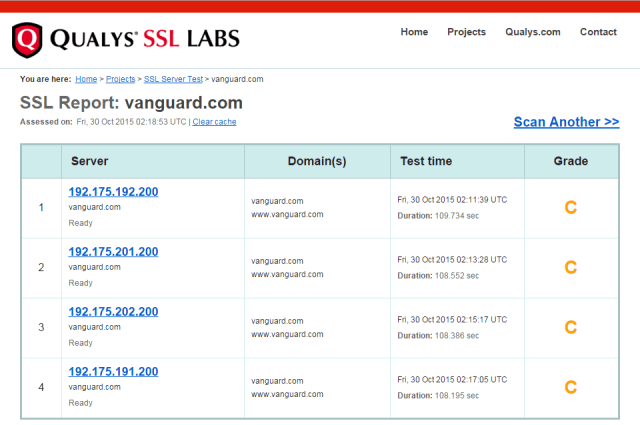
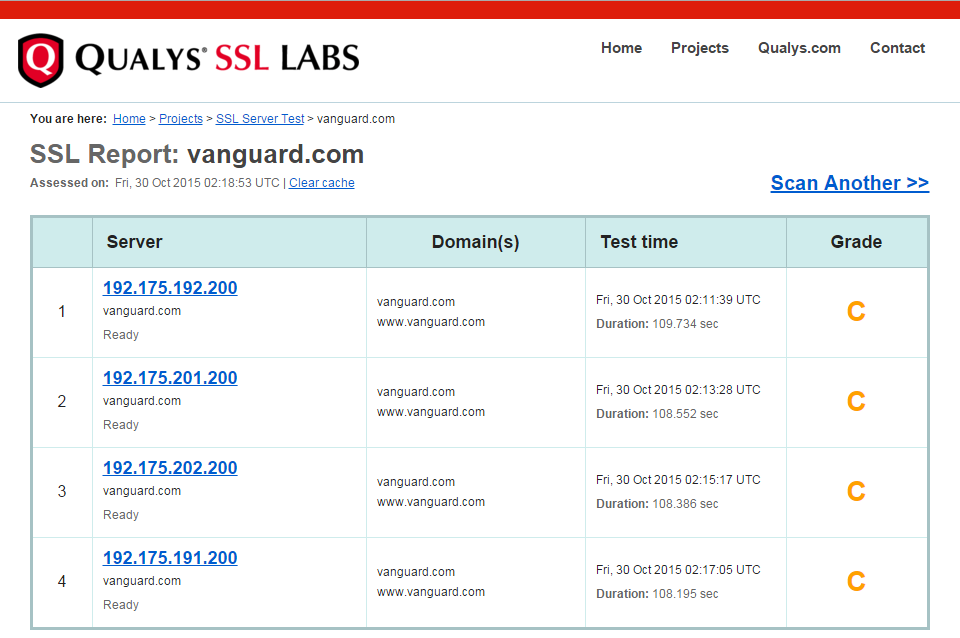
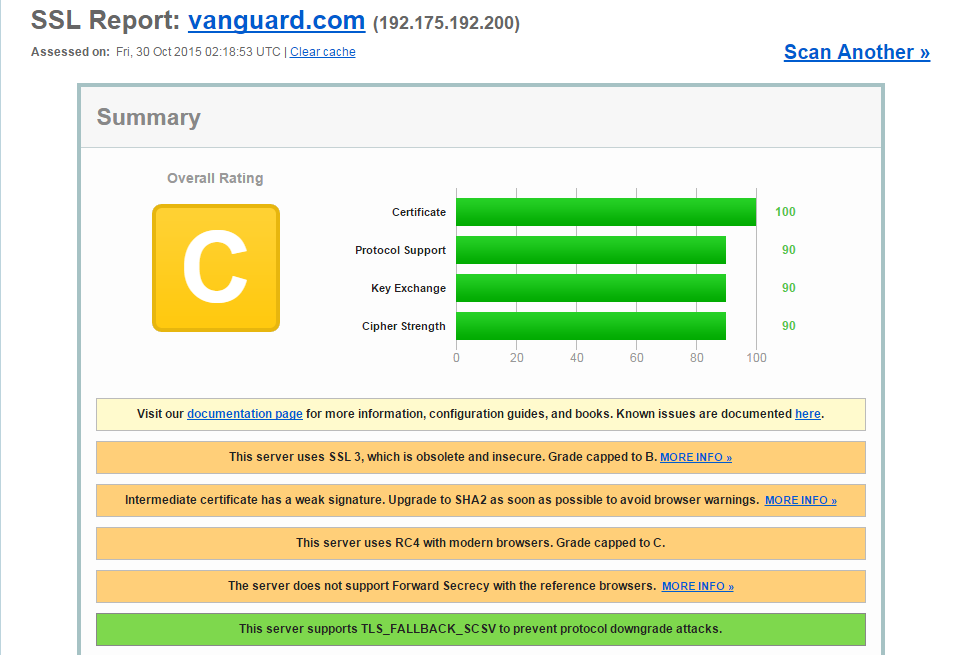
  • Security: This is how secure Vanguard is
    vanguard

vanguard2

  • Irritation: Whenever you will call their 800 number, the automated system will prompt you to enter your SSN and then the agent will ask you to repeat it again. I have given them feedback about this many times but they refuse to do anything about it. This is how much they value your feedback.
  • Substandard Experience: Whenever I have to buy stocks of a foreign company, their website will not let me do it and I have no choice but to make a phone call. Every time I make a phone call, the agent tells me that in future I will be able to purchase the shares of the same company  through the website and every time its a lie. I have to keep calling them.
  • Recharacterization Experience I: Most recently (and this is the experience that has driven me to write this blog post) I wanted to recharacterize a IRA contribution. I called them on a Saturday during their business hours. No one picked up the phone and I kept waiting. I tried another time on same day and the same thing happened. How dishonest – looks like they don’t even take calls on a Saturday but advertise that they have support available on Saturday. I don’t remember the exact number I called at now but do remember I am not dreaming about this experience and that I had double-checked the times when I called to make sure they are available.
  • Recharacterization Experience II: In part II of my experience, I submitted a recharacterization request to Vanguard. Since they are complete morons and cannot do anything right, they made two recharacterizations.
  • Recharacterization Experience III: So now I had to call them about it (and waste my time and blood pressure). The agent admitted that one of the transactions was faulty and shouldn’t be there. He apologized and told me Vanguard would take care of it.
  • Imagine my shock when I logged into my account a few weeks later to find out that the transaction is still sitting there and has not been reversed. Again I have to call them. Again I have to enter my SSN twice. Again I have to waste my time (and time is money). And am not sure if they will fix it this time.

I definitely feel that Vanguard is a highly overrated company now. I don’t have much experience with other financial institutions but maybe its time to try them out.

Posted in Money | Leave a comment

Linux & Bash Tips

Normally by itself the terminal app displays bash in the tab title and its not very useful if you have a large number of tabs open and want to know e.g., what is the pwd in each of the tabs. add this line in ~/.bash_profile so that the tab title displays the pwd (source: http://superuser.com/a/560393):

export PROMPT_COMMAND='echo -ne "\033]0;$(pwd)\007"'

once you modify your bash_profile, to apply the settings run . ~/.bash_profile from the cmd prompt.

to count lines in a file

wc -l log.txt

Count number of columns in a csv file

head -n 1 file.csv | sed 's/[^,]//g' | wc -c

Count lines of code in a directory

find . -type f -exec cat {} + | wc -l

this also worked:

find src -name "*.ts" | xargs wc -l

sed and awk

to extract second column of a file, try:

awk 'BEGIN { FS = "," } ;{print $2}' log.txt
FS defines the field delimiter. summing all numbers in the third column of a text file: awk '{ x += $3 } END { print x }' file.txt

Say you have a file like this where the fields are delimited by | character:

00k2T000015uSR3QAM|0063400001Aw8epAAB|true|""|-18.00|4717430071|false|12.0|""|holy
00k2T000015v5mjQAA|0063400001BXKLvAAP|true|""|172.50|4717882609|false|12.0|""|holy
00k34000010oIxbAAE|006340000191XVqAAM|true|""|4000.00|4715645568|false|""|""|logy
00k34000013JUYXAA4|0063400001APiUOAA1|true|""|0.00|4716969707|false|12.0|""|hnol
00k2T00001Ga160QAB|0062T00001MD7dQQAT|true|""|4467.82|""|false|0.0|""|hnol

On line number 5 the 8th column is supposed to be a number but has "" in it. We want to fix that. So the task is to compare the 8th column of every line with "" and if there is a match replace it with 0. Here is how you can do it with awk:

$ awk 'BEGIN{OFS=FS="|"}$8=="\"\""{$8=0}{print}' sample.csv

sort

to find minimum number using sorting:
awk '{print $2}' log.txt | sort -n

to sort the lines by filesize:
sort -k2 -n log.txt > sorted.txt
-n tells to interpret key as number
-k2 tells to use the second field as sort key

Search for files recursively in a directory

find . -name myfile.txt

find only *.php files:

find . -name "*.php"

Grep

Find a string searching only the php files:

grep somestring $(find . -name "*.php")

Recursively find the number of files in a directory

find DIR_NAME -type f | wc -l

Get hostname

$ hostname

Siddharths-MacBook-Pro-1674.local

https://github.com/jlevy/the-art-of-command-line
Know about cut, paste, and join to manipulate text files. Many people use cut but forget about join.

Know about wc to count newlines (-l), characters (-m), words (-w) and bytes (-c)

To replace all occurrences of a string in place, in one or more files:

perl -pi.bak -e 's/old-string/new-string/g' my-files-*.txt

To rename many files at once according to a pattern, use rename. For complex renames, repren may help.


Check what OS you’re on with uname or uname -a (general Unix/kernel info) or lsb_release -a (Linux distro info).

uname -a
Darwin Siddharths-MacBook-Pro-1674.local 14.5.0 Darwin Kernel Version 14.5.0: Tue Sep 1 21:23:09 PDT 2015; root:xnu-2782.50.1~1/RELEASE_X86_64 x86_64

Know sort’s options. For numbers, use -n, or -h for handling human-readable numbers (e.g. from du -h). Know how keys work (-t and -k). In particular, watch out that you need to write -k1,1 to sort by only the first field; -k1 means sort according to the whole line. Stable sort (sort -s) can be useful. For example, to sort first by field 2, then secondarily by field 1, you can use sort -k1,1 | sort -s -k2,2.

to total file sizes in a directory

WITSC02X6385JGH:manuscript sjain68$ du -ach chap*.adoc
116K	chap01.adoc
 76K	chap02.adoc
 40K	chap03.adoc
 56K	chap04.adoc
 84K	chap05.adoc
 72K	chap06.adoc
 56K	chap07.adoc
 36K	chap08.adoc
 24K	chap09.adoc
100K	chap10.adoc
 44K	chap11.adoc
 76K	chap12.adoc
 60K	chap13.adoc
8.0K	chap14.adoc
848K	total

find command

find command is used to find all files matching a pattern in a directory. E.g., list all files ending in .sql:

$ find . -name *.sql

It searches the directory recursively by default. Above command will not list the sql files in a folder that contains spaces. To fix that use following form:

$ find . -name "*.sql"

To zip files on Mac. link

$ zip -vr folder.zip folder/ -x "*.DS_Store"

To find out the directory containing your bash script

BASE_DIR=$(dirname "${BASH_SOURCE[0]}")

BASH_SOURCE

This gives a relative path. To get absolute path use:

BASE_DIR="$(cd -- "$(dirname "${BASH_SOURCE[0]}")" && pwd)"

An array variable whose members are the source filenames where the corresponding shell function names in the FUNCNAME array variable are defined. The shell function ${FUNCNAME[$i]} is defined in the file ${BASH_SOURCE[$i]} and called from ${BASH_SOURCE[$i+1]}

Restart Shell

exec -l $SHELL

Find your IP address

3 ways of doing this. simplest way on Mac is to open Network and read it from there. Another way is to run following command (works only on Mac):

$ ipconfig getifaddr en0

Here en0 is the identifier of the network interface (WiFi vs Ethernet for example). To my knowledge above two ways will return the local IP address. If you want to get your router’s IP address (i.e., your public IP address), run:

$ wget -qO - http://ipecho.net/plain

Split large file into chunks

$ split -a 2 -d -l 20000000 --additional-suffix=.csv lineorder.tbl lineorder_

will split lineorder.tbl into chunks named lineorder_00.csv, lineorder_01.csv and so on. Each chunk will have 20000000 lines in it.

Get hex dump of a file

$ od -t x1 -An FILE

Echo commands as they are run

An incredibly useful function is this:

echo_command() { printf '%s\n' "${*}"; "${@}"; }

What it does is echo the command and also run it. We can echo commands using set -x as well. But above comes in handy when you have a large script and don’t want to echo each and every command, only a select few.

Loop through array

# List of logs and who should be notified of issues
logPaths=("api.log" "auth.log" "jenkins.log" "data.log")
logEmails=("jay@email" "emma@email" "jon@email" "sophia@email")

# Look for signs of trouble in each log
for i in ${!logPaths[@]};
do
  log=${logPaths[$i]}
  stakeholder=${logEmails[$i]}
  numErrors=$( tail -n 100 "$log" | grep "ERROR" | wc -l )

  # Warn stakeholders if recently saw > 5 errors
  if [[ "$numErrors" -gt 5 ]];
  then
    emailRecipient="$stakeholder"
    emailSubject="WARNING: ${log} showing unusual levels of errors"
    emailBody="${numErrors} errors found in log ${log}"
    echo "$emailBody" | mailx -s "$emailSubject" "$emailRecipient"
  fi
done

List all packages installed on Linux

below we list all packages and filter by postgres

$ dpkg -l | grep postgres

Get directory Size

du -sh /path/to/folder

Get size of folder and its sub-folders

du -h -d 1 /path/to/folder | sort -h

The sort -h will sort by size in ascending order

Get free space on disk

df -h --total

Get command used to launch a process

tr '\0' ' ' < /proc/<PID>/cmdline

How to move everything under a directory to a subdirectory?

cd /path/to/your/dir
mkdir -p sub
find . -mindepth 1 -maxdepth 1 ! -name . ! -name sub -print0 | xargs -0 mv -t sub

Check if process exists

ps -p <PID> -o pid=,stat=,etime=,cmd=
  • If it prints a row, the PID exists.
  • stat helps interpret state (R running, S sleeping, etc).

How to diff two folders?

diff -rq --brief dir1/ dir2/

Posted in programming, Software | Tagged , , | Leave a comment

Attributes in Java

Yes, Java has them. They are called annotations. Finding a complete example is hard to find on the web. But this is how you use them to give a real-world example of reading and parsing TIGER EDGE DBF files using geotools library.

import org.geotools.data.shapefile.dbf.DbaseFileReader;
import java.lang.annotation.RetentionPolicy;
import java.lang.annotation.Retention;
import java.lang.reflect.Field;
import java.lang.reflect.Modifier;
import java.lang.reflect.Type;
    @Retention(value=RetentionPolicy.RUNTIME)
    public @interface Column {
        int value() default -1;
    }
public class TigerEdge {
    @Column(0)
    private String stateFP;
    @Column(1)
    private String countyFP;
    @Column(2)
    private long tlid;
    @Column(3)
    private long tfidl;
    @Column(4)
    private long tfidr;
    @Column(5)
    private String mtfcc;
    @Column(6)
    private String fullName;
    @Column(7)
    private String smid;
    @Column(8)
    private String lfromadd;
    @Column(9)
    private String ltoadd;
    @Column(10)
    private String rfromadd;
    @Column(11)
    private String rtoadd;
    @Column(12)
    private String zipl;
    @Column(13)
    private String zipr;
    @Column(14)
    private String featcat;
    @Column(15)
    private String hydroflg;
    @Column(16)
    private String railflg;
    @Column(17)
    private String roadflg;
    @Column(18)
    private String olfflg;
    @Column(19)
    private String passflg;
    @Column(20)
    private String divroad;
    @Column(21)
    private String exttyp;
    @Column(22)
    private String ttyp;
    @Column(23)
    private String deckedroad;
    @Column(24)
    private String artpath;
    @Column(25)
    private String persist;
    @Column(26)
    private String gcseflg;
    @Column(27)
    private String offsetl;
    @Column(28)
    private String offsetr;
    @Column(29)
    private long tnidf;
    @Column(30)
    private long tnidt;
    private  TigerEdge() {}
public static TigerEdge fromDbf(DbaseFileReader.Row row) throws Exception
{
    return (TigerEdge) DbfParser.parseDbf(row, TigerEdge.class);
}
}
import org.geotools.data.shapefile.dbf.DbaseFileReader;

import java.lang.annotation.Retention;
import java.lang.annotation.RetentionPolicy;
import java.lang.reflect.Constructor;
import java.lang.reflect.Field;
import java.lang.reflect.Modifier;
import java.lang.reflect.Type;

@Retention(value= RetentionPolicy.RUNTIME)
@interface Column {
    int value() default -1;
}

public class DbfParser {
    public static Object parseDbf(DbaseFileReader.Row row, Class c) throws Exception
    {
        // http://stackoverflow.com/questions/8249173/what-is-the-difference-between-getdeclaredconstructors-and-getconstructors-in-th
        Constructor ctor = c.getDeclaredConstructor();
        ctor.setAccessible(true);
        Object answer = ctor.newInstance();
        Field[] allFields = c.getDeclaredFields();
        for (Field field : allFields) {
            if (Modifier.isPrivate(field.getModifiers())) {
                // without setting the fields to be accessible, there will be an error trying to get/set it
                field.setAccessible(true);
                Type t = field.getType();
                int column = field.getAnnotation(Column.class).value();
                Object o = row.read(column);
                if (t == String.class && o.getClass() == String.class)
                {
                    field.set(answer, o);
                }
                else if (t == long.class)
                {
                    if (o.getClass() == Long.class) {
                        field.setLong(answer, (long) o);
                    }
                    else if (o.getClass() == Double.class)
                    {
                        // normally o.class MUST be equal to Long.class
                        // but looks like due to a bug in DbaseFileReader
                        // 0 is misinterpreted as 0.0 and we need a special check
                        // to take care of it
                        field.setLong(answer, ((Double)o).longValue());
                    }
                    else
                    {
                        String message = String.format("unable to parse %s expected a long or double", o);
                        throw new IllegalArgumentException(message);
                    }
                }
                else
                {
                    throw new IllegalStateException();
                }
            }
        }
        return answer;
    }
}
Posted in Software | Leave a comment

Setting up new Mac

Keyboard Shortcuts

I verified these shortcuts with my microsoft keyboard.

Cmd + right arrow (or Ctrl+E) moves you to the end of the sentence and the
Cmd + left arrow (or Ctrl+A) moves you to the start.
Fn + Left/Right arrows = Home & End
Cmd + Up/Down Keys = Home & End
Cmd + T will launch new terminal
Cmd + space will launch spotlight
Cmd + Tab to move between apps
Cmd + shift + ~ to switch between windows of an app
Ctrl + down key is also useful to switch between windows of an app
Cmd+F Find

Cmd + Backspace to move something to trash. Cmd + Delete did not work.

Pressing the Space bar on a web page will scroll down one page, and Shift-Space will scroll up one page.

iTerm2

iterm2 is better alternative to the Terminal.app that comes with Mac

on the bash prompt you will need to use
CTRL + A to jump to beginning
CTRL + E to jump to end
Cmd + D will split terminal horizontally
Cmd + Shift + D will undo the split
Cmd + Shift + [ to move to previous tab in terminal
Cmd + Shift + ] to move to next tab in terminal
ctrl-w to delete the last word
ctrl-u to delete all the way back to the start of the line

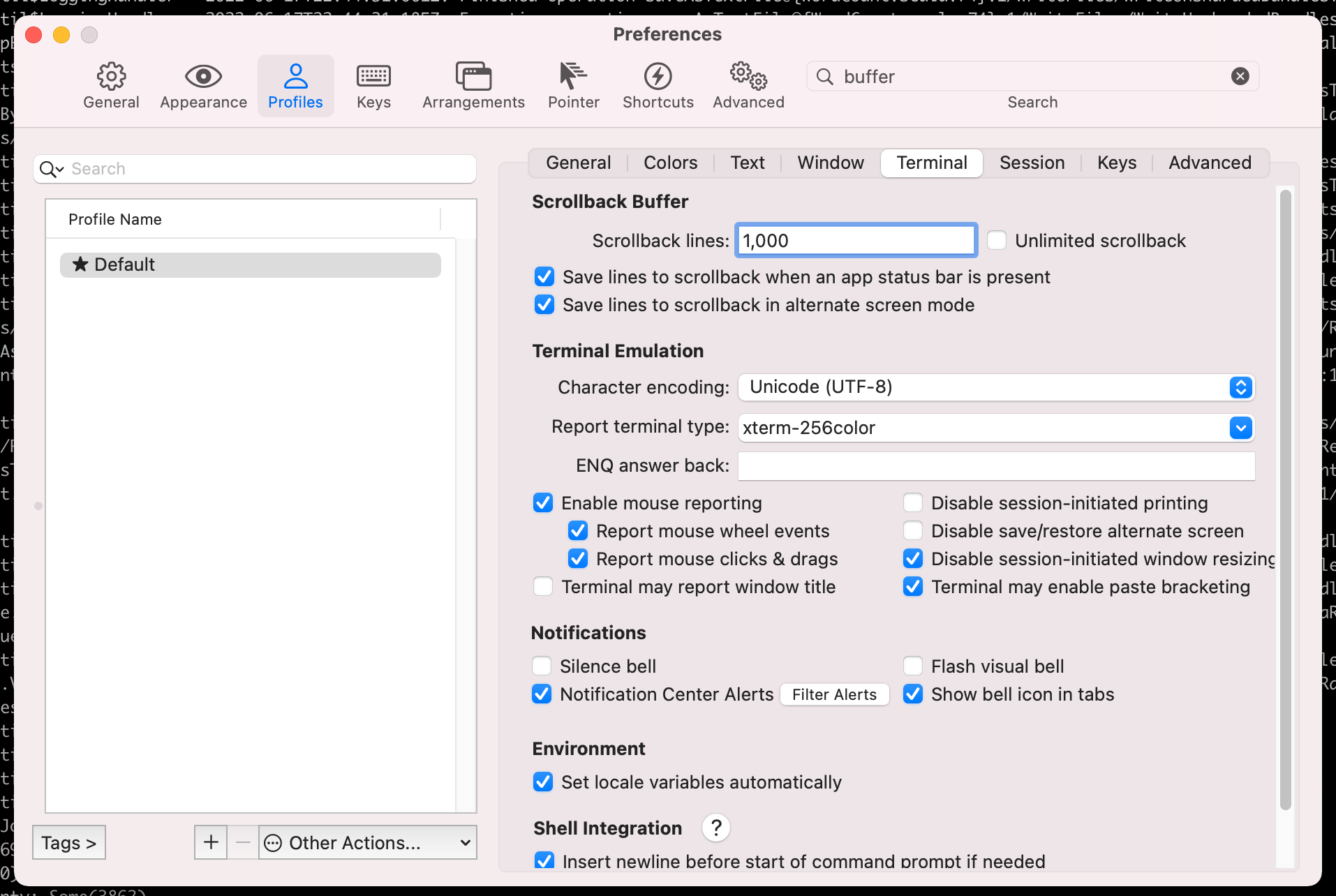
You can change the scrollback buffer for iterm2 (the number of lines it keeps in memory) from following screen

changing scrollback buffer of iTerm2

Terminal.app

Terminal app shortcuts:
https://support.apple.com/lt-lt/guide/terminal/trmlshtcts/2.11/mac/11.0

To change keyboard bindings of the Terminal app that comes with Mac OS see https://stackoverflow.com/a/39359692/147530
https://github.com/electrovir/karabiner-elements-terminal-navigation


to take screenshot in mac use following:
Cmd + Shift + 4, then you will see your cursor turns into capture mode And drag the area you want to capture It will create a screenshot image in your Desktop ~/Desktop
Cmd + Ctrl + Shift + 4 If you want it to be in clipboard,
Cmd + Ctrl + Shift + 3 will let you simply capture entire screen

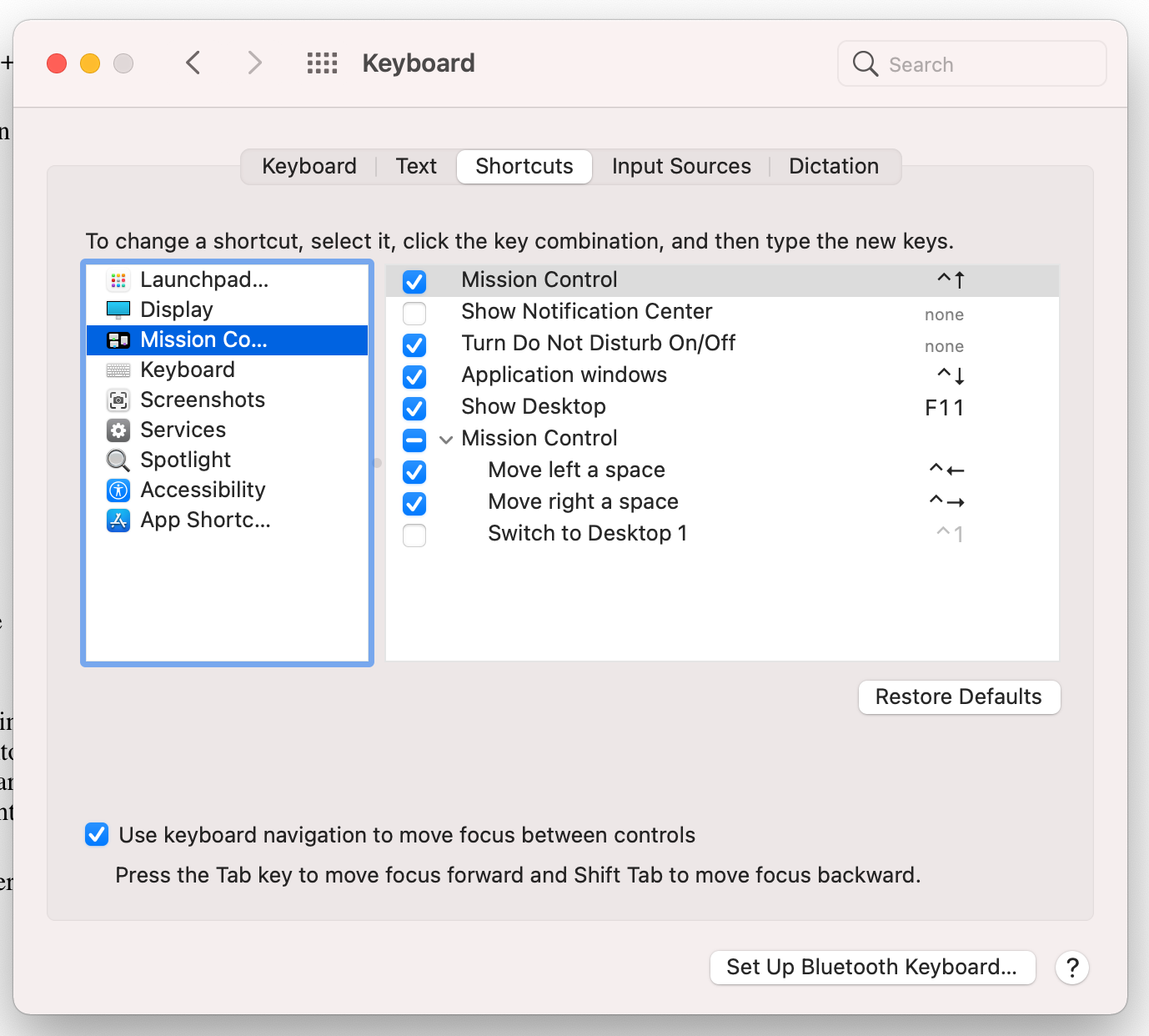
F11 takes you to the desktop. The setting is defined under System Preferences -> Keyboard -> Shortcuts -> Mission Control:

I would recommend turning it off if you are using VS Code because in VS Code F11 is supposed to step inside a function while debugging.

Chrome

Cmd + R to refresh
Cmd + Alt + Left arrow = opens the tab immediately to the left of current one
Cmd + Alt + Right arrow = opens the tab immediately to the right of current one
Cmd + W to close a tab
Cmd + Shift + W to close a window
Cmd + N to open a new window
Cmd + T to open a new tab
Cmd + L to jump to address bar
Cmd + Left arrow open previous page
Cmd + Right arrow open next page
Cmd + q quit chrome
Cmd+Option+j open javascript console
Cmd+d add to bookmarks
Cmd+Shift+delete open clear browsing data window
Cmd + Option + Up / Down cycles focus between address bar, tab bar, bookmarks bar and page content.

also see System Preferences > Keyboard > Keyboard Shortcuts to customise

In Finder, Press Command-Shift-G to navigate to a folder

To get full path of a file, press Cmd+C in finder and then Cmd+V in terminal

By default Mac Finder does not show hidden files. To show all the hidden files run following commands from terminal

$ defaults write com.apple.finder AppleShowAllFiles TRUE
$ killall Finder

More:

Change scroll direction of mouse

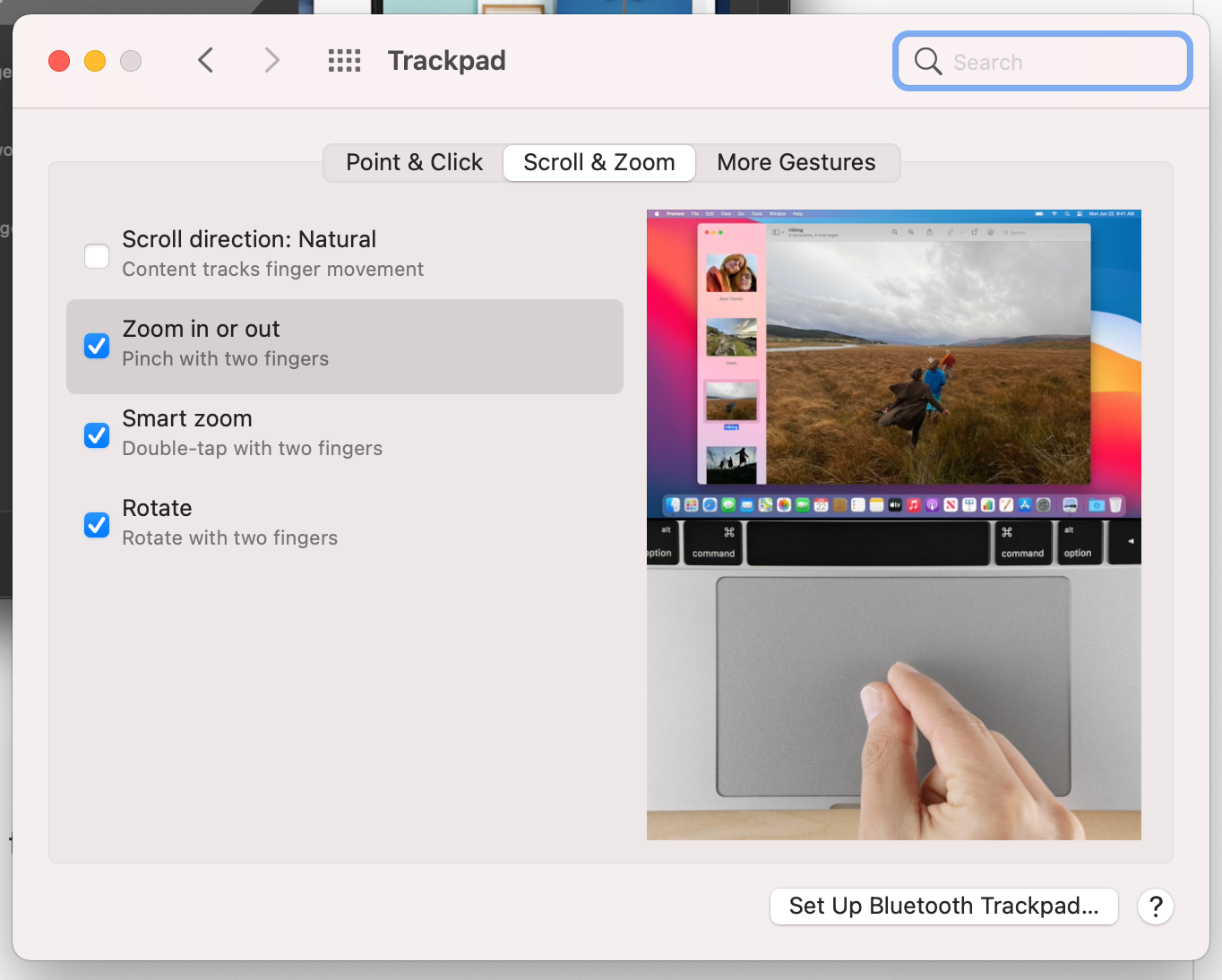
The direction in which the mouse scrolls in Mac is opposite to that in Windows. To change it I first tried System Preferences -> Mouse but Mac did not detect my USB mouse even though it worked (see this). I found a workaround here. The solution is to change it from System Preferences -> Trackpad. Uncheck Scroll direction: Natural to make the scroll direction consistent with Windows if that’s the way you like it.

Outlook

Cmd+R reply
Cmd+Shift+R reply all
Cmd+N new email (or appointment)
Cmd+1 Mail view
Cmd+2 calendar view
Cmd+3 contacts view
Cmd+4 tasks view
Cmd+Return send
Cmd+E add attachment
Cmd+J forward
Ctrl + [ display previous message
Ctrl + ] display next message
Cmd+0 open contacts search

GOOGLE DOCS
CMD+K add hyperlink in google docs
doc.new in chrome to open new doc
Cmd+Shift+8 for bullet points
Cmd+Shift+7 for ordered list
Cmd+Shift+. to increase the size

GMAIL
Cmd+] to indent
Cmd+[ to unindent
r to reply

Using the same set of shortcuts across Windows and Mac

If you use both Windows and Mac, an obvious desire is to use the same set of shortcuts across the two. E.g., on Windows we have to use Ctrl+C to copy whereas in Mac we have to use Cmd+C. Wouldn’t it be nice if we could use the same shortcut across the two? I haven’t done much research on how to customize Windows keyboard bindings but it seems like its possible to customize the keyboard bindings on the Mac. There are many things you can do:

  • You can remap the keys so that Ctrl maps to Cmd and Cmd maps to Ctrl. Now if you press Ctrl+C on Mac its as though you pressed Cmd+C. I would advise against this because now everywhere you read Ctrl, you have to mentally replace it with Cmd and vice-versa.
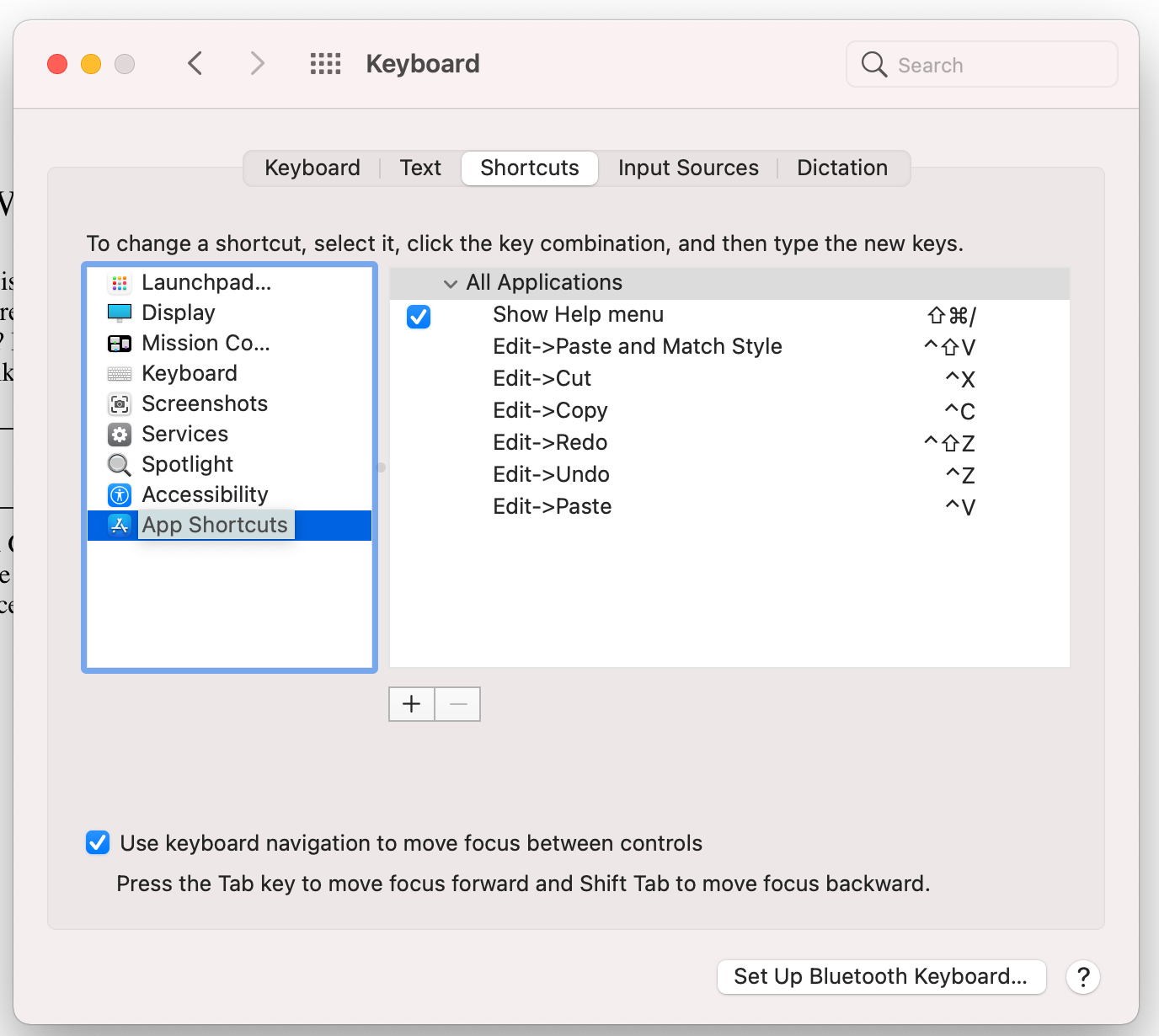
  • Under System Preferences -> Keyboard -> Shortcuts -> App Shortcuts you can change the keyboard bindings to do a task. Example is shown below where I have changed the keyboard bindings to do Copy, Paste etc.

    See this for more details.
  • Another option is to use an app called Karabiner elements. It is a powerful app that allows you to specify keyboard mappings. These are listed under Preferences -> Complex Modifications and stored as json config under ~/.config/karabiner/assets/complex_modifications. Example of a config is shown below:
"description": "PC-Style Find",
      "manipulators": [
        {
          "type": "basic",
          "from": {
            "key_code": "f",
            "modifiers": {
              "mandatory": [
                "control"
              ],
              "optional": [
                "any"
              ]
            }
          },
          "to": [
            {
              "key_code": "f",
              "modifiers": [
                "left_command"
              ]
            }
          ],

This config is saying when user presses Ctrl+F, map it to Cmd+F instead. Thus Ctrl+F becomes an alias of Cmd+F. User presses Ctrl+F, Karabiner translates it to Cmd+F and then Mac OS does what it would do if the user had pressed Cmd+F. I like this because it does not change what Cmd+F would do normally. Now you have two bindings to do the same thing – Cmd+F as well as Ctrl+F. So you can keep on using the default Mac bindings or use the aliases you have defined. This is fundamentally different from defining custom shortcuts in System Preferences -> Keyboard -> Shortcuts -> App Shortcuts. Those shortcuts don’t create aliases. They fundamentally change the keyboard bindings required to perform a task. The old binding will no longer work. See this for more.

Shell Tips

Moral:

  • For bash, put stuff in ~/.bashrc, and make ~/.bash_profile source it.
  • For zsh, put stuff in ~/.zshrc, which is always executed.
  • You will find packages you install via homebrew under /usr/local/opt

Microphone not working

Had exact same problem as here:

My microphone is not working on my MacBook Pro. In the system settings, it shows an internal microphone. but there are no response dots when I speak. Anytime I use Zoom, no one can hear me unless I use my bluetooth headset. I tried apple support by telephone, and they sent me to a store, who fixed it by doing a “control-option-shift-power down” simultaneously and tested it using voicememo. I was happy to not have to send my laptop out for repair. Then it didn’t work for my next zoom call- back to the headset. And I repeated the sequence that worked for the guy in the shop, no luck this time. Anybody got suggestions?

In my case I had my Macbook connected to external display and the lid was down. If I open the lid, the internal microphone is able to pick up my voice. Not sure if closing the lid turns off the microphone or if you need to speak really loud for microphone to be able to catch your voice.

Startup Applications

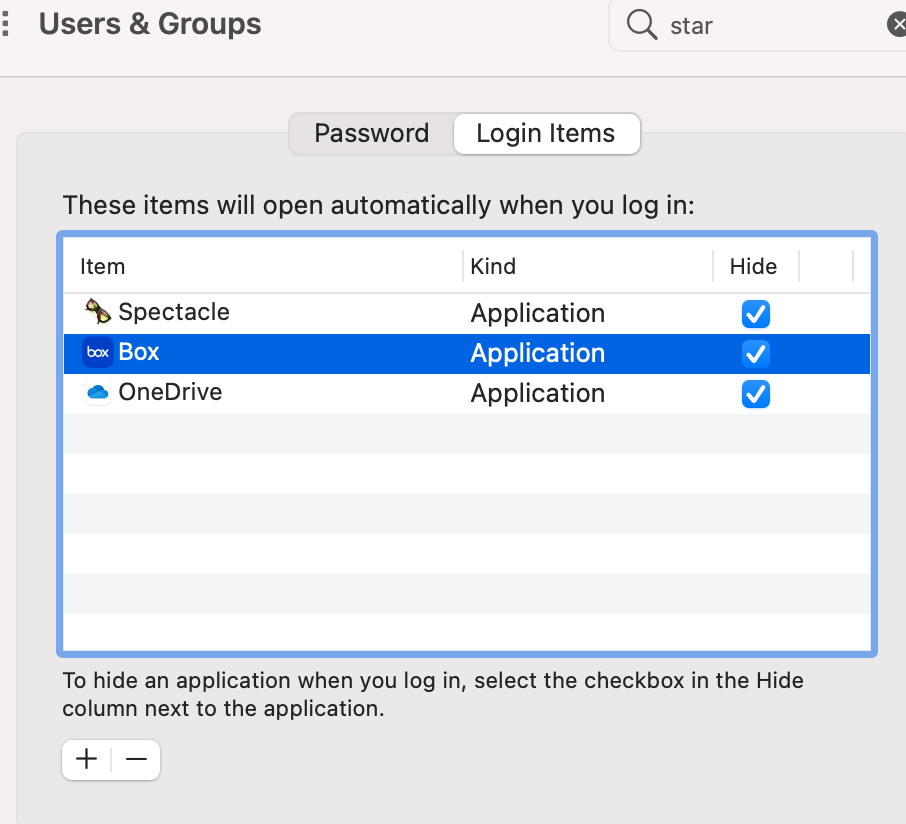
You can control what applications you want to automatically start (launch) when you log into your account. The setting is available under Users & Groups -> Login items:

Allowing untrusted applications to run

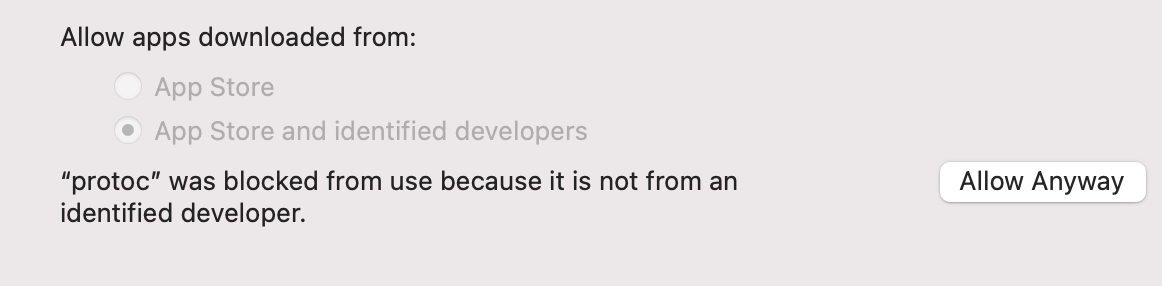
Sometimes you will install a binary downloaded from the internet. If MacOS cannot verify the publisher of the binary, it will rightfully display a message

If you still want to run the program goto Apple menu  > System Preferences, click Security & Privacy, then click General. If the lock at the bottom left is locked , click it to unlock the preference pane. Then click on Allow anyway

You can also do the above from the command-line. e.g. [1]:

 xattr -dr com.apple.quarantine ~/bin/ffmpeg

References

Change Settings from Command Line

All settings are stored under ~/Library/Preferences and .plist files. These are not text files but you can read them like following:

defaults read com.apple.AppleMultitouchMouse.plist

and change a setting like this:

defaults write com.apple.finder AppleShowAllFiles TRUE

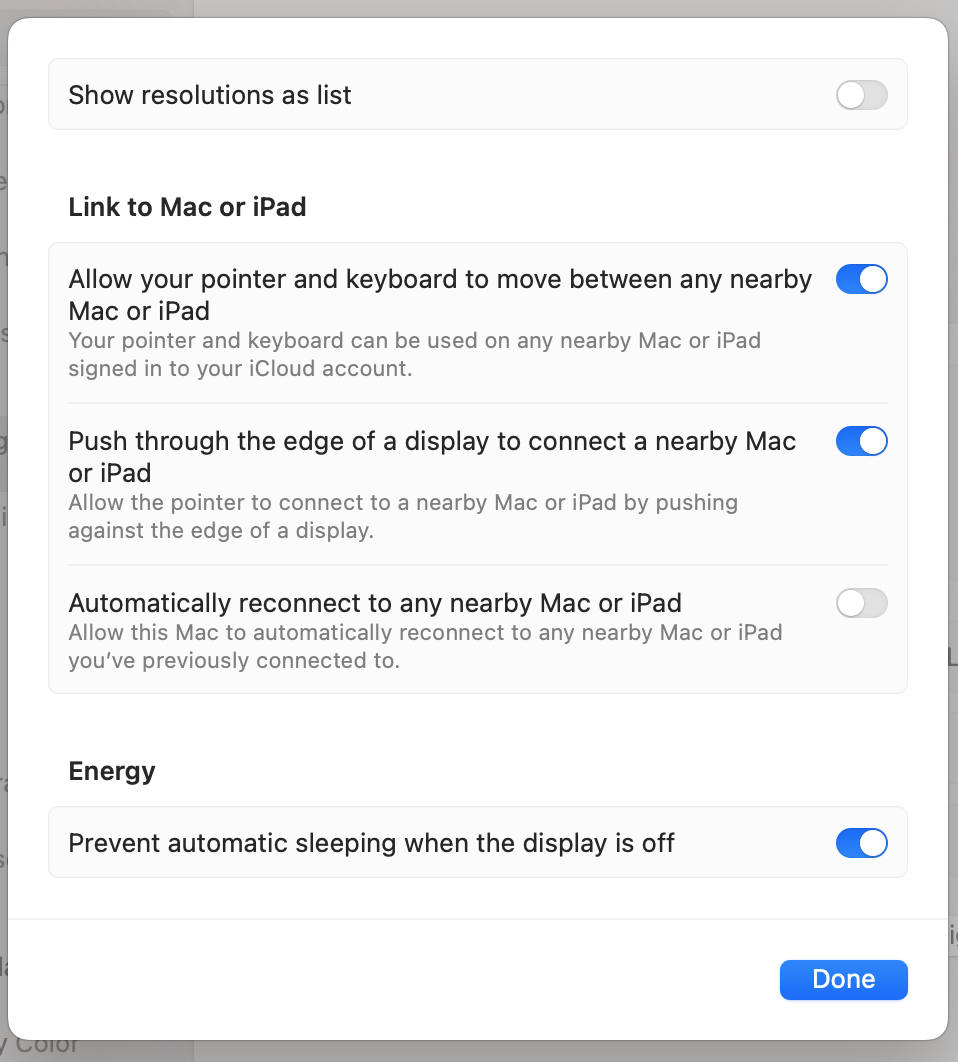
Prevent computer from sleeping when display turns off

This comes in handy when you are ssh'ed to a remote server and running a long executing program. If your computer sleeps the connection will be lost.

Posted in Computers | Tagged , , , | Leave a comment

Why I hate Java

  • whenever a method throws exception, need to decorate method name with throws Exception clause
  • no var (newer versions have this)
  • no File.ReadAllText
  • no Path.ChangeExtension
  • no import as [http://stackoverflow.com/questions/2447880/change-name-of-import-in-java-or-import-two-classes-with-the-same-name]
  • no yield return [http://stackoverflow.com/questions/2352399/yield-return-in-java]
  • no properties [http://stackoverflow.com/questions/70471/no-properties-in-java]
  • no static class [http://stackoverflow.com/questions/1844355/java-static-class]
  • no ref and out keywords [http://stackoverflow.com/questions/2806545/does-java-have-something-like-cs-ref-and-out-keywords]
  • no delegates [http://stackoverflow.com/questions/44912/java-delegates]
  • no extension methods [http://stackoverflow.com/questions/4359979/java-equivalent-to-c-sharp-extension-methods]
  • no LINQ [http://stackoverflow.com/questions/1217228/what-is-the-java-equivalent-for-linq]
  • no events
  • no support for C# style verbatim strings that start with @ [http://stackoverflow.com/questions/2673855/java-equivalent-of-cs-verbatim-strings-with]
  • no indexers [https://stackoverflow.com/questions/13403881/is-there-an-equivalent-of-c-sharp-indexer-in-java]
  • cannot have static method in a non-static inner class [http://stackoverflow.com/questions/975134/why-cant-we-have-static-method-in-a-non-static-inner-class]
  • Generics are a complete joke when compared to C# [e.g. http://stackoverflow.com/questions/3403909/get-generic-type-of-class-at-runtime%5D. This by far is the biggest pain point when moving to Java. I have spent countless hours trying to find out how one can get the type in a Generic class and its just not possible.
  • no support for multiline strings [http://stackoverflow.com/questions/878573/java-multiline-string]
  • Buggy tools and ecosystem [e.g., http://stackoverflow.com/questions/36755799/unexpected-maven-dependency-mediation-behavior%5D
  • In C# when I am writing a generic method, I can use the where keyword to tell that the type parameter should be of a certain type. C++ also supports this with concepts (C++20). But Java has no support for this.
  • no support for conditional compilation [1]. C# supports it [2] and of course C++ is famous for its compile-time flags.
  • javadoc documentation (e.g., [1]) is extremely unhelpful as it doesn’t tell you what artifact you need to import in order to use a class. By contrast C# docs tell you the dll in which a class resides. You then know which dll you have to import in order to use the class. This by far is the biggest problem with Java development and I am further amazed the community has not developed any solution for this [1]. I cannot overstate how many countless hours I have spent trying to figure out what Maven artifact to import just to be able to use a class. Edit: Today I did a test and even some C# docs (e.g., [1]) suffer from this problem. So am I unnecessarily bad mouthing Java here?
  • Inconsistent from top to bottom. The -cp option for specifying classpath works for java but not for jdb. For jdb you have to use -classpath.
  • Inconsistent. You can use --add-opens in MAVEN_OPTS for mvn exec:java but it won’t work for mvn test
  • no partial classes [1]
  • for a new project I tried using JPMS (Java Platform Module System). It has been 6 years since it was released with JDK 9. I kept running into so many issues and spending so much time to fix them that eventually I decided to abandon after wasting weeks of effort just to keep it going. The problem is not the JDK. Its fucking Maven [1,2,3,4,5,6,7]. Maven is 1,000 times more ugly than Java itself. A large part of the reason I hate Java is not because of Java per se, but because of Maven. Oracle for its part works hard to release JDK with a certain level of quality. But Maven is a completely separate project developed by indie developers – full of bugs and zero quality control. The problem is without Maven, Java is incomplete. Oracle needs to own development of Maven as well. A broken Maven gives bad name to Java as well.
  • some people compare C# to a luxury car (Lexus) and Java to a Camry or Corolla. I think the more accurate analogy is that Java gives you an engine and a transmission system. You want to ride a car? Use Maven to get the other parts, chassis etc.
  • So many times whenever I work on a multi-module Java project, Maven will build the project and all sub-modules successfully but at runtime you will get ClassDefError, ClassNotFoundError, ClassNotFoundException, IllegalClassFormatException and so on. And these are the hardest to fix.
  • At times Maven would fail the build and simply re-running it the build will pass. I am not hallucinating. What gives? One user aptly calls it the Maven Uncertainty Principle and no – its not gone; it still exists.
  • Over here one person in their test of ASP.NET Core vs Spring Boot says that “both Golang and ASP.NET Core memory consumption decreases to around 10 MB and 100 MB respectively, while Spring Boot stays over 1 GB until I kill the process”.
  • It is surprising and embarrassing that basic things (the 101) are broken out of the box on mature frameworks like Spring [e.g. 1]
  • With Java, what I have realized is that it unwittingly invites you to write ugly code. This is not by intention but just happens to be by virtue of the fact how the language and its best practices are designed. All Java frameworks and libraries are over-engineered and require you to study realms of documentation to be able to use. Compare to how easy it is to use something like Node.js.

It is my sincere advice to anyone working on a new project to stay away from Java if you have the option to do so. Java will make your life miserable and kill your productivity. You will no longer enjoy coding.

Posted in Software | Leave a comment

Using XIRR function in Excel to calculate rate of return for Fidelity 401k

Not deleting this post but below steps will not give you the correct rate of return. Excel merely hides the cells that are not marked as CONTRIBUTION. It doesn’t exclude them from the XIRR computation.

  1. Download your transaction history as a CSV file
  2. Open this file in Excel
  3. Click on Data->Filter
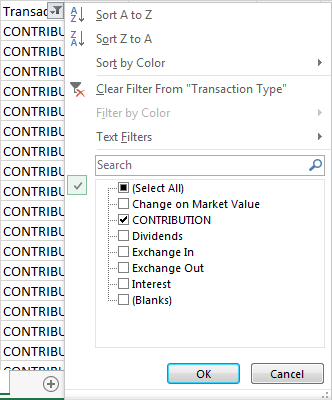
  4. Select the Transaction Column and select CONTRIBUTION (we are only interested in rows that are marked CONTRIBUTION)
  5. excel0
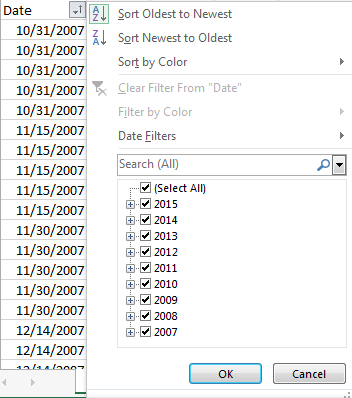
    • Select the Date Column and Sort from Oldest to Newest (somehow excel doesn’t compute XIRR otherwise)

excel1

  • Create a row at the end of your spreadsheet and enter today’s date and the current value of your portfolio as a negative number
  • Select a cell where you want to display XIRR
  • Type =XIRR(D1:D100,A1:A100,0.1) Here D1:D100 are the contribution amounts and A1:A100 are the dates. Cell A100 will have today’s date and cell D100 will have current value of the portfolio expressed as a negative number
  • if all goes well, Excel should display your rate of return
Posted in Money | Leave a comment

Okhil Chandra Sen

Date: 02 – 07 – 1909
Divisional Railway Officer,
Sahibgunj,

Respected Sirs,
I am arrive by passenger train Ahmedpur station and my belly is too much swelling with jackfruit. I am therefore went to privy. Just I doing the nuisance that guard making whistle blow or train to go off and I am running with lotaah in one hand and dhoti in the next when I am fall over and expose all my shocking to man and female women on platform. I am got leaved at Ahmedpur station. This too much bad, if passenger go to make dung that dam guard not wait train five minutes for him. I am therefore pray your honour to make big fine on that guard for public sake. Otherwise I am making big report to papers.(ORIGINAL LETTER)

Your faithful Servant,
Okhil Chandra Sen

Okhil Babu wrote this letter to the Sahibganj divisional railway officer in 1909. It is on display at the Railway Museum in New Delhi. It was also reproduced under the caption Travellers Tales in the Far Eastern Economic Review.

Any guesses why this letter is of Historic Value?
It led to the introduction of TOILETS in trains in India…!!!!

So no idea is stupid and
Always speak up…Thumbs up sign😀Victory hand(How so ever bad  or good you may be at any language)

Posted in Jokes | Leave a comment

New HR policy for 2016

Dress Code:
1) You are advised to come to work dressed according to your salary.
2) If we see you wearing Prada shoes and carrying a Gucci bag, we will assume you are doing well financially and therefore do not need a raise.
3) If you dress poorly, you need to learn to manage your money better, so that you may buy nicer clothes, and therefore you do not need a raise.
4) If you dress just right, you are right where you need to be and therefore you do not need a raise.

Sick Leave:

We will no longer accept a doctor’s statement as proof of sickness. If you are able to go to the doctor, you are able to come to work.

Casual leave:

Each employee will receive 104 personal days a year. They are called Saturdays & Sundays.

Bathroom Breaks:

Entirely too much time is being spent in the toilet. There is now a strict three-minute time limit in the stalls. At the end of three minutes, an alarm will sound, the toilet paper roll will retract, the stall door will open, and a picture will be taken. After your second offense, your picture will be posted on the company bulletin board under the ‘Chronic Offenders’ category. Anyone caught smiling in the picture will be sectioned under the company’s mental health policy.

Lunch Break:

* Skinny people get 30 minutes for lunch, as they need to eat more, so that they can look healthy.
* Normal size people get 15 minutes for lunch to get a balanced meal to maintain their average figure.
* Chubby people get 5 minutes for lunch, because that’s all the time needed to drink a Slim-Fast.

Thank you for your loyalty to our company. We are here to provide a positive employment experience.

The HR Smiling Face with Horns

Posted in Jokes | Leave a comment

The Husband Store

A brand new store has just opened in New York City that sells Husbands.
When women go to choose a husband, they have to follow the instructions at the entrance:

You may visit this store ONLY ONCE! There are 6 floors and the value of
the products increase as you ascend the flights. You may choose any item
from a particular floor, or may choose to go up to the next floor, but you
CANNOT go back down except to exit the building.

So, a woman goes to the Husband Store to find a husband.
The 1st floor sign on the door reads:
Floor 1: These men have jobs.
The 2nd floor sign reads:
Floor 2: These men have Jobs and Love Kids.
The 3rd floor sign reads:
Floor 3: These men have Jobs, Love Kids and are extremely good looking.
“Wow,” she thinks, but feels compelled to keep going.
She goes to the 4th floor and the sign reads:
Floor 4: These men Have Jobs, Love Kids, are Drop-dead Good Looking and help with Housework.
“Oh, mercy me!” she exclaims, “I can hardly stand it!”
Still, she goes to the 5th floor and sign reads:
Floor 5: These men Have Jobs, Love Kids, are Drop-dead Gorgeous, help with Housework and Have a Strong Romantic Streak.

She is so tempted to stay, but she goes to the 6th floor and the sign reads:
Floor 6: You are visitor 31,456,012 to this floor.
There are no men on this floor.
This floor exists solely as proof that women are impossible to please.
Thank you for shopping at the Husband Store.

To avoid gender bias charges, the store’s owner opens a New Wives store just across the street.
The 1st first floor has wives that listen to their husbands.

The 2nd, 3rd,4th, 5th and 6th floors have never been visited.

Posted in Jokes | Leave a comment

Jokes

mil

Posted in Jokes | Leave a comment