NES Notes

Can buy Retron 2 at Fred Meyer for $44 but Contra itself will cost about $50. Add to that the fact that  Sadly, the NES slot does not have the eject button, and while it doesn’t have the problem of not fitting in the slot properly, NES games are a complete pain to get out of the system. I have seen at least 4 systems where the nes game slot was damaged due to games getting stuck in the system. Our store dispay model no longer plays NES games due to several of the metal pins in the game slot being bent or ripped out. (source)

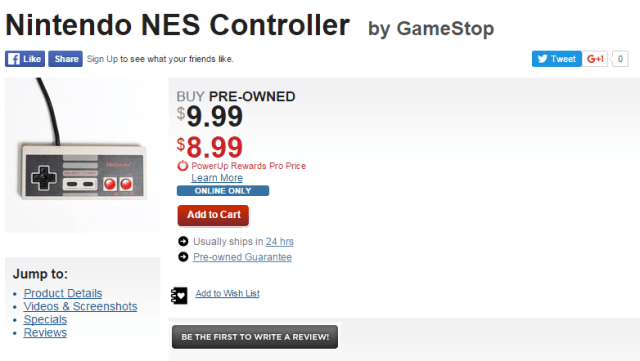
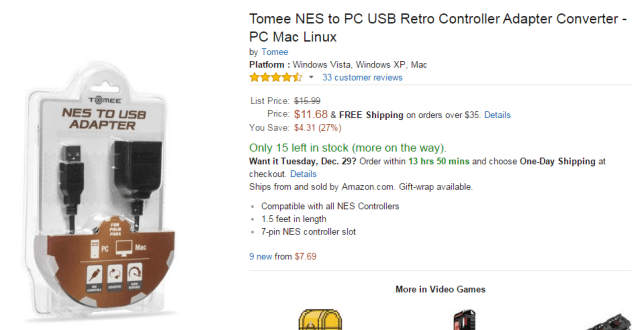
Preowned NES controller sells for about $11 at gamestop . Add to it $12 for NES to USB adapter

I originally bought a NES USB controller and that thing was horrible. I couldn’t believe how horrible it was. It was so bad it made me go digging through all of my storage to find my original NES controller that I wasn’t entirely too sure I even still had. (source)

gamestop

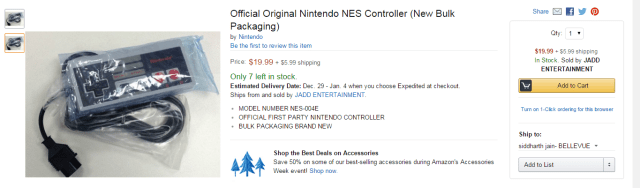
at amazon:

amazon

adapter:

nes_to_usb

Posted in Computers | Leave a comment

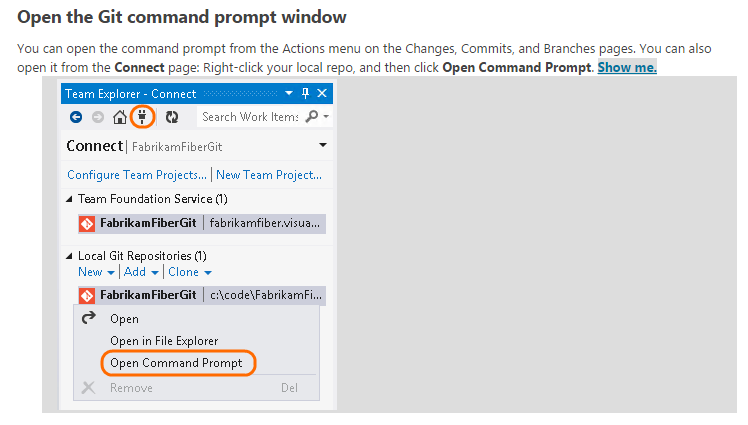
Git command prompt from Visual Studio

git_prompt

Posted in Software | Leave a comment

How to add unit tests to typescript application?

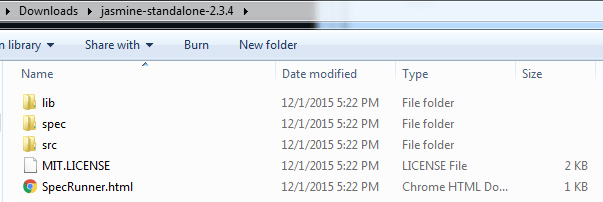
  1. Download Jasmine https://github.com/jasmine/jasmine/archive/v2.4.1.zip. Extract the zip file and you should see following structurejasmine_folder_structure
  2. Open Visual Studio solution containing your typescript project and add another project of type HTML5 Application with Typescript. This will be the unit test project.
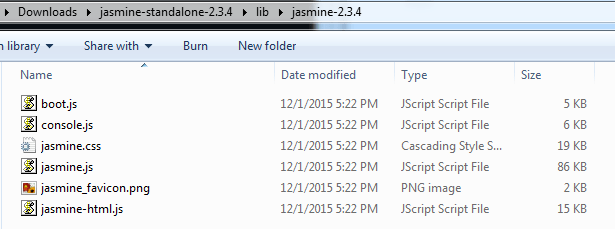
  3. Copy the contents of lib/jasmine-2.3.4 from step 1 to your unit test projectjasmine_core_files. Also copy the SpecRunner.html or you could write a new one from scratch
  4. Goto https://github.com/DefinitelyTyped/DefinitelyTyped/blob/master/jasmine/jasmine.d.ts and copy the code into notepad. Save it as jasmine.d.ts under the unit test project’s directory
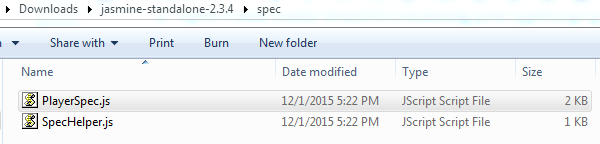
  5. Start adding unit tests to your newly created project in step 2 by adding typescript files that contain unit testing code. Look at PlayerSpec.ts for example of how to do write unit tests playerspec
  6. Edit SpecRunner to load your unit test js file
  7. Open SpecRunner in a browser and you should see your unit test results

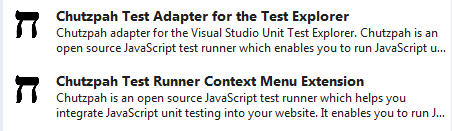
To run unit tests from command line you could install Chutzpah from Visual Studio -> Tools -> Extensions and Updateschutzpah Install both the Test Adapter and the Test Runner (they do different things).

What is the relationship between Jasmine and Chutzpah? Jasmine is sufficient to add unit tests (and they can be run and debugged from Chrome/IE) but if you want to automate running them or have visual studio display the test coverage or be able to debug JS tests from within VS then Chutzpah claims to provide this functionality.

Posted in Software | Leave a comment

How to setup NES Controller with Nestopia

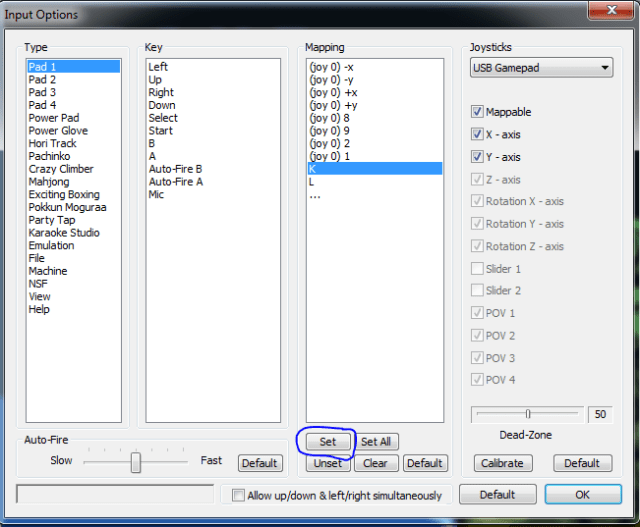
Goto Options -> Input and set the bindings as below using the Set button. refer http://www.instructables.com/id/How-to-set-up-a-USB-NES-controller-with-NESTOPIA-o/

nestopia

Posted in Computers | Leave a comment

How to rip a CD using Windows Media Player

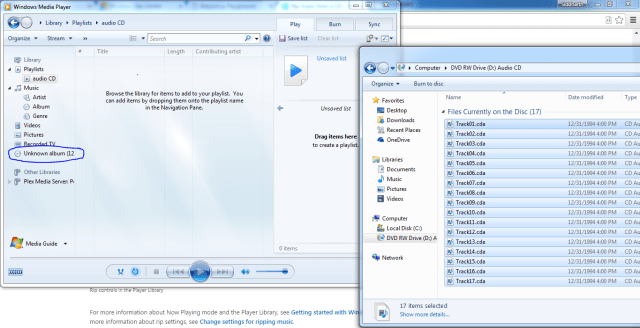
right click and select rip

ripping_using_WMP

Posted in Computers | Leave a comment

Confessions of a Windows Store developer

Being a fan of Microsoft Developer Tools (Visual Studio and .NET in particular) I was really excited to develop an app for Windows Store this year. I worked on it tirelessly for many months. Finally when I was ready and excited to release it, this is the experience I got:
1. First my login wouldn’t work for some reason for a long time. I was using developer.windows.com to login. I changed to dev.windows.com and it worked then. Not making this up. really.
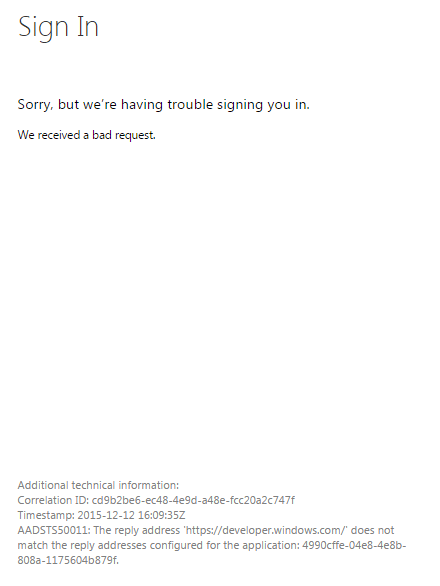
sign_in_fails

2. Submitting the app didn’t even work in Chrome. There was a blue submit button. I clicked on it and nothing happened in Chrome.

submit_button

Was able to submit in IE but IE was very slow and locked up (more on this later)

3. I submitted my app and got this error: Msadvertisingjs\Ads\Settings.Html Is Not Properly Utf-8 Encoded. Re-Save The File As Utf-8 (Including Byte Order Mark). This is Microsoft’s file. Why should I have to bother with it? Even if I am willing to save it as UTF-8 where do I find this darn file on my computer? Searching online I couldn’t find location of this file on my system. After doing a dir /s I finally found it located at c:\Program Files (x86)\Microsoft SDKs\Windows\v8.1\ExtensionSDKs\MSAdvertisingJS\8.1\Redist\CommonConfiguration\neutral\MSAdvertisingJS\ads\settings.html. I saved the file as UTF-8 with BOM.

4. I wanted to create a new ad unit for my app and found that you can no longer create a new one in pubcenter. You have to create one on dev.windows.com -> Dashboard -> Monetization -> Monetize your apps. But it doesn’t allow you to customize the size of the ad. Oddly enough it doesn’t even show the ad size. But when I logged into pubcenter I saw the ad size was 300×250 – not what I wanted. I wanted to use 160×600. No way to set that size in the new dev center.

5. Submitted again. After 8 hours or so get this error:
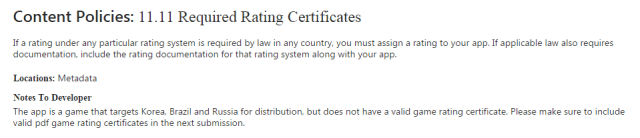
Content_policies_11.11

Content Policies: 11.11 Required Rating Certificates
If a rating under any particular rating system is required by law in any country, you must assign a rating to your app. If applicable law also requires documentation, include the rating documentation for that rating system along with your app.
Locations: Metadata
Notes To Developer
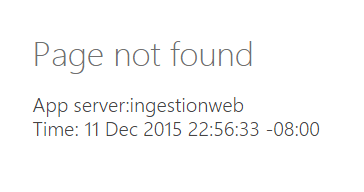
The app is a game that targets Korea, Brazil and Russia for distribution, but does not have a valid game rating certificate. Please make sure to include valid pdf game rating certificates in the next submission. Found this link on SO http://stackoverflow.com/questions/32602757/publishing-unity-application-on-windows-phone-store. I was able to get ESRB and PEGI certificates but getting the other two is not easy (read possible). So I decided maybe the only way is to not release the app in Korea and Taiwan. So I went to Pricing and Availability. When I try to save the form, it gave me this error in Chrome:
page_not_found_ingestionweb
and now I am always getting this error in Chrome whenever I try to do anything in the Dev Center.

and on IE, its not even able to expand the list when Show Options below is clicked. It locks up and crashes when you try to click on Show options. See screenshots below:

markets_and_options_IE_stuck

ie_takes_cpu_on_a_ride

ie_not_responding

ie_crashes

Why an app submission webpage should take the CPU on a ride is beyond me. When I profiled the Pricing and Availability page, I found it takes 30s to load up in Chrome and makes a whooping 52 web requests. And you can imagine how long would it take in IE (IE being at least 2-3x slower than Chrome).

takes_30s_to_load

In one trial, the save button at end of the form gave a white blank screen because of a 413 response from the server (entity too large)

failed_to_load_resource

After trying many times (logging out and logging back in) finally managed to submit the app once again through Chrome
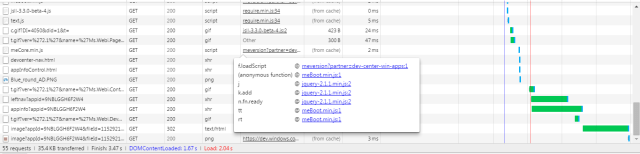
submit_55_requests

Submit button makes 55 web requests. Now stuck with this:
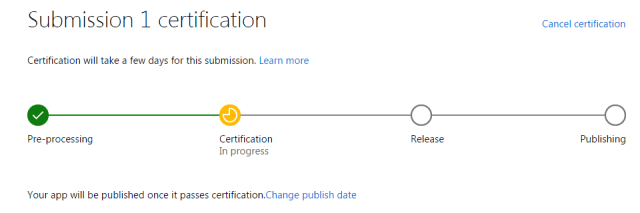
certification_will_take_a_few_days


Posted in Software | Leave a comment

Reading Geometry (spatial data) from MySql

first add this dependency (in addition to mysql-connector-java)

<dependency>
  <groupId>com.vividsolutions</groupId>
  <artifactId>jts</artifactId>
  <version>1.13</version>
</dependency>

and then use following code from http://www.dev-garden.org/2011/11/27/loading-mysql-spatial-data-with-jdbc-and-jts-wkbreader/:

//MySQL geometries are returned in JDBC as binary streams.  The
//stream will be null if the record has no geometry.
try(InputStream inputStream = rs.getBinaryStream("Geom")) {
    Geometry geometry = GeometryParser.getGeometryFromInputStream(inputStream);
}

where rs is a ResultSet (rs = stmt.getResultSet())
, "Geom" is a column of type Geometry, and:
import com.vividsolutions.jts.geom.Geometry;
import com.vividsolutions.jts.io.WKBReader;

import java.io.ByteArrayOutputStream;
import java.io.InputStream;

public class GeometryParser {
    /**
     * http://www.dev-garden.org/2011/11/27/loading-mysql-spatial-data-with-jdbc-and-jts-wkbreader/
     * @param inputStream
     * @return
     * @throws Exception
     */
    public static Geometry getGeometryFromInputStream(InputStream inputStream) throws Exception {

        Geometry dbGeometry = null;

        if (inputStream != null) {

            //convert the stream to a byte[] array
            //so it can be passed to the WKBReader
            byte[] buffer = new byte[255];

            int bytesRead = 0;
            ByteArrayOutputStream baos = new ByteArrayOutputStream();
            while ((bytesRead = inputStream.read(buffer)) != -1) {
                baos.write(buffer, 0, bytesRead);
            }

            byte[] geometryAsBytes = baos.toByteArray();
            baos.close();

            if (geometryAsBytes.length < 5) {
                throw new Exception("Invalid geometry inputStream - less than five bytes");
            }

            //first four bytes of the geometry are the SRID,
            //followed by the actual WKB.  Determine the SRID
            //here
            byte[] sridBytes = new byte[4];
            System.arraycopy(geometryAsBytes, 0, sridBytes, 0, 4);
            boolean bigEndian = (geometryAsBytes[4] == 0x00);

            int srid = 0;
            if (bigEndian) {
                for (int i = 0; i < sridBytes.length; i++) {
                    srid = (srid << 8) + (sridBytes[i] & 0xff);
                }
            } else {
                for (int i = 0; i < sridBytes.length; i++) {
                    srid += (sridBytes[i] & 0xff) << (8 * i);
                }
            }

            //use the JTS WKBReader for WKB parsing
            WKBReader wkbReader = new WKBReader();

            //copy the byte array, removing the first four
            //SRID bytes
            byte[] wkb = new byte[geometryAsBytes.length - 4];
            System.arraycopy(geometryAsBytes, 4, wkb, 0, wkb.length);
            dbGeometry = wkbReader.read(wkb);
            dbGeometry.setSRID(srid);
        }

        return dbGeometry;
    }
}
Posted in Software | Leave a comment

Reading MySql db from Java

first add this dependency to pom.xml

<dependency>
  <groupId>mysql</groupId>
  <artifactId>mysql-connector-java</artifactId>
  <version>5.1.6</version>
</dependency>

and then use JDBC like below:
import java.sql.*;
public class JdbcReader implements Closeable{

    Connection conn;

    public JdbcReader() throws ClassNotFoundException, SQLException, IllegalAccessException, InstantiationException
    {
        // The newInstance() call is a work around for some
        // broken Java implementations
        Class.forName("com.mysql.jdbc.Driver").newInstance();
        this.conn = DriverManager.getConnection("jdbc:mysql://localhost/my_sample_db?user=guest");
    }

    /**
     * https://dev.mysql.com/doc/connector-j/en/connector-j-usagenotes-statements.html
     */
    public void test() throws Exception
    {
        Statement stmt = null;
        ResultSet rs = null;
        try {
            stmt = this.conn.createStatement();
            if (stmt.execute("SELECT * FROM my_sample_db.my_sample_table limit 20")) {
                rs = stmt.getResultSet();
                // Fetch each row from the result set
                while (rs.next()) {
                    String name = rs.getString("name");
                    String description = rs.getString("Descr");
                    System.out.printf("%s\t%s\n", name, description);
                }
            }
        }
        finally {
            // it is a good idea to release
            // resources in a finally{} block
            // in reverse-order of their creation
            // if they are no-longer needed

            if (rs != null) {
                try {
                    rs.close();
                } catch (SQLException sqlEx) { } // ignore

                rs = null;
            }

            if (stmt != null) {
                try {
                    stmt.close();
                } catch (SQLException sqlEx) { } // ignore

                stmt = null;
            }
        }
    }

    public void close()
    {
        if (conn != null)
        {
            try {
                conn.close();
            }
            catch (SQLException ex) { } // ignore
            conn = null;
        }
    }
}

Further Reading: https://docs.oracle.com/javase/tutorial/jdbc/index.html

Posted in Software | Leave a comment

Buying Vanguard funds in Fidelity

https://assetbuilder.com/knowledge-center/articles/three-ways-to-have-vanguard-at-fidelity

https://www.bogleheads.org/wiki/Fidelity

Q. Does Fidelity have a fund that compares to the Vanguard Balanced Index (ticker: VBINX)? I like the performance and the low expense fees the Vanguard fund has. I also like the ratio of 60 percent stocks, 40 percent bonds. I currently have things set up with Fidelity and would like to stay with them, if possible. —E. S., by email from Austin, TX

A. There are three ways to get that fund— or a reasonable facsimile— and stay at Fidelity. One is to open a Fidelity brokerage account and buy Vanguard Balanced Index fund through the brokerage account. It will involve paying a commission, but you’ll still have an account at Fidelity.

The second option is to create a virtually identical balanced index fund using two of the few index funds that Fidelity offers. You can do this by investing 60 percent of your money in Fidelity Spartan Total Market Index fund (ticker: FSTMX) and 40 percent of your money in Fidelity U.S. Bond Market Index fund (ticker: FBIDX). The expense ratios on these funds are 0.10 percent and 0.33 percent, respectively. And each requires a minimum investment of $10,000.

That means your minimum portfolio size would be $25,000— $15,000 in Total Market and $10,000 in U.S. Bond Market. If you did this, the average expense ratio for the portfolio would be 0.19 percent, exactly the same as the expense ratio for Vanguard Balanced Index fund.

If $25,000 is more than you can invest, you have a third option.

You can build the fund using Vanguard exchange traded funds and buy them through a Fidelity brokerage account. You would invest 60 percent of your money in the Vanguard Total Stock Market ETF (ticker, VTI) and 40 percent in the Vanguard Total Bond Market ETF (ticker, BND). These ETFs have expense ratios of 0.07 and 0.11 percent, respectively, so the average cost for your portfolio would be lower than the Vanguard fund, about 0.086 percent. Assuming a commission cost of $12, your expenses will be lower using this path if your portfolio is $23,000 or more.

Posted in Money | Leave a comment

MySql Setup

Its better to use Docker for this now:

docker container create \
--name mysql-01 \
-p 13306:3306 \
-e MYSQL_ROOT_PASSWORD="$(openssl rand -base64 8)" \
-e MYSQL_DATABASE=mydb \
-e MYSQL_USER=my_sa \
-e MYSQL_PASSWORD="$(openssl rand -base64 8)" \
mysql:8.0.30 \
--default-authentication-plugin=mysql_native_password

1) Download:

http://dev.mysql.com/downloads/file/?id=459872

2) If you install with default location, this would get installed in:

/usr/local/mysql

After install, you will get a password, note that.

3) sudo touch /usr/local/mysql/data/[hostname].local.pid (type hostname on bash to get your hostname)

4) Start MySql:

sudo /usr/local/mysql/support-files/mysql.server start

5) Connect to the server:

sudo /usr/local/mysql/bin/mysql –password=[give the password that you got after installation and put it in quotes]

On the mysql prompt:

Change your password:

set password = password(‘password’);

Create user:

CREATE USER guest@localhost;

GRANT ALL PRIVILEGES ON *.* TO guest@localhost;

to Create DB:

create database dmp;

to see list of Dbs:

show databases;

mysql> GRANT SELECT,INSERT,UPDATE,DELETE,CREATE,DROP

    -> ON dmp.*

    -> TO guest@localhost;

mysql>quit to quit

6) To access DB using guest:

/usr/local/mysql/bin/mysql -h localhost -u guest dmp

  1. to restore a db from a .sql file I did this:

./mysql -h localhost -u guest mydb < my_sql_dmp.sql

[ref: https://www.howtoforge.com/faq/howto-restore-a-mysql-database-from-an-sql-dump]

  1.  to count # of rows in a table do:
  2. select count(*) from <db>.<table>;
  3. to get schema of a table do:
  4. 10. mysql> describe <db>.<table>;
    +——-+————–+——+—–+———+——-+
    | Field | Type         | Null | Key | Default | Extra |
    +——-+————–+——+—–+———+——-+
    | name  | varchar(200) | YES  |     | NULL    |       |
    | Descr | char(40)     | YES  |     | NULL    |       |
    | Geom  | geometry     | YES  |     | NULL    |       |
    +——-+————–+——+—–+———+——-+
    3 rows in set (0.00 sec)
  5. to select top 10 rows:
    mysql>select name,Descr from <db>.<table> limit 10;


    Further Reading: http://www.plumcreek.us/mysql/

Posted in Software | Tagged | Leave a comment