Sansa Clip Playlists

http://forums.sandisk.com/t5/Sansa-Clip-Sansa-Clip/PLAYLISTS-FOR-DUMMIES-TAMING-THE-SANSA-CLIP/td-p/108728

CREATING PLAYLISTS FOR PODCASTS, MUSIC AND AUDIOBOOKS

In the Clips’ Main menu, go into settings and scroll down til you find USB Mode.
Make sure it’s in Auto Detect.

Plug in the USB cable to your computer and find the player in Explorer (Start, My Computer, Sansa Clip).  Click “Internal Memory” to get to the Clips’ folders.  We’ll call this the Clip Explorer.  If you want to create a podcast playlist, open the Podcast folder and by selecting File, New Folder, create and name it whatever you want.  If you want your podcasts organized into two or three categories, just create more folders.  Do the same for Music and/or Audiobooks.

Leave it open and using Explorer again (Start, My Computer), find the files or folders you want to copy onto the Clip.  We’ll call this the Computer File Explorer.  It’s easier if you put your mp3 files in a folder in the Computer File Explorer first.  Then you can just copy those music, podcast or audiobook folders to the appropriate folder on the Clip (copy and paste).

What we have done thus far does not create playlists.  It merely puts all files into a big jumble on the player where they can only be accessed by tags in categories such as Artists, Albums and Genre.  In order to create a list that will play in sequence, we have to create a .pla file (a playlist from those files on the player).  Go back to the Clip Explorer, open a folder (Podcasts for example), select one of your created folders with a Right Click, and then select “Create Playlist” from the drop down menu.  At the bottom you’ll see “New Playlist.pla” flashing.  Now you just name it again whatever you want to and you’re done.  Get out of Explorer and unplug the USB cord.  Whenever you open up the Clip Explorer on your computer again, you’ll find that .pla file in the same folder.  If you want to rearrange the order of that playlist, just double click the .pla file and use the arrows at the bottom of the pop-up window.

The confusing category in the Clip Explorer is Playlists.  This is simply a place where you can drag and drop (or cut and paste) your .pla playlist files and see them all in one place in the Clip Explorer.  You don’t need to put them there.  You can just leave them in the Music, Podcast or Audiobook folders and they’ll still show up as playlists on the player, but if you have a lot of playlists, it is convenient to be able to see them all in one place.

Posted in Computers | Leave a comment

Einstein in plane with Indian

Einstein & a Gujju sitting next to each other on a long flight..
Einstein says,”Let’s play a game.. I will ask you a question,if you don’t know the answer,you pay me only $5 and if I don’t know the answer,I will pay you $500..”

Einstein asks the first question: What’s the distance from the Earth to the Moon..?

Gujju doesn’t say a word,reaches his pocket,pulls out a $5..

Now,it’s the Gujju’s turn..

He asks Einstein: What goes up a hill with 3 legs and comes down on 4 legs..?

Einstein searches the net and asks all his smart friends.. After an hour he gives Gujju $500..

Einstein going nuts and asks: Well,so what goes up a hill with three legs and comes down with four..?

Gujju reaches his pocket and gives Einstein $5.. Einstein fainted. Gujju makes $490

Posted in Jokes | Leave a comment

How should performance reviews be done?

I believe that large software companies spend an inordinate amount of time stack ranking employees during performance reviews and fitting a performance curve and then distributing rewards (stocks + bonuses) according to the curve. For the longest time, a bell curve was used to model performance but recent studies advocate using a power-law curve. A simpler common sense approach to distributing rewards should be that the CEO decides how to distribute rewards among his direct reports and let each of them in turn decide how they want to distribute their share and so on. Besides the time wastage, stack ranking is also detrimental to teamwork and smells highly of hypocrisy because on one hand managers are expected to preach teamwork and then the same people behind closed doors are playing games and pitching people against each other. How can an employee be expected to act selflessly and be a strong team player when s/he knows that behind closed doors s/he will be ranked against his/her own peers?

Posted in Career | Leave a comment

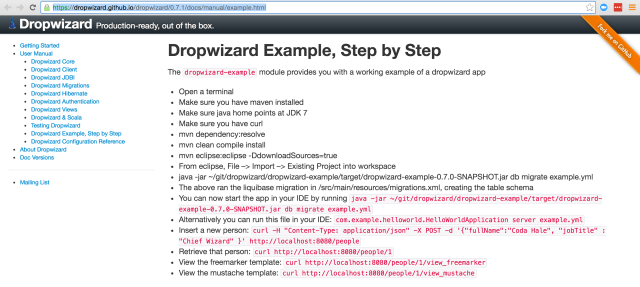
Typical example of Java documentation page

https://dropwizard.github.io/dropwizard/0.7.1/docs/manual/example.html

Screen Shot 2016-05-06 at 11.45.15 AM.png

it goes on to describe the dropwizard-example module but on the whole page there is no link from where one can actually download the module

Posted in Software | Leave a comment

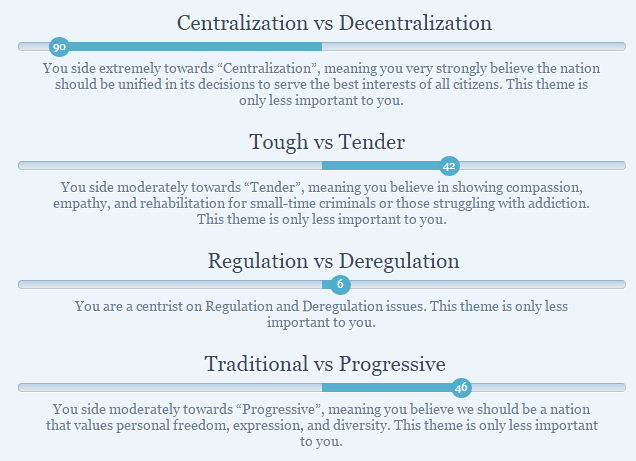
ISideWith Quiz

isidewith3isidewith5isidewith4isidewith6isidewith2isidewith

Posted in Politics | Leave a comment

HotSpot Dynamic Attach Mechanism

http://openjdk.java.net/groups/hotspot/docs/Serviceability.html#battach

HotSpot Dynamic Attach Mechanism

This is a Sun extension that allows a tool to ‘attach’ to another process running Java code and launch a JVM TI agent or a java.lang.instrument agent in that process. This also allows the system properties to be obtained from the target JVM.

The Sun implementation of this API also includes some HotSpot specific methods that allow additional information to be obtained from HotSpot:

  • The ctrl-break output from the local JVM
  • The ctrl-break output from the remote JVM
  • A dump of the heap
  • A histogram showing the number of instances of the classes loaded in the target JVM. Either all instances or just ‘live’ instances can be counted.
  • The value of a manageable command line flag. Such flags can also be set.

Dynamic attach has an attach listener thread in the target JVM. This is a thread that is started when the first attach request occurs. On Linux and Solaris, the client creates a file named .attach_pid(pid) and sends a SIGQUIT to the target JVM process. The existence of this file causes the SIGQUIT handler in HotSpot to start the attach listener thread. On Windows, the client uses the Win32 CreateRemoteThread function to create a new thread in the target process. The attach listener thread then communicates with the source JVM in an OS dependent manner:

  • On Solaris, the Doors IPC mechanism is used. The door is attached to a file in the file system so that clients can access it.
  • On Linux, a Unix domain socket is used. This socket is bound to a file in the filesystem so that clients can access it.
  • On Windows, the created thread is given the name of a pipe which is served by the client. The result of the operations are written to this pipe by the target JVM.
Posted in Software | Leave a comment

Jmap

<pre>
<dependency>
   <groupId>com.sun</groupId>
   <artifactId>tools</artifactId>
   <version>1.6.0</version>
   <!-- This scope is similar to provided except that you have to provide the JAR which contains it explicitly. The artifact is always available and is not looked up in a repository. -->
   <scope>system</scope>
   <systemPath>${env.JAVA_HOME}/lib/tools.jar</systemPath>
</dependency>
<dependency>
   <groupId>org.slf4j</groupId>
   <artifactId>slf4j-api</artifactId>
   <version>1.6.0</version>
</dependency>
</pre>
<pre>package com.wordpress.ghulal;

import com.sun.tools.attach.VirtualMachine;
import org.slf4j.Logger;
import org.slf4j.LoggerFactory;
import sun.tools.attach.HotSpotVirtualMachine;

import java.io.BufferedReader;
import java.io.InputStream;
import java.io.InputStreamReader;
import java.lang.management.ManagementFactory;
import java.text.NumberFormat;
import java.text.ParseException;

/**
 * Class to profile heap usage of a java program. Works by reverse engineering the jmap utility.
 * http://grepcode.com/file/repository.grepcode.com/java/root/jdk/openjdk/6-b14/sun/tools/jmap/JMap.java?av=f
 * Created by siddjain on 4/8/16.
 */
public class Jmap
{
    private static final Logger LOG = LoggerFactory.getLogger(Jmap.class);
    /**
     * A flag to ensure the start method of this class is only called once and subsequent invocations cause a noop
     */
    private boolean isStarted;

    private Jmap()
    {

    }

    /**
     * Class to implement proper thread safe lazy instantiation singleton pattern
     */
    private static class Holder
    {
        public static final Jmap instance = new Jmap();
    }

    private class Task implements Runnable
    {
        private String pid;
        private int lines;
        private long milliseconds;

        public Task(String processId, long sleepInterval, int numberOfLines)
        {
            if (processId == null || processId.isEmpty())
            {
                throw new IllegalArgumentException();
            }
            if (sleepInterval <= 0)
            {
                sleepInterval = 10000;
            }
            if (numberOfLines <= 0)
            {
                numberOfLines = 100;
            }
            this.pid = processId;
            this.lines = numberOfLines;
            this.milliseconds = sleepInterval;
        }

        /**
         * This method should not be called by developer. It is called implicitly by the thread.
         */
        public void run()
        {
            try
            {
                while (true)
                {
                    try
                    {
                        HotSpotVirtualMachine vm = (HotSpotVirtualMachine) VirtualMachine.attach(pid);
                        try (InputStream is = vm.heapHisto("-live"))
                        {
                            drain(vm, is, lines);
                        }
                        vm.detach();
                    }
                    catch (Exception e)
                    {
                        LOG.error("", e);
                    }
                    Thread.sleep(milliseconds);
                }
            }
            catch (InterruptedException ex)
            {
                // http://www.ibm.com/developerworks/library/j-jtp05236/
                // If you catch InterruptedException but cannot rethrow it, you should preserve evidence that the
                // interruption occurred so that code higher up on the call stack can learn of the interruption and
                // respond to it if it wants to. This task is accomplished by calling interrupt() to "reinterrupt" the
                // current thread. At the very least, whenever you catch InterruptedException and don't rethrow it,
                // reinterrupt the current thread before returning.
                Thread.currentThread().interrupt();
            }
        }

        private void drain(VirtualMachine vm, InputStream in, int numLines)
        {
            try
            {
                int counter = 0;
                try (BufferedReader bufferedReader = new BufferedReader(new InputStreamReader(in)))
                {
                    String line;
                    while ((line = bufferedReader.readLine()) != null && counter++ < numLines)
                    {
                        LOG.debug(line);
                    }
                }
            }
            catch (Exception e)
            {
                LOG.error("", e);
            }
        }
    }

    public static Jmap getInstance()
    {
        return Holder.instance;
    }

    /**
     * Call this method to start instrumenting heap usage using default sampling interval.
     */
    public synchronized void start()
    {
        this.start(10000, 100);
    }

    /**
     * Call this method to start instrumenting heap usage.
     * @param intervalMilliseconds the sampling interval between profiling heap usage. units: milliseconds
     */
    public synchronized void start(long intervalMilliseconds)
    {
        this.start(intervalMilliseconds, 100);
    }

    /**
     * Call this method to start instrumenting heap usage.
     * @param verbosity controls the number of lines in the output. use this to control verbosity of the output
     */
    public synchronized void start(int verbosity)
    {
        this.start(10000, verbosity);
    }

    /**
     * Call this method to start instrumenting heap usage. This method should only be called once in your program.
     * Subsequent calls to the method are ignored. Once started, there is no way to stop the profiler.
     * @param intervalMilliseconds the sampling interval between profiling heap usage. units: milliseconds
     * @param numberOfLines controls the number of lines in the output. use this to control verbosity of the output.
     * @throws Exception
     */
    public synchronized void start(final long intervalMilliseconds, final int numberOfLines)
    {
        if (!this.isStarted)
        {
            if (intervalMilliseconds <= 0)
            {
                throw new IllegalArgumentException("intervalMilliseconds must be greater than 0");
            }
            if (numberOfLines <= 0)
            {
                throw new IllegalArgumentException("numberOfLines must be greater than 0");
            }
            String pid = null;
            try
            {
                pid = getProcessId();
            }
            catch (Exception e)
            {
                // do nothing
            }
            if (pid != null && !pid.isEmpty())
            {
                new Thread(new Task(pid, intervalMilliseconds, numberOfLines)).start();
            }
            else
            {
                LOG.debug("failed to obtain PID. No heap statistics will be available.");
            }
            this.isStarted = true;
        }
    }

    /**
     * Get the PID of this process
     * http://stackoverflow.com/a/35885/147530
     * @return
     */
    private static String getProcessId() throws ParseException
    {
        // this is not a foolproof way to get the process ID
        return String.format("%d", (NumberFormat.getIntegerInstance().parse(ManagementFactory.getRuntimeMXBean().getName()).intValue()));
    }
}

</pre>

Posted in Software | Leave a comment

Debugging java out of memory exception

  1. First run the process that needs to be debugged
  2. Run jps to get PIDs of running java processes. On Windows jps did not give me all the PIDs. But this command worked [1]:
    wmic process where "name='java.exe'" get ProcessID, CommandLine
  3. Once you have found the PID of process you need to debug, you can get heap statistics by running jmap -histo:live <PID>

Read http://stackoverflow.com/a/35963059/147530 to understand the nuances esp. if you are getting this error:

Unable to open socket file: target process not responding or HotSpot VM not loaded
The -F option can be used when the target process is not responding

Real world example:

Needed to debug a service that would cause an OOM exception after running for a while. Wrote following script to periodically make requests to the service (running at localhost:5622) every 10s and print out top 5 entries from `jmap`’s output:

#!/bin/bash

while true; do

    #http://unix.stackexchange.com/questions/196549/hide-curl-output

    curl -s localhost:5622 > /dev/null

    jmap -histo:live $1 | head -n 8

    sleep 10s

done

Save the script as `debug.sh`. Now can run the process and this script to get realtime output of memory usage:

$. debug.sh 76100

where 76100 is the PID of the java service obtained by running `jps`

See http://stackoverflow.com/questions/1087177/what-do-those-strange-class-names-in-a-java-heap-dump-mean to understand jmap’s output. Sample jmap output (truncated to top 5 entries):

num     #instances         #bytes  class name

----------------------------------------------

   1:        171821       14836520  [C

   2:          6296        7004424  [B

   3:            40        5243520  [Lcom.sun.tools.javac.util.SharedNameTable$NameImpl;

   4:        133194        4262208  com.sun.tools.javac.util.SharedNameTable$NameImpl

   5:        170551        4093224  java.lang.String

Troubleshooting:

Well-known file is not secure:

first thing to check is if the process you are debugging is owned by the same user which is used to start jmap.

if that is the case, the next thing to check is if /tmp/hsperfdata_$USER/$PID file is accessible to that user. Check permissions on both the file and the directory.

More details at:

http://blog.tsunanet.net/2010/10/ioexception-well-known-file-is-not.html

Jmap source code:

http://grepcode.com/file/repository.grepcode.com/java/root/jdk/openjdk/6-b14/sun/tools/jmap/JMap.java#JMap.attach%28java.lang.String%29

Using Eclipse MAT

Eclipse MAT is by far considered the most comprehensive tool for debugging heap dumps. One tip in case it fails to run on a Mac. Edit /Applications/MemoryAnalyzer.app/Contents/Eclipse/MemoryAnalyzer.ini and add following lines to it replacing paths as necessary:

-vm
/Library/Java/jdk-21.0.1.jdk/Contents/Home/bin

IMPORTANT: there needs to be a line break between -vm and /Library/Java/jdk-21.0.1.jdk/Contents/Home/bin. My complete file looks like following:

-vm
/Library/Java/jdk-21.0.1.jdk/Contents/Home/bin
-startup
../Eclipse/plugins/org.eclipse.equinox.launcher_1.6.600.v20231106-1826.jar
--launcher.library
../Eclipse/plugins/org.eclipse.equinox.launcher.cocoa.macosx.aarch64_1.2.800.v20231003-1442
-vmargs
--add-exports=java.base/jdk.internal.org.objectweb.asm=ALL-UNNAMED
-Xmx1024m
-Dorg.eclipse.swt.internal.carbon.smallFonts
-XstartOnFirstThread

Another tip: change the -Xmx setting if you get OOM while opening a heap dump in Eclipse MAT.

Other Useful Commands to debug OOM

check system logs for OOM exceptions

sudo dmesg -T | grep -i 'oom'
Posted in programming, Software | Tagged , | Leave a comment

A list of all languages I have programmed in

  1. Logo – played on BBC Micro in school
  2. BASIC (or rather GWBASIC) – my first programming language
  3. QBASIC – GWBASIC  and QBASIC are what got me interested in computers
  4. Pascal (or rather Turbo Pascal) – didn’t like having to declare variable types, found it too restrictive compared to BASIC. Liked BASIC more. Anything I could do in Pascal, I could do in BASIC as well.
  5. C – when I entered college
  6. C++ – when I took an advanced programming course in my final year
  7. C# – when I had my first job. One of my favorite.
  8. Javascript, Typescript – like it a lot. Among my favorite.
  9. Python – find it somewhat similar to JavaScript. The nice thing about it is that it comes with batteries included. Can’t go wrong with it esp. for prototyping and small projects. But managing huge codebase in Python can become difficult because of no static type-checking.
  10. Java – One of the languages I hate the most.
  11. R – liked it
  12. Matlab – like
  13. PHP – this is the language for developing with WordPress. another scripting language like Python.
  14. Swift – Apple’s shiny new programming language. Everything I feel about Swift is aptly summarized by this quote: “Swift is like all of Apple’s products – it looks pretty sexy, but once you actually start using it, you realize that it is shit.”
  15. Ruby – I used it when I had to hack AsciiDoctor which is written in Ruby. Inspired by Python.
The GoodJavaScript, C#, Python
The Bad
And The UglyJava, Swift
Posted in Software | Leave a comment

Attaching IntelliJ Debugger to a process

Attach IntelliJ to a remote process
Open project containing the source code
Goto Run -> Edit Configuration. Click on + and select Remote option

Change the port from 5005 to 8000 using the Port textbox under Settings. We do this because 8000 is the default port used by mvnDebug (see later)

Now add some breakpoints
Now launch your process from command line like this: mvnDebug exec:java -Dexec.mainClass=“com.mycompany.subdomain.App”
the advantage of running using mvnDebug is that you don’t have to specify the classpath(s) of any dependencies, which can get pretty long. Otherwise run the program to be debugged like this:
export JAVA_OPTS=”-agentlib:jdwp=transport=dt_socket,server=y,suspend=n,address=5005”
suspend=y is supposed to suspend execution until a debugger is attached. then run your program:
java $JAVA_OPTS -jar
if your program takes arguments run like this mvnDebug exec:java -Dexec.mainClass=“com.xyz.abc.App” -Dexec.args=”arg0 arg1 arg2″
You should get this message:
Preparing to Execute Maven in Debug Mode
Listening for transport dt_socket at address: 8000

[mvnDebug is now waiting for a debugger to attach before continuing program execution]

9. Now in IntelliJ, Debug the configuration you created in step 3

10. The debugger should now attach to the running process

http://stackoverflow.com/questions/2935375/debugging-in-maven
https://dzone.com/articles/debugging-maven-build-mvndebug
> alias mvnDebug=/usr/share/maven/bin/mvnDebug
> mvnDebug clean install
Preparing to Execute Maven in Debug Mode
Listening for transport dt_socket at address: 8000
This ends up being the equivalent of invoking java with the proper debugging arguments:

java … -Xdebug -Xrunjdwp:transport=dt_socket,address=8000,server=y,suspend=y
also http://stackoverflow.com/questions/21114066/attach-intellij-idea-debugger-to-a-running-java-process
You can change suspend=n to suspend=y to force your application to wait until you connect with IntelliJ before it starts up. This is helpful if the breakpoint you want to hit occurs on application startup.
more on mvn exec here: http://www.vineetmanohar.com/2009/11/3-ways-to-run-java-main-from-maven/

Posted in Software | Leave a comment