Software Ke Phool

MODERN VERSION OF GURU DUTT’S FILM ”KAAGAZ KE PHOOL ”

Guru Dutt is reborn and makes a film, called ‘Software ke phool’.
Sahir Ludhianvi Sahab revises his old song for the new venture.

It goes like this :

yeh document, yeh meetings, yeh features ki duniya,
yeh insaan ke dushman, cursors ki duniya,
yeh deadlines ke bhooke, management ki duniya;
yeh Product agar ban bhi jaaye to kya hai?

yahaan ek khilona hai programmer ki hasti,
yeh basti hai murda bug-fixers ki basti,
yahaan par to raises hai, inflation se sasti,
yeh Review agar ho bhi jaaye to kya hai?

har ek keyboard ghayal, har ek login pyaasi
excel mein uljhan, winword mein udaasi,
yeh office hai ya aalame microsoft ki,
yeh Release agar ho bhi jaaye to kya hai?

jalaa do ise, phoonk daalo yeh monitor,
mere saamne se hataa daalo yeh modem,
tumhaara hai tumhi sambhaalo yeh computer,
yeh Product agar chal bhi jaaye to kya hai?

Try actually hum these lyrics in th original tune
sung by Mod.Rafi, it fits so well. What a composition.

How is’it???? Like it?

Posted in Jokes | Leave a comment

Concatenating pdfs

I need to do this every once in a while, and then forget how to do it.

Instructions for Windows


1. Install Ghostscript. Get it from http://www.ghostscript.com/. On my machine it got installed under C:\Program Files\gs\gs9.05

2. Run:

gswin64c -dBATCH -dNOPAUSE -q -sDEVICE=pdfwrite -sOutputFile=temp.pdf pdf1.pdf pdf2.pdf

see http://superuser.com/questions/54041/how-to-merge-pdfs-using-imagemagick-resolution-problem

To convert xps to pdf:
1. download GhostXPS from http://www.ghostscript.com/download/gxpsdnld.html. Download the zip file, unzip it, copy to c:program files (x86). Rename exe file to gxps.exe
2. Run:

gxps.exe -dNOPAUSE -sDEVICE=pdfwrite -sOutputFile=mypdffile.pdf myxpsfile.xps

Instructions for 32bit machine:
1. Download Ghostscript 9.06 for Windows (32 bit) from http://www.ghostscript.com/download/gsdnld.html
2. Gets installed under c:\Program Files\gs\gs9.06
3. Run gswin32c.exe …

Windows batch file to concatenate all pdfs under current directory:


echo off
setlocal ENABLEDELAYEDEXPANSION
set params=
for %%i in ('dir *.pdf /b') do if exist %%i set params=!params! "%%i"
echo on
gswin64c -dBATCH -dNOPAUSE -q -sDEVICE=pdfwrite -sOutputFile=%1 %params%

Save it as catpdf.bat and run it like catpdf finaldoc.pdf. This should concatenate all pdfs under current directory and create a file finaldoc.pdf

some useful settings: if you want to decrease the size of output pdf try adding below flag

-dPDFSETTINGS=/ebook

This can reduce files to ~15% of their size (2.3M to 345K, in one case) with no obvious degradation of quality.

ghostscript -sDEVICE=pdfwrite -dCompatibilityLevel=1.4 -dPDFSETTINGS=/printer -dNOPAUSE -dQUIET -dBATCH -sOutputFile=output.pdf input.pdf

Other options for PDFSETTINGS:

  • /screen selects low-resolution output similar to the Acrobat Distiller “Screen Optimized” setting.
  • /ebook selects medium-resolution output similar to the Acrobat Distiller “eBook” setting.
  • /printer selects output similar to the Acrobat Distiller “Print Optimized” setting.
  • /prepress selects output similar to Acrobat Distiller “Prepress Optimized” setting.
  • /default selects output intended to be useful across a wide variety of uses, possibly at the expense of a larger output file.

Source: http://ghostscript.com/doc/current/Ps2pdf.htm

Instructions for Mac or Linux

On Mac or Linux we can use the pdftk program. Install it if you don’t have it and then concatenate files by running:

$ pdftk chap1.pdf chap2.pdf chap3.pdf chap4.pdf chap5.pdf cat output edx.pdf

or to concatenate all files under a directory, run:

$ pdftk *.pdf cat output edx.pdf

To Extract a Page Range

pdftk full-pdf.pdf cat 12-15 output outfile_p12-15.pdf

Embed fonts in a PDF (Mac OS)

gs \
  -sFONTPATH=/System/Library/Fonts:/Library/Fonts \
  -o pdf-with-embedded-fonts.pdf \
  -sDEVICE=pdfwrite \
  -dPDFSETTINGS=/prepress \
   input_file.pdf

On MacOS gs can be found under /usr/local/bin/gs

Using Python

import sys
import fitz  # PyMuPDF

def concatenate_pdfs(input_pdf1, input_pdf2, output_pdf):
    pdf_writer = fitz.open()

    # Open the first PDF and add its pages to the writer
    with fitz.open(input_pdf1) as pdf_document1:
        pdf_writer.insert_pdf(pdf_document1)

    # Open the second PDF and add its pages to the writer
    with fitz.open(input_pdf2) as pdf_document2:
        pdf_writer.insert_pdf(pdf_document2)

    # Save the combined PDF
    pdf_writer.save(output_pdf)
    pdf_writer.close()

if __name__ == "__main__":
    if len(sys.argv) != 4:
        print("Usage: python script.py <input_pdf1> <input_pdf2> <output_pdf>")
        sys.exit(1)

    input_pdf1 = sys.argv[1]
    input_pdf2 = sys.argv[2]
    output_pdf = sys.argv[3]

    concatenate_pdfs(input_pdf1, input_pdf2, output_pdf)
Posted in Software | Tagged , , , , | Leave a comment

Developing Android Applications with Notepad and Windows Command Line

1. Install JDK. The latest version is 1.7 and it gets installed at C:Program FilesJavajdk1.7.0_02 on my machine
2. Install Android SDK. It gets installed at C:Program Files (x86)Androidandroid-sdk
3. Install Apache Ant. It gets installed at C:Program Files (x86)apache-ant-1.8.2
4. add following folders to PATH environment variable:
C:Program Files (x86)Androidandroid-sdktools;
C:Program Files (x86)Androidandroid-sdkplatform-tools;
C:Program Files (x86)apache-ant-1.8.2bin;
C:Program FilesJavajdk1.7.0_02bin;
5. create following environment variable:
variable name: JAVA_HOME
variable value: C:Program FilesJavajdk1.7.0_02
6. edit C:Program Files (x86)Androidandroid-sdktoolsantbuild.xml as mentioned in http://stackoverflow.com/a/8225017/147530
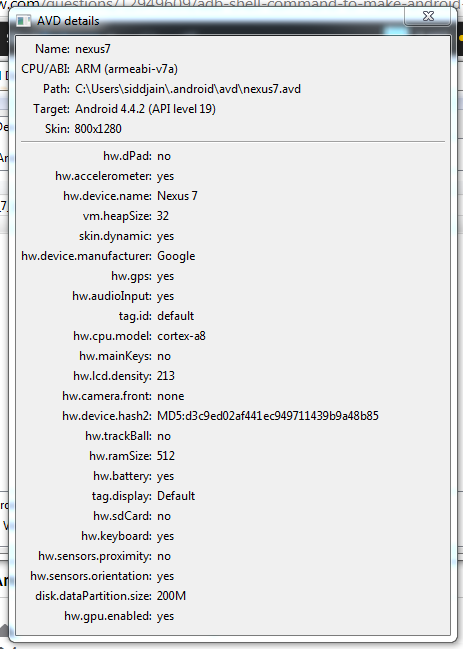
7. Follow steps at aplusbi.com to create a virtual device, create your android project from cmd line
8. start emulator (C:\Program Files (x86)\Android\android-studio\sdk\tools\emulator.exe)
9. ant debug install will compile debug binary and install onto device
10. to build release version, create your key, then edit ant.properties file and use ant release install

Signing the app: the google play store will require you to sign the app before you can publish it to the store. Follow steps at http://developer.android.com/tools/publishing/app-signing.html for signing.
keytool.exe can be found in C:\Program Files\Java\jdk1.8.0_25\bin
zipalign.exe is located at C:\Program Files (x86)\Android\android-sdk\build-tools\21.1.1
My ant.properties looks like this:
key.store=c:/users/siddjain/jainaartis/siddjain-release-key.keystore
key.alias=helios

When you run ant release, you will be prompted for two passwords:
[input] Please enter keystore password (store:c:/users/siddjain/jainaartis/siddjain-release-key.keystore):
[input] Please enter password for alias ‘helios’:

These two passwords can be changed on later if you desire, by following two commands:
To change the first password use keytool -storepasswd
To change the second password use keytool -keypasswd

Both these passwords are stored in encrypted form in the .keystore file

Troubleshooting:
– emulator takes a long time to start http://stackoverflow.com/questions/20051073/emulator-for-android-4-4-kitkat-is-not-starting
nexus7

Developing app in html/js and embedding in webview. follow tutorial on google website. note below:

protected void onCreate(Bundle savedInstanceState) {
        super.onCreate(savedInstanceState);
        if(Build.VERSION.SDK_INT >= Build.VERSION_CODES.KITKAT) {
            WebView.setWebContentsDebuggingEnabled(true);
        }
        setContentView(R.layout.activity_main);

        mWebView = (WebView) findViewById(R.id.activity_main_webview);
        // Enable Javascript
        WebSettings webSettings = mWebView.getSettings();
        webSettings.setJavaScriptEnabled(true);
        webSettings.setAllowFileAccess(true);
        webSettings.setAllowUniversalAccessFromFileURLs(true);
        mWebView.loadUrl("file:///android_asset/www/index.html");
    } 

You can also directly set the view without being dependent on a layout xml file like so:

WebView webview = new WebView(this);
 setContentView(webview);

Troubleshooting
Problem: No resource identifier found for attribute adsize in package com.google…
Solution: http://stackoverflow.com/questions/5819369/error-no-resource-identifier-found-for-attribute-adsize-in-package-com-googl
Problem: Build system is not able to pick up your android sdk directory. This happened to me after I uninstalled android studio and installed just the sdk without the IDE.
Solution: Define ANDROID_HOME environment variable and set it to android SDK directory. Next time you create a project the local.properties file will automatically have a line like so sdk.dir=C:\\Program Files (x86)\\Android\\android-sdk
Problem: How to add reference to google play services library?
Solution: add android.library.reference.1=../../../../Program Files (x86)/Android/android-sdk/extras/google/google_play_services/libproject/google-play-services_lib to project.properties. Note adding an absolute path instead of a relative path gave me an error.
Problem: Where can I define the API Level against which I want my project to be built?
Solution: edit project.properties and define the target like so target=android-21
Problem: What is minSdkVersion and targetSdkVersion in AndroidManifest.xml?
Solution: minSdkVersion specifies the minimum SDK version your app supports. Android will not install your app on devices running a lower SDK version. Google Play Store will list your app as incompatible on devices running a lower SDK. targetSdkVersion specifies the API Level against which you have tested your app. This should logically be the target against which you build your app and which is defined in project.properties
Problem: How to see list of targets available on my machine?
Solution: android list targets
Problem: How to create android project from command line?
Solution: first create empty directory for the project and then run e.g., android create project –target 2 –name adMobExample –path . –activity Main –package com.siddjain.admobexample
Problem: What should I use for the .gitignore file?
Solution: My .gitignore file contains:
bin\
gen\

### References ###

[How to reference a library project in android](http://developer.android.com/tools/projects/projects-eclipse.html#ReferencingLibraryProject)
[Creating and Managing Android Projects from the cmd line](http://developer.android.com/tools/projects/projects-cmdline.html)
[Debugging without eclipse or android studio](http://realmike.org/blog/2010/10/31/android-development-without-eclipse/)
[Another link to debug from cmd line](http://codeseekah.com/2012/02/16/command-line-android-development-debugging/)
[Android Page on Debugging](http://developer.android.com/tools/debugging/index.html)

Posted in Software | 1 Comment

File I/O in java

Recently I had to read a hindi text file in java. I learnt a couple of lessons in the process:
1. First, eclipse kept raising a FileNotFoundException even though the file existed. Turns out if you put the ctor of FileStream in a try-catch the problem goes away.
2. The second lesson was learning how to run java programs w/o eclipse. For this do:
javac Foo.java
java -cp . Foo
3. The third lesson was how to display hindi characters in eclipse. For this see http://paranoid-engineering.blogspot.com/2008/05/getting-unicode-output-in-eclipse.html

Posted in Software | Leave a comment

Hangman Strategy

Problem: Devise strategy for a computer to play hangman.

Details: The computer needs to guess a word using as few guesses as possible, and make no more than maxWrongGuesses incorrect guesses.
At end of the game, calculate the score for a word to be:

# letter guesses + # number of incorrect word guesses if the computer guessed the word right before making maxWrongGuesses incorrect guesses

or

25 if the computer lost the game before guessing the word correctly.

Solution: The computer starts with a set P of candidate words that initially contains all words from dictionary. Then at any point of time, the computer will guess letter x that will result in discarding maximum # of words from P. The computer finds the answer when only one word is left in P.
Let n = # of words in P
Let G = the computer’s guess so far. To take an example, lets say the word to be guessed is DREAM. When game starts G = —– and P will contain all five letter words in the English dictionary
To calculate the expected cardinality of P, conditional on guessing x, and assuming each word in the dictionary is equally likely to be the secret word that the computer has been asked to guess

foreach (var x in C)
{
   int sum = 0;
   foreach (var word in P)
   {
      // calculate cardinality of P that will result if
      // secret word to be guessed is word, and x is guessed
      // by the computer, and G is the guess so far.
      sum += Cardinality(x, word, G);
   }
   e[x] = sum;
}

The computer guesses x that minimizes e over the range of possible characters C to guess from.
When computer has guessed x in a turn, it will never consider guessing x again in subsequent turns (whether it was wrong or right)
i.e., after guessing x, remove x from C, and also revise P appropriately.
If x is a wrong guess, discard all words from P that have x in them;
else if x is a correct guess, update G and filter out words in P that don’t match G.

Implementation: (full code is not shown below)

using System.Collections.Generic;
using System.Diagnostics;
using System.Linq;

namespace Hangman
{
    public class SidsStrategy : GuessingStrategy
    {
        private HashSet<char> letters = new HashSet<char>(new char[] { 'A', 'B', 'C', 'D', 'E', 'F', 'G', 'H', 'I', 'J', 'K', 'L', 'M', 'N', 'O', 'P', 'Q', 'R', 'S', 'T', 'U', 'V', 'W', 'X', 'Y', 'Z' });
        private readonly HashSet<string> words = new HashSet<string>();
        private char lastGuess;
        private string lastSofar;

        public SidsStrategy(IEnumerable<string> dictionary)
        {
            foreach (var word in dictionary)
            {
                words.Add(word.ToUpper());
            }
        }

        public Guess nextGuess(HangmanGame game)
        {
            var sofar = game.getGuessedSoFar();
            Filter(game);
            int N = words.Count;
            if (N == 1)
            {
                return new GuessWord(words.First());
            }
            else
            {
                Dictionary<char, double> dict = new Dictionary<char, double>();
                foreach (var ch in letters)
                {
                    int sum = 0;
                    foreach (var word in words)
                    {
                        // calculate cardinality of P assuming secret word to be guessed is word, and we guess ch
                        sum += Cardinality(ch, word, sofar);
                    }
                    dict[ch] = sum;
                }
                lastGuess = ArgMin(dict);
                letters.Remove(lastGuess);
                lastSofar = sofar;
                return new GuessLetter(lastGuess);
            }
        }

        private int Cardinality(char ch, string secretWord, string sofar)
        {
            Debug.Assert(secretWord.Length == sofar.Length);
            char[] array = new char[sofar.Length];
            bool flag = false;
            for (int i = 0; i < sofar.Length; i++)
            {
                if (sofar[i] == HangmanGame.MYSTERY_LETTER &&
                    secretWord[i] == ch)
                {
                    array[i] = ch;
                    flag = true;    // ch will be a correct guess
                }
                else
                {
                    array[i] = sofar[i];
                }
            }
            string postGuess = new string(array);   // if we guess ch, postGuess is what we will end up with
            if (flag)
            {
                int answer = 0;
                foreach(var word in words)
                {
                    if (isEligible(word, postGuess))
                    {
                        answer++;
                    }
                }
                return answer;
            }
            else
            {
                // ch is not present in the secret word
                int answer = 0;
                foreach (var word in words)
                {
                    if (!word.Contains(ch))
                    {
                        answer++;
                    }
                }
                return answer;
            }
        }

        private char ArgMin(Dictionary<char, double> dict)
        {
            double min = double.MaxValue;
            char answer = '0';
            foreach (var kvp in dict)
            {
                if (kvp.Value < min)
                {
                    min = kvp.Value;
                    answer = kvp.Key;
                }
            }
            return answer;
        }

        private void Filter(HangmanGame game)
        {
            var sofar = game.getGuessedSoFar();
            HashSet<string> discard = new HashSet<string>();
            if (sofar == lastSofar)
            {
                // we guessed incorrectly, discard all words that have lastGuess in them
                foreach (var word in words)
                {
                    if (word.Contains(lastGuess))
                    {
                        discard.Add(word);
                    }
                }
            }
            else
            {
                foreach (var word in words)
                {
                    if (!isEligible(word, sofar))
                    {
                        discard.Add(word);
                    }
                }
            }
            foreach (var word in discard)
            {
                words.Remove(word);
            }
        }

        private bool isEligible(string candidate, string sofar)
        {
            if (candidate.Length != sofar.Length)
            {
                return false;
            }
            for (int i = 0; i < candidate.Length; i++)
            {
                var ch1 = candidate[i];
                var ch2 = sofar[i];
                if (ch1 != ch2 && ch2 != HangmanGame.MYSTERY_LETTER)
                {
                    return false;
                }
            }
            return true;
        }
    }
}

Performance: This algorithm turns out to be woefully slow, and cannot be used in any practical scenario.

Revision: Instead of computing expected cardinality conditional on guessing x, we just consider two cases:

Case1: x is a right guess

Case2: x is a wrong guess

f(x) = p1*n1 + p2*n2

p1 = probability of case 1 = n1 / (n1 + n2)

p2 = probability of case 2 = n2 / (n1 + n2)

n1 = # of words in P that contain x

n2 = # of words in P that do not contain x

Strategy: Choose x that minimizes f. This algorithm is practical and scores for sample test words are shown below (maxWrongGuesses is set to 5):

COMAKER = 9

CUMULATE = 9

ERUPTIVE = 25

FACTUAL = 7

MONADISM = 6

MUS = 25

NAGGING = 25

OSES = 4

REMEMBERED = 25

SPODUMENES = 7

STEREOISOMERS = 25

TOXICS = 25

TRICHROMATS = 5

TRIOSE = 6

UNIFORMED = 25

MODEL = 8

CAR = 7

RAILWAY = 5

ROAD = 5

TELEPHONE = 4

EXCHANGE = 6

AUTHORITY = 5

COMPLAINTS = 7

FURNITURE = 5

HOUSE = 7

NOTEBOOK = 5

LONG = 6

SHORT = 8

TALL = 25

THIN = 25

FAT = 6

PLAZA = 6

RELOCATIONS = 6

ACCOUNTS = 7

ADDRESS = 7

WEBSITE = 8

AVERAGE SCORE = 11

The problem with this algorithm is that there is no penalty for making a wrong guess. Consider guesses x and y.
x is correct guess, and y is wrong guess.
If both reduce the search space P by equal amounts, both are weighed equally. We would like to choose x over
y in such a case. To factor this in, we make following empirical modification:

f(x) = p1*n1 + (1 + α/maxWrongGuesses)*p2*n2

The new scores are shown below (α set to 5):

COMAKER = 25

CUMULATE = 10

ERUPTIVE = 6

FACTUAL = 9

MONADISM = 6

MUS = 25

NAGGING = 5

OSES = 4

REMEMBERED = 6

SPODUMENES = 6

STEREOISOMERS = 3

TOXICS = 9

TRICHROMATS = 5

TRIOSE = 10

UNIFORMED = 6

MODEL = 8

CAR = 7

RAILWAY = 7

ROAD = 5

TELEPHONE = 6

EXCHANGE = 6

AUTHORITY = 7

COMPLAINTS = 6

FURNITURE = 6

HOUSE = 7

NOTEBOOK = 6

LONG = 6

SHORT = 8

TALL = 25

THIN = 25

FAT = 6

PLAZA = 6

RELOCATIONS = 9

ACCOUNTS = 6

ADDRESS = 5

WEBSITE = 7

AVERAGE SCORE = 8.58333333333333

An alternative to try if you are one of those who don’t like arbitrary constants like α in the algorithm above, is to set α=0 and if the computer guessed wrong, do not update P. This was actually a bug in my program. I was not updating P in case of a wrong guess, and was using f(x) = p1*n1 + p2*n2. When I realized the bug, and updated P in case of wrong guess, I found much to my surprise that my scores actually increased by quite a bit instead of decreasing! After much debugging, I realized the need of an α. Anyway the results with α=0, and not updating P in case of a wrong guess are as follows:

COMAKER = 8
CUMULATE = 10
ERUPTIVE = 10
FACTUAL = 8
MONADISM = 8
MUS = 25
NAGGING = 5
OSES = 4
REMEMBERED = 25
SPODUMENES = 9
STEREOISOMERS = 5
TOXICS = 11
TRICHROMATS = 9
TRIOSE = 7
UNIFORMED = 8
MODEL = 10
CAR = 6
RAILWAY = 6
ROAD = 5
TELEPHONE = 6
EXCHANGE = 8
AUTHORITY = 6
COMPLAINTS = 7
FURNITURE = 8
HOUSE = 7
NOTEBOOK = 6
LONG = 8
SHORT = 8
TALL = 6
THIN = 25
FAT = 6
PLAZA = 9
RELOCATIONS = 6
ACCOUNTS = 10
ADDRESS = 8
WEBSITE = 7
AVERAGE SCORE = 8.88888888888889

Download code from https://skydrive.live.com/self.aspx/.Public/Hangman.zip?cid=c1da670a9c473d39&sc=documents

Posted in Software | Leave a comment

5 things returning NRIs should know about salaries in India

In the previous article we saw what kind of salaries NRIs returning to India from the US could expect. Broadly, you could expect 40-70% of your US salary as your salary in India. The next step is to understand what exactly salary means.

Salaries in India are quoted in terms of CTC or cost to company. CTC is nothing but the cost that the company incurs to employ you and keep you employed. It includes your pay and anything else that the company may incur to keep you in employment. It’s important because a lot of components of your CTC may not translate into actual take-home cash every month. Says Kris Lakshmikanth, Founder CEO of The Head Hunters India Pvt Ltd, “As a broad thumb rule, what you get in hand will be 70% of your CTC. So if your annual CTC is Rs 50 lakh, you can expect to get an annual take home of 35 lakh or Rs 2.9 lakh per month.”

So what happens to the difference? That’s one question we will try to answer today. The next is, there are many components that are offered in addition to the CTC, ESOPs being a good case in point. So what are the things you need to look at there? Let’s take a look.

1. Certain components of CTC may not be cash components

A company may beef-up your CTC with components that don’t really translate into month-end cash or that may have just a notional components. Some examples include:

-Value of perquisites is included in CTC. So if you are provided with a company accommodation, car, driver, child education expenses and so on, the value of these get included in the CTC.

-Banks may include interest subsidies in CTC. That is, if you are a bank employee, you are entitled to a discounted rate on loans. The difference between the market rate and the discounted rate maybe considered part of your CTC. Even corporate give out loans and advances at subsidized interest rates and the subsidy would be added to the CTC.

-Companies may include the cost of group medical or life insurance. Some companies may add food subsidies, that is, you may be getting a subsidy on your lunch in the office canteen. If you carry your lunch from home, you may not actually benefit from this component. Similarly, if the company provides transport, there maybe transport costs or subsidies.

-Companies include gratuity in the CTC. Gratuity is a sort of bonus that is paid out when you resign or retire from your company. The catch: You are entitled to gratuity only after completing 5 years in the company.

-Employer’s contribution to your provident fund is included in CTC. This amount is deposited by the employer in your provident fund and so this does not form part of your take-home. You will get this amount only at the time you resign or retire.

“Ask to see the cash-in-hand figure. That will give you a good idea of what you will get,” advises Aseem Juneja, Country Manager – India at US based executive search firm ZRG Partners.

2. Deductions further reduce monthly take home

Even after you have arrived at the cash value of your take home, there are certain deductions made from it. Tax is one such deduction. It is nothing but the taxes withheld from your income by the company. It is the equivalent of ‘withholding tax’ that several countries have. How much tax is deducted depends on the various components of your salary. This guide should help you understand.

In addition to income tax deduction, you will find a professional tax deduction being made every month.

“A lot of companies may allow you to choose the components in your salary. For instance, they may allocate a certain amount as a ‘flexi pay’ component. Within this amount, you maybe able to choose components such as HRA, medical reimbursement, etc depending on what maybe most tax efficient for you. If you are in a higher income bracket, it would be wise to consult a professional to help you optimize your salary to make it tax effective,” advises Lakshmikanth.

Also read: Companies like M&M, Wipro, KPMG, Mercer dangle custom-made perks to retain talent

The other deduction is your contribution to provident fund. This amount is deducted from your monthly salary and deposited in the provident fund. This is your contribution and comes out of your monthly salary, thus reducing your take-home. Again, a lot of companies make this deduction optional. However, making provident fund contributions maybe a wise saving tool. Currently company provident funds earn tax free returns of 8.5% per annum. Over a long period of time, that would build up to a decent corpus.

3. Annualised and variable components

There are certain components that are paid out to you annually or subject to your performance; these do not become part of your monthly take home. Examples include leave travel allowance, annual bonus etc.

“Variable salaries can range between 15-50%,” Lakshmikanth says, adding, “For programmers the variable pay would be around 15% of the CTC while for marketing professionals it could go up to 50%. Before the 2008 crisis, most companies paid out the variable components in full, but that has changed now. There are various factors that come into play while arriving at the variable pay outs. The company’s performance as well as your individual performance would both matter.”

4. Understand what your ESOP consists of

Employee Stock Option Plans or ESOPs are given out over and above the CTC. The company gives employees an option to purchase stocks at a certain future date at a discounted price. As the value of the company scrip increases, the employee stands to earn capital gains. “When a company offers ESOPs, the CTC part of the compensation maybe a little lower,” Lakshmikanth explains.

While ESOPs might seem attractive when the company HR presents the numbers to you, it is important to look into the fine print. Says Juneja, “There are a number of issues here. Firstly, people do not realize that there is a certain vesting period for ESOPs. That is, you will be eligible to exercise the ESOP only after working in the company for a certain period, say 2 years or so. The second issue is the strike price. This is the price at which the ESOP is granted. If the market price at the time of exercising the ESOP is lower than the strike price, there is really no gain. And that has happened many times in the past.”

So is there room for negotiation? “There is always a 10% room for negotiation in any component of your salary,” Juneja says adding, “So you might ask the employer to reduce the variable component by 10% or the value of ESOPs by 10% and increase the cash component by 10%. It’s worth giving a shot.”

5. Don’t forget to negotiate a relocation package

“It’s very common for senior executives to forget to negotiate a relocation package,” says Juneja. “Relocating to another country, even if it is India, especially with a family in tow can be an expensive affair. You might get a few weeks of accommodation. Sometimes that time may not be enough. So negotiate a package before-hand. For instance, make sure the relocation package includes important things like getting a real estate agent through the company. That way, the likelihood of bumping into rogue agents is less,” he adds.

http://timesofindia.indiatimes.com/nri/other-news/5-things-returning-NRIs-should-know-about-salaries-in-India/articleshow/10336313.cms

Posted in Career | Tagged , | Leave a comment

Interactively trying gae code

import sys
sys.path.append(‘c:/program files (x86)/google/google_appengine’)
sys.path.append(‘c:/Program Files (x86)/Google/google_appengine/lib/yaml/lib’)
from google.appengine.ext import db
import datetime

class A(db.Model):
date = db.DateProperty()

class B():
date = datetime.date.today()

a = A(date=datetime.date.today())
print a.date.month
b = B()
print b.date.month

prints:
>>10
>>10

the db.Model class does some magic to ensure that the date argument passed to ctor of A is of type datetime.date

Note that a.date is of type datetime.date. It is NOT a DateProperty.

>>> a.date
datetime.date(2011, 10, 2)
>>> b.date
datetime.date(2011, 10, 2)
Posted in Software | Leave a comment

CSS Primer

No one hates CSS more than I do. Some essential tips:

  • if you are floating an element, make sure to set its width
  • if you set the width of a div in html, it has no effect. the width must be set in css
  • say you have a div and set its width to 100%. it means the div will take up 100% of the width of its parent container
  • if you set a div’s width, and then apply padding and/or margins to the div – its width will change. to get around this, use the technique of the inner div as explained in stylin’ with css by charles smith

Understanding Z Index
Example 1:

<div id="div1">
    <div id="div2"></div>
</div>
div
{
    position:absolute;
    width:100px;
    height:100px;
}

#div1
{
    z-index:2;
    background:rgba(255,0,0,0.8);
    left:0px;
    top:0px;
}

#div2
{
    z-index:1;
    background:rgba(0,255,0,0.8);
    left:20px;
    top:20px;
}

Result: div2 appears on top of div1 even though its z-index is less than div1
Lesson: Descendants will always appear on top of parent even if their z-index is less than that of parent.

Look at Example 2 vs Example 3 below to understand the difference between z-index:auto and z-index:inherit
Example 2

<div id="div1">
    <div id="div2"></div>
    <div id="div3"></div>
</div>
div
{
    width:100px;
    height:100px;
    position:absolute;
}

#div1
{
    top:0;
    left:0;
    z-index:10;
    background:rgba(255,0,0,0.8);
}

#div2
{
    top:10px;
    left:10px;
    z-index:1;
    background:rgba(0,255,0,0.8);
}

#div3
{
/* z-index is left unspecified */
    top:20px;
    left:20px;
    background:rgba(0,0,255,0.8);
}

Result: div2 appears at the top followed by div3, then div1.
Lesson: if z-index is left unspecified, element shares stacking context of its parent and as seen in example 1 will appear on top of parent.
Contrast above with
Example 3:

#div3
{
    z-index:inherit;
    top:20px;
    left:20px;
    background:rgba(0,0,255,0.8);
}

Lesson: Now div3 will inherit z-index of the parent and in addition establish a new stacking context which will compete and win against stacking context of div2

Example 4:

<div id="div1">
    <div id="div2"></div>
</div>
<div id="div3"></div>

div
{
    width:100px;
    height:100px;
    position:absolute;
}

#div1
{
    top:0;
    left:0;
    z-index:0;
    background:rgba(0,0,255,0.8);
}

#div2
{
    top:10px;
    left:10px;
    z-index:10;
    background:rgba(0,255,0,0.8);
}

#div3
{
    top:20px;
    left:20px;
    z-index:5;
    background:rgba(255,0,0,0.8);
}

div1 and div3 are at same level in the DOM hierarchy. div3 has higher z-index. so it will appear at the top. div1 forms container for div2. by lesson #1, div2 will render on top of div1.

Example 5:
This one is unexpected:

<div id="div0">
<div id="div1">
    <div id="div2"></div>
</div>
<div id="div3"></div>
</div>    

div
{
    width:100px;
    height:100px;
    position:absolute;
}

#div0
{
z-index:69;    
}

#div1
{
    top:0;
    left:0;
    background:rgba(0,0,255,0.8);
}

#div2
{
    top:20px;
    left:20px;
    z-index:10;
    background:rgba(0,255,0,0.8);
}

#div3
{
    top:10px;
    left:10px;
    z-index:5;
    background:rgba(255,0,0,0.8);
}

Result: div2 is at top, followed by div3, then div1.
Expected: div3 to be at the top since it will create a new stacking context whereas div2 will share stacking context of the parent. This example seems to violate what we learnt from Example 2.

Some References:

Z-Index And The CSS Stack: Which Element Displays First?


http://webdesign.tutsplus.com/articles/what-you-may-not-know-about-the-z-index-property–webdesign-16892

Posted in Software | Leave a comment

Announcing launch of essayworld.net – a website for budding writers and enthusiasts

Dear Writer,

I would like to introduce you to http://www.essayworld.net – a website I have developed where you can participate in a monthly essay writing competition and win cash prizes. You can use this website to express your views on current topics, showcase your writing, connect with other writers, and engage in public debate over matters of public interest. This is only the beginning – eventually I hope you will use this website to build an online reputation of yourself as a world class writer and think-tank.

Using the website is easy – write your essay as a word doc or text file and then upload it on the submissions page. The current topic for which submissions are currently being accepted is Do you prefer co-ed vs. single gender schools? There is no minimum or maximum word-length limit, although we suggest your essay be within 1000-8000 words, and your file size be less than 100 KB. There are no age restrictions. People from all ages and walks of life are welcome.

Please take time to go through the Terms and Conditions. In particular, note that no cash prizes may be awarded in case of very small number of submissions, or where no submission is of good quality. Note that once you submit an essay, you will not be able to modify it. Please verify your essay before finalizing the submission.

I welcome your submissions, and hope you like the website. If you are having any difficulty using the website, please do not hesitate to contact me. If something doesn’t work as expected, I would encourage you to try out the website in Chrome. You can get it free from http://www.google.com/chrome in case you don’t have it already.

Sincerely,
Siddharth Jain
Posted in Software | Leave a comment

GAE setup

1. install python 2.5
2. install GAE SDK
3. download gdata, atom, webapp2 and copy to your application directory (no need to install them, since the production machines won’t have them installed and they will need to pick them up from application dir. However, do install them so that you can write python scripts from IDLE and have them accessible)
4. install git for windows
5. unittest2 (to install: python.exe setup.py install)
6. PIL (if you don’t install PIL, importing testbed will give error. for 64 bit windows you will have to install from uci.edu)
7. install pycharm
i know i am talking to myself in this post

Posted in Software | Leave a comment