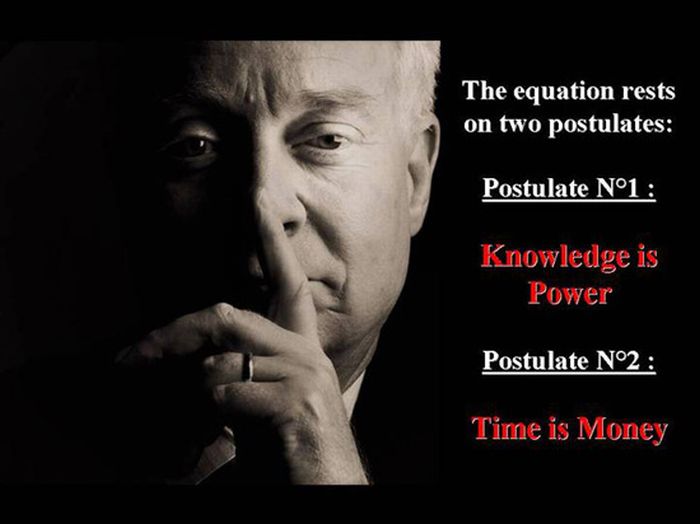
Salary Theorem

ImageImageImageImageImageImageImageImage

Posted in Jokes | Leave a comment

Investing in Gold without actually buying physical Gold

Which Gold ETF Is Right For You? GLD vs. IAU vs. SGOL
POSTED ON AUGUST 3, 2012 BY JARED CUMMANS

For the past few decades, gold has been one of the most popular commodities, as there are those who swear by it and others who write it off completely (often going out of their way to do so). Today, gold is widely considered one of the last (if not the last) safe haven investment available, especially with the global economy in general disarray. While physical bullion and futures contracts have long been the only ways to gain gold exposure, the popularity of the exchange traded world has cracked gold investing wide open.

There are now a number of ETFs that allow investors to add gold exposure to their portfolio with ease. But when it comes time to actually make an allocation, many are stuck between all of the options available. Below, we outline the three most popular gold ETFs and which one will fit your investment objectives [see also Why No Investor Should Own GLD].

SPDR Gold Trust (GLD)

Quick Stats (8/1/2012)

Total Assets: $65 billion
Average Daily Volume: 7.5 million
Expense Ratio: 0.40%
In Depth: GLD Analyst Report and ETFdb Realtime Rating
GLD is not only the largest gold ETF, but also the second-largest ETF in the world (it even briefly surpassed SPY in assets during 2011). If nothing else, its sheer size is arguably its most appealing factor. GLD has been trading since 2004 and tracks physical bullion. It should be noted that there is a fair amount of controversy concerning GLD, as a number of bloggers and investors feel that it is nothing more than a “paper asset” and that there is no actual gold behind the fund. Its price is representative of approximately 1/10th an ounce of gold and the fund comes with a number of advantages. Though it can be used as a part of a long-term strategy, GLD has a very active options market as well as a healthy daily volume, making it ideal for active traders [for more gold news subscribe to our free newsletter].

GLD is Right for You if: You are an active trader seeking to either speculate on gold’s movements or quickly execute positions in the precious metal.

COMEX Gold Trust (IAU)

Quick Stats (8/1/2012)

Total Assets: $9.5 billion
Average Daily Volume: 3.5 million
Expense Ratio: 0.25%
In Depth: IAU Analyst Report and ETFdb Realtime Rating
IAU is a very similar fund to GLD in that it tracks physical gold bullion. Each share is representative of approximately 1/100th ounce of gold. But IAU’s real advantage all boils down to its fee superiority. IAU charges 0.15% less than GLD, making it the ideal long term hold. Think that number sounds insignificant? Consider two different million dollar portfolios, one which is wholly invested in GLD and the other doing the same for IAU (obviously a diversification nightmare but stick with me). The GLD portfolio will incur annual expenses of $4,000, while its competitor will shell out only $2,500. That $1,500 difference seems miniscule for just one year, but drag it out over a 30 year investment and the difference between fees amounts to $45,000, or 4.5% of your original investment. Saving yourself a quick 4.5% could have been as simple as buying IAU over GLD.

IAU is Right for You if: You are a long term investor seeking to hold onto your ETF for an extended period of time.

Physical Swiss Gold Shares (SGOL)

Quick Stats (8/1/2012)

Total Assets: $1.8 billion
Average Daily Volume: 62,000
Expense Ratio: 0.39%
In Depth: SGOL Analyst Report and ETFdb Realtime Rating
SGOL is another popular gold ETF but puts a different spin on physically-backed ETFs. Many investors fear for the safety of their physically-backed ETFs, as they do not trust the vault locations to securely hold their bullion. SGOL holds all of its gold in Switzerland, allowing some of the more paranoid investors to gain peace of mind when making their gold allocation. This ETF began trading in 2009 and quickly gathered assets as gold bugs around the world flocked to its one-of-a-kind strategy. Also note that its expense ratio of 0.39% is curiously one basis point cheaper than the ultra-popular GLD [see also Is Gold Overvalued? The Bearish Case vs. The Bullish Case].

SGOL is Right for You if: You are a long term investor who wants a vault location in the secure land of Switzerland.

Posted in Money | Leave a comment

Notes on NRI accounts

1. NRE account gives handsome interest rate. The interest is not taxable in India, but will be taxed in US (to confirm). Most important thing to keep in mind is that the investment & returns are subject to rupee/dollar currency fluctuations. If rupee depreciates, you will end up losing money when you repatriate funds to US. This is nicely illustrated here: http://articles.timesofindia.indiatimes.com/2012-05-11/us-canada-news/31668427_1_nre-term-deposit-nre-accounts-savings-account/2
You invested $ 20,000 in a rupee deposit when the rupee was at 53. Let us say that at maturity, after 1 year, the rupee touches 55. Here are your gains:
Principal: $20,000 or Rs 10,60,000 Interest @8%: Rs 84,800 Maturity: Rs 11,44,800 or $ 20815 Gain in dollars: $ 815 or 4%

Thus, if the rupee slips to 55 at the end of one year, your 8% interest rate would translate into a net 4% gain after currency adjustment. If the rupee were to slip further, say to 56, your net gains would further drop to 2%. Instead, had you invested in a dollar deposit, your gains would have been 4% irrespective of currency movement.

FCNR dollar deposits would suit more to an investor who is completely risk averse and looking at investing in India with an at least 3 year horizon. However NRE deposits at current attractive rates may prove to be a better option if one is willing to take the currency risk since the rate differential between a NRE deposit and FCNR is about 500 basis points for 3 year tenure and even higher for lower tenures.”

Mashruwala adds, “If you are certain that you will repatriate the maturity proceeds, then it is best to invest in the FCNR as you protect yourself against currency risk. Conversely, if you are certain that your investment will remain in India, NRE would be a better choice.”

Tax treatment: http://desiways.wordpress.com/tag/nre-accounts/

Posted in Money | Leave a comment

Using python to inspect pixel values

install PIL if you don’t have it installed already
>>> import Image
>>> filename = ‘test.png’
>>> im = Image.open(filename)
>>> print im.format, im.size, im.mode
PNG (256, 256) RGBA
>>> im.getpixel((247,160))
(229, 224, 219, 239)

Posted in Software | Leave a comment

Mercator Projection Notes

To calculate \frac{d\phi}{dy}

public static double DPhi_Over_Dy(double latitudeDegrees)
{
var x = CalculateY(latitudeDegrees) / RadiusInMeters;
var t = Math.Exp(x);
// using wolfram alpha: derivative of 2arctan(exp(x))
return (1.0 / RadiusInMeters) * (2 * t) / (t * t + 1) * 180.0 / Math.PI;
}

public static double CalculateY(double latitudeDegrees)
{
var radians = latitudeDegrees * Math.PI / 180;
return RadiusInMeters * Math.Log(Math.Tan(Math.PI / 4 + radians / 2));
}

\frac{dy}{d\phi} (mercator meters per latitude) is simply \frac{1}{d\phi/dy}

Posted in Software | Leave a comment

Mortgage Rates: truth about The Real Rate vs. The Advertised Rate

Real Rate vs. Advertised Rate

The mortgage industry cheats consumers by advertising a lower interest rate, than what is actually charged. If x is the advertised rate, then the real rate you end up paying is
y = (1+\frac{x}{12})^{12} - 1
e.g. taking x = 0.03375 for a 3.375% interest rate, the real rate is
y = (1+\frac{0.03375}{12})^{12} - 1 = 0.03428 or 3.428%

How?

If y = the real rate of interest per year, then to calculate the monthly rate of interest r, we need to solve (1+y)^t = (1+r)^{12t}. This gives
r = (1+y)^{\frac{1}{12}} - 1
Whereas if x is the advertised rate, then the monthly rate of interest is calculated as \frac{x}{12} (refer to the wikipedia article where it says: Since the quoted yearly percentage rate is not a compounded rate, the monthly percentage rate is simply the yearly percentage rate divided by 12). So
\frac{x}{12} = (1+y)^{\frac{1}{12}} - 1
or,
y = (1+\frac{x}{12})^{12} - 1

Monthly payment Calculation:
Let p = amount borrowed from the bank a.k.a. loan amount
r = monthly rate of interest
z = monthly payment
At end of Month 1:
Amount Due = p(1+r)
You pay z
Balance p_1 = p(1+r) - z

At end of Month 2:
Amount Due = p_1(1+r)
You pay z
Balance p_2 = p_1(1+r) - z

At end of n-th month (when loan is paid in full):
Amount Due = p_{n-1}(1+r)
You pay z
Balance p_n = p_{n-1}(1+r) - z = 0
This can be written as
p(1+r)^n - \sum_{i=0}^{i=n-1}(1+r)^{i}z = 0
which can be solved to give
z = pr\frac{(1+r)^n}{(1+r)^n-1}
Total payments over n months, T = nz
Total Interest paid to the bank I = T - p = p(nr\frac{(1+r)^n}{(1+r)^n-1} - 1)
is directly proportional to p => the more you borrow, the more interest you will end up paying.
First Order Approximation of z: Assume r \ll 1, then z = p(r+\frac{1}{n})

The time to repay:
n = \frac{\log(\frac{z}{z-pr})}{\log(1+r)}
if z <= pr, you will never be able to repay your loan.

My calculators:
Calculate Monthly Payment
Calculate Time to Repay
Calculate How Much Loan You Should Take
Rent Vs. Buy

Posted in Money | Leave a comment

Rate of Inflation of Gas

Raw Data: http://www.randomuseless.info/gasprice/gasprice.txt

Model:
p(t) = p_0(1+r)^t where r is the rate of inflation. This can also be written as:
p(t) = p_0e^{\gamma t}
Given series of data points (p_i,t_i) construct cost fn.
e = \sum_i (p_i - p_0e^{\gamma t_i})^2
Need to find p_0 and \gamma that minimize e.
\frac{de}{dp_0} = \sum_i 2(p_i - p_0e^{\gamma t_i})(-e^{\gamma t_i}) = 0
\frac{de}{d\gamma} = \sum_i 2(p_i - p_0e^{\gamma t_i})(-p_0t_ie^{\gamma t_i}) = 0
Simplify above two equations to
\sum_i \alpha_i \beta_i = 0 ….(1)
and
\sum_i \alpha_i \beta_i t_i = 0 ….(2)
where
\alpha_i = p_i - p_0 \beta_i
\beta_i = e^{\gamma t_i}
Simplify (1) to give
p_0 = \frac{\sum_i p_i \beta_i}{\sum_i \beta_i^2} ….(3)
substitute value of p_0 from (3) into (2) to give
f(\gamma) = \sum_i (p_i - p_0(\gamma)\beta_i(\gamma))\beta_i(\gamma) t_i = 0
Now use Newton’s method to find roots of f(\gamma)
\gamma_{n+1} = \gamma_n - \frac{f(\gamma_n)}{f^{'}(\gamma_n)}
After lots of algebra, verify
f^{'}(\gamma) = -2p_0 \beta_i^2 t_i^2 - p_0^{'} \beta_i^2 t_i + p_i \beta_i t_i^2
p_0^{'}(\gamma) = \frac{bc-ad}{c^2}
where
a = 2\sum_i \beta_i p_i
b = \sum_i p_i \beta_i t_i
c = \sum_i \beta_i^2
d = \sum_i \beta_i^2 t_i

Code: http://sdrv.ms/MWaGWo

Output of program (Newton’s method):
\gamma = 0.0584642367944379, residual = 8264.22684488131
\gamma = 0.0394587424266077, residual = 755.065800336963
\gamma = 0.0373150889455502, residual = 11.93657393052
\gamma = 0.0372800836836129, residual = 0.00330268916627574
Rate of inflation: 3.798%
Residual = 0.00330268916627574
Iterations = 4

Graph:

http://db.tt/PeU0ZBmK

Posted in Money | Leave a comment

Git Notes

Set default editor:

$ ­git­config -­global core. Editor notepad++

git init initilaizes empty repository.
.gitignore file contains folders and paths that Git will ignore. Example:

gdata/
atom/
.idea/
*.pyc

To stage and commit your changes:

Git add .
Git commit –m “your comment”

To see your config settings:

$ git config --list
core.symlinks=false
core.autocrlf=true
color.diff=auto
color.status=auto
color.branch=auto
color.interactive=true
pack.packsizelimit=2g
help.format=html
http.sslcainfo=/bin/curl-ca-bundle.crt
sendemail.smtpserver=/bin/msmtp.exe
diff.astextplain.textconv=astextplain
user.name=morpheus
user.email=
core.editor=notepad++
core.repositoryformatversion=0
core.filemode=false
core.bare=false
core.logallrefupdates=true
core.symlinks=false
core.ignorecase=true
core.hidedotfiles=dotGitOnly

If you modify a file after you run git add, you have to run
git add again to stage the latest version of the file:

The rules for the patterns you can put in the . gitignore file are as follows:
• Blank lines or lines starting with # are ignored.
• Standard glob patterns work.
• You can end patterns with a forward slash (/) to specify a directory.
• You can negate a pattern by starting it with an exclamation point (! ).
Glob patterns are like simplified regular expressions that shells use. An asterisk (*) matches
zero or more characters; [ abc] matches any character inside the brackets (in this case a, b, or c);
a question mark (?) matches a single character; and brackets enclosing characters separated by
a hyphen ([0- 9]) matches any character between them (in this case, 0 through 9).

Here is another example .gitignore file:

# a comment – this is ignored
*. a # no . a files
! lib. a # but do track lib. a, even though you' re ignoring . a files above
/TODO # only ignore the root TODO file, not subdir/TODO
build/ # ignore all files in the build/ directory
doc/*. txt # ignore doc/notes. txt, but not doc/server/arch. txt

If you want to see what you’ve staged that will go into your next commit, you can use git
diff –-cached
. (In Git versions 1.6.1 and later, you can also use git diff –-staged, which may
be easier to remember.) This command compares your staged changes to your last commit:

It’s important to note that git diff by itself doesn’t show all changes made since your last
commit—only changes that are still unstaged. This can be confusing, because if you’ve staged
all of your changes, git diff gives you no output.
Thus git diff = difference between latest and staged
git diff --cached = difference between staged and committed

Although it can be amazingly useful for crafting commits exactly how you want them, the staging
area is sometimes a bit more complex than you need in your workflow. If you want to skip the
staging area, Git provides a simple shortcut. Providing the -a option to the git commit command
makes Git automatically stage every file that is already tracked before doing the commit, letting
you skip the git add part:

$ git rm *~
This command removes all files that end with ~. Now consider the mv command:

$ git mv file_from file_to

This is equivalent to running something like below:

$ mv README. txt README
$ git rm README. txt
$ git add README

To see a log of changes, run:

$ git log --pretty=format:"%h - %an, %ar : %s"
ca82a6d - Scott Chacon, 11 months ago : changed the version number
085bb3b - Scott Chacon, 11 months ago : removed unnecessary test code
a11bef0 - Scott Chacon, 11 months ago : first commit

To see the logs of past two weeks, run:

$ git log --since=2.weeks

If you want to see which commits in the Git source code history were committed by Junio Hamano and were not merges in the month of October 2008, you can run something like this:

$ git log -- pretty=" %h: %s" - - author=gitster -- since="2008- 10- 01"
- -before="2008- 11- 01" - -no- merges - - t/

If you commit and then realize you forgot to stage the changes in a file you
wanted to add to this commit, you can do something like this:

$ git commit - m ' initial commit'
$ git add forgotten_file
$ git commit - - amend

All three of these commands end up with a single commit—the second command
replaces the results of the first.

to undo your pending changes:

$ git checkout -- FILE

to make backup on f: drive:
1. cd to f: from cmd.exe
2. run “c:Program Filesgitbinsh.exe” –login -i
3. mkdir my_repository
4. cd my_repository
5. git init –bare
6. now cd to the directory in c:
7. git push –mirror “f:my_repository” (execute this command periodically to make backups)
Counting objects: 211, done.
Delta compression using up to 2 threads.
Compressing objects: 100% (200/200), done.
Writing objects: 100% (211/211), 124.92 KiB, done.
Total 211 (delta 108), reused 0 (delta 0)
To f:git
* [new branch] master -> master

Uploading local repository to BitBucket


1. Create empty repository on bitbucket
2. git remote add bb https://URL. this adds a remote repository named bb
3. git push bb master. this pushes the master (which is the local repo) to bb
http://git-scm.com/book/en/Git-Basics-Working-with-Remotes
You are set.
then to push updates just do:
git push bb master

To push to non-master branch use:

git push <remote> <local-branch>:<remote-branch>

e.g., git push bb master:pro

To see list of files in a commit use:

git diff-tree --no-commit-id --name-only -r 8561998a

To delete remote branch

$ git push origin --delete <name-of-remote-branch>

Adding a file and ignoring it afterwards

e.g., you want to commit launch.json but want to ignore change to it afterwards (e.g., you add a password). once you have committed a file adding it to .gitignore will not ignore it. But you can run:

git update-index --assume-unchanged .vscode/launch.json

and as the command says git will assume file has not changed (even though it has). to undo this run:

git update-index --no-assume-unchanged .vscode/launch.json

show how many commits your feature branch is ahead of main

git rev-list --left-right --count main...feature-branch

Change URL of remote repository such as the origin

git remote set-url origin git@github.com:username/repository.git

Updating your remote URL is only the first step. To get your local environment fully in sync with the new server state, you usually need to perform a “handshake” to verify the connection and update your local tracking references.

Here is how you can sync and refresh effectively:

1. Verify the Change

First, make sure the URL actually updated correctly.

git remote -v

2. Fetch the New Data

Running a fetch is the most important part. This tells your local Git to reach out to the new URL, see what branches exist there, and update its internal map of the remote.

git fetch --all --prune

  • --all: Grabs updates from all remotes.
  • --prune: This is the “refresh” part. It deletes local references to branches that no longer exist on the remote (cleaning up the “ghost” branches).

3. Re-link Your Branches (If Needed)

If you changed the remote’s name (e.g., from origin to upstream), or if you’ve moved to a completely different repository where the branch names don’t match, you might need to reset the “upstream” tracking for your current branch:

git branch --set-upstream-to=origin/main main

4. Pull the Latest

Now that the connection is refreshed, pull down the actual files:

git pull


Troubleshooting “Authentication Failed”

Since you changed the URL, your computer might still be trying to use old credentials stored in your keychain or credential manager.

  • If using HTTPS: You may be prompted for a new Personal Access Token (PAT).
  • If using SSH: Ensure your public key is added to the settings of the new host (e.g., the new GitHub or GitLab account).

Find size of untracked files

You can compute it from the index (what’s staged) or from what would be committed if you staged everything.

1) After you stage, get the exact size that will be committed

git add -A
git ls-files -s -z \
  | cut -d' ' -f2 \
  | tr '\0' '\n' \
  | git cat-file --batch-check='%(objectsize)' \
  | awk '{sum += $1} END {printf "staged blob bytes: %d (%.2f MiB)\n", sum, sum/1024/1024}'

Notes:

  • This sums the sizes of the blob objects for the staged content (i.e., what Git will store), not “working tree file sizes”.
  • This is usually what you want if your concern is “how big is this commit in Git terms?”

2) Without staging: estimate size of “everything currently untracked” (your current case)

Since your git status shows only untracked files, you can sum their on-disk sizes directly:

GNU/Linux:

du -sb .gitignore README.md dotnetipl paintings-csharp paintings-swift paintings-winforms python-scripts wordpress \
  | awk '{sum += $1} END {printf "working-tree bytes: %d (%.2f MiB)\n", sum, sum/1024/1024}'

macOS / BSD (no -b):

du -sk .gitignore README.md dotnetipl paintings-csharp paintings-swift paintings-winforms python-scripts wordpress \
  | awk '{sum += $1} END {printf "working-tree KiB: %d (%.2f MiB)\n", sum, sum/1024}'

3) If you want a one-liner that matches “what would be committed if I staged everything”, but without writing to the index

You can use Git’s pathspec from git status --porcelain and du:

git status --porcelain -z \
  | awk -v RS='\0' 'substr($0,1,2)=="??"{print substr($0,4)}' \
  | tr '\n' '\0' \
  | xargs -0 du -sb 2&gt;/dev/null \
  | awk '{sum+=$1} END {printf "untracked bytes: %d (%.2f MiB)\n", sum, sum/1024/1024}'

Posted in Software | Tagged | Leave a comment

Windows Scripting Basics

To iterate through files in a directory and modify attributes, create following bat file:
echo off
for %%1 in (*.txt) do attrib -r %%1

Posted in Software | Leave a comment

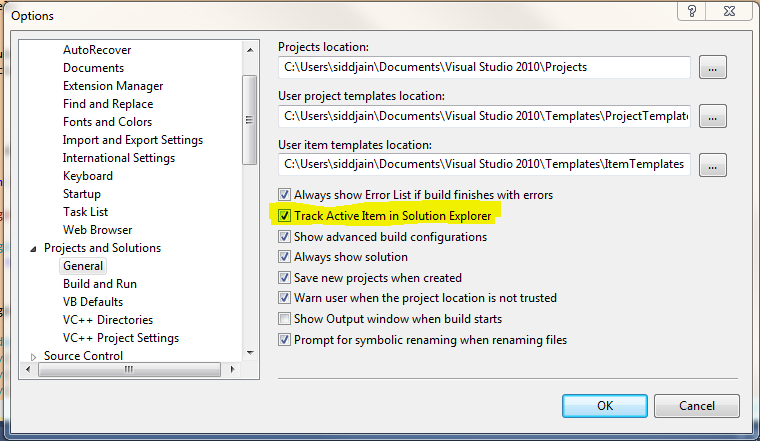
Track Active Item in Solution Explorer

Posted in Software | Leave a comment