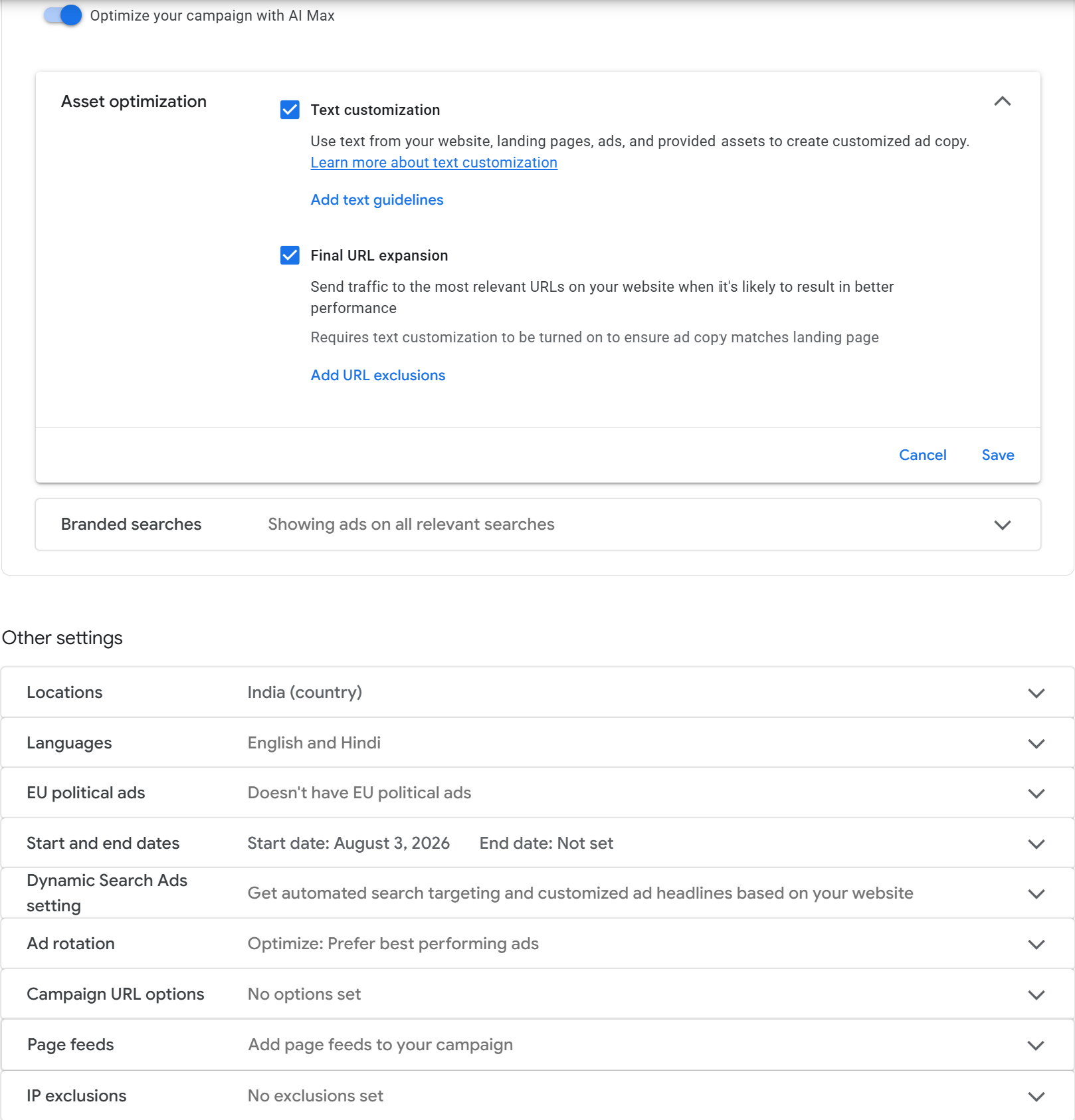
Preventing Google Ads from showings ads in locations that you don’t want to target

First of all I don’t recommend Google Ads – it kept showing my ads to people in Nigeria when I had selected US as the location – but if you do, you have to be extra careful to make sure it does not cheat you this way. Some things to check:

in Location Options (closed by default) make sure you select Presence not the default Presence or Interest.

Second if you are using AI Max, there is a further screen where you should only select the location of interest

Posted in Computers | Leave a comment

Q&A with Gemini: Why Developers Hate ServiceNow (And Why CIOs Spend Millions On It Anyway)

If you’ve ever worked inside a large enterprise or a corporate IT department, you’ve likely encountered ServiceNow or similar heavy enterprise ITSM (IT Service Management) systems.

To most engineers and developers used to clean abstractions, fast tools, and low-friction issue tracking, ServiceNow feels like a slow, bloated monster designed to force you to fill out 40 fields on a form just to request a server restart.

Below is an unedited Q&A exploring why ITSM tools feel like they add complexity rather than removing it, what actually powers these multi-billion-dollar platforms behind the scenes, and the corporate dynamics that drive their massive adoption.


Q: Who are ServiceNow’s main competitors?

Because ServiceNow spans multiple operational areas—including IT Service Management (ITSM), Customer Service Management (CSM), HR Delivery, Strategic Portfolio Management (SPM), and low-code digital workflows—its primary competitors vary by product module:

1. Core IT Service Management (ITSM) & Operations (ITOM)

  • Atlassian (Jira Service Management): The fastest-growing mid-market and enterprise alternative, popular with engineering and DevOps-centric teams due to tight Jira integration.
  • BMC Software (BMC Helix): Historically ServiceNow’s primary legacy competitor in heavy enterprise environments, offering hybrid on-prem and cloud setups.
  • Freshworks (Freshservice): A cloud-native alternative targeting mid-sized businesses and enterprises seeking lower total cost of ownership (TCO) and faster deployment times.
  • Ivanti (Ivanti Neurons): Strong in enterprise endpoint management, unified IT asset management (ITAM), and automated patch management combined with ITSM.
  • ManageEngine (ServiceDesk Plus): A cost-effective solution commonly favored by SMBs and mid-market IT teams.

2. Customer Service Management (CSM)

  • Salesforce (Service Cloud / Agentforce): ServiceNow’s main enterprise rival in non-IT workflows, dominating front-office customer service and contact centers.
  • Zendesk: Widely used for consumer and SMB customer support teams looking for scalable, out-of-the-box ticketing and omnichannel support.

3. HR Service Delivery (HRSD) & Enterprise Workflows

  • Workday: Competes directly for HR service delivery, employee onboarding, and internal workforce request routing.
  • SAP & Oracle: Major enterprise resource planning (ERP) suites offering native internal service request modules.
  • Microsoft (Power Platform / System Center): Fills workflow automation gaps through Power Automate, Power Apps, and Teams integrations.

4. Strategic Portfolio Management (SPM)

  • Planview & Broadcom (Clarity): Heavyweight enterprise competitors for project portfolio management, resource allocation, and strategy execution.

Q: I fail to understand what makes ITSM a big thing—it’s an issue tracker after all with hooks and automations. Having used JIRA (which already feels bloated and complicated), ServiceNow feels like it takes it one step further and adds complexity instead of removing it. Is that accurate?

That perspective is actually far from unpopular—it is the dominant sentiment among software engineers, developers, and builders who interact with these platforms daily.

To an engineer used to clean abstractions, modern APIs, and lightweight tools like GitHub Issues or Linear, enterprise ITSM looks like administrative bloat. Here is why it feels that way:

  1. It’s Built for Governance, Not Velocity: Developer tools are optimized for speed and execution. ITSM platforms are optimized for compliance, auditing, risk mitigation, and operational control.
  2. “Configure Everything” Means “Mess Up Everything”: ServiceNow is essentially a relational database with a UI and workflow engine built on top of JavaScript. Because enterprises can customize every single rule and form field, internal IT admins frequently end up building over-engineered, slow processes.
  3. It Functions as Enterprise Middleware: Half of ServiceNow’s complexity isn’t the ticketing UI; it’s the background plumbing connecting legacy ERPs (SAP, Oracle), HR systems (Workday), cloud providers (AWS, Azure), and Active Directory.

What Makes ITSM Big Beyond Issue Tracking?

Calling ITSM an “issue tracker with hooks” is technically accurate at the micro level, but at enterprise scale (e.g., 20,000 to 100,000+ employees), three core architectural problems transform basic issue tracking into a multi-million-dollar necessity:

1. The Configuration Management Database (CMDB)

In a large organization, tracking what hardware, cloud infrastructure, and software dependencies exist across dozens of siloed departments is non-trivial. Without a CMDB, updating a single database schema might break an internal billing API and knock out a customer portal without anyone knowing who owns the broken component. A CMDB maps those relationships so root causes and blast radiuses can be analyzed immediately.

2. Change Management & Blast Radius Control

Engineers prefer shipping code straight to production, but enterprise executives and compliance auditors are terrified of outages and security breaches. ITSM enforces a formal Change Request process: Who is changing what? What is the rollback plan? What is the risk score? Has the Change Advisory Board (CAB) approved it? It converts human decisions into an auditable trail.

3. Cross-Departmental Workflows (Enterprise Service Management)

An issue tracker handles Task A assigned to Person B. ITSM orchestrates multi-departmental business processes. For example, onboarding a new employee requires HR to create a profile, IT to provision a laptop and grant VPN access, Facilities to issue a building badge, and Finance to set up payroll. An ITSM system orchestrates this single trigger across different software ecosystems without requiring endless email threads.

The Takeaway: Adding vs. Removing Complexity

+-----------------------------------------------------------------------+
|  PERSPECTIVE    |  WHAT THEY SEE IN SERVICENOW                        |
+-----------------+-----------------------------------------------------+
|  Developer / IC |  Added Complexity: Slow UI, bureaucratic gates,     |
|                 |  unnecessary form fields, friction to building.     |
+-----------------+-----------------------------------------------------+
|  CIO / Auditor  |  Reduced Complexity: One single pane of glass for   |
|                 |  security, compliance, costs, and assets.           |
+-----------------+-----------------------------------------------------+

ServiceNow does not reduce complexity for the individual worker—it increases operational friction. Instead, it absorbs and centralizes organizational complexity for leadership, trading developer ergonomics for enterprise control and auditability.


Q: What exactly is a CMDB? Is it a generic term or specific to ServiceNow?

CMDB stands for Configuration Management Database. It is a generic IT term and concept, not proprietary to ServiceNow.

Origin

The term comes from ITIL (Information Technology Infrastructure Library), a framework for managing IT services developed in the 1980s and 90s by the UK government. ITIL defined the CMDB as a central repository storing information about all components needed to deliver an IT service.

Every major enterprise ITSM platform implements its own CMDB:

  • ServiceNow: ServiceNow CMDB
  • BMC Helix: Atrium CMDB
  • Atlassian Jira: Asset & Configuration Management (formerly Insight)
  • Ivanti: Ivanti Neurons for Discovery / CMDB

Configuration Items (CIs) and Relationships

In a basic asset management spreadsheet, you record what you bought (e.g., “100 Dell Laptops”). A CMDB tracks Configuration Items (CIs) and, crucial for IT operations, the relationships and dependencies between them.

CIs include:

  • Hardware: Physical servers, routers, firewalls, endpoints.
  • Cloud Infrastructure: AWS S3 buckets, EC2 instances, Kubernetes clusters, VPCs.
  • Software & Applications: PostgreSQL instances, microservices, internal apps.
  • Business Services: “Payment Gateway,” “Payroll System,” or “East Coast Data Center.”

If an engineer files a Change Request to upgrade a database instance, the CMDB traces dependencies to warn: “Upgrading this database affects the Payment Gateway API, which impacts the Customer Checkout Service.”

Why Engineers Dislike Maintaining Them

In practice, CMDBs are notoriously difficult to keep accurate. If someone provisions cloud infrastructure via Terraform or manually without updating the record, the data goes stale. Modern platforms run automated discovery agents to continuously scan networks and cloud APIs, but keeping a CMDB clean remains a major operational challenge.


Q: Why do CIOs actually buy these platforms? Is it really about serving the business, or is it about corporate optics and risk reduction?

The preference for massive enterprise software suites often comes down to the incentives built into corporate structures—what many call the Enterprise IT Iron Triangle: offloading liability, protecting budgets, and building organizational scale.

1. Risk Offloading (“Nobody Ever Got Fired For Buying IBM”)

For an executive, selecting software is rarely driven by what makes individual engineers most productive. It is driven by risk mitigation.

If a CIO implements ServiceNow and a major outage or security audit occurs, they can demonstrate to the board and auditors that they are using an industry-standard, SOC2-compliant platform with established ITIL processes. If they instead build a lightweight internal developer portal using custom scripts, and a major audit failure occurs, the personal liability falls directly on leadership.

2. The Budget and Headcount Dynamic

In many enterprise organizations, executive compensation, title, and internal influence are linked to managed budget size and team headcount:

  • The Lightweight Route: Implementing lightweight developer tools might require a small team of platform engineers.
  • The Enterprise Suite Route: Implementing and maintaining a footprint like ServiceNow typically requires dedicated platform admins, specialized developers, business analysts, and multi-million-dollar implementation projects with external consulting firms.

Choosing the complex route inflates the department’s operational footprint, justifying larger annual budget allocations.

3. Compliance as an Audit Shield

In regulated industries (finance, healthcare, government), auditors demand complete traceability. They need proof that every code deployment or infrastructure change had an associated ticket, risk assessment, approval, and rollback strategy.

The operational friction that developers experience as “bloat” is, to a compliance officer, the exact evidence needed to demonstrate that control gates are functioning.


Conclusion

The tension around platforms like ServiceNow stems from a fundamental disconnect in goals:

  • Developers & Engineers value velocity, clean APIs, low friction, and minimal administrative overhead.
  • Enterprise Leadership & Auditors value risk mitigation, auditability, centralized governance, and predictable control.

ServiceNow did not become a $100B+ enterprise software company solely by solving technical problems—it grew by aligning directly with the political, regulatory, and risk-management incentives of enterprise executive teams.

Posted in Computers, Software | Leave a comment

Introducing Elections Manager: run your next election electronically, start to finish

Every board election, HOA vote, or association ballot tends to run into the same problems: mailed ballots that get lost or arrive late, volunteers spending a weekend hand-counting paper, and no real way to know who’s voted until it’s too late to remind them. We built Elections Manager to fix that.

What is it?

Elections Manager is a cloud-based SaaS for running electronic elections (or any poll for that matter) — no software to install, no committee IT project, and no monthly subscription. You pay only when you actually run an election.

How it works

Running an election takes seven steps, all inside the app:

  1. Create an election.
  2. Add ballot items — each one has a position (President, Board Member, a bylaws vote, whatever your organization needs) and the candidates or options running for it.
  3. Upload your voter list — just an email address plus first and last name for each voter.
  4. Set the date polling opens and the date it closes.
  5. Choose a scoring method for each item: plurality or ranked-choice.
  6. Voters get their ballot by email and vote electronically during the polling window.
  7. Compile and email results whenever you’re ready — one click.

Built for how real organizations vote

We support two scoring methods, so you can pick whichever fits the race being contested — no separate setup required:

  • Plurality — most votes wins.
  • Ranked-choice — voters rank candidates, and the lowest performer’s votes redistribute until someone has a majority.

And it’s built for the kinds of organizations that actually run these elections: HOAs and condominium associations, professional and trade associations, nonprofits and member organizations, clubs, cooperatives and alumni groups, private-company board and shareholder votes — and everyone else with a group that needs to vote on something.

Why go electronic

  • No mail-in ballots. No waiting on the mail, no printing or postage costs.
  • No ballots lost or discarded in transit.
  • Results in minutes, not a weekend of volunteers hand-counting paper.
  • Every vote is tied to a verified voter on your uploaded list — no duplicate ballots.
  • Turnout visible automatically — no hand-tallying who’s voted so far.

Pay only for what you use

There’s no monthly subscription — pricing is pay-as-you-go, per election:

Voters Price per election
Up to 25 $1
25+ $1–$3/voter depending on volume

You’ll always see the final price before checkout.

Get started

Create your organization, build your first ballot, and upload your voter list — you can be ready to open polling in minutes.

Get started →

Posted in Computers, programming, Software | Leave a comment

Demystifying tsconfig.json: Target vs. Module vs. ModuleResolution vs. esModuleInterop

If you’ve ever opened a tsconfig.json file, tweaked a setting, and prayed your build didn’t break, you’re not alone. TypeScript’s compiler settings can feel like a labyrinth of overlapping keywords. Four options in particular cause endless head-scratching:

  • target
  • module
  • moduleResolution
  • esModuleInterop

While they all sound like they’re doing the exact same thing (handling JavaScript modules), they actually control very distinct phases of compilation and module resolution.

Here is the ultimate mental model to untangle them once and for all.


The Quick Mental Model

To keep them straight, assign each setting a specific role in your build pipeline:

Setting What Question Does It Answer? Analogy
target How modern should the output JavaScript syntax be? Choosing the language dialect
module How should file imports and exports look in the output JS? Choosing the delivery container
moduleResolution How does TypeScript find the imported file on disk? The map/GPS algorithm
esModuleInterop How do we bridge the gap between ESM and legacy CommonJS modules? An adapter plug

1. target: Modern Syntax vs. Legacy Compatibility

target dictates the version of JavaScript syntax TypeScript outputs when it strips out your types. It controls syntax features like async/await, arrow functions, classes, and optional chaining.

Important: target does not change how your import and export statements are written—unless your module setting depends on it!

Example

Imagine you write this TypeScript code:

const greet = (name: string) => {
  console.log(`Hello, ${name}?.length`);
};

  • "target": "ES2020" → Outputs modern arrow functions and template literals as-is.
const greet = (name) => {
  console.log(`Hello, ${name}?.length`);
};

  • "target": "ES5" → Transpiles everything down to old ES5-compatible code using regular functions and string concatenation.
var greet = function (name) {
  console.log("Hello, " + (name === null || name === void 0 ? void 0 : name.length));
};


2. module: The Module Format of the Output

While target controls JS syntax, module controls how files import and export other files in the generated .js output.

Common JS module systems include:

  • CommonJS (CJS): Uses require() and module.exports (traditional Node.js).
  • ES Modules (ESM): Uses import and export (modern browser & Node.js standard).

Example

Suppose your TypeScript code imports a helper:

import { add } from './math';
export const result = add(1, 2);

  • "module": "CommonJS"
"use strict";
Object.defineProperty(exports, "__esModule", { value: true });
const math_1 = require("./math");
exports.result = (0, math_1.add)(1, 2);

  • "module": "ESNext" (or ES2022)
import { add } from './math';
export const result = add(1, 2);


3. moduleResolution: How TS Finds Your Files

moduleResolution tells the TypeScript compiler the algorithm to use when searching for a module when you write import something from 'location'.

It doesn’t affect your compiled JS code at all. It strictly exists for compile-time type checking.

Common Values:

  1. node10 (formerly node): Mimics older Node.js require() lookup behavior. Looks in node_modules, searches for index.js or package.json “main” fields.
  2. node16 / nodenext: Built for modern Node.js which supports both ESM and CJS natively. It respects package.json "exports" fields and requires file extensions (like .js) in relative import paths!
  3. bundler: Designed for apps using modern bundlers (Vite, Webpack, esbuild). It respects "exports" like node16, but relaxes rules like requiring explicit .js extensions in imports.

Example

import { helper } from './utils';

With node16, TypeScript will yell at you:

Relative import paths must end with an extension. You’d have to write ./utils.js (even though the source file is ./utils.ts).

With bundler, TypeScript lets ./utils pass without complaint because your bundler handles extension resolving for you.


4. esModuleInterop: Smoothing Over CJS & ESM Friction

Historically, CommonJS modules exported a single default value like this:

// lodash in CommonJS
module.exports = function () { /* ... */ };

ES Modules require explicit default exports (export default ...). When ESM code tries to import a CJS package, syntax friction happens:

// Standard ES Module spec requires this:
import React from 'react'; 

// But without esModuleInterop, TS forced you to do this for CJS libs:
import * as React from 'react';

Setting "esModuleInterop": true tells TypeScript to emit tiny helper functions in the JavaScript output so you can use standard import React from 'react' syntax seamlessly, even when importing legacy CommonJS modules.

Example

import express from 'express';

  • "esModuleInterop": false → Fails compilation or runtime error because express exports via module.exports, not an ES default export.
  • "esModuleInterop": true → TS wraps the require('express') in an __importDefault helper under the hood so your clean ES import default syntax just works!

Summary Checklist

When configuring your next project, ask yourself:

  1. target: How old are the browsers or Node runtime I am deploying to? (e.g., ES2022)
  2. module: What module system does my target runtime execute? (e.g., NodeNext for modern Node, ESNext for Vite/Frontend)
  3. moduleResolution: Who is bundling or running my code? (e.g., bundler for Webpack/Vite, nodenext for pure Node)
  4. esModuleInterop: Am I importing CommonJS libraries into an ESM project? (Set to true 99% of the time!)
Posted in Computers, programming, Software | Leave a comment

Cold Email Outreach Tips

The short answer is yes—it matters immensely. In the world of email deliverability, the difference between sending 10 and 1,000 emails a day isn’t just a matter of volume; it’s the difference between being seen as a human and being flagged as a bot.

Here is why your daily volume acts as a massive signal to Email Service Providers (ESPs) like Google and Outlook.

1. The “Spam Trigger” Thresholds

ESPs look for patterns. A normal business user typically sends between 30 and 100 emails a day, many of which receive replies.

  • 10 emails/day: You are invisible to spam filters. Even if your copy is a bit “salesy,” you’re operating within the behavior of a standard human user.
  • 1,000 emails/day: This is a huge red flag for a single mailbox. Without a high-reputation “warmed-up” domain and specialized infrastructure, sending this many emails will likely land you in the “Promotions” tab or the “Spam” folder within hours.

2. The Infrastructure Gap

To send 1,000 emails a day safely, you can’t just hit “send” from a standard Gmail account. You need:

  • Domain Reputation: New domains have a “honeymoon” period where ESPs watch them closely. Blasting 1,000 emails from a new domain is the fastest way to get it blacklisted permanently.
  • SPF, DKIM, and DMARC: These are technical authentication records. If these aren’t set up perfectly, 1,000 emails will look like a spoofing attack.
  • Warm-up: You have to gradually increase volume over weeks (e.g., 20 today, 40 tomorrow) to prove you aren’t a spammer.

3. Engagement Ratios

Spam filters calculate a “reputation score” based on your Reply Rate.

  • If you send 10 emails and 0 people reply, your “bounce/ignore” rate is negligible.
  • If you send 1,000 emails and only 5 people reply, your engagement rate is $0.5\%$. Filters will assume your content is unwanted (UCE – Unsolicited Commercial Email) and start blocking you.

Comparison at a Glance

Feature10 Emails / Day1,000 Emails / Day
Risk LevelNegligibleVery High
PersonalizationHigh (Manual)Low (Automated templates)
Setup NeededBasic EmailMultiple domains + Warm-up tools
Likely OutcomeHigh Inbox PlacementHigh Spam Placement (if unprepared)

The Verdict

If you need to reach 1,000 people, the professional way to do it isn’t sending 1,000 from one account. It’s sending 30–50 emails/day across 20–30 different “throwaway” domains that redirect to your main site. This spreads the “risk” and keeps your main business email safe.

Posted in Computers | Leave a comment

The Case of the Mysterious Systemd Restart (It Wasn’t a Crash)

A few days ago I noticed something odd in my Spring Boot app’s logs: a fresh “Initializing Spring embedded WebApplicationContext” line, out of nowhere, in the middle of otherwise normal operation. No stack trace. No OutOfMemoryError. No exception at all — just the app quietly starting up again, as if nothing had happened.

That’s the annoying kind of bug. When the app itself logs an error, you at least know where to look. When it logs nothing, you’re debugging a crime scene with no witnesses.

Here’s how I tracked it down.

Step 1: Ask systemd what it saw

Since the app is run as a systemd service (my-app.service), the first move was to check systemd’s own record of what happened:

systemctl status my-app.service

This showed the service as healthy and running, with an uptime that lined up with the restart — not hugely informative on its own, but it confirmed the service was in fact bounced, not just logging something weird.

Step 2: Pull the journal around the exact restart time

Application logs only tell you what the app chose to log. Systemd’s journal tells you what actually happened to the process — stops, starts, exit codes, signals.

journalctl -u my-app.service --since "<restart-time-minus-2min>" --until "<restart-time-plus-2min>"

e.g.:

journalctl -u my-app.service --since "2026-08-11 15:27:13 UTC" --until "2026-08-11 15:30:13 UTC" -o cat | cat

This is where the trail actually started. The output showed:

systemd[1]: Stopping my-app.service...
systemd[1]: my-app.service: Deactivated successfully.
systemd[1]: Stopped my-app.service.
systemd[1]: my-app.service: Consumed 20min 58s CPU time, 1.8G memory peak, 0B memory swap peak.
systemd[1]: Started my-app.service.

Two things stood out immediately:

  1. “Deactivated successfully” — this was not a crash. A crash shows up as a nonzero exit code or a kill signal. This was a clean stop, meaning something intentionally told the service to stop.
  2. 1.8G memory peak — worth noting for later, since my JVM heap was capped at -Xmx768m. The total footprint (heap + metaspace + thread stacks + native buffers) had crept well past that. Not the cause of this particular incident, but a red flag worth fixing separately.

Step 3: Widen the net — what else happened at that exact second?

A clean stop means something else on the system triggered it. So instead of filtering to just my service, I pulled the entire system journal for that window:

journalctl --since "<restart-time-minus-2min>" --until "<restart-time-plus-2min>"

This was the payoff. The full log showed a very telling sequence, all within the same second:

systemd[1]: Starting apt-daily-upgrade.service...
apt.systemd.daily: [unattended-upgrade running]
systemd[1]: Stopping other-service-A.service...
systemd[1]: Stopping other-service-B.service...
systemd[1]: Stopping my-app.service...
systemd[1]: other-service-A.service: Deactivated successfully.
systemd[1]: Started other-service-A.service.
systemd[1]: other-service-B.service: Deactivated successfully.
systemd[1]: Started other-service-B.service.
systemd[1]: my-app.service: Deactivated successfully.
systemd[1]: Started my-app.service.

Three completely unrelated services — all running on the JVM, all otherwise unconnected to each other — restarted within the same second, immediately after an unattended package upgrade. That’s not a coincidence; that’s a pattern.

Step 4: Confirm the suspect — needrestart

That pattern is the signature of needrestart, a tool that ships with Ubuntu’s unattended-upgrades setup. Its job: after a security patch updates a shared library (things like libssl, libtinfo, libnghttp2), it scans running processes to see which ones are still linked against the old version of that library still sitting in memory, and restarts them so they pick up the patched version.

A quick check of the unattended-upgrades log confirmed the timing lined up exactly with a batch of library upgrades:

cat /var/log/unattended-upgrades/unattended-upgrades.log
INFO Packages that will be upgraded: libncurses6 libnghttp2-14 libtinfo6 ...
INFO All upgrades installed

And checking needrestart’s config confirmed it runs in fully automatic mode when triggered by apt:

cat /etc/needrestart/needrestart.conf | grep -i restart
# UBUNTU: the default restart mode when running as part of the APT hook is 'a',

'a' = automatic. No prompt, no notification, no log line in my app’s own output — it just quietly restarts anything it flags, which is exactly why the only trace in the application log was a fresh startup banner.

Mystery solved: my three JVM-based services all got swept up in a routine security patch restart, triggered by needrestart after unattended-upgrades patched some shared libraries.

Takeaways

  • A clean restart with no app-level error is a strong signal to look outside the application — systemd, the kernel, or another process is a more likely culprit than your own code.
  • journalctl -u <service> narrows the view; a plain journalctl (no unit filter) widens it. The second one was the key here — it revealed the surrounding system activity that the per-service view couldn’t show.
  • If multiple unrelated services restart at the exact same moment, look for a shared dependency, not a shared bug. In this case the shared thread was “runs on the JVM,” and the trigger was a routine library patch.
  • Automatic security patching is generally a good thing. Once I understood the cause, the fix wasn’t to disable it — it was simply to know that this kind of brief, clean restart is expected behavior, not an incident.

Debugging checklist for “my service restarted and there’s no error”

  1. systemctl status <service> — is it actually a clean stop or a crash/kill?
  2. journalctl -u <service> --since ... --until ... — narrow to the exact window
  3. journalctl --since ... --until ... (no unit filter) — widen to see the whole system at that moment
  4. dmesg -T | grep -i oom and journalctl -k | grep -i oom — rule out the OOM killer
  5. systemctl show <service> -p MemoryMax — rule out a cgroup memory limit
  6. Check /var/log/unattended-upgrades/ and needrestart config if the timing lines up with routine patching

Sometimes the most reassuring outcome of a debugging session isn’t finding a bug — it’s finding out there wasn’t one.

Posted in Computers, programming, Software | Leave a comment

certbot tips

Certbot

what is the difference between running certbot with –nginx vs –webroot?

https://grok.com/c/d50b69ef-d55c-4e15-b38e-53e3bf66edd1?rid=64adda4a-61ed-4173-8732-d40794c0d0ba

The main difference is:

  • --nginx = Authenticator + Installer (fully automatic for Nginx)
  • --webroot = Only Authenticator (manual configuration required for Nginx)

1. --nginx (Nginx plugin)

This is the easiest and most automated option when you’re using Nginx.

  • What it does:

    • Automatically modifies your Nginx config files to handle the ACME HTTP-01 challenge (serves the validation files).
    • Obtains the certificate.
    • Automatically installs the certificate (adds ssl_certificate, ssl_certificate_key, etc. to your server blocks).
    • Reloads Nginx.
  • Pros:

    • Very convenient — one command does everything.
    • Great for simple setups.
  • Cons:

    • It edits your Nginx configuration (makes backups, but still modifies files).
    • Less flexible if you have complex Nginx setups (reverse proxies, multiple includes, Docker, etc.).
    • Can sometimes produce less clean config than hand-written.

Typical command:

sudo certbot --nginx -d example.com -d www.example.com

2. --webroot (Webroot authenticator)

This is the most flexible method.

  • What it does:

    • Places a temporary validation file in a directory you specify (-w /path/to/webroot).
    • You must configure Nginx yourself to serve that directory at /.well-known/acme-challenge/.
    • Only gets the certificate (certonly mode by default) — does not install it into Nginx.
  • Pros:

    • Doesn’t touch your Nginx config.
    • Works great with complex setups, Docker, reverse proxies, CDNs, etc.
    • More predictable and controllable.
    • Preferred by many advanced users and in containers.
  • Cons:

    • You have to manually configure Nginx to serve the challenge files.
    • You have to manually install the certificate into your Nginx config.

Typical command:

sudo certbot certonly --webroot \
  -w /var/www/html \
  -d example.com \
  -d www.example.com

Comparison Table

Feature --nginx --webroot
Modifies Nginx config Yes (automatic) No
Needs manual Nginx setup No Yes (for .well-known/acme-challenge)
Certificate installation Automatic Manual
Best for Simple setups Complex, Docker, reverse proxies
Flexibility Lower Higher
Renewal Works automatically Works automatically

Recommendation

  • Use --nginx if your setup is straightforward and you want maximum convenience.
  • Use --webroot if you:
    • Have a complex Nginx config
    • Run Nginx in Docker
    • Want full control
    • Are behind a CDN/reverse proxy

Many experienced users prefer --webroot even on standard servers because it keeps Certbot from touching their carefully crafted Nginx configurations.


This is what happens exactly when you use --webroot.

Consider:

sudo certbot certonly --cert-name your-domain.com --webroot -w /some/path -d comma-separated-domains -v --dry-run
  • Step 1. For each domain, certbot client running on your computer is going to place a random file under /some/path.
  • Step 2. The certbot service will then attempt to read this file e.g.: https://your-domain/.well-known/acme-challenge/BG2yBJEAsS1FwvRFgSLp6zeH05G7bGShSpSkVX6gXj8
  • Step 3. If the service is able to read the file (200 OK), you are authenticated and the service will issue a certificate.

This means your NGINX must be configured as follows:

server {
    server_name your-domain;

    location /.well-known/acme-challenge/ {
        root /some/path;
        try_files $uri =404;
    }
}

If you do not explicitly specify the root e.g. our NGINX config uses:

# Allow standard well-known endpoints
location ^~ /.well-known/ { try_files $uri =404; }

NGINX will fallback to the root with which it was compiled. This can be found by running:

$ nginx -V 2>&1 | grep --color 'prefix='

Look for --prefix= — the default root is {prefix}/html. If you installed NGINX using apt-get then --prefix=/usr/share/nginx and so you should use -w /use/share/nginx/html in arguments to certbot.

The catch – if there is no server block for the domain, NGINX will fallback to the default server block and with the factory-installed config that comes with NGINX the root is set to /var/www/html so this is what happens when you run:

certbot -w /use/share/nginx/html ...

with a domain that is NOT explicitly covered by a server block:

  • Step 1. The client places the file under /use/share/nginx/html. This is the directory you gave to certbot under -w argument.
  • Step 2. The remote service tries to read the file https://your-domain/.well-known/acme-challenge
  • Step 3. There is no server block in your NGINX covering your-domain so NGINX falls back to the default server
  • Step 4. NGINX tries to serve the file from /var/www/html. This is the root in the default server block.
  • Step 5. The file is not found and NGINX returns 404
  • Step 6. The verification fails

Migrating sites from one server to another

The problem: How to migrate a site from one server to another and install TLS certificate on new server before switching the DNS

Solution: Proxy request from old server to new one so certbot verification can complete. Insert this block on the old server:

    # 1. Catch the Let's Encrypt challenge and proxy it to the new server
    location /.well-known/acme-challenge/ {
        proxy_pass http://IP-ADDRESS-OF-NEW-SERVER;
        proxy_set_header Host $host;
        proxy_set_header X-Real-IP $remote_addr;
        proxy_set_header X-Forwarded-For $proxy_add_x_forwarded_for;
    }
Posted in Computers, programming | Leave a comment

Building a Custom Stock Alert System with Google Apps Script

A lean, zero-cost programmatic guide to monitoring stock floors using Google Sheets and Gmail

Google Finance provides a powerful interface for tracking tickers and building watchlists. However, it lacks a native automated mechanism to alert you when a stock falls below a specific target or threshold. For developers looking for a fast, minimalist workaround, you can construct a self-contained alert agent inside Google Drive at zero cost.

This guide details how to leverage the native =GOOGLEFINANCE() formula inside Google Sheets, back it with a short Google Apps Script macro, and schedule an automated trigger to email you the moment a floor price is breached.

Step 1: Construct the Spreadsheet Architecture

Create a new Google Sheet. Configure the headers exactly as follows on the first row:

Column A (Ticker) Column B (Target Floor) Column C (Current Price) Column D (Circuit Breaker)
NASDAQ:AAPL 150.00 =GOOGLEFINANCE(A2, "price")
NYSE:BRK.B 380.00 =GOOGLEFINANCE(A3, "price")

Design Principle: Column D acts as an operational circuit breaker. Without this state verification, a script scheduled to run every 5 minutes would continuously spam your inbox for as long as the asset stays below your target floor. Leave column D empty to begin with.

Step 2: Implement the Apps Script Execution Layer

Open the internal script editor by navigating to Extensions > Apps Script. Clear the default scaffold code and inject the optimized monitoring subroutine below:

function checkStockPrices() {
  const sheet = SpreadsheetApp.getActiveSpreadsheet().getActiveSheet();
  const lastRow = sheet.getLastRow();
  
  // Guard clause against empty sheets
  if (lastRow < 2) return;
  
  // Fetch columns A through D dynamically
  const dataRange = sheet.getRange("A2:D" + lastRow);
  const data = dataRange.getValues();
  const emailAddress = Session.getActiveUser().getEmail(); 

  data.forEach((row, index) => {
    const ticker = row[0];
    const targetPrice = row[1];
    const currentPrice = row[2];
    const emailSentFlag = row[3];

    // Evaluate conditions for dropping below floor target
    if (ticker && currentPrice <= targetPrice && emailSentFlag !== "YES") {
      const subject = `[Market Alert] ${ticker} Drop Detected`;
      const body = `Alert Triggered: ${ticker} is currently trading at ${currentPrice}, ` +
                   `dropping below your target threshold of ${targetPrice}.\n\n` +
                   `Spreadsheet source: ${SpreadsheetApp.getActiveSpreadsheet().getUrl()}`;
      
      // Dispatch alert via Gmail infrastructure
      MailApp.sendEmail(emailAddress, subject, body);
      
      // Toggle the state flag inside column D to prevent notification loops
      sheet.getRange(index + 2, 4).setValue("YES"); 
    }
  });
}

Step 3: Establish the Cron Trigger Topology

To run this check completely headless without requiring the spreadsheet UI to remain open, configure a time-driven event trigger within Google infrastructure:

  1. Inside the Apps Script interface, click on the Triggers icon (represented by an alarm clock on the left sidebar).
  2. Click the blue + Add Trigger button in the bottom right corner.
  3. Configure the parameters as follows:
  • Choose which function to run: checkStockPrices
  • Choose which deployment should run: Head
  • Select event source: Time-driven
  • Select type of time-based trigger: Minutes timer
  • Select minute interval: Every 5 minutes (or daily/hourly depending on your preferences)
  1. Click Save.

Step 4: Navigate the Security Consent Boundary

Upon saving your initial trigger settings, Google will execute an authorization flow. Because your account is both the author and consumer of this custom binary, Google flags this code as an unverified script.

Security Verification Sandbox: When the warning modal displays “Google hasn’t verified this app”, click Advanced down at the bottom left. Select the hidden link labeled Go to [Your Script Name] (unsafe). On the succeeding summary modal, select Allow to grant your macro permission to read your spreadsheet data and dispatch emails on your behalf.

Operational Mechanics & Limitations

  • Data Latency: Tickers queried via =GOOGLEFINANCE() are subject to historical reporting cache lag of up to 20 minutes depending on exchange protocols. Do not deploy this macro framework for active algorithmic day trading or high-frequency options plays.
  • State Resets: Once an alert triggers and logs a YES flag in Column D, it is locked out from issuing subsequent notifications. To clear out expired signals automatically at market open every day, you can append a second maintenance script bound to a Daily Timer trigger set to clear column D content programmatically.
  • Runtime Limits: Standard Google workspace users enjoy 100 free email dispatches per day via MailApp, running for a combined maximum execution window of 90 minutes across all concurrent scripts—vastly out-scaling personal monitoring requirements.

Optional Improvement

The original code will save the Google Sheet as it updates every cell. This is probably going to be fine for most users but if you have hundreds of rows that need to be updated, its better to batch the updates in 1 call. You can do it using below script:

function checkStockPrices() {
  const sheet = SpreadsheetApp.getActiveSpreadsheet().getActiveSheet();
  const lastRow = sheet.getLastRow();
  
  // Guard clause against empty sheets
  if (lastRow < 2) return;
  
  // Fetch columns A through D dynamically
  const dataRange = sheet.getRange("A2:D" + lastRow);
  const data = dataRange.getValues();
  const emailAddress = Session.getActiveUser().getEmail(); 
  let updatesMade = false;
  
  data.forEach((row, index) => {
    const ticker = row[0];
    const targetPrice = row[1];
    const currentPrice = row[2];
    const emailSentFlag = row[3];

    // Evaluate conditions for dropping below floor target
    if (ticker && currentPrice <= targetPrice && emailSentFlag !== "YES") {
      const subject = `[Market Alert] ${ticker} Drop Detected`;
      const body = `Alert Triggered: ${ticker} is currently trading at ${currentPrice}, ` +
                   `dropping below your target threshold of ${targetPrice}.\n\n` +
                   `Spreadsheet source: ${SpreadsheetApp.getActiveSpreadsheet().getUrl()}`;
      
      // Dispatch alert via Gmail infrastructure
      MailApp.sendEmail(emailAddress, subject, body);
      
      // Toggle the state flag inside column D to prevent notification loops
      row[3] = "YES"
      updatesMade = true;
    }
  });

  // Write all changes back to the sheet in one go
  if (updatesMade) {
    dataRange.setValues(data);
  }
}

Let me know what you think

Posted in Money | Leave a comment

I Built Eight Trading Strategies. The Dumbest One Won.

I spent several weeks building a systematic backtesting framework in Python — eight quantitative trading strategies, ranging from Richard Dennis’s 1983 Turtle Trading system to a modern Gaussian channel filter with multi-indicator signal confluence. Each strategy has its own entry logic, position-sizing model, and exit rules. Each was implemented bar-by-bar with no look-ahead bias, signals firing on close and filling at the next day’s open.

Then I ran them all on four different assets — SPY, QQQ, IBIT, and GLD — over a 2.5-year window (January 2024 to June 2026) and printed a leaderboard.

Buy and Hold won. Three times out of four.


The Contestants

Eight strategies competed head-to-head, each starting with $10,000, long-only, no leverage, no commissions:

Strategy Core Idea
BB+MACD Bollinger Band breakout confirmed by MACD momentum
Mean Reversion Buy below the lower Bollinger Band; sell at 5% profit
Adaptive Supertrend Direction flips on a volatility-adaptive trailing band
Trend Breakout ATR-sized N-day channel breakout with Supertrend regime gate and pyramid sizing
EWO+RSI Elliott Wave Oscillator + RSI + Money Flow Index momentum
Gaussian Channel Cascaded IIR low-pass filter (Gaussian poles) + Stochastic RSI confluence
Turtle Trading Richard Dennis’s 1983 55-day channel breakout with ATR-based unit sizing
Anti-Turtle Trading The same system, with buy and sell logic reversed

And a ninth “strategy” that required zero research to implement: Buy and Hold.


The Results

                           SPY       QQQ       IBIT      GLD     Wins
─────────────────────────────────────────────────────────────────────
  BB+MACD (v2)            +4.66%   +10.93%   +61.28%   +21.30%   1
  Mean Reversion         +39.95%   +45.62%    +0.20%   +45.80%
  Adaptive Supertrend     -9.17%   +21.72%   +48.95%   +35.22%
  Trend Breakout          +0.92%    +3.79%   +12.24%   +37.39%
  EWO+RSI                +14.35%   +13.19%    +4.18%    -4.59%
  Gaussian Channel       +11.37%    +7.14%   +51.90%   +63.99%
  Turtle Trading         +10.35%   +19.17%   +11.62%   +60.00%
  Anti-Turtle Trading    +25.79%   +21.82%    -8.85%   +28.35%
  Buy & Hold             +57.10%   +77.74%   +28.99%  +107.14%   3

What the Data Says

1. Buy and Hold Is Embarrassingly Good on Trending Assets

On SPY, QQQ, and GLD, no active strategy came close. Buy and Hold returned +57%, +78%, and +107% respectively — and that last number is not a typo. Gold had an extraordinary bull run driven by geopolitical tension, central bank accumulation, and de-dollarization narratives. Every active strategy that dipped in and out of GLD left gains on the table. The best active performer on gold was the Gaussian Channel at +64% — still 43 percentage points behind doing nothing.

On SPY and QQQ, the story is the same. These markets trended up strongly and relatively smoothly over the period. Any strategy that exited a position — for a trailing stop hit, a momentum reversal, a regime flip — gave up days of upside it never recovered.

The lesson is not that the strategies are bad. It’s that trend-following systems are designed to ride intermittently trending markets, not unbroken multi-year bull runs. When the market barely corrects, the exit signal never fires, and the strategy that stayed in from day one wins by default.

2. The IBIT Exception: Active Strategies Can Win on Volatile Assets

Bitcoin is a different beast. IBIT — the BlackRock spot Bitcoin ETF — returned only +29% on a buy-and-hold basis over this period, despite Bitcoin famously crossing $100,000. The reason is path dependency: if you bought in January 2024 and held, you rode both the massive rally and the subsequent drawdowns. Active strategies that sidestepped some of the volatility compounded better.

BB+MACD led with +61%. Gaussian Channel returned +52%. Adaptive Supertrend returned +49%. All three beat Buy and Hold by a wide margin.

This is the asset class where active management has a real theoretical edge: high volatility with no structural upward drift guarantee means that when you are in the market matters, not just that you are.

3. BB+MACD: Lottery Winner, Not a Strategy

The headline result — BB+MACD beating everyone on IBIT with a +61% return — deserves a footnote. This is the same strategy that produced a cumulative 125% total return on Google over 22 years. That is not a typo either; it is genuinely that bad on large-cap equities over a long horizon. It averages roughly 3.6% per year on a company that 10x’d in that time.

BB+MACD won on IBIT in this specific 2.5-year window. But a strategy that fails on GOOG over two decades and succeeds on a volatile crypto ETF in a narrow window is not demonstrating edge — it is demonstrating noise. A single lottery ticket wins sometimes too.

4. Turtle Trading: The Most Honest Active Strategy

The most interesting active result is Turtle Trading. It did not win on any symbol, but it produced double-digit returns on every single asset: +10% on SPY, +19% on QQQ, +12% on IBIT, +60% on GLD.

No other strategy managed that. BB+MACD was in single digits on SPY. Mean Reversion collapsed to +0.2% on IBIT. EWO+RSI lost money on GLD. Turtle Trading, a system designed in 1983 with three inputs and no data fitting, just quietly showed up in every market and did something.

The reason is structural: ATR-based position sizing and channel breakout entry are asset-agnostic. The system does not know whether it is trading soybeans or Bitcoin. That generality, which looks like simplicity, is actually the mechanism of robustness.

It still trailed Buy and Hold on every conventional asset. But if you ran Turtle Trading across a diversified portfolio and added systematic rebalancing, you would have the skeleton of something real.

5. Trend Breakout: The One That Got Away

My personal favorite among the strategies I built was Trend Breakout: a regime-filtered N-day channel breakout with ATR-normalized unit sizing and a pyramiding mechanic borrowed from the original Turtle rules. Theoretically, every component is principled — the Adaptive Supertrend gate, the position sizing formula, the trailing stop. It is a coherent, internally consistent system.

On SPY it returned +0.92% over 2.5 years. That is not a typo.

The failure mode is a mismatch between timeframe and regime. Trend Breakout is designed to find breakouts — moments when price escapes its recent range and continues. SPY in 2024–2026 did not break out; it just steadily rose. New 20-day highs were constant, the regime stayed bullish, and every pyramided entry was interrupted before it could compound because the trailing stop was too tight relative to the slow, grinding uptrend.

The strategy works. The market just did not cooperate with the conditions it was designed for.


Why Beating Buy and Hold Is So Hard

The deeper lesson here is not about any individual strategy. It is about the structural handicap that any active strategy faces.

Buy and Hold has three properties that are almost impossible to replicate simultaneously:

  1. Zero friction — no slippage, no opportunity cost from being out of the market
  2. Perfect holding — it never exits during recoveries from drawdowns
  3. Full capture of compounding — every day of appreciation compounds on every prior day

An active strategy must have a very large edge in timing just to compensate for the times it is out of the market earning zero while prices recover. In a sustained bull market, being out even 20% of the time at the wrong moments costs more than most alpha can recover.

This does not mean active strategies are useless. In sideways or volatile markets, they shine. The Turtle system’s GLD result (+60%) on what turned out to be a runaway trend is impressive even if it was 47 points behind the index. In a flat or mean-reverting market, even a mediocre strategy would dominate Buy and Hold simply by avoiding capital sitting idle.


Conclusion

Four months of evenings, eight strategies, thousands of lines of Python, and the clearest conclusion in quantitative finance: for conventional assets in a sustained bull market, it is very hard to beat doing nothing.

Buy and Hold won on SPY (+57%), QQQ (+78%), and GLD (+107%), and it was not close in any case. The one exception — IBIT — is an asset class where volatility is so extreme that timing genuinely matters, and even there the winning strategy (BB+MACD, +61%) is one with a poor long-term track record that may simply have gotten lucky in a 30-month window.

None of these results mean the strategies are bad or that building them was pointless. Turtle Trading’s consistency across all four assets shows that principle-based, volatility-aware systems generalize better than parameter-tuned momentum signals. Trend Breakout’s theoretical elegance is real — it is just waiting for a market environment that matches its assumptions.

But if someone asks whether they should run an active strategy on their S&P 500 allocation, the honest answer, backed by this data, is no. Buy the index. Reinvest the dividends. Go outside.


All backtests are daily bar simulations on raw (unadjusted) OHLCV data. Initial capital: $10,000. No commissions, no slippage, no look-ahead bias. Signals fire on bar close; fills at next open. Past performance does not predict future results.

Posted in Computers, Money, programming | Leave a comment

Quant Leaderboard v4

Posted in Money | Leave a comment