Yellowstone suggested 5 day itinerary

when to visit: July – August

What to do:

Day 1: Mammoth Hot Springs

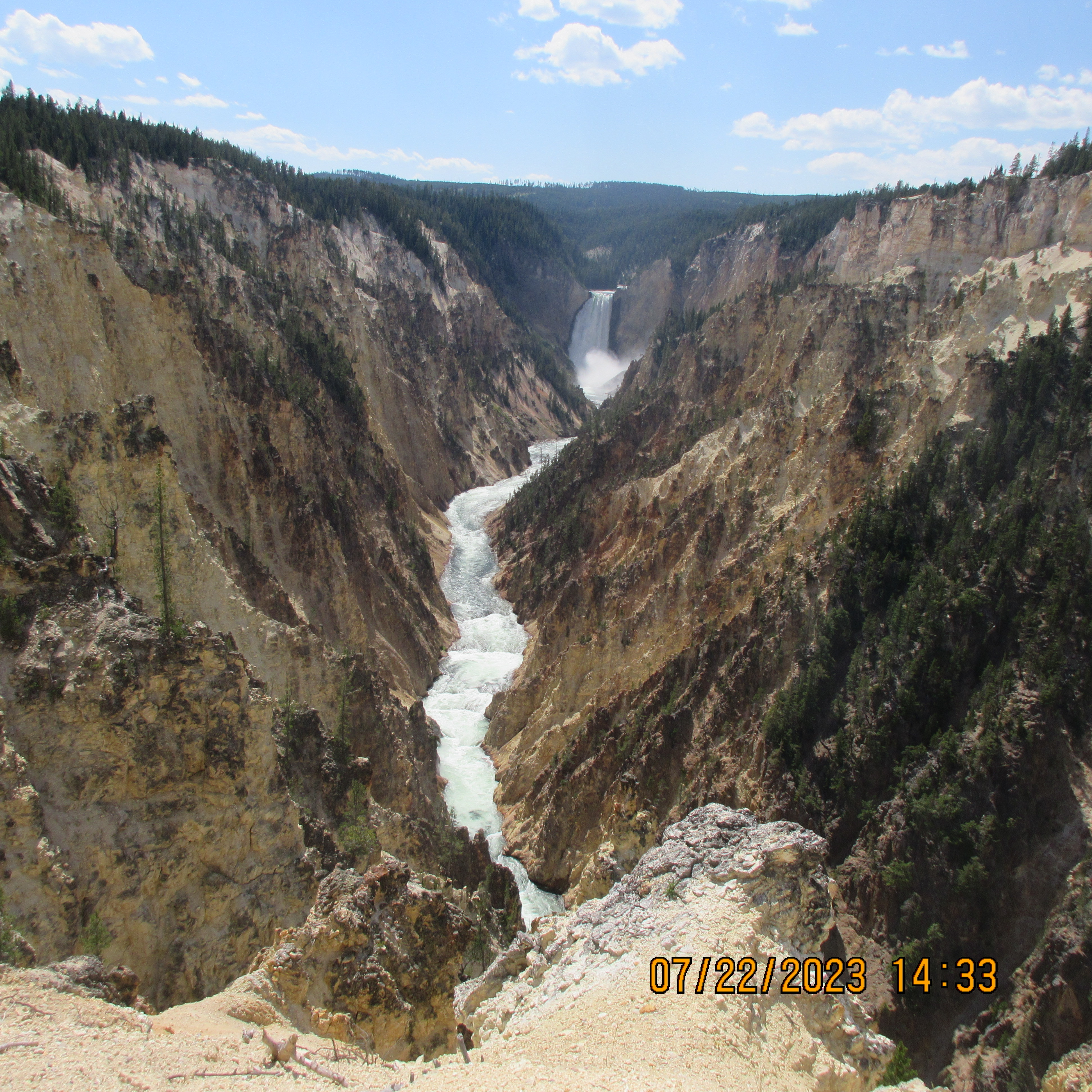
Day 2: Grand Canyon of the Yellowstone (Artist Point, Inspiration Point, North Rim Drive)

Day 3: Old Faithful Inn and Upper Geyser Basin

Day 4: Grand Prismatic Spring and Norris Geyser Basin

Day 5: Go back to where you came from

Where to stay:

Day 1: Mammoth Hot Springs

Day 2: Canyon Lodge

Day 3: Old Faithful Inn

Day 4: Mammoth Hot Springs

What to Eat:

Day 1: Mountain Tacos (Gardiner). Mammoth Hot Springs Dining Room was closed when I went there. There is another dining option at Mammoth Hot Springs called Terrace Grill but not so nice.

Day 2: Canyon Lodges have 2 veggie options – braised portebello mushroom and Asian Bowl

Day 3: Old Faithful Inn. try Potato Gnocchi with roasted red pepper with smoked gouda soup

Day 4: Mountain Tacos again! I liked them quite a bit. There are two other options in Gardiner – Yellowstone Pizza Company and a Cafe.

Rate your preparedness: good pair of shoes (must), mask (good), mosquito repellent (better – needed this in MHS), bear spray and bells (best). the mask should help not just with covid precaution but also against sulphur fumes (hydrogen sulfide).

Details:

Day 1: Fly to Bozeman (BZN). The drive from BZN airport to Yellowstone is about 90 mi or between 90 min to 2h depending on traffic. Stop at Gardiner which is just outside the park. Stop at a grocery store and pack few cans of Guinness, Cold brew coffee, protein bars and fruits. Have lunch at Mountain Tacos. You can build your own plate. Arrive at Mammoth Hot Springs. Do the terrace hike at Mammoth Hot Springs. It is an easy 0.5 mi hike one-way (20 min). Even with breaks and photo stops it should not take more than 1 to 1.5 hrs total roundtrip. Assuming you start at bottom, the hike will take you to Upper Terrace Drive. Upper Terrace Drive is paved and you could walk it but I don’t recommend esp. late in evening with no traffic. It is a long walk – 30 min to do the loop. After the hike, check out the Visitor Center and then the Map Room in Mammoth Hot Springs Hotel.

Day 2: Drive from Mammoth Hot Springs to Canyon Lodge. Start driving to canyon lodge. Wraith Falls. Easy warmup hike. 1 mi round trip. Stop at Roosevelt Lodge. Rustic Cabins. Next stop Tower Falls. preview of what’s to come. Hike goes to base of the river. Beautiful drive through mountains. Mount Washburn. Strenuous hike if you want to do it. Suggest doing just 0.5 mi as there are more interesting things to come. Canyon Lodge. Artist Point (main attraction – don’t miss). Inspiration Point. Brink of Upper Falls. Hike around the canyon.

Day 3: Drive from Canyon Lodge to Old Faithful Inn. Mud volcano (must see). Dragon’s mouth. Take 3 hr detour to Grand Teton National Park (3h includes total time – going to Teton and coming back). Have lunch and coffee at Lake Jackson Lodge. Head over to Old Faithful Inn. Upper Geyser Basin. Hike starts at Old Faithful Inn and goes to mountain glory. Will see many geysers. See if you are able to catch the Grand geyser. There will be lot of fumes so carry mask if you like. Dinner at Old Faithful Inn. Try potato gnocchi and roaster red pepper with smoked gouda soup.

Day 4: Drive from Old Faithful Inn to Mammoth Hot Springs. start the day with breakfast at Old Faithful Inn terrace. checkout old faithful inn visitor center. Grand Prismatic Spring. Norris Geyser Basin – hottest and most acidic. Do the Mammoth Hot Springs hike again when you reach Mammoth Hot Springs.

Overall: the park is nice but when you have already watched everything on YouTube and internet (and been to a dozen other parks) much of the charm and wonder is gone. For me a lot of this trip was about getting physical activity and being away from work. In 4 days I must have hiked 12 mi or more (3-4 mi per day).

Wildlife: for me, it was not a big attraction to watch wildlife. Be thankful if you don’t come across a bear. You will see bison, elk, deer etc.

Be safe: don’t wander into solitary areas. The trails have signs but its easy to get lost. This happened to me when there are forks in the trail and its not clear from the sign which path you should take. Carry a bell with you to make noise it you end up in some lonely area. the noise will keep any bears away.

Shoutout to our rental car – Hyundai Elantra. The seating was a bit uncomfortable but I was able to do the whole trip (450 mi) on a single tank of gas (11.9 gallon). Also the car runs incredibly smooth. I could barely feel anything at 80 mph. One of the best part of the trip was driving high speed on I-90. It felt like I was in America.

In all the trip cost $2,500

Posted in Travel | Leave a comment

Postgres Command Line Reference

How to connect to postgres server?

psql -h xxx -U xxx -d 

Create a .pgpass file in which you can store the password of the user.

How to Get table size?

first you have to run ANALYZE.

Option 1 (overall):

select
  pg_relation_size(20306, 'main') as main,
  pg_relation_size(20306, 'fsm') as fsm,
  pg_relation_size(20306, 'vm') as vm,
  pg_relation_size(20306, 'init') as init,
  pg_table_size(20306),
  pg_indexes_size(20306) as indexes,
  pg_total_relation_size(20306) as total;

Option 2 (specific table):

SELECT ROUND(pg_total_relation_size (oid) / ( 1024.0 * 1024.0 ), 2) AS
       "Size in MB"
FROM   pg_class c
WHERE  relname = 'sbtest1';

Option 3 (partitioned tables):

SELECT
   pi.inhparent::regclass AS parent_table_name, 
   pg_size_pretty(sum(pg_total_relation_size(psu.relid))) AS total,
   pg_size_pretty(sum(pg_relation_size(psu.relid))) AS internal,
   pg_size_pretty(sum(pg_table_size(psu.relid) - pg_relation_size(psu.relid))) AS external, -- toast
   pg_size_pretty(sum(pg_indexes_size(psu.relid))) AS indexes
FROM pg_catalog.pg_statio_user_tables psu
   JOIN pg_class pc ON psu.relname = pc.relname
   JOIN pg_database pd ON pc.relowner = pd.datdba
   JOIN pg_inherits pi ON pi.inhrelid = pc.oid
WHERE pd.datname = :database_name
GROUP BY pi.inhparent
ORDER BY sum(pg_total_relation_size(psu.relid)) DESC;

Option 4 (for all non-partitioned tables):

SELECT relname, ROUND(pg_total_relation_size (oid) / ( 1024.0 * 1024.0 ), 2) AS "Size in MB"
FROM   pg_class c
order by "Size in MB" DESC;

How to Create User?

postgres=> CREATE USER sysbench WITH ENCRYPTED PASSWORD '2O3vdR4F';
CREATE ROLE
postgres=> GRANT ALL PRIVILEGES ON DATABASE sysbench TO sysbench;

How to Grant read privilege on tables?

grant SELECT on all tables in schema public to someuser;

The issue with this command is that it will grant read privileges on the existing tables but not on future tables.

How to Alter default privileges?

To grant SELECT privilege to everyone for all tables (and views) you subsequently create in schema myschema, and allow role webuser to INSERT into them too:

ALTER DEFAULT PRIVILEGES IN SCHEMA myschema GRANT SELECT ON TABLES TO PUBLIC;
ALTER DEFAULT PRIVILEGES IN SCHEMA myschema GRANT INSERT ON TABLES TO webuser;

ref

Check user privileges

select * from information_schema.role_table_grants where grantee='username';
SELECT * FROM information_schema.table_privileges WHERE grantee = 'username';

How to List users and their roles?

\du
\dp

List Databases

\l

List Schemas

\dn

The schema exists within a database. Above will show schemas in current database

List Tables

\d
\dt

Describe table

\d sometable

How to see currently executing queries

select * from pg_stat_activity where usename='postgres';

Select a database

\c somedatabase

View command history

\s

Extract table as CSV file

\copy (select _from sometable) to 'sometable.csv' with csv header quote '"' force quote_

Load data from CSV file into Postgres

First you have to create the table. Then:

\copy sometable
  FROM 'sometable.csv'
with  DELIMITER ','
csv
header
quote '"'

How to see table schema (show create table of MySQL)

show create table is a MySQL command that gives the command that can be used to re-create a table. In case of postgres, we have to use pg_dump:

pg_dump --table some_table --schema-only
pg_dump -t 'schema-name.table-name' --schema-only database-name

Check shared buffer size

postgres=> show shared_buffers;
 shared_buffers
----------------
 10704MB
(1 row)

How to get database size?

SELECT pg_size_pretty(pg_database_size('database_name'));

How to view database settings?

 SELECT name, setting FROM pg_settings;

How to measure time?

\timing on

How to change password?

ALTER USER user_name WITH PASSWORD 'new_password';

Run last command continuously

\watch 

Check if table contains a foreign key constraint

SELECT
    tc.table_schema, 
    tc.constraint_name, 
    tc.table_name, 
    kcu.column_name, 
    ccu.table_schema AS foreign_table_schema,
    ccu.table_name AS foreign_table_name,
    ccu.column_name AS foreign_column_name 
FROM 
    information_schema.table_constraints AS tc 
    JOIN information_schema.key_column_usage AS kcu
      ON tc.constraint_name = kcu.constraint_name
      AND tc.table_schema = kcu.table_schema
    JOIN information_schema.constraint_column_usage AS ccu
      ON ccu.constraint_name = tc.constraint_name
      AND ccu.table_schema = tc.table_schema
WHERE tc.constraint_type = 'FOREIGN KEY' AND tc.table_name='mytable';

Get row count of all tables

SELECT schemaname, relname, n_live_tup
FROM pg_stat_user_tables
ORDER BY n_live_tup DESC;

List tables I own

SELECT tablename 
FROM pg_catalog.pg_tables 
WHERE schemaname = 'public' 
AND tableowner = current_user;

Show all indexes

SELECT tablename, indexname, indexdef
FROM pg_indexes
WHERE schemaname = 'public'
ORDER BY tablename, indexname;

This does not list indexes created as a result of constraints on the tables.

the pg_indexes table only includes indexes that have been created explicitly with a CREATE INDEX statement. It does not include indexes created automatically by PostgreSQL to enforce constraints or improve query performance.

List all constraints

SELECT conname, conrelid::regclass, contype, condeferrable, condeferred, convalidated
FROM pg_constraint
ORDER BY conrelid::regclass::text, contype DESC;

See long running queries

create extension pg_stat_statements;
SELECT query, calls, mean_exec_time, rows FROM pg_stat_statements ORDER BY mean_exec_time DESC;

Save output to a file (very useful)

Step 1:

\o out.txt

Step 2:

run your command

Step 3:

\o

this undoes Step 1. the output will now go to console.

Connect to Google Cloud SQL using IAM

PGPASSWORD=$(gcloud sql generate-login-token) psql \
"sslmode=verify-ca \
sslrootcert=/path/to/root/cert \
sslcert=/path/to/client/cert.pem \
sslkey=/path/to/client/key.pem \
hostaddr=x.x.x.x \
user=$EMAIL \
dbname=$SOME_DATABASE"

pg_dump using IAM credentials

export PGPASSWORD=$(gcloud sql generate-login-token)
pg_dump \
"sslmode=verify-ca \
sslrootcert=/path/to/root/cert \
sslcert=/path/to/client/cert \
sslkey=/path/to/client/key.pem \
hostaddr=x.x.x.x \
user=$EMAIL \
dbname=$SOME_DATABASE" \
--table=$SOME_TABLE \
--schema-only
Posted in Computers, programming, Software | Tagged | Leave a comment

Copying data from BigQuery to Postgres (Cloud SQL)

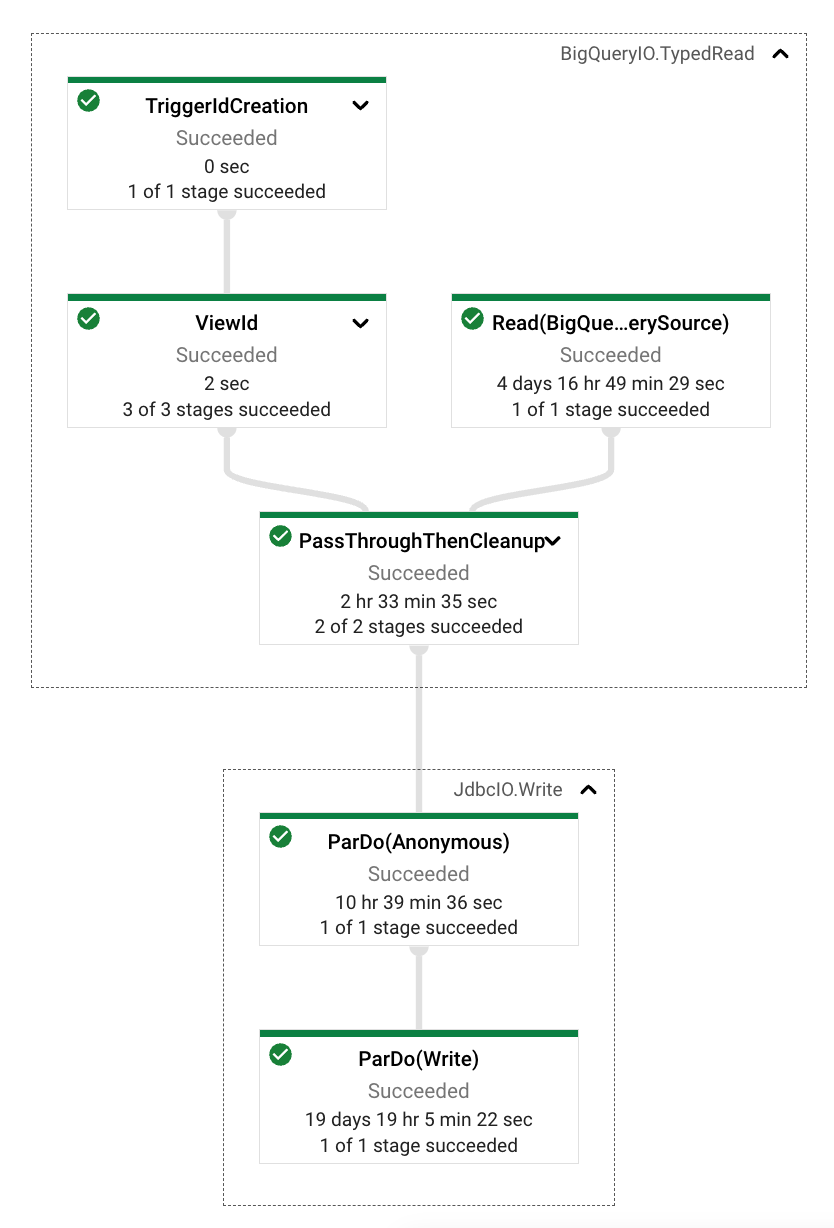
Google provides a database migration service but at time of this writing it does not support copying data from BigQuery to Postgres (Cloud SQL). You can DIY in a couple of ways. Here I describe a way to do it using Dataflow. At high-level you will create a Pipeline and run it like this (I am using Java):

Pipeline p = Pipeline.create(options);
        p
            .apply(BigQueryIO.readTableRows().fromQuery(readSql).usingStandardSql())
            .apply(JdbcIO.<TableRow>write()
                .withDataSourceConfiguration(pgConfiguration)
                .withStatement(insertSql)
                .withPreparedStatementSetter(insertHelper)
            );        
        p.run().waitUntilFinish();        

where readSql is given by:

String readSql = String.format("select %s from %s.%s", config.queryColumns, config.gcpDataset, config.gcpTable);

and pgConfiguration is created as:

DataSourceConfiguration pgConfiguration = JdbcIO.DataSourceConfiguration.create(POSTGRES_DRIVER, pgConnectionString);

The pgConnectionString will be of the form:

jdbc:postgresql:///${pgDatabase}?cloudSqlInstance=${gcpProjectId}:${pgRegion}:${pgInstance}&socketFactory=com.google.cloud.sql.postgres.SocketFactory&user=${pgUsername}&password=${pgPassword}&useSSL=true

insertSql will give the SQL command to insert a row into the table and will be of the form:

insert into XYZ (colA, colB, ColC) values (?,?,?)

The insertHelper has to implement JdbcIO.PreparedStatementSetter<TableRow> and override:

public void setParameters(TableRow element, PreparedStatement query) throws Exception

The first argument element will contain a row from BigQuery and the second argument query will contain the prepared statement to insert the row into Postgres. The job of insertHelper is to set the query parameters based on element. This is where you will do a lot of the work. You have to parse each column of element and depending on the data type of the column convert to appropriate object. E.g.:

Object o = element.get(columnName);
        switch (typeName.toUpperCase()) {
            case "NUMERIC":
                // https://www.instaclustr.com/blog/postgresql-data-types-mappings-to-sql-jdbc-and-java-data-types/
                query.setBigDecimal(parameterIndex, Utils.parseBigDecimal(o, this.scale, this.mode));
                break;
            case "STRING":
                query.setString(parameterIndex, Utils.parseString(o));
                break;
            case "TIMESTAMP":
                query.setTimestamp(parameterIndex, Utils.parseTimestamp(o));
                break;
            case "INT64":
                query.setLong(parameterIndex, Utils.parseLong(o));
                break;
            default:
                throw new NotImplementedException();
        }

You need to add a bunch of Maven dependencies (left as exercise). Most are found under groupId:org.apache.beam. I used version 2.44.0 at time of this writing.

Finally you can run the program like this:

mvn compile exec:java -e \
-Dexec.mainClass=your.main.class \
-Dexec.args="$PROPERTIES_FILE \
--project=gcp-project \
--region=us-central1 \
--stagingLocation=gs://your/staging/location \
--tempLocation=gs://your/temp/location \
--runner=DataflowRunner \
--diskSizeGb=100 \
--numberOfWorkerHarnessThreads=8 \
--workerMachineType=n1-highmem-8 \
--maxNumWorkers=4
"

The stagingLocation is where the JAR is uploaded and the tempLocation is needed to store intermediate avro files (these get deleted after job completion). I changed the default workerMachineType as otherwise I got an OOM exception. If your Postgres is hosted in a private IP due to security reasons, you will also need to use the --network and --subnetwork flags.

With this you should be able to copy tables having TB of data successfully from BigQuery to Postgres.

Posted in Computers, programming, Software | Tagged , | Leave a comment

Learning to use `pdb`- Python command line debugger

Learn to use pdb, the command line Python debugger, to debug. Its useful when VS Code debugger does not work. Also it allows you to capture stack traces and other information as text which is useful for sharing in forums etc. when you are asking for help.

Common pdb commands:

  • b filename:lineno will set breakpoint
  • c will continue
  • p variable will print variable
  • q to quit
  • bt or w to print the stacktrace. Python’s stacktrace is reversed. The topmost line in the stacktrace is the frame at bottom of the callstack.
  • u or d to move up or down the callstack. Python convention is opposite so u actually moves down the callstack (but is consistent with bt output).

Sample debug session

Below is output of sample debug session to illustrate how to use pdb. It actually illustrates two things: how to use pdb and what does per_device_train_batch_size do. The source code comment is really helpful (sarcastic): The batch size per GPU/TPU core/CPU for training.

Objective: find out what per_device_train_batch_size does.

Hypothesis: when we train a model, we pass it a training dataset. think of it as a dataframe that contains rows which are examples used to train. these are essentially the data points to which we are trying to fit the model. The hypothesis is that per_device_train_batch_size selects M out of N data points in each iteration of the forward/backward pass where N is total number of rows (examples) in the dataset and M=per_device_train_batch_size.

How will we test the hypothesis: the hypothesis can be tested by sticking a breakpoint in /transformers/models/gpt2/modeling_gpt2.py:770 and monitoring the size of input_ids as per_device_train_batch_size is varied. If you are using a different model, then stick breakpoint accordingly.

Begin by launching a pdb session:

PROTOCOL_BUFFERS_PYTHON_IMPLEMENTATION=python \
python3 -m pdb fine-tune.py \
--model gpt2 \
--file-type jsonl \
--file quotes.jsonl \
--data-key quote \
--per-device-train-batch-size 1 \
--gradient-accumulation-steps 1 \
--debug

We don’t list the source code for fine-tune.py but it is basically doing the same thing as this. Running above command gets us to:

> /Users/siddjain/llm/fine-tune.py(2)<module>()
-> import torch
(Pdb)

Now stick breakpoint using b:

(Pdb) b /Users/siddjain/llm/.env/lib/python3.9/site-packages/transformers/models/gpt2/modeling_gpt2.py:770

let the program run (continue) by typing c. it will break at:

(Pdb) c
...
> /Users/siddjain/llm/.env/lib/python3.9/site-packages/transformers/models/gpt2/modeling_gpt2.py(770)forward()
-> output_attentions = output_attentions if output_attentions is not None else self.config.output_attentions
(Pdb) 

to see the callstack we can type w:

(Pdb) w
  /Library/Developer/CommandLineTools/Library/Frameworks/Python3.framework/Versions/3.9/lib/python3.9/bdb.py(580)run()
-> exec(cmd, globals, locals)
  <string>(1)<module>()
  /Users/siddjain/llm/fine-tune.py(154)<module>()
-> fine_tune(trainer)
  /Users/siddjain/llm/fine-tune.py(149)fine_tune()
-> trainer.train()
  /Users/siddjain/llm/.env/lib/python3.9/site-packages/transformers/trainer.py(1536)train()
-> return inner_training_loop(
  /Users/siddjain/llm/.env/lib/python3.9/site-packages/transformers/trainer.py(1801)_inner_training_loop()
-> tr_loss_step = self.training_step(model, inputs)
  /Users/siddjain/llm/.env/lib/python3.9/site-packages/transformers/trainer.py(2646)training_step()
-> loss = self.compute_loss(model, inputs)
  /Users/siddjain/llm/.env/lib/python3.9/site-packages/transformers/trainer.py(2671)compute_loss()
-> outputs = model(**inputs)
  /Users/siddjain/llm/.env/lib/python3.9/site-packages/torch/nn/modules/module.py(1501)_call_impl()
-> return forward_call(*args, **kwargs)
  /Users/siddjain/llm/.env/lib/python3.9/site-packages/peft/peft_model.py(849)forward()
-> return self.base_model(
  /Users/siddjain/llm/.env/lib/python3.9/site-packages/torch/nn/modules/module.py(1501)_call_impl()
-> return forward_call(*args, **kwargs)
  /Users/siddjain/llm/.env/lib/python3.9/site-packages/transformers/models/gpt2/modeling_gpt2.py(1076)forward()
-> transformer_outputs = self.transformer(
  /Users/siddjain/llm/.env/lib/python3.9/site-packages/torch/nn/modules/module.py(1501)_call_impl()
-> return forward_call(*args, **kwargs)
> /Users/siddjain/llm/.env/lib/python3.9/site-packages/transformers/models/gpt2/modeling_gpt2.py(770)forward()
-> output_attentions = output_attentions if output_attentions is not None else self.config.output_attentions
(Pdb)

The callstack is reversed. That’s how Python displays it. In VS Code you would see /Users/siddjain/llm/.env/lib/python3.9/site-packages/transformers/models/gpt2/modeling_gpt2.py(770)forward() at the top of the callstack.

Let’s inspect the size of input_ids using p:

(Pdb) p input_ids.size()
torch.Size([1, 14])

This matches our hypothesis. We should also check how many examples are there in our training dataset. To do that we have to go “up” the callstack. we are using Python terminology here which is opposite of actual. In reality we are going down the callstack:

(Pdb) u 10
> /Users/siddjain/llm/fine-tune.py(149)fine_tune()
-> trainer.train()

Now lets see how many training examples we have:

(Pdb) p data
Dataset({
    features: ['text', 'input_ids', 'attention_mask'],
    num_rows: 2508
})

Good. These are the number of quotes in the training data. You can verify it here. We will abort the program now (by typing q) and re-run with a different value of per-device-train-batch-size and repat the steps. we leave this as exercise but I was able to verify that changing the per-device-train-batch-size from 1 to 10 and then 100 changed the input_ids.size() to 10 and 100 respectively. That confirms our hypothesis and we learned how to use pdb along the way!

Posted in Computers, programming, Software | Tagged , , , | Leave a comment

Teradata: Common Queries

Get all tables in a database

            SELECT  TableName
            FROM    DBC.TablesV
            WHERE   TableKind = 'T'
            and     DatabaseName = ?
            ORDER BY    TableName;            

Get all Views in a database

SELECT  TableName
            FROM    DBC.TablesV
            WHERE   TableKind = 'V'
            and     DatabaseName = ?
            ORDER BY    TableName;            

Get # of rows in a table

SELECT  count(*) FROM    database.table

Get Column Info (information about columns) in a table

SELECT *        FROM dbc.ColumnsV WHERE databasename = ? AND tablename = ?";        

Get Table Size (size of table)

select sum(currentperm) from dbc.tablesize where tablename=? and databasename=?";

Get Teradata Version

SELECT * FROM dbc.dbcinfo;

Connect using default mechanism

Below I am using bteq.

.logon <server>/<user>

Connect using LDAP

.logmech LDAP
.logdata
.logon <server>/<user>

List all databases

SELECT DatabaseName, OwnerName FROM DBC. DATABASESV WHERE DBKind = 'D';
Posted in Computers, programming, Software | Leave a comment

How to build a rate-limiter in JavaScript or Node.js

In this post we show how to build a rate-limiter in JavaScript or Node.js. A rate-limiter as its name suggests is used to limit the amount of traffic being sent to a server. Think of it as a dam that collects water and slowly releases it to a city or area.

Let’s get started. There are two things we need to keep track of in a rate-limiter and these are:

  • the number of inactive (or latent) requests, and
  • the number of active (or concurrent) requests

Inactive request is defined as a request that is waiting to be sent to the receiver. We will also call these as pending or latent requests. Active (or concurrent) request is defined as a request that has been sent to the receiver but we are still waiting for it to be processed. We know when a request has been processed (sucessfully or unsuccessfuly) when we hear back from the receiver. We will also call these as in-flight requests similar to a flight that has taken off but not landed. We will also use the term message for a request interchangeably.

The basic design of a rate-limiter is like this then: we will define a constructor and just one method:

class RateLimiter extends EventEmitter {
    constructor(config);
    enqueueRequest(request);
}

The reason for EventEmitter will become clearer in a moment. The constructor takes input a config object which defines:

  • url of the receiver to which requests should be sent
  • maxConcurrentRequests which defines an upper bound on the number of requests that can be concurrent at any given time. This is a positive number and must be greater than 0. A value of 1 corresponds to complete serialization of requests whereby the rate-limiter sends one request to receiver, waits for it to be processed and then sends the second request and so on.

When a request is enqueued by calling enqueueRequest, the rate-limiter will immediately add it to an internal FIFO queue of inactive requests. The rate-limiter will check the number of currently active requests and if that is less than the maximum allowed it will dispatch the first message in the queue. The dispatch logic can be encapsulated in a private #dispatch method:

#dispatch();

This method should:

  1. throw an error if the queue is empty
  2. dequeue a request from the queue
  3. tag it with an auto-generated id (we can use nanoid library for this)
  4. add the request to an internal dictionary that keeps track of the active requests
  5. send it to the receiver
  6. Add event handler that is executed when the request has been processed. This event handler will remove the request from the dictionary. This is where we use the id generated in step 2.

The event handler needs to do more than just the above: it should again check if the queue is not empty and if the number of active requests have dropped below the maximum allowed and if so, dispatch the next request to the receiver.

So this is the basic design. To implement it, we will define a few basic data structures internal to the RateLimiter class:

#pendingMessages = [];  // messages waiting to be sent. the inactive requests.
#inFlightMessages = {}; // messages that have been sent but not processed. the active requests.

We will define an idle state as the state when the number of active requests < maximum allowed. Note that strictly speaking, the rate-limiter is not really idle when the number of active requests < maximum allowed. To someone, an idle state might mean the number of active requests = 0 but we use the term loosely.

We can start with following constructor:

class RateLimiter extends EventEmitter {
    constructor(config) {
        this.#pendingMessages = [];
        this.#inFlightMessages = {};   
        this.#maxInFlightMessages = config.maxConcurrentRequests;
        
        // more code to populate this.#url from config ...
    }
}

Let’s look at the enqueueRequest method:

class RateLimiter extends EventEmitter {
    ...
    enqueueRequest = (message) => {
        // add message to FIFO queue of inactive requests
        this.#pendingMessages.push(message);
        // dispatch the message if we have bandwidth to do so
        if (this.#isIdle()) {
            this.#dispatch();
        }
    }
}

The #isIdle method is nothing but:

#isIdle = () => {
    // check we have not maxed out our quota
    return Object.keys(this.#inFlightMessages).length < this.#maxInFlightMessages;
}

Let’s now come to the #dispatch method which will be a lengthy one:

#dispatch = (msg) => {
    if (this.#pendingMessages.length === 0) {
        throw new Error("cannot post message when buffer is empty. This should NOT happen.")
    }
    const id = nanoid();        
    var msg = this.#pendingMessages.shift(); // dequeue operator
    
                
        try {
            // here we are sending the message as JSON object in the body of a POST request
            // change this code according to your needs
            const postData = JSON.stringify(msg);
            const options = {
                hostname: this.#url.hostname,
                port: this.#url.port,
                path: this.#url.path,
                method: 'POST',
                headers: {
                    'Content-Type': 'application/json',
                    'Content-Length': Buffer.byteLength(postData),
                },
            };
            
            const req = http.request(options, (res) => {
                logger.debug(`STATUS: ${res.statusCode}`);
                logger.debug(`HEADERS: ${JSON.stringify(res.headers)}`);
                res.setEncoding('utf8');
                res.on('data', (chunk) => {
                logger.debug(`BODY: ${chunk}`);
                });
                res.on('end', () => {
                    this.#removeInFlightMessage(id);
                    this.emit('complete', msg);
                });
            });
            
            req.on('error', (e) => {                    
                this.#removeInFlightMessage(id);
                this.emit('error', { message:msg, error:e });
            });
            this.#inFlightMessages[id] = msg;
            // Write data to request body
            req.write(postData);
            req.end();
            this.emit('dispatch', msg);
        } catch (e) {
            this.#removeInFlightMessage(id);
            this.emit('error', { message:msg, error:e });
        } 
    
}  

the code is long and I encourage to study it but it is basically doing the steps outlined earlier. We are making use of nanoid library to generate a unique id or token for each message and logger is reference to a logger (I use winston). There are three important events we raise in the dispatch method to tell consumers of the rate-limiter what’s going on behind the scenes:

  • dispatch event is raised whenever a message is dispatched to the receiver
  • complete event is raised when we get a successful acknowledgement from the receiver
  • error event is raised whenever there is an error. Note that the consumer of this class MUST add an event handler to handle the error event. If they do not do so, an unhandled error event will terminate the Node.js process. Refer this.

The #removeInFlightMessage looks like so:

#removeInFlightMessage = (id) => {
    delete this.#inFlightMessages[id];
    if (this.#isIdle()) {
        this.#handleIsIdleEvent();
    }
}

As mentioned earlier removing the message from the dictionary of active requests is not enough. We also need to check if we have the bandwidth to dispatch another message from the FIFO queue. If we don’t do this crucial step, the messages will never get sent subsequently. To do this we check if the rate-limiter has become idle and if so handle that event appropriately as shown below:

#handleIsIdleEvent = () => {
    // take the first message in the buffer and send it to the downstream receiver
    if (this.#pendingMessages.length > 0) {
        this.#dispatch();
    }
}

And that gives us the basic rate-limiter. The key to getting it right is to recognize we need two data-structures: the FIFO queue of inactive requests and a dictionary of active requests.

Making it better: adding metrics

Wouldn’t it be nice if we can keep track of the rps – requests per second and the average time it takes to process a request by the receiver? Let’s see how to do it. To make it possible, we are going to define some additional variables for book-keeping:

  • countOfSuccessfulRequests is a variable that keeps track of the count of successful requests. As a design choice we only consider successful requests in calculation of the metrics. You could track unsuccessful requests and their associated metrics separately if you like.
  • wallClockFlightTimeInSeconds is a variable that will track the amount of time for which the rate-limiter is processing one or more active requests i.e., it is the period of time during which number of active requests > 0.
  • cumulativeTimeInSeconds will add up the response time of each individual request.
  • stopwatch is an object we will define that will function like a real-world stopwatch using which we can measure time.
constructor(config) {
    ...
    this.#countOfSuccessfulRequests = 0;
    this.#wallClockFlightTimeInSeconds = 0;
    this.#cumulativeTimeInSeconds = 0;
    this.#stopwatch = new Stopwatch();    
}

Stopwatch is loosely modelled after the C# Stopwatch class and has following methods:

class Stopwatch {
    start();
    stop();
    elapsedTimeInSeconds();
    isTicking();
    reset();
}

Stopwatch has to be started first of all by calling the start method. This puts the stopwatch in the ticking state and it starts measuring time. To get out a reading we must first stop the staopwatch by calling stop and then we can get a reading of the elapsed time by calling elapsedTimeInSeconds. To use the stopwatch again for a new measurement we must reset it first by calling reset followed by startstopelapsed cycle again. I will leave implementation of this as an exercise.

Calculating RPS – requests per second

First, let us focus on the work we need to do to measure rps and we will address the problem of calculating the mean response time later. The rps will be given by this.#countOfSuccessfulRequests / this.#wallClockFlightTimeInSeconds so we just need to keep track of these two variables appropriately. To that effect, whenever #dispatch is called, we need to start the stopwatch only if its not already running before sending the request to the receiver. This is done as follows:

#dispatch = async (msg) => {
    ...
    if (!this.#stopwatch.isTicking()) {
        this.#stopwatch.start();
    }
    // Write data to request body
    req.write(postData);
}

The necessity of the if condition will become clearer as you read through the whole code. Next, we need to increment the count of successful requests when a request completes successfully. This is done in the dispatcher code:

res.on('end', () => {
    ...
    this.#countOfSuccessfulRequests++;  // count of SUCCESSFUL requests
}

After this, we will make modifications to the isIdle event handler so it will accumulate the wallClock time and crucially, it has to re-start the stopwatch if the number of active requests is not zero. This is done as follows:

#handleIsIdleEvent = () => {
    assert.ok(this.#stopwatch.isTicking());        
    this.#stopwatch.stop();
    this.#wallClockFlightTimeInSeconds += this.#stopwatch.elapsedTimeInSeconds();
    this.#stopwatch.reset();
    if (this.#numberOfActiveRequests() > 0) {
        this.#stopwatch.start();
    }
    ...
}

That’s it. We can now define a calcRps method:

#calcRps = () => {
    let rps = 0;
    if (this.#wallClockFlightTimeInSeconds > 0) {        
        rps = this.#countOfSuccessfulRequests / this.#wallClockFlightTimeInSeconds;
    }
    logger.info(`rps = ${rps}`);
}

The method can be called anywhere you like in the code. I call it whenever a request completes successfully i.e., in the same event handler that increments the count of successful requests.

Calculating the mean response time

I found this to be actually easier than calculating rps. To do this I defined another class very similar to Stopwatch but that I call Flight. It has following methods that mimic an airline flight that takes off, lands and you can measure the time in flight:

class Flight {
    takeOff();
    land();
    elapsedTimeInSeconds();
}

The implementation of this is left as exercise to the reader. So now in the dispatch method, we simply create a flight for each request that takes off when the request is sent and lands when the request successfully completes. We have already been keeping track of the count of successful requests when we implemented the rps metric in previous section so we can calculate the mean response time as this.#cumulativeTimeInSeconds / this.#countOfSuccessfulRequests. All we need to do is keep track of #cumulativeTimeInSeconds which is done in the same event handler that increments count of successful requests like so:

res.on('end', () => {
    flight.land();
    this.#countOfSuccessfulRequests++;
    this.#cumulativeTimeInSeconds += flight.flightTimeInSeconds();
    this.#removeInFlightMessage(id);
    this.#calcRps();
    this.emit('complete', msg);
});

The calcRps method now displays both rps and mean response time like below:

#calcRps = () => {
    let rps = 0;
    let meanResponseTime = 0;
    if (this.#wallClockFlightTimeInSeconds > 0) {        
        rps = this.#countOfSuccessfulRequests / this.#wallClockFlightTimeInSeconds;
    }
    if (this.#countOfSuccessfulRequests > 0) {
        meanResponseTime = this.#cumulativeTimeInSeconds / this.#countOfSuccessfulRequests;
    }
    logger.info(`rps = ${rps}, mean response time = ${meanResponseTime}s`);
}

and with this we have a fully instrumented rate-limiter! Putting the pieces together is left as exercise for the reader. I do not give out link to any GitHub repo.


Posted in Computers, programming, Software | Tagged , | Leave a comment

Get BigQuery Table Schema

This post describes how to get the schema of a table in BigQuery. Its actually quite straightforward (I mean you can use standard JDBC methods to get it) if one uses the BigQuery JBDC connector like below:

try (Connection connection = BigQueryJdbcConnection.createJdbcConnection(gcpProjectId)) {
            // https://www.baeldung.com/jdbc-database-metadata
            DatabaseMetaData databaseMetaData = connection.getMetaData();
            try(ResultSet columns = databaseMetaData.getColumns(null,null, table, null)){                
                while(columns.next()) {
                  String columnName = columns.getString("COLUMN_NAME");
                  String columnSize = columns.getString("COLUMN_SIZE");
                  String dataType = columns.getString("DATA_TYPE");
                  String isNullable = columns.getString("IS_NULLABLE");
                  String isAutoIncrement = columns.getString("IS_AUTOINCREMENT");
                  String typeName = columns.getString("TYPE_NAME");
                  int sqlDataType = columns.getInt("SQL_DATA_TYPE");
                  System.out.printf("%s %s %s %s %d %s %s\n", columnName, columnSize, typeName, dataType, sqlDataType, isNullable, isAutoIncrement);                  
                }
            }
        }

BigQueryJdbcConnection is a class I have defined. To get the JDBC connection, first you have to download the bigquery-jdbc-connector jar (it is not available in Maven Central), then mvn install it to Maven repository, and after that add reference to it in pom.xml:

<dependency>
      <groupId>com.simba.googlebigquery</groupId>
      <artifactId>bigquery-jdbc-connector</artifactId>
      <version>1.3.0</version>
    </dependency>

After that, obtaining a JDBC connection is simply a matter of calling (in below I am using ADC – application default credentials):

DriverManager.getConnection(buildConnectionUrl(projectId, AUTH_TYPE.APPLICATION_DEFAULT_CREDENTIALS));

and you can build the connection URL as:

private static String buildConnectionUrl(String projectId, AUTH_TYPE auth) {
        return String.join(";", 
            PREFIX,
            String.format("OAuthType=%s", getAuthType(auth)),
            String.format("projectId=%s", projectId),
            "LogLevel=4");
    }

where:

private static String PREFIX = "jdbc:bigquery://https://www.googleapis.com/bigquery/v2:443";
private enum AUTH_TYPE { APPLICATION_DEFAULT_CREDENTIALS, SERVICE_ACCOUNT, USER_CREDENTIALS, ACCESS_TOKEN };

private static int getAuthType(AUTH_TYPE authType) {
        switch (authType) {
            case SERVICE_ACCOUNT:
                return 0;
            case USER_CREDENTIALS:
                return 1;
            case ACCESS_TOKEN:
                return 2;
            case APPLICATION_DEFAULT_CREDENTIALS:
                return 3;
        }
        throw new IllegalArgumentException();
    }

Let me know how it goes for you. Alternatively, you can query the schema without using the JDBC connector as follows:

SELECT column_name, ordinal_position, is_nullable, data_type, is_generated, is_hidden, is_partitioning_column FROM `some-project.some-dataset.INFORMATION_SCHEMA.COLUMNS` WHERE table_name = 'some-table'
Posted in Computers, programming, Software | Tagged , | Leave a comment

React Sucks. Redux sucks even more.

Today I just want to vent out my frustration with React (and Redux) and say it loud that it sucks big time! Years ago I used a library called Knockout to build UI and never had any problem with it. It was simple to understand and pick up. React takes a lot of time to pick up and I have to write all this convoluted code. Redux multiplies the convolution by 10 times. I honestly don’t think anyone would use this library and kudos to Facebook for somehow making it a blockbuster success.

I was very patient with React and in fact started with a very positive image of it in my mind i.e., had already made up my mind that is was good. I did not enjoy constant problems with create-react-app, babel etc. but was ready to forgive. My frustration really started when I was trying to render some data (basically a JavaScript dictionary that stores the rows from a database) as a table and the table won’t refresh when I would update a cell [1]. React forces you to make a complete copy of the data and call the setState for changes to take effect. I wonder why no one points out the performance issues with this. With KO (Knockout) you would make each cell as an observable and add an event handler to it. Or you could just make the table as observable and raise an event that told the UI which cell to update. Simple as that.

Redux is no better in that it also forces you to make a complete copy of the data. Anyway I liked the concept of all the state being stored in a single centralized place. But it introduces so much unnecessary baggage and distasteful terms: slices, thunks, actions, dispatcher, reducer, blah blah blah. I refactored the app to use Redux and now this stupid of stupidest errors when I try to store a Date in the store [2]. Ref:

A non-serializable value was detected in an action, in the path: `payload.start_date`. Value: Tue Aug 10 2021 00:00:00 GMT-0700 (Pacific Daylight Time)

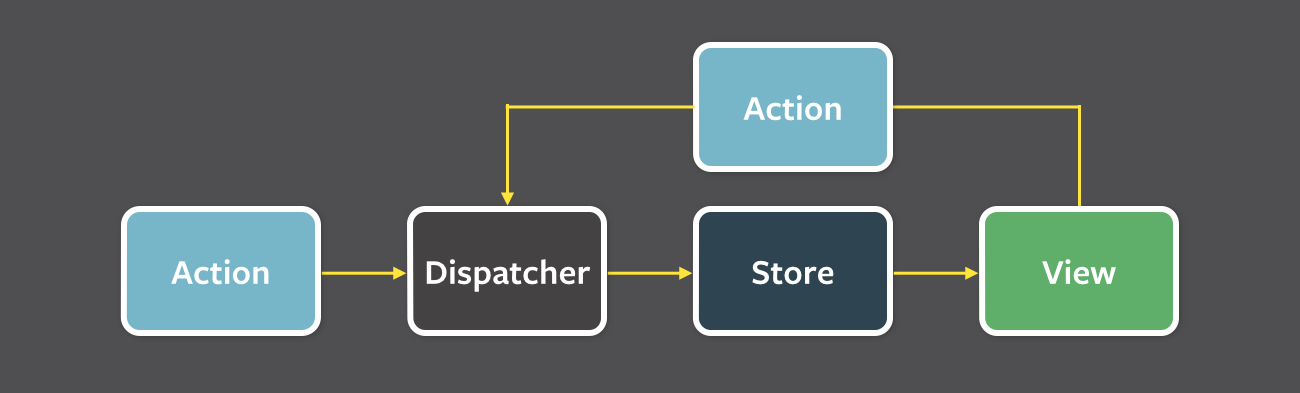
The claim that data flows unidirectionally in a Redux app is just BS. From here:

A unidirectional data flow is central to the Flux pattern, 

This is Redux (or Flux) data flow:

https://facebook.github.io/flux/docs/in-depth-overview/

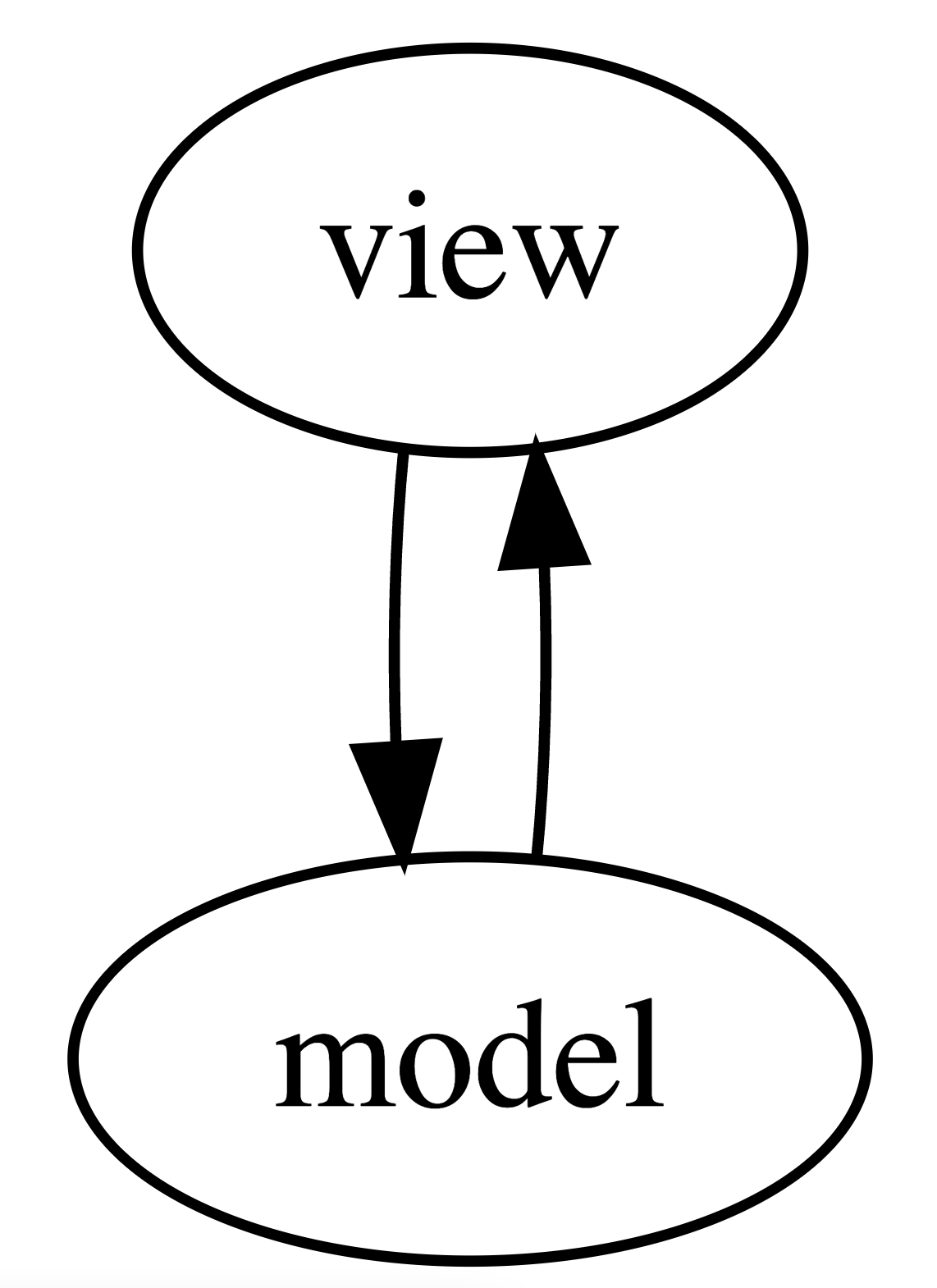
From Graph theory point of view this is a cyclic and bi-directional graph no different than the MVC pattern below (omitting the controller):

that Redux or Flux seems to imply is different.

React-Redux sucks big time.

Posted in Computers, programming, Software | Leave a comment

The Manager’s Dilemma

In a nutshell, should I reward everyone in the team equally or should rewards be based on individual performance? Below I list the pros and cons of rewarding everyone equally that come to my mind:

Pros:

  • encourages selfless teamwork
  • people don’t try to outsmart each other to gain promotions and higher rewards
  • the entire team wins or loses as a whole

Cons:

  • some people will get complacent
  • accepted norm is to reward disproportionately and in fairness to what one contributed. the problem arises when we start to evaluate one’s contribution.
  • in fact, some companies go as far as to reward the top performers up to 10x more than average
  • 20% of the people do 80% of the work. See the Myth of the Bell Curve

Additional Notes

In my opinion, the thing about hyper-performers is that if you reward them less (I am not saying you should do this; everyone deserves their fair share), they will still perform the same. They are in it for the game (and recognition), not for money. What hurts a hyper-performer is if their credit is taken away.

What do you think? Has there ever been an experiment done to objectively evaluate the two approaches?

Posted in General | Leave a comment

How to know if you are running ARM or x64 version of dotnet on MacOS

You can find it out by running dotnet --info.

x64

% dotnet --info
.NET SDK (reflecting any global.json):
 Version:   6.0.404
 Commit:    be4f3ec411

Runtime Environment:
 OS Name:     Mac OS X
 OS Version:  13.1
 OS Platform: Darwin
 RID:         osx-x64
 Base Path:   /usr/local/share/dotnet/x64/sdk/6.0.404/

global.json file:
  Not found

Host:
  Version:      6.0.12
  Architecture: x64
  Commit:       02e45a41b7

.NET SDKs installed:
  6.0.404 [/usr/local/share/dotnet/x64/sdk]

.NET runtimes installed:
  Microsoft.AspNetCore.App 6.0.12 [/usr/local/share/dotnet/x64/shared/Microsoft.AspNetCore.App]
  Microsoft.NETCore.App 6.0.12 [/usr/local/share/dotnet/x64/shared/Microsoft.NETCore.App]

Download .NET:
  https://aka.ms/dotnet-download

Learn about .NET Runtimes and SDKs:
  https://aka.ms/dotnet/runtimes-sdk-info

ARM64

% dotnet --info
.NET SDK (reflecting any global.json):
 Version:   6.0.404
 Commit:    be4f3ec411

Runtime Environment:
 OS Name:     Mac OS X
 OS Version:  13.1
 OS Platform: Darwin
 RID:         osx-arm64
 Base Path:   /usr/local/share/dotnet/sdk/6.0.404/

global.json file:
  Not found

Host:
  Version:      6.0.12
  Architecture: arm64
  Commit:       02e45a41b7

.NET SDKs installed:
  6.0.404 [/usr/local/share/dotnet/sdk]

.NET runtimes installed:
  Microsoft.AspNetCore.App 6.0.12 [/usr/local/share/dotnet/shared/Microsoft.AspNetCore.App]
  Microsoft.NETCore.App 6.0.12 [/usr/local/share/dotnet/shared/Microsoft.NETCore.App]

Download .NET:
  https://aka.ms/dotnet-download

Learn about .NET Runtimes and SDKs:
  https://aka.ms/dotnet/runtimes-sdk-info

Both versions can be installed side-by-side as seen above.

Posted in Computers, programming, Software | Tagged | Leave a comment