How to read/write HDF5 files in C#

There are 2 things you need for this:

I won’t go into details of .net installation. Let’s get started. The HDF5 library can be installed on Mac in two ways:

Method 1: Using brew (I don’t recommend it). sample install log if you still follow this option. On my mac, the library got installed under /opt/homebrew/lib. You will need this path when running the C# program.

Method 2: From the official site. This will give you more than Method 1. You will have to register first and create an account. Or, you could try downloading from:

wget https://support.hdfgroup.org/ftp/HDF5/releases/hdf5-1.14/hdf5-1.14.1/bin/unix/hdf5-1.14.1-2-Std-macos11m1_64-clang.tar.gz

Above is for Mac with Apple Silicon (arm64 i.e., non-Intel) CPU. You can see other packages on https://support.hdfgroup.org/ftp/HDF5/releases/hdf5-1.14/hdf5-1.14.1/bin/unix/.

Steps to install:

gunzip hdf5-1.14.1-2-Std-macos11m1_64-clang.tar.gz
tar -xvf hdf5-1.14.1-2-Std-macos11m1_64-clang.tar
./hdf/HDF5-1.14.1-Darwin.sh

After that I recommend moving the package to ~/Library/HDF5. The static libraries will be under ~/Library/HDF5/1.14.1/lib folder. Double-check and verify.

To use the C# wrapper, add a reference to it in your .csproj project like this:

<PackageReference Include="HDF.PInvoke.1.10" Version="1.10.612" />

When you run dotnet build, the dotnet compiler will download and install the dependency if its not already there. Some tips: I wouldn’t recommend using other C# HDF5 libraries. I tried some of them and they didn’t work out very well for me.

When the C# program is run HDF.PInvoke.1.10 is going to make calls to libhdf5.dylib. The C# program should be able to find this file on your system. On Mac, I had to set DYLD_LIBRARY_PATH environment variable to the the path where libhdf5.dylib is located. If you use VS Code, set this environment variable in launch.json like so:

{
            "name": ".NET Core Launch (console)",
            "type": "coreclr",
            "request": "launch",
            "preLaunchTask": "build",
            "program": "${workspaceFolder}/bin/Debug/net7.0/my-program.dll",
            "args": [],
            "cwd": "${workspaceFolder}",
            "console": "internalConsole",
            "stopAtEntry": false,
            "env": {
                "DYLD_LIBRARY_PATH": "/path/to/libhdf5.dylib"
            }
        }

Next we come to the code itself. Before writing the code, it would be a good idea to familiarize yourself with the HDF5 data format. This can be done by reading the documentation on official HDF5 website.

Reading HDF5 File

I give a few code snippets to help you out. This is not complete code but should get you there for the most part:

using HDF.PInvoke;

...
H5.open();
long fileId = H5F.open(fileName, H5F.ACC_RDONLY);
var train = Hdf5Utils.Read2DTensor<float>(fileId, "train");
var test = Hdf5Utils.Read2DTensor<float>(fileId, "test");
H5F.close(fileId);
H5.close();

where Hfd5Utils.cs is a class I have written.

public static ReadResult<T> Read<T>(long fileId, String dataset) {
            // Open the dataset
            long datasetId = H5D.open(fileId, dataset);

            // Get the datatype and dataspace
            long datatypeId = H5D.get_type(datasetId);
            long dataspaceId = H5D.get_space(datasetId);

            // Get the number of dimensions in the dataspace
            int rank = H5S.get_simple_extent_ndims(dataspaceId);

            // Get the dimensions of the dataspace
            ulong[] dimensions = new ulong[rank];
            H5S.get_simple_extent_dims(dataspaceId, dimensions, null);

            // Read the data
            ulong n = 1;
            for (int i = 0; i < dimensions.Length; i++) {
                n *= dimensions[i];
            }

            T[] data = new T[n]; 
            GCHandle handle = GCHandle.Alloc(data, GCHandleType.Pinned);
            H5D.read(datasetId, datatypeId, H5S.ALL, H5S.ALL, H5P.DEFAULT, handle.AddrOfPinnedObject());
            handle.Free();

            // Close the dataset, dataspace, and file
            H5D.close(datasetId);
            H5S.close(dataspaceId);

            return new ReadResult<T> {
                dimensions = dimensions,
                data = data
            };
        }

Writing HDF5 File

Again, I give most relevant code snippets which should get you there for the most part:

hid_t outFileId = H5F.create(outFileName, H5F.ACC_TRUNC);
ulong[] dimensions = new ulong[] {(ulong)n, (ulong)m};
Hdf5Utils.WriteDataset<int>(outFileId, "labels", labels, dimensions);
Hdf5Utils.WriteDataset<float>(outFileId, "distances", distances, dimensions);
H5F.close(outFileId);
public static void Write2DTensor<T>(long fileId, String dataset, T[][] data) {
            var array = flatten<T>(data);
            string datasetName = "myDataset";
            ulong[] dimensions = { (ulong)data.Length, (ulong)data[0].Length }; // 2D array
            hid_t dataType = H5T.copy(GetDatatype(typeof(T))); 
            hid_t dataspaceId = H5S.create_simple(dimensions.Length, dimensions, null); // Create dataspace

            // Create the dataset
            hid_t datasetId = H5D.create(fileId, datasetName, dataType, dataspaceId, H5P.DEFAULT, H5P.DEFAULT, H5P.DEFAULT);
            unsafe {
                fixed (T* dataPtr = array) {
                    H5D.write(datasetId, dataType, H5S.ALL, H5S.ALL, H5P.DEFAULT, new IntPtr(dataPtr));
                }            
            }

            H5D.close(datasetId);
            H5S.close(dataspaceId);
            H5T.close(dataType); // https://github.com/HDFGroup/HDF.PInvoke/wiki/Cookbook-:-Strings
        }

Hope you find it useful. Let me know what you think.

Posted in Computers, programming, Software | Tagged , | Leave a comment

Testing MySQL SERIALIZABLE Isolation Level

This post illustrates testing MySQL’s (version 8.0.30 was used in the tests) SERIALIZABLE with the 3 examples given on Postgres wiki.

Black and White

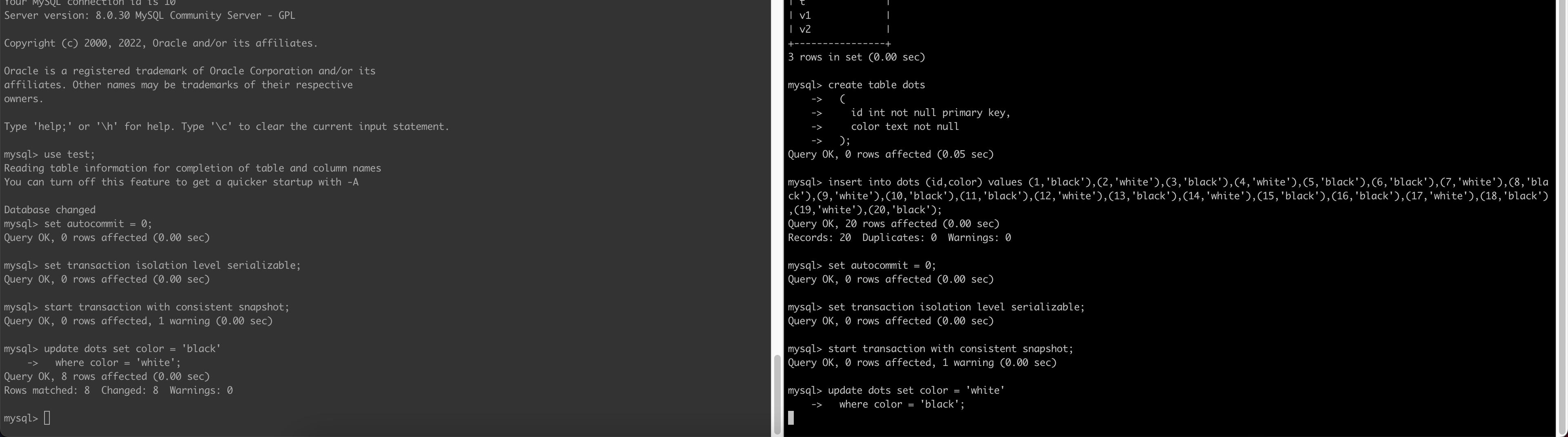
MySQL handles this correctly. Below is the sequence of events:

  • I ran the first update and it returned with
Query OK, 10 rows affected (0.00 sec)
Rows matched: 10  Changed: 10  Warnings: 0
  • When I ran the update on the second transaction it got blocked (i.e., has to wait)
  • Then I ran commit on the first tx. This unblocked the second transaction with following message:
Query OK, 20 rows affected (4.50 sec)
Rows matched: 20  Changed: 20  Warnings: 0
  • and then I was able to commit the second transaction as well

In summary, the second transaction is blocked (has to wait for the first transaction to commit). After that the second transaction is also allowed to commit ending in a serializable state. In case of Postgres one of the transactions will be aborted and will have to be re-tried.

This shows the second tx as blocked:

and this shows both txs are serialized resulting in all dots being of the same color in the end:

so kudos to MySQL on this one. No need to retry any transaction!

Intersecting Data

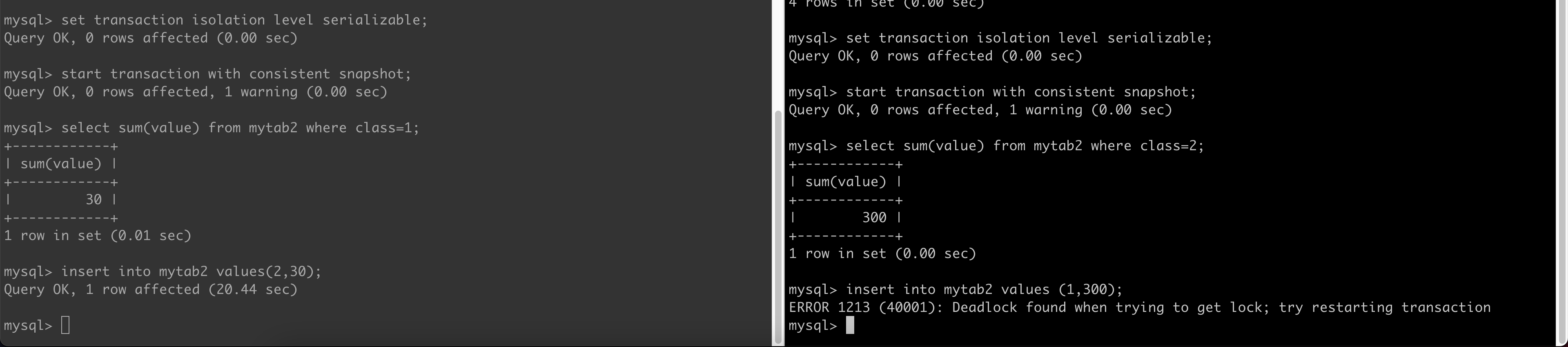
MySQL was able to handle this case as well. The actual sequence of events was like this:

  • the first tx was blocked when I executed the insert statement
  • when I executed the insert on the other transaction, I got the deadlock error and the second transaction was aborted by MySQL. Good Job!

Overdraft Protection

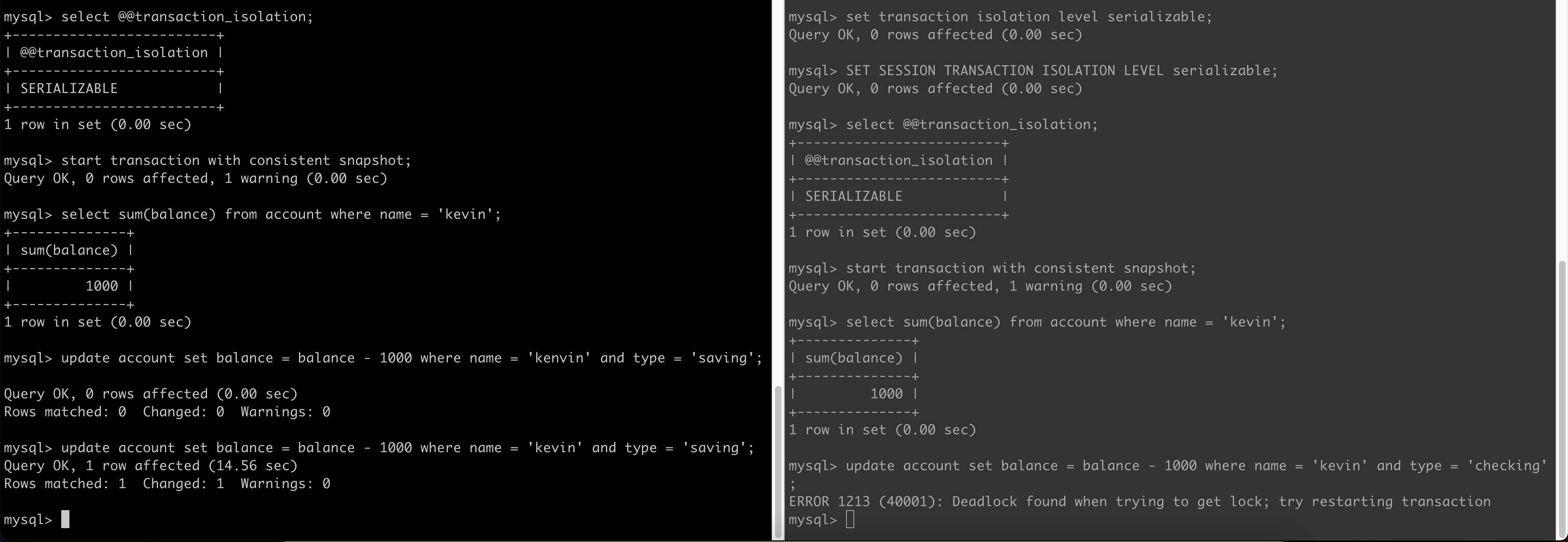
MySQL was able to handle this case as well and I saw same behavior as with Intersecting Data.

  • the first tx was blocked when I executed the update statement
  • when I executed the update on the other transaction, I got the deadlock error and the second transaction was aborted by MySQL. Good Job!
Posted in Computers, programming, Software | Tagged | Leave a comment

Illustrating write skew in Postgres with Repeatable Read (Snapshot Isolation)

In this post we will see write skew in action using Node.js, Postgres and Sequelize. We will use the example given in wikipedia where there are two accounts (tables) V1 and V2 with a single balance column. The tables are initialized to V1=V2=100. Either (or both) accounts can be debited subject to the constraint that V1+V2 should always be >=0. What happens when two transactions try to debit V1 and V2 with $200 concurrently? Transaction T1 tries to debit V1 and Transaction T2 tries to debit V2. Let’s find out.

const debit = async (t, account) => {
try {        
        const v1 = await V1.findOne({
            transaction: t
        });
        const v2 = await V2.findOne({
            transaction: t
        });
        const debit = 200;
        const sufficient_balance = v1.balance + v2.balance >= debit;
        if (sufficient_balance) {
            if (account === 'v1') {
                v1.balance -= debit;
                await v1.save({ transaction: t });
            } else if (account === 'v2') {
                v2.balance -= debit;
                await v2.save({ transaction: t });
            }
            await t.commit();
            console.log(`transaction successfully committed! debited ${debit} from ${account}`);
        } else {
            console.log('you do not have sufficient balance to complete the transaction');
            // we still need to call t.commit else the program will hang! try commenting out this line!
            await t.commit();            
        }        
    } catch (e) {
        console.error(e.name);        
        console.error(e.original?.code);
        if (!is_rollback_failure(e)) {
            await t.rollback();
        }   // dot NOT try to rollback a tx that is already rolled back or you will get an error! try it out!
        throw e;
    }
}

We can try running this code with the 3 isolation levels: READ COMMITTED, REPEATABLE READ and SERIALIZABLE. What output do you think you will get? Test your understanding with below:

> $ ./run.sh                                                                                                                                                                                                        ⬡ 18.15.0 [±master ●●]
testing with READ COMMITTED
transaction successfully committed! debited 200 from v1
you do not have sufficient balance to complete the transaction
result of 1 transaction
fulfilled
result of 2 transaction
fulfilled
final balances
v1 = -100, v2 = 100

testing with REPEATABLE READ
transaction successfully committed! debited 200 from v1
transaction successfully committed! debited 200 from v2
result of 1 transaction
fulfilled
result of 2 transaction
fulfilled
final balances
v1 = -100, v2 = -100

testing with SERIALIZABLE
transaction successfully committed! debited 200 from v2
Committing transaction 6a62f5ec-93b1-4b54-af4c-80bc05b683db failed with error "could not serialize access due to read/write dependencies among transactions". We are killing its connection as it is now in an undetermined state.
SequelizeDatabaseError
40001
result of 1 transaction
rejected
result of 2 transaction
fulfilled
final balances
v1 = 100, v2 = -100

The REPEATBALE READ transaction ended up debiting both the accounts and the constraint V1+V2 >= 0 is violated. This is write skew in action. Side note: although the READ COMMITTED transaction gave correct behavior, its a matter of chance (race condition). If both transactions execute in lock-step both will end up debiting V1 and V2 as well. Only SERIALIZABLE level provides complete protection.

Posted in Computers, programming, Software | Tagged , , | Leave a comment

Handling Postgres Serialization errors in Sequelize

When using the REPEATABLE READ or SERIALIZABLE isolation levels, you should be prepared to handle serialization (error code 40001) and deadlock failures (error code 40P01) in your code. Well this is how you do it:

let retry = true;
        while (retry) {
            const t = await sequelize.transaction({
                isolationLevel: Transaction.ISOLATION_LEVELS.SERIALIZABLE
            });
            try {
                let id = await the_function_that_actually_does_the_work(t);
                await t.commit();
                retry = false;
            } catch (err) {
                retry = is_serialization_failure(err); // serialization failures should be retried
                if (!is_rollback_failure(err)) {
                    await t.rollback();
                }   // else transaction has already been rolled back and you should NOT roll it back again!
                if (!retry) {
                    throw err;  // re-throw so caller knows we failed
                }   
            }
        }

where

export const is_serialization_failure = (e): boolean => {
    // https://www.postgresql.org/docs/current/mvcc-serialization-failure-handling.html
    // The optional chaining (?.) operator accesses an object's property or calls a function.
    // If the object accessed or function called using this operator is undefined or null, 
    // the expression short circuits and evaluates to undefined instead of throwing an error.
    // more accurately only 40001 is serialization failure. 40P01 is a deadlock failure.
    return (e.original?.code === '40001' || e.original?.code === '40P01');
}

export const is_rollback_failure = (e): boolean => {
    // https://www.postgresql.org/docs/current/errcodes-appendix.html
    return e.original?.code?.startsWith('40');    
}

That’s it for this post! Let me know what you think.

Posted in Computers, programming, Software | Tagged , | Leave a comment

Understanding transformers internals

Understanding transformers Internals

transformers is the goto library for LLM development. In this blog post I try to capture some tips and tricks about transformers in no particular order. The focus is on trying to understand the internals of the library – what happens underneath when you call a function and how you can debug it etc. This is based on my belief that:

All coding is debugging

Understanding Tokenizers

Broadly speaking, a tokenizer serves two purposes:

  1. defines a vocabulary
  2. defines a method to take a string as input and tokenize it into tokens from the vocabulary (and vice-versa)

Takeaway: When fine-tuning a pre-trained model, you must use the pre-trained model’s tokenizer otherwise you will get non-sense results.

>>> tokenizer = AutoTokenizer.from_pretrained("gpt2")
>>> tokenizer
GPT2TokenizerFast(name_or_path='gpt2', vocab_size=50257, model_max_length=1024, is_fast=True, padding_side='right', truncation_side='right', special_tokens={'bos_token': '<|endoftext|>', 'eos_token': '<|endoftext|>', 'unk_token': '<|endoftext|>'}, clean_up_tokenization_spaces=True)

we can see the context size of gpt2 is 1024 tokens.

bos = beginning of sequence eos = end of sequence. a special token that tells the model to stop generating text.

Fast tokenizers are implemented in Rust.

lmsys/vicuna-13b-v1.3 tokenizer

>>> tokenizer
LlamaTokenizerFast(name_or_path='lmsys/vicuna-13b-v1.3', vocab_size=32000, model_max_length=2048, is_fast=True, padding_side='right', truncation_side='right', special_tokens={'bos_token': AddedToken("<s>", rstrip=False, lstrip=False, single_word=False, normalized=True), 'eos_token': AddedToken("</s>", rstrip=False, lstrip=False, single_word=False, normalized=True), 'unk_token': AddedToken("<unk>", rstrip=False, lstrip=False, single_word=False, normalized=True), 'pad_token': '<unk>'}, clean_up_tokenization_spaces=False)

we can see vicuna has a context length of 2048 tokens.

Understand difference between tokenize and __call__ functions

>>> tokenizer.tokenize(tokenizer.pad_token)
['<unk>']
>>> tokenizer(tokenizer.pad_token)
{'input_ids': [1, 0], 'attention_mask': [1, 1]}

Why did it return 2 input_ids? Its because the vicuna tokenizer by default adds a bos token (input_id=1) to every argument. verify:

>>> tokenizer.convert_ids_to_tokens([1, 0])
['<s>', '<unk>']
>>> tokenizer.pad_token
'<unk>'
>>> tokenizer.bos_token
'<s>'

How to wrap the tokens so they don’t overflow the model’s context length?

If you try to tokenize a very long piece of text, it may overflow the model’s context window. You will also see a warning. For purposes of causal language modelling, we would like to simply wrap around the overflowing tokens into a new line. It can be done using following function call:

tokenizer_output = tokenizer(rows, max_length=tokenizer.model_max_length, truncation=True, stride=4, return_overflowing_tokens=True)

Try it out. rows are the examples from original dataset. This will wrap around overflowing rows into new lines. The stride dictates number of overlapping tokens when a row is wrapped around.

Understanding Datasets

Use the Dataset.from_dict method to create a dataset from your own data that is not published on hugging face hub. You will frequently encounter the dataset.map method. It takes as input a function that is applied to tokenize the data. The function can do anything – its not necessary for it to do tokenization. When things aren’t working the way you expect, stick a breakpoint on this line /datasets/arrow_dataset.py:3344:

processed_inputs = function(*fn_args, *additional_args, **fn_kwargs)

This is the point where the function is applied and will help to debug any issues. See Issue 5997 for an issue/bug with datasets when you wrap around overflowing tokens.

Understanding DataCollators

The purpose of a data collator is to turn jagged arrays of token ids to arrays of uniform length so they can be passed to the trainer.

The meat of a data collator can be found here:

def torch_call(self, examples: List[Union[List[int], Any, Dict[str, Any]]]) -> Dict[str, Any]:
    # Handle dict or lists with proper padding and conversion to tensor.
    if isinstance(examples[0], Mapping):
        batch = self.tokenizer.pad(examples, return_tensors="pt", pad_to_multiple_of=self.pad_to_multiple_of)
    else:
        batch = {
            "input_ids": _torch_collate_batch(examples, self.tokenizer, pad_to_multiple_of=self.pad_to_multiple_of)
        }

    # If special token mask has been preprocessed, pop it from the dict.
    special_tokens_mask = batch.pop("special_tokens_mask", None)
    if self.mlm:
        batch["input_ids"], batch["labels"] = self.torch_mask_tokens(
            batch["input_ids"], special_tokens_mask=special_tokens_mask
        )
    else:
        labels = batch["input_ids"].clone()
        if self.tokenizer.pad_token_id is not None:
            labels[labels == self.tokenizer.pad_token_id] = -100 ## NOTE
        batch["labels"] = labels
    return batch

Stick a breakpoint in this function to debug. This function is basically doing 2 things:

  1. convert jagged arrays of token ids to arrays of uniform length. This is done by the call to pad. Make sure tokenizer.pad_token is defined before this function is called.
  2. The labels with pad token ids are replaced with -100. Why? Refer transformers book p. 161 or elsewhere. The function that computes the training loss will ignore labels marked as -100.

For purposes of causal language modelling, you will set mlm =False. mlm stands for masked language modelling. If you set mlm=True, the data collator will randomly mask a few labels according to a probability set by the user. The model has to then predict or fill-in the masked labels.

Here is a notebook showing the data collator in action. Notice how it turns the jagged arrays of input_ids into arrays of uniform length.

Where are we defining the expected outputs?

This is all well and good but where are the expected outputs defined? The labels define input to the model. They contain token ids of the tokenized text. But where are we defining the expected outputs? Turns out we don’t do that explicitly. By convention causal language models do this implicitly in their forward pass. See e.g., here:

# Shift so that tokens < n predict n
shift_logits = logits[..., :-1, :].contiguous()
shift_labels = labels[..., 1:].contiguous() # expected outputs of the causal LM

You can pick any causal LM you like under models. You will see code similar to above in the model’s forward function. To calculate the training loss, we calculate the cross entropy between model predictions and the expected outputs. See this:

loss = loss_fct(shift_logits, shift_labels)

The logits variable contains un-normalized probabilities of the model’s predictions. This will be a vector of length = vocab size and f(i) = probability of i-th token appearing next in the output. A maximum likelihood estimator will thus select the token with the largest probability (argmax of f). The shift_labels contains the ground truth (scalar value). Cross-entropy function take the logits vector and calculates its cross-entropy w.r.t. the ground truth. rank(shift_labels) = rank(shift_logits) - 1 since shift_logits contains logits for every token whereas shift_labels has unambiguous ground-truth (scalar).

The DataLoader

The Trainer class uses the training dataset and data collator to create a DataLoader as seen here:

def get_train_dataloader(self) -> DataLoader:
    """
    Returns the training [`~torch.utils.data.DataLoader`].

    Will use no sampler if `train_dataset` does not implement `__len__`, a random sampler (adapted to distributed
    training if necessary) otherwise.

    Subclass and override this method if you want to inject some custom behavior.
    """
    ...

    return self.accelerator.prepare(DataLoader(train_dataset, **dataloader_params))

What is the purpose of the DataLoader? The training loop uses this DataLoader to get the next batch of samples for each iteration of the loop. This is happening in following lines of _inner_training_loop:

for epoch in range(epochs_trained, num_train_epochs):
    epoch_iterator = train_dataloader
...
    for step, inputs in enumerate(epoch_iterator):

Understanding TrainingArguments

TrainingArguments class is defined here. It takes input a large number of arguments. Let us explain some of them.

per_device_train_batch_size

Used to tell how many examples (data points) to select at a time from the training dataset for gradient optimization (model fitting).

gradient_accumulation_steps

A trick to feed large batches to the model while keeping per_device_train_batch_size small. The computer will quickly run into out of memory as you increase per_device_train_batch_size. Feeding very small batches to the model will lead to poor training and optimization. The effective batch size = per_device_train_batch_size * gradient_accumulation_steps. You should first keep gradient_accumulation_steps = 1 and increase per_device_train_batch_size to the point where you get OOM. After that you should increase gradient_accumulation_steps as necessary.

max_steps vs. num_train_epochs

We need to tell the trainer when it can stop. We can do it in 2 ways: either set max_steps (default = -1) or num_train_epochs. a step = an update of model weights. usually this includes 1 forward and backward pass but if you set gradient_accumulation_steps > 0 the update happens after that many passes. an epoch = as many steps as required such that the entire dataset has been fed to the optimizer. If user sets both, the library will use max_steps to decide (the two are mutually exclusive) when to stop the training. num_train_epochs will be reset accordingly (see tip later in the section).

number of steps = (per_device_train_batch_size * gradient_accumulation_steps) / (number of examples in training dataset) * number of epochs

Why don’t we have a criterion like stop the training when the incremental (i.e., the successive delta) loss between each iteration becomes lower than a specified number like 0.01%? That to me is the proper way to identify when the optimization has converged and is what is taught in textbooks rather than forcing the optimizer to perform an absolute number of iterations.

Tip: Below is the code that overrides num_train_epochs when max_steps > 0 [1]:

if args.max_steps > 0:
    max_steps = args.max_steps
    num_train_epochs = args.max_steps // num_update_steps_per_epoch + int(
        args.max_steps % num_update_steps_per_epoch > 0
    )

gradient_checkpointing

again, its a technique to cope up with OOM exceptions. It reduces memory footprint at expense of increased computation. It does not affect the output of the optimizer.

no_cuda

Set no_cuda=True if you do not want to use GPU even if its available.

QLoRa

QLoRa is not some separate library. QLoRa adds quantization on top of LoRa. In transformers ecosystem, the quantization is provided by the bitsandbytes library (so you could think of bitsandbytes as the QLoRa library if you want). bitsandbytes requires GPU (specifically CUDA). so it won’t run on Mac. You don’t have to make explicit calls to bitsandbytes in your code. The calls happen implicitly from transformers modules once you load a model with a BitsAndBytesConfig (which is defined in transformers not bitsandbytes).

Using accelerator library

You don’t have to make explicit calls to accelerator. The HF Trainer will do it for you. That’s why we use it instead of PyTorch’s Trainer.

Where is the code that returns what optimizer class to instantiate?

Here:

def get_optimizer_cls_and_kwargs(args: TrainingArguments) -> Tuple[Any, Any]:
"""
Returns the optimizer class and optimizer parameters based on the training arguments.

Args:
    args (`transformers.training_args.TrainingArguments`):
        The training arguments for the training session.

"""

All the optimizer names are defined here:

class OptimizerNames(ExplicitEnum):
    """
    Stores the acceptable string identifiers for optimizers.
    """

    ADAMW_HF = "adamw_hf"
    ADAMW_TORCH = "adamw_torch"
    ADAMW_TORCH_FUSED = "adamw_torch_fused"
    ADAMW_TORCH_XLA = "adamw_torch_xla"
    ADAMW_APEX_FUSED = "adamw_apex_fused"
    ADAFACTOR = "adafactor"
    ADAMW_ANYPRECISION = "adamw_anyprecision"
    SGD = "sgd"
    ADAGRAD = "adagrad"
    ADAMW_BNB = "adamw_bnb_8bit"
    ADAMW_8BIT = "adamw_8bit"  # just an alias for adamw_bnb_8bit
    LION_8BIT = "lion_8bit"
    LION = "lion_32bit"
    PAGED_ADAMW = "paged_adamw_32bit"
    PAGED_ADAMW_8BIT = "paged_adamw_8bit"
    PAGED_LION = "paged_lion_32bit"
    PAGED_LION_8BIT = "paged_lion_8bit"

target_modules

To use LoRa with transformers, we need to specify the target_modules in LoraConfig. You could leave it empty in which case the library tries to automatically populate them for you based on a pre-defined config. This config can be found here:

TRANSFORMERS_MODELS_TO_LORA_TARGET_MODULES_MAPPING = {
    "t5": ["q", "v"],
    "mt5": ["q", "v"],
    "bart": ["q_proj", "v_proj"],
    "gpt2": ["c_attn"],
    "bloom": ["query_key_value"],
    "blip-2": ["q", "v", "q_proj", "v_proj"],
    "opt": ["q_proj", "v_proj"],
    "gptj": ["q_proj", "v_proj"],
    "gpt_neox": ["query_key_value"],
    "gpt_neo": ["q_proj", "v_proj"],
    "bert": ["query", "value"],
    "roberta": ["query", "value"],
    "xlm-roberta": ["query", "value"],
    "electra": ["query", "value"],
    "deberta-v2": ["query_proj", "value_proj"],
    "deberta": ["in_proj"],
    "layoutlm": ["query", "value"],
    "llama": ["q_proj", "v_proj"],
    "chatglm": ["query_key_value"],
    "gpt_bigcode": ["c_attn"],
    "mpt": ["Wqkv"],
}

Further Reading

Posted in Computers, programming, Software | Tagged , , | Leave a comment

SQL Antipatterns: Then and Now

I am an absolute fan of Bill Karwin’s SQL Antipatterns book. I rate it amongst my top 3 database books together with Martin Kleppmann’s Designing Data-Intensive Applications. However, its good to think twice about some of the advice in the book before blindly following it:

Store Images and other BLOB data in the Database

This is what Bill recommends but I think nobody does that in practice these days. Bill’s argument in favor of storing images in the database is that everything is stored in one place, there is only one backup to take and restore process is simple. I agree with all of that. Bill tries to keep things simple for the developer. But we have to pay the price in terms of performance. I think maybe this was a good practice pre-2007s when the book was written, but as data volumes have grown storing blob data in the database is an antipattern. Relational database is meant to store structured data, not unstructured data.

From High Performance MySQL 4th ed.:

In the past, it was not uncommon for some applications to accept uploaded images and store them as BLOB data in a MySQL database. This method was convenient for keeping the data for an application together; however as the size of the data grew, operations like schema changes got slower and slower due to the size of that BLOB data.

If you can avoid it, don’t store data like images in a database. Instead, write them to a separate object data store and use the table to track the location or filename for the image.

Foreign Keys

Bill is a fan of FKs. He writes:

Foreign keys are easy to use, improve performance, and help you maintain consistent referential integrity during any data change, both simple and complex.

Performance is often used as a justification for cutting corners, but it usually creates more problems than it solves – including performance problems.

Contrast this with the advice given in High Performance MySQL (3rd ed.):

We think foreign keys are a nice-to-have feature for ensuring system integrity, but they’re a luxury for applications that need extremely high performance; most people don’t use them when performance is a concern, preferring instead to trust the application code.

Foreign keys can add significant overhead. We don’t have any benchmarks to share, but we have seen many cases where server profiling revealed that foreign key constraint checks were the performance problem, and removing the foreign keys improved performance greatly.

This theme is also echo’ed here:

Avoid foreign key constraints, unless you are in a department that specifically requires you use them. MySQL allows you to define foreign key constraints. They come at a price…

Again, as with the blob dilemma the question is one of simplicity vs. performance. Which one would you rather have? Bill sides on making the developer’s life simple and is willing to sacrifice performance in favor of data integrity.

Using NUMERIC to store financial data

This one is less controversial. Bill recommends using the NUMERIC data type to store financial data to protect oneself from rounding off errors caused by floating point arithmetic. I think the advice holds today and most people will agree with it but fwiw, I found the double precision offered in Postgres 14 is good enough for 15 digits precision and there is no loss of precision for the numbers I tried. The double precision only takes 8 bytes whereas NUMERIC can end up taking much more. Depending on your application and performance trade-offs, using NUMERIC might be overkill.

Posted in Computers, programming, Software | Tagged , | Leave a comment

Understanding concurrency control in Postgres and comparing with MySQL

Concurrency control is one of the key things to understand in any database. It is the I in ACID. From MySQL docs (applies to Postgres as well):

the isolation level is the setting that fine-tunes the balance between performance and reliability, consistency, and reproducibility of results when multiple transactions are making changes and performing queries at the same time.

The SQL standard defines 4 isolation levels. From PG docs:

Table 13.1. Transaction Isolation Levels

Isolation LevelDirty ReadNonrepeatable ReadPhantom ReadSerialization Anomaly
Read uncommittedAllowed, but not in PGPossiblePossiblePossible
Read committedNot possiblePossiblePossiblePossible
Repeatable readNot possibleNot possibleAllowed, but not in PGPossible
SerializableNot possibleNot possibleNot possibleNot possible

Ideally we would like to use the Serializable level but as we go down the list, the perf (tx throughput) takes a hit. However what would you rather have – a buggy system or one with higher throughput?

Let’s understand these isolation levels in more detail.

Read Uncommitted

Do not bother. Do not use. In fact PG does not even support it.

Read Committed

I like to think of Read Committed = No Isolation. More accurately Read Committed isolates a transaction from uncommitted changes of another transaction. Read Uncommitted provides no isolation of any sort. It is not necessarily bad to have your tx not isolated from (committed changes of) other txs (depending on the context). What it means is that you always get to see the latest (committed) state of the database. You are never working with stale data. The database is effectively not doing any concurrency control. All concurrency control is up to you by making use of LOCK, SELECT FOR SHARE or SELECT FOR UPDATE statements. Think of this mode as what you would do if you were doing multi-threaded programming with in-memory data structures.

Repeatable Read

Repeatable read is great for avoiding write conflicts (lost updates). If your transaction attempts to write to a row which was modified by another transaction, your transaction will abort when you try to commit it. This is a form of optimistic locking or MVCC. It is built into Postgres when using this setting and you don’t have to do MVCC at application level. Postgres does not block txs or lock any rows under repeatable read (do not ask for permission). It checks the version of the row when you try to commit your tx and if this version does not match the version when the tx started, it will auto-abort the transaction (ask for forgiveness). The application should catch the exception and then retry the tx.

You might think this is the best setting but the problem with repeatable read is that your application might be working with a stale copy of the data. Let’s say you read a value from the database and are using that to make a decision on what something else should be i.e., y = f(x). Your x can be stale. If no other tx has modified y, your tx will be able to modify y but you have made the decision based on outdated value of x. This problem is known as write skew. See wikipedia for a great example. One way to fix it is to use the FOR SHARE clause when you read x. The FOR SHARE clause will prevent any other tx from modifying x by placing a lock on it. Other txs will still be able to read x.

FOR UPDATE will also block any tx from reading x. Use FOR UPDATE when your tx will also be updating x, not just reading it and you want other txs to wait until you have updated x to its new value.

Repeatable read is a good setting when you have to make backup for example.

You might read the term snapshot isolation. Snapshot Isolation (or MVCC) is the technique by which Postgres implements Repeatable Read. Same principle is used in MySQL (double-check).

Serializable

The docs provide an example of a bug that cannot be handled with Repeatable Read or Read Committed levels unless you lock the table with LOCK command (read section 13.2.3). The Serializable level is implemented in Postgres using SSI = Serializable Snapshot Isolation. This technique uses optimistic locking like MVCC and does not cause any blocking or locking (wait…it does use predicate locks). It asks for forgiveness. It is best to think of SSI as an extension of MVCC. MySQL on the other hand implements Serializable using locking (more on it in later section). Like Repeatable Read, your application should be prepared for your transaction to abort in case of concurrency conflicts and should retry the tx in case of exception. Much more info can be found on Postgres wiki.

What level is the best?

I do not think there is a black and white answer to this question otherwise we would just use that level and don’t have to bother with anything else. End of story. I was reading the book High Performance MySQL and authors say they have rarely seen Serializable used in practice (because of the perf hit that in turn is because of locking). Also from MySQL docs:

The levels on the edges (SERIALIZABLE and READ UNCOMMITTED) change the processing behavior to such an extent that they are rarely used.

On the other hand I think a case could be made why use Repeatable Read when we know for a fact that it suffers from the problem of write skew? See this for another great example of the bug caused by REPEATABLE READ. Either use Read Committed and handle all the concurrency control yourself or use Serializable and let the database handle all of it. What’s the point of doing it half and half with Repeatable Read?

Postgres docs seem to nudge the user towards using Serializable. The docs say this regarding repeatable read:

Attempts to enforce business rules by transactions running at this isolation level are not likely to work correctly without careful use of explicit locks to block conflicting transactions.

and they do give an example of the bug that cannot be handled with Repeatable Read or Read Committed levels unless you lock the table with LOCK command. The docs then go onto saying this regarding Serializable:

The monitoring of read/write dependencies has a cost, as does the restart of transactions which are terminated with a serialization failure, but balanced against the cost and blocking involved in use of explicit locks and SELECT FOR UPDATE or SELECT FOR SHARE, Serializable transactions are the best performance choice for some environments.

So I think in the end its up to the developer and what matters more. Are you looking for simplicity and correctness willing to pay in terms of perf? Choose Serializable. Do you think you can handle concurrency yourself? Consider Read Committed. As MySQL docs say:

Expert users might choose the READ COMMITTED level as they push the boundaries of scalability with OLTP processing

Recap of Concepts (specific to PG)

Snapshot Isolation = MVCC = Repeatable Read = No locking = No blocking. suffers from write skew

Read Committed = No Isolation (you manage concurrency yourself)

Locks = blocking. SELECT FOR SHARE and SELECT FOR UPDATE acquire locks.

Serializable = Serializable Snapshot Isolation = No locking = No blocking

Differences from MySQL

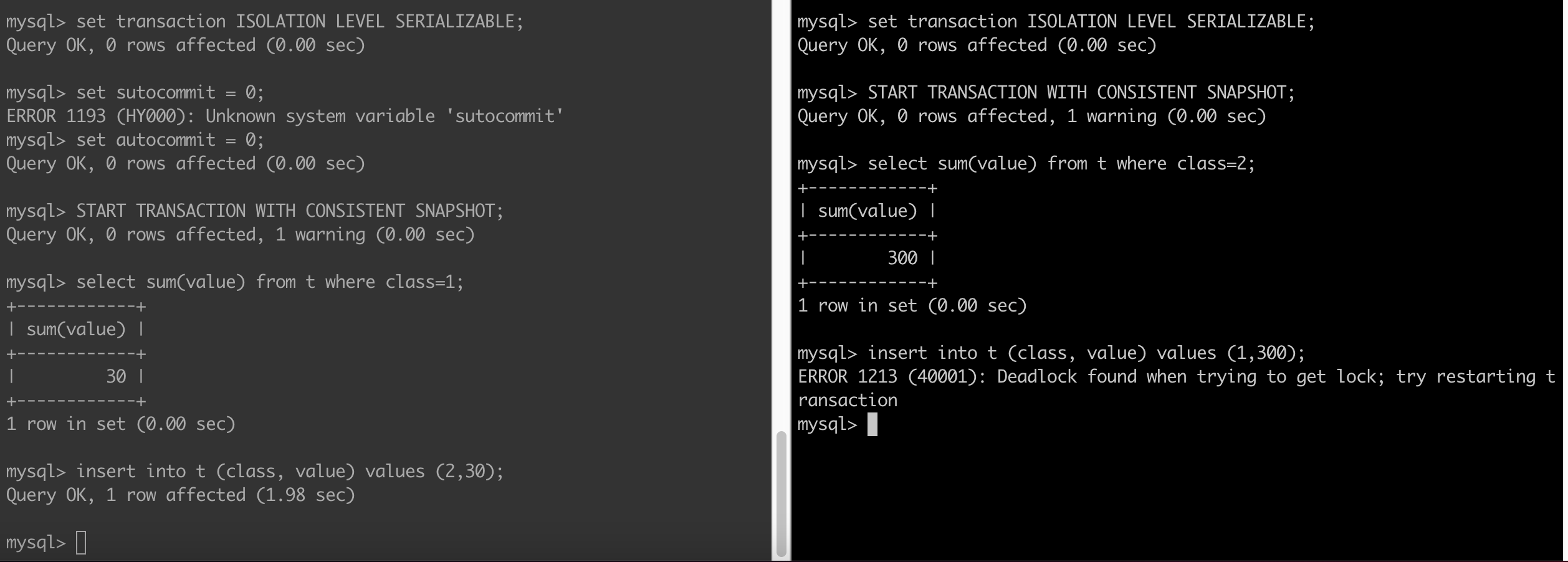
In MySQL, Serializable is like REPEATABLE READ, but InnoDB implicitly converts all plain SELECT statements to SELECT ... FOR SHARE if autocommit is disabled. If autocommit is enabled, the SELECT is its own transaction [ref]. Exercise: convince yourself this is exactly what you need to prevent the write skew from happening when using Repeatable Read.

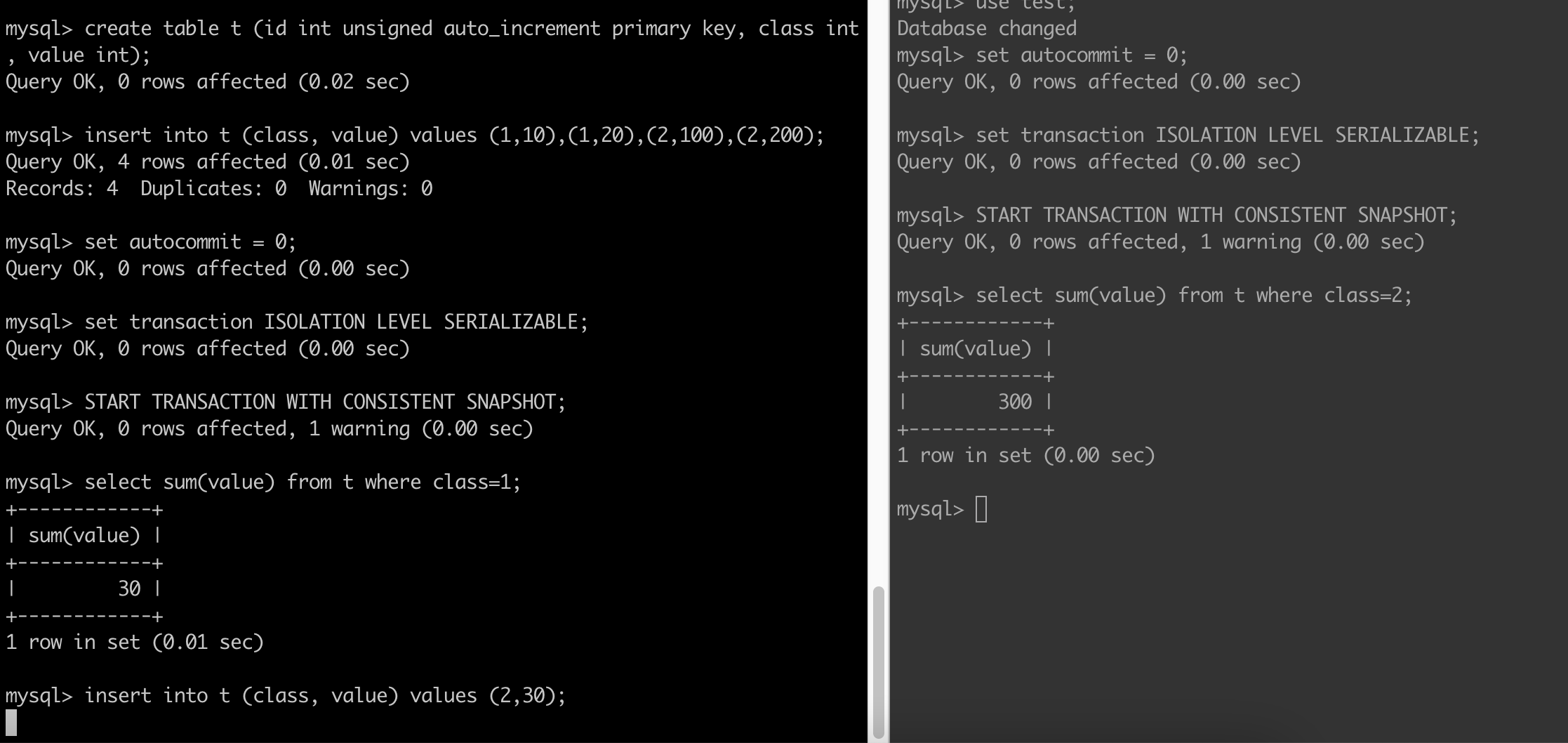
It is very instructive to compare the difference between Postgres and MySQL when using the SERIALIZABLE level using the example in section 13.2.3. You get the same end result but the internals are different. In case of PG there is no locking (refer docs) whereas in case of MySQL there is locking which manifests itself as one transaction waiting on another to complete as seen below:

After sometime you will get a deadline exceeded error:

ERROR 1205 (HY000): Lock wait timeout exceeded; try restarting transaction

If both transactions try to commit, MySQL will detect a deadlock and abort one of the transactions:

A Final Note

Note that SELECT...FOR SHARE and SELECT...FOR UPDATE do not work with aggregate clauses in Postgres:

postgres=*# select sum(value) from concur_test where class=1 for share;
ERROR:  FOR SHARE is not allowed with aggregate functions

How do we protect against serialization anomaly with lower isolation levels?

Using a lower isolation level than Serializable does not mean that you are allowed to ship bugs in the code. What it means is that you will do extra coding to ensure there is no concurrency bug. Let’s take the example of the serialization anomaly in section 13.2.3 and see how we would avoid it with a transaction running with READ COMMITTED isolation level. I first thought of locking the table in SHARE lock mode. But it gave me unexpected behavior. See screenshot below:

The insert call on LHS is blocked. What happened?

  1. The SHARE mode is not self-conflicting so both transactions were able to acquire that lock.
  2. The insert call to a table acquires ROW EXCLUSIVE lock and aha ROW EXCLUSIVE conflicts with SHARE. Since the second transaction has a SHARE lock on the table, the first tx cannot move ahead. It has to wait until the second transaction releases its lock.

What would happen if the second transaction also tries to make an insert? If you guessed deadlock you would be right:

Both txs are now waiting on each other. Postgres detects the deadlock and aborts one of the tx with this message:

DETAIL:  Process 13115 waits for RowExclusiveLock on relation 16884 of database 14020; blocked by process 12516.
Process 12516 waits for RowExclusiveLock on relation 16884 of database 14020; blocked by process 13115.

The other tx goes ahead and is able to finish its insert.

Ok, so this is a bug I made but how to fix this problem really. so far we haven’t solved the problem we set out to solve. Lets see what happens if we try to use SHARE ROW EXCLUSIVE lock mode:

The SHARE ROW EXCLUSIVE lock mode conflicts with itself. The other tx cannot acquire it while first tx is holding on to it. The second tx now has to wait (i.e., is blocked; has to wait for permission) for the first tx to finish. In this way the two txs are serialized now. Problem solved.


Dealing with concurrency is hard. Very hard. Developing databases is harder.

Further Reading:

Posted in Computers, programming, Software | Tagged | Leave a comment

Do we need NUMERIC data type to store financial data in Postgres?

TL;DR:

  • The double precision in Postgres is good enough for storing financial data up to a few decimal places. It takes up 8 bytes and provides 15 decimal digits precision (this includes all the digits, not just the fractional part). You can still use NUMERIC as best practice.
  • A NUMERIC data type will appear as string when reading from the database using the pg JS library. This needs to be converted to a number or Decimal (requires 3rd party library).
  • On JS side use decimal.js for absolute precision. However, for many applications it might be an unnecessary overhead. Use of Decimal requires more CPU. Instead do following: Use JS built-in number type but when you write data to Postgres convert the number to 2 decimal places (e.g., number 0.7999999 gets rounded off to 0.80 when writing to the database). This way you don’t have to use any 3rd party library and results should be accurate enough for most applications. Of course, test if application is working as expected.

Conventional wisdom dictates that one should use the NUMERIC data type to store financial data to protect from rounding errors that happen with floating point arithmetic (refer IEEE 754 standard). And on JS side we should use a library like decimal.js. However in practice I am finding the use of NUMERIC as unnecessary with Postgres 14. Here is what I did. Created a table with 3 columns:

create table test (
    row_id integer serial primary key,
    col1 double precision,
    col2 numeric
);

Start inserting some data into it:

insert into test(col1,col2) values(59.95,'59.95');
...

I finally have a table with:

postgres=# select * from test;
    col1     |    col2     | row_id
-------------+-------------+--------
       3.333 |       3.333 |      1
       4.444 |       4.444 |      2
     3.14159 |     3.14159 |      3
      5.5555 |      5.5555 |      4
    3033.333 |    3033.333 |      5
 4900060.339 | 4900060.339 |      6
 21051979.88 | 21051979.88 |      7
       59.95 |       59.95 |      8
       1.414 |       1.414 |      9
(9 rows)

Test 1

Inspect the table using:

select * from test;

don’t see any difference between col1 and col2.

Test 2

Print out the difference between col1 and col2 magnified by a billion:

select (col1-col2)*1000000000 from test;

returns 0s

Test 3

Query for a row doing equality test on col1 (double precision):

select * from test where col1 = 59.95;

I do get back an answer. So there was no loss of precision when storing the floating point number. I think this is the most stringent test and the reason why its recommended to use a NUMERIC column in the first place because the equality fails due to rounding off errors (according to the conventional wisdom of course).

Test 4

postgres=# select (sum(col1) - sum(col2))*1e9 from test;
 ?column?
----------
        0
(1 row)

Does that mean we should use double precision for storing financial data? No, I would still recommend using NUMERIC to be extra safe but above tests do go onto showing that its not necessary to use NUMERIC. You will probably be fine even if you used double precision.

What about JS? Do you need to use a library like decimal.js to handle financial data?

Yes if you want absolute precision. From node REPL run:

> x=0.7+0.1
0.7999999999999999
> x===0.8
false 

In general the number approximation is good enough. decimal.js will give absolute precision though:

> const Decimal = require('decimal.js');
undefined
> x1 = new Decimal(0.7)
0.7
> x2 = new Decimal(0.1)
0.1
> x3 = x1.add(x2)
0.8
> x3.toNumber() === 0.8
true

Final Notes on using Postgres with pg JS library

Remember when inserting data into a NUMERIC column you can pass either a number or a string. When you read a NUMERIC column you will get back a string that you should convert to a number or a Decimal object if using decimal.js library.

What about MySQL? I don’t know. Try it out and let me know.

Posted in Computers, programming, Software | Tagged | Leave a comment

If you could only install 10 applications on your Mac

what would they be? here is my list:

  1. Rectangle.app
  2. VS Code
  3. iTerm2
  4. Command Line Developer Tools
  5. Oh My Zsh
  6. (Home)Brew
  7. Chrome
  8. Karabiner Elements
  9. Node
  10. Docker

let me know yours.

Posted in Computers, programming, Software | Tagged | Leave a comment

Guide to using Sequelize with Postgres

Below notes are w.r.t. Sequelize v6

Mapping of data types across Sequelize, Postgres and JavaScript

Below is not exhaustive list but covers some advanced types:

Sequelize Postgres JavaScript Read Write
DataTypes.INTEGER integer number number number
DataTypes.DECIMAL numeric decimal.js string Decimal
DataTypes.STRING character varying (255) string string string
DataTypes.UUID uuid uuid string string
DataTypes.DATEONLY date Date string Date
DataTypes.DATE TIMESTAMP WITH TIME ZONE Date Date Date

Read is what you get when you read using Sequelize. Write is what you can write to database using Sequelize. They are explained more in following sections.

declare properties to fix TypeScript errors

Consider a model defined like this:

class Foo extends Model { 
}

Foo.init({
    // WARNING: note this does not prevent an empty field (empty UUID) even though we set allowNull: false
    id: { type: DataTypes.UUID, allowNull: false, field: 'booking_id' }, 
}, {
    // Other model options go here
    sequelize: sql, // We need to pass the connection instance
    tableName: 'bookings'
});

If you are using TypeScript, the TypeScript compiler will complain when you try to access a property like so:

foo.id;

To fix this, we need to declare id like so:

class Foo extends Model { 
    declare id: string;
}

Reading and Writing UUIDs

Read UUID

A field defined as DataTypes.UUID will come out as a string when read from the database.

Write UUID

A field defined as DataTypes.UUID can be assigned a string (e.g., uuid.v4()) before writing to the database.

Reading and Writing Dates

Read Date

A field defined as DataTypes.DATEONLY will come out as a string when read from the database. To convert it into a JavaScript Date object, you can define a custom getter like so:

endDate: { type: DataTypes.DATEONLY, allowNull: false, get() { return parseISO(this.getDataValue('endDate')) }, field: 'end_date' },

Write Date

A field defined as DataTypes.DATEONLY can hold a JavaScript Date before writing to the database.

Reading and Writing Timestamps

Read Timestamp

A field defined as DataTypes.DATE will come out as a JavaScript Date object when read from the database. This is due to the way the underlying pg library works. As documented here:

node-postgres will convert instances of JavaScript date objects into the expected input value for your PostgreSQL server. Likewise, when reading a date, timestamp, or timestamptz column value back into JavaScript, node-postgres will parse the value into an instance of a JavaScript Date object.

Write Timestamp

As mentioned above, a field defined as DataTypes.DATE can hold a JavaScript Date before writing to the database.

Reading and Writing Decimals (or INT8)

Reading Decimal

A field defined as DataTypes.DECIMAL (or DataTypes.BIGINT) will come out as a JavaScript string when read from the database! This is because of the way the underlying pg library works. see:

By default the PostgreSQL backend server returns everything as strings.

You can convert it to a number by defining a custom getter (refer this):

dollarValue: { type: DataTypes.DECIMAL, allowNull: false, get() { return parseFloat(this.getDataValue('dollarValue'))}, field: 'dollar_value' }

or even convert it to a decimal (requires the decimal.js library):

dollarValue: { type: DataTypes.DECIMAL, allowNull: false, get() { return new Decimal(this.getDataValue('dollarValue'))}, field: 'dollar_value' }

WARNING: The established pattern of using types.setTypeParser to parse BIGINT and DECIMAL columns does NOT work with Sequelize. Refer this thread for details. This is quite unfortunate and one of the things I dislike about Sequelize (but not a deal-breaker).

Writing Decimal

A field defined as DataTypes.DECIMAL can hold a Decimal before writing to the database.

Fun Fact

decimal is not same as decimal.js!

&gt; var Decimal = require('decimal.js')
undefined
&gt; var D2 = require('decimal')
undefined
&gt; x = new Decimal('-100.001')
-100.001
&gt; y = new D2('-200.0002')
Decimal {
  internal: '-200.0002',
  as_int: { value: -2000002, exp: -4 },
  add: [Function (anonymous)],
  sub: [Function (anonymous)],
  mul: [Function (anonymous)],
  div: [Function (anonymous)],
  toString: [Function (anonymous)],
  toNumber: [Function (anonymous)]
}
&gt; y.toFixed
undefined
&gt; x.toFixed
[Function (anonymous)]

Note that you can JOIN tables with Sequelize without creating foreign keys. Refer this.

Further Reading

Posted in Computers, programming, Software | Tagged | Leave a comment