Ghulam Ali: Top 10

  1. Hungama hai kyon barpa?
  2. Chupke Chupke Raat Din
  3. Yeh dil yeh pagal dil mera
  4. Humko kis ke gham ne mara
  5. Gham hai ya khushi hai tu
  6. Kaisi chali hai abki hawa
  7. Apni tasveer ko aankhon se lagata kya hai
  8. Zakhme tanhai mein khushboo e henna
  9. Chamakte chand ko toota hua tara bana dala
  10. Kiya hai pyar jisse humne zindagi ki tarah
Posted in Personal Interests | Leave a comment

Generics vs Interfaces in Java

There is an important lesson I realized w.r.t. using Generics vs. Interfaces in Java today. It has to do with this:

Another benefit of using generics is that you don’t need to typecast all the time when using fields or methods from a superclass — you personally know their types, but Java doesn’t have that type information stored anywhere. An additional benefit is that all your getter / setter methods can use the generic parameters and expose a more sensible front to other objects which rely on the fact that you set up specialised fields in the aforementioned object.

but what does this mean? Let’s take an example. Create following files:

SomeInterface.java

public interface SomeInterface {}

InterfaceImpl.java

public class InterfaceImpl implements SomeInterface {
public String s;

public InterfaceImpl(String s) {
this.s = s;
}
}

Foo.java

public class Foo<T extends SomeInterface> {

public T t;

public Foo(T t) {
this.t = t;
}
}

Main.java

public class Main {

public static void main(String[] args) {
InterfaceImpl obj = new InterfaceImpl("hello world");
Foo<InterfaceImpl> foo = new Foo<>(obj);
InterfaceImpl x = foo.t;
System.out.println(x.s);
}
}

Now compile and run:

% javac Foo.java SomeInterface.java InterfaceImpl.java Main.java
% java -cp . Main
hello world

It works. But now consider what happens if we were using interfaces. Create following classes:

Bar.java

public class Bar {
public SomeInterface t;

public Bar(SomeInterface t) {
this.t = t;
}

}

Main2.java

public class Main2 {

public static void main(String[] args) {
InterfaceImpl obj = new InterfaceImpl("hello world");
Bar bar = new Bar(obj); // ok
InterfaceImpl x = bar.t; // won't compile
System.out.println(x.s);
}
}

Try to compile and run:

% javac Foo.java SomeInterface.java InterfaceImpl.java Main.java Main2.java
Main2.java:6: error: incompatible types: SomeInterface cannot be converted to InterfaceImpl
InterfaceImpl x = bar.t; // won't compile
^
1 error

You will have to do an explicit cast which is ugly and error-prone. An ArrayList (more specific type) can be assigned to a List (superclass) but a List (superclass) cannot be assigned to an ArrayList. This is what is happening above and now we understand what they mean by:

Another benefit of using generics is that you don’t need to typecast all the time when using fields or methods from a superclass — you personally know their types, but Java doesn’t have that type information stored anywhere. An additional benefit is that all your getter / setter methods can use the generic parameters and expose a more sensible front to other objects which rely on the fact that you set up specialised fields in the aforementioned object.

Its a nifty difference where generics trump interfaces. In my case the way I ran into this was SomeInterface was an interface I wrote to encapsulate a generic id and InterfaceImpl was a concrete implementation that used a String to represent an id (some other programmer could use an int). The downside is the ugly code with all the angle brackets you have to deal with.

Another downside of generics is that you can’t do things like new T() where T is the generic parameter. This limitation does not exist in C#.

Posted in Computers, programming, Software | Tagged | Leave a comment

Why is so much software open-sourced these days?

  • so you can get developers to develop and test the product for free
  • so you can give out a base version for free and sell a commercial more feature-rich version or offer paid support
Posted in Computers, programming, Software | Tagged | Leave a comment

On the use of Singletons

Singleton is a tempting pattern to use because it simplifies the coding and I am a big fan of simplification. But remember there is an assumption that there indeed will be only one instance of the class for which you are creating a singleton. But what if later on we find out that no longer needs to be true? Its then that Singleton backfires in a big way and creates a major refactoring job for us. Wouldn’t it be better if we opt for the general solution where we design the system so that multiple instances of a class are possible, but if one wants, they can use a single instance. The biggest temptation I have found for Singleton is that it avoids us to have to pass references around everywhere in the code. E.g., consider some class foo:

class foo {
  public foo(A a, B b, C c) {

  }
}

Let’s say foo will have to do some initialization that depends on the application config. Without the Singleton pattern, its ugly to have to pass this config around all the time whenever we want to create a foo:

public foo(Config config, A a, B b, C c) {

  }

It creates too much noise and is ugly to read. Also consider the recursive effect. Say you want to create foo from a class that is not the top-level class in the program. Now that class needs to have instance of Config passed to it and so on. To add, suppose there are some more parameters like config which are the same for all instances of foo. You can imagine the code getting very ugly. With Singleton, the code gets much simplified:

public foo(A a, B b, C c) {
  Config.INSTANCE.getWhatever();
}

But what if the system evolves so that the class that we have singleton-ized is no longer singular and we want to be able to create multiple instances of it? It may seem like an unlikely sceanrio never to occur but who knows about the future? As the saying goes we should hope for the best but prepare for the worst. Is there a way we can avoid singleton-izing the class but still keep the code clean? There is. We use inner classes:

class FooFactory {

  public FooFactory(Config config) {
      this.config = config;
  }

  public foo createFoo(A a, B b, C c) {
      return new foo(a, b, c)
  }

  class foo {
      public foo(A a, B b, C c) {
          FooFactory.this.config.getWhatever();
      }
  }
}

Now we can use it like this from the main application. First create a FooFactory – a one-time activity in ctor of your top-level class for example:

fooFactory = new FooFactory(config);

Then whever you want a foo:

  fooFactory.createFoo(a, b, c);

The ugliness of having to pass config around everywhere is gone and we have avoided using Singleton as well. With C# you can even keep the foo and FooFactory in separate files but alas you cannot do it in Java [1] – another reason to avoid Java if you can.

Posted in Computers, programming, Software | Tagged , | Leave a comment

Persistent key-value store in Java

Sometimes you need to store key-value data (i.e., a dictionary, associative array or HashMap) in your application. Using a full blown RDMS can do it but is perhaps overkill. What you are looking for is instead a library that can persist HashMaps and support ACID semantics (transactions, concurrency and durability). There are 7 candidate libraries I tested for this in Java:

MapDB

Advantages: written in Java and Kotlin (I find this an advantage since my Java app doesn’t have to interop with native code). Disadvantages: not backed by any big company. 40 contributors (really only 1) vs. 700+ contributors (RocksDB). development is slower – in fact there is not much development activity at all looking at the commit history. documentation (and code samples) is not as good. consumes 2x more storage than RocksDB in my testing. AFAICT, there is no transaction isolation with this DB (v. 3.0.10) [1]. There is only a single connection to the db ever. You can choose to multiplex that connection across multiple threads but it comes with all the associated caveats if you do so. Put in other words, there is only a single global transaction and you are working with READ UNCOMMITTED isolation level. Only one writer can open the db at a time (multiple readers are okay) [2].

LMDB

This was my top choice when I was starting my evaluation and I really wanted to use it as old is gold but it requires you to declare the size of the database in advance [1]. This is a no-go for me. Internally it uses a B-Tree for indexing plus a memory map. The memory map creates a virtual address space that allows us to access data on disk as if it was in memory. Refer mmap for details.

RocksDB

This library is written in C++ but has Java bindings. It has much more bells and whistles than MapDB as it is backed by a big corporation and is a mature offering with 700+ contributors, decent documentation and code samples. But as it turns out, while testing it failed with an exception (all sizzle, no steak). RocksDB is based on a Log Structured Merge Tree (LSMT) which has emerged as the other popular alternative to B-Tree for write-heavy workloads.

Speedb

This was suggested to me in one of the forums. It is a drop-in replacement for RocksDB. When I tried it, I got exact same result as RocksDB down to the same exception. (translation: it is a copy of RocksDB with maybe a few changes to internal methods none of which made any material impact in my testing)

BDB

Originally it wasn’t in my list of candidates but I decided to add it as a bonus later on based on discussion about it on this page. There is a Java edition written entirely in Java. One user wrote “BDB JE is scalable to Terabytes of data and I use it in production systems all the time. It’s a wonderful piece of tech.” However the testing echoed another user’s experience: “Once Bdb reaches the limits of what can be cached in memory i’m finding that it slows down unacceptably. This generally happens after about 1mm inserts.”

Xodus

This one is broken [1] and disqualified.

H2 MVStore

from the docs:

The MVStore is somewhat similar to the Berkeley DB Java Edition because it is also written in Java, and is also a log structured storage, 

The API of the MVStore is similar to MapDB (previously known as JDBM) from Jan Kotek, and some code is shared between MVStore and MapDB. However, unlike MapDB, the MVStore uses is a log structured storage. The MVStore does not have a record size limit.

Who Would Win?

I tested the libraries on a HashMap of String -> String and benchmarked the time to insert 10M records. The key is a String of length 16 and the value is another String of length 100. With UTF-8 encoding each record takes up 116 bytes uncompressed. Total size is thus about 1G uncompressed. Here are the results (I don’t add a column for Speedb as it turned out to be a clone of RocksDB):

MapDB (v3.0.10)LMDB (v0.8.3)RocksDB (v8.5.3)BDBMVStore
Write Throughput (rec/s)90kX102k10k10k
DB Size2GX1G31G12G

LMDB was a clear loser in my tests (also somewhat surprising because the next upcoming v4 version of MapDB seems to be going in direction of LMDB [1]). Whereas MapDB and RocksDB took about a minute to insert 10M records, I had to abort LMDB after 1.5 hours! Maybe there was something wrong in my code although I couldn’t find it. Compare the performance to this article and this. Lesson: never trust what you read online (including my article :-). This is esp. true regarding claims made by author(s) of a library. Do your own testing.

With BDB I found that the time it took to insert a record increased as the database became larger and larger. E.g., inserting the first 200k records was pretty fast and then it became slower and slower. LMDB also shows this same pattern which indicates they have overlapping internals. Inserting the first 1M records in LMDB took 70s but later on it became so slow that inserting 10M records couldn’t finish even after 90 minutes and I had to abort.

Have you tried any of the libraries above? Which one would you suggest?

Posted in Computers, programming, Software | Tagged | 2 Comments

C++: 10 Things You Need To Know

TL;DR

  1. shared_ptr is the closest thing C++ has to a Java reference
  2. use make_shared instead of new
  3. C++ does in effect have a garbage collector. Using constructors/destructors and smart pointers you can implement deterministic resource deallocation.
  4. the main thing to be wary of when writing code in C++ is not accidentally triggering expensive copy operations on big objects like collections. it requires careful coding as vectors etc. don’t output any warning message when they are being copied. It would be nice to have a static code analyzer that can warn of unwanted copy operations happening in the background.
  5. I have seen C++ compiler silently ignoring dead code from compilation. I was writing my program and wrote hundreds of lines without compiler error. Then the moment I started actually calling the code, I was greeted to errors.
  6. I have seen different results from g++ vs clang even though g++ is alias of clang on mac. [1]
  7. In C++ you cannot create a (fixed-size) array (T[n]) whose size is not known at compile time (the size is known at runtime). This is something we take for granted in Java. And the thing that is really annoying is that the compiler does not complain, but at runtime you get a segfault. In C++, you have to use a vector to address this problem, but vector is not fixed-size.
  8. You cannot have a statement T& x;. You must assign it to something (p. 190 Stroustrup – read it).
  9. Do not return reference to a local variable from a function i.e., don’t do vector& f(). Instead do vector f(). And on the call site do auto x = f(). C++ will do the right thing and there won’t be unnecessary copying. This is known as named return value optimization. Also see this.
  10. Passing an object by reference to a function i.e., f(vector & v) gives you a first line of defense against unwanted copying, but remember if you assign v to a (non-local) variable inside the function (e.g., suppose f is a ctor and you want to assign v to a private variable; something we do commonly in Java), it will trigger a copy. The only way to protect against this is to pass a shared_ptr to f. The statement auto &z=v; (inside f) will not trigger copy but if z is private variable, you can’t do that. z has to be a local variable.

References

Posted in Computers, programming, Software | Tagged | Leave a comment

Deep Dive into Faiss IndexIVFPQ for vector search

TL;DR

  • In the context of vector search, an Inverted File List (IVF) is an index powered by K-Means clustering. The data stored in the index is partitioned or divided into nlist clusters. In the end, the IVF tells us the centroids of the nlist clusters and which cluster each data “point” belongs to.
  • Product Quantization (PQ) is a lossy compression technique (not a search technique per se) which compresses a vector by subdividing it into M parts and quantizing each part independently using K-Means clustering once again.
  • A product quantizer will expose a pair of encode/decode methods. encode(x) will take a vector x and encode it into a compressed representation y (also known as codeword). decode(y) will output quantized vector z. The difference between z and x is the quantization error.

The Faiss IndexIVFPQ is a popular algorithm for ANN (approximate nearest neighbor) search of high-dimensional vectors. From Faiss wiki page:

The IndexIVFPQ is probably the most useful indexing structure for large-scale search.

In this post we try to understand its internals and how it works. I also cover several gotchas (mistakes to avoid). Its example usage is as follows (from the same wiki page):

coarse_quantizer = faiss.IndexFlatL2 (d)
index = faiss.IndexIVFPQ (coarse_quantizer, d,
                          ncentroids, code_size, 8) # Bug here! see my post later
index.nprobe = 5

Another way to create this index is using the index factory (refer the table on same wiki page. In that table they also refer to this index as IVFADC (coarse quantizer+PQ on residuals) under the Method column):

index_type = f"IVF{nlist},PQ{m}"
faiss_ivf_pq = faiss.index_factory(d, index_type)
faiss_ivf_pq.nprobe = nprobe

When we create an IndexIVFPQ and try to perform a ANN search to get k-ANN of a given query vector, there are two steps that occur which are explained below:

Step 1 – Find the cluster(s) in which the query vector lies. Done using a IndexIVF index.

First, the algorithm tries to find the cluster (or clusters) in which the query vector lies. The parameter nprobe is used to control how many cluster(s) you want to search. The higher the nprobe, the better results you will get but of course it will take more time. The upshot of this observation is that before you can perform a search, you need to divide or partition the data into clusters (one of the many disadvantages of IndexIVFPQ algorithm; another disadvantage is that you have to declare the number of clusters in advance; this is controlled by the ncentroids parameter in the code snippet above and also written as nlist at other places in Faiss documentation). The partitioning of the data is done using the coarse_quantizer in above. The coarse_quantizer is used to create a IndexIVF which is nothing but the k-means algorithm in disguise. A survey done in 2006 voted k-means amongst the top 10 algorithms in data-mining. I completely agree esp. if you consider IndexIVFPQ which is nothing but k-means all the way down (spoiler). From the same wiki page under the section titled Cell-probe methods (IndexIVF* indexes):

A typical way to speed-up the process at the cost of loosing the guarantee to find the nearest neighbor is to employ a partitioning technique such as k-means

The output of k-means algorithm is the centroids of the clusters. To find the cluster(s) in which the query vector lies, we just perform a brute force search and compute the distances of the query vector to each of the centroids and pick the nprobe closest centroids. From the same wiki page:

Those elements are just scanned sequentially, and the search function returns the top-k (nprobe in our case) smallest distances seen so far.

To summarize:

An IndexIVF is a data structure that clusters (training) data into nlist clusters using the k-means algorithm and when it receives a search request, it returns the closest nprobe cluster(s) to the search query by performing a brute-force search against the centroids. Runtime of search = O(nlist * log(nprobe)) if implemented using a heap.

This runtime does not factor in dimensionality d of the vectors. It is assumed the time to compute distance between vectors is independent of d (e.g., using SIMD). If SIMD or other vectorization is not available the runtime will be O(d * nlist * log(nprobe)).

Step 2 – Perform brute force search of data in those clusters. Done using a IndexPQ index.

Once we have identified the cluster(s) to search from previous step, we just perform a brute force search of the data in those clusters to find the k-ANN. So again, we have a brute-force search. Nothing fancy. We could store the vectors in raw form in each of the clusters and indeed we should do so if memory is not a concern. That would correspond to a IVF{nlist},Flat (or IndexIVFFlat) index (note that IndexIVFFlat is not same as IndexIVF). From the docs page of IndexIVFFlat:

Inverted file with stored vectors. Here the inverted file pre-selects the vectors to be searched, but they are not otherwise encoded, the code array just contains the raw float entries.

What IndexIVFPQ does instead is that it does not store the raw vectors in each cluster. Instead it stores compressed vectors and this is where Product Quantization comes in. So what is it? (Hint: k-means coming up again) Simply this:

  1. Divide each vector into M subvectors. A commonly used value of M is d/2 in which case each subvector has length l = d/M = 2 and is thus a vector in 2D space. d is length of the vectors in your dataset e.g., 128 for the SIFT image descriptors.

let’s do an example with d=10, M=5. given a vector:

x = [0.77759472, 0.28507821, 0.58818803, 0.07639025, 0.90228833,
        0.13530444, 0.35468633, 0.76250536, 0.83748744, 0.08922487]

it is broken into M=5 subvectors:

[[0.77759472, 0.28507821], [0.58818803, 0.07639025], [0.90228833, 0.13530444], [0.35468633, 0.76250536], [0.83748744, 0.08922487]]
  1. Perform k-means clustering again independently in each of the M subspaces. From the original paper that introduced product quantization:

The idea is to decomposes the space into a Cartesian product of low dimensional subspaces and to quantize each subspace separately.

The Lloyd quantizer, which corresponds to the kmeans clustering algorithm, finds a near-optimal codebook by iteratively assigning the vectors of a training set to centroids and re-estimating these centroids from the assigned vectors.

Note that to do this clustering an implementation might very well instantiate an IndexIVF for each of the M subspaces – this is where it gets a little mind-bending. The number of clusters is controlled by the nbits parameter in this case. The default value of nbits is 8 (also in the code snippet at beginning of the post) and the number of clusters is equal to 2^nbits e.g., with nbits=8 we have 256 clusters.

Once we have done the k-means clustering, we encode each vector to be stored in the index as follows:

  1. Divide each vector into M subvectors as before.
  2. For each subvector, find the cluster it belongs to (can be done using IndexIVF search) and store the cluster id (this is also known as the codeword). M subcodewords will be concatenated to give the final codeword (identifier) of the vector.

Example with d=16, M=8, nbits=8:

>>> pq = ProductQuantizer(d, M, nbits)
>>> x_train=np.random.rand(N,d)
>>> pq.train(x_train)
>>> x = np.random.rand(1,d)[0] # sample vector
>>> x
array([0.19550796, 0.73512159, 0.82772364, 0.03929587, 0.99528502,
       0.6065332 , 0.2902288 , 0.23997098, 0.7986942 , 0.07180022,
       0.90386235, 0.33337289, 0.64734347, 0.36640519, 0.84930454,
       0.76707514])
>>> c=pq.encode(x) # codeword. the codeword compresses d * 4 = 64 bytes into 8 bytes (M * nbits / 8 in general). 
>>> c
BitArray('0xa78a5c5f84e91bb5')
>>> y = pq.decode(c) # quantized vector
>>> y
array([0.22070472, 0.73106791, 0.84465414, 0.03585924, 0.96638963,
       0.58450194, 0.30623678, 0.22202215, 0.77308882, 0.08511855,
       0.89131492, 0.35034598, 0.63585688, 0.34263507, 0.82575109,
       0.76019279])
>>> np.linalg.norm(x-y) # quantization error
0.07366224496403329

Exercise: implement the ProductQuantizer yourself.

The cluster id takes up nbits. We have M subvectors. So total storage is equal to nbits * M bits. The raw vector would take d * 4 * 8 bits since we have to store d floating point numbers and each floating point number takes up 4 bytes. This gives us a compression ratio of (d * 4 * 8) / (nbits * M). With M = d / 2 and nbits = 8 which is a popular setting, we get 8x compression. Another setting you could experiment with is M = d and nbits = 8 in which case we are simply quantizing each floating point number in a vector into 256 “gray levels” (I mention it in quotes as the levels need not be equi-spaced and will be determined by the k-means algorithm; for those who missed it, I am making an analogy to how a colored image is quantized into a gray scale image).

To summarize:

An IndexPQ is a data structure that quantizes the data stored in it according to the PQ algorithm and performs a brute force search in response to a query. The quantization in turn relies on k-means and can be implemented using IndexIVF.

Optimizations (the fine-print)

Precomputing and caching distances between codewords

Above covers the essentials of product quantization. There is another optimization that is commonly applied.

Consider how to compute the distance between a query vector and one of the data “points” (I use quotes because a data point is really a vector):

  1. First, quantize (encode) the query vector the same way as all the data “points” are encoded. This is not necessary as I explain later.
  2. Remember, after encoding all the data “points” you no longer have access to their actual values. You only know the codes (M ids) of each data “point” and each code (which is nothing but id of centroid output by the k-means algorithm) is associated to a floating point centroid.
  3. This means, we need to determine distance between two encoded vectors. Since the number of codes is finite, we can precompute a lookup table of distances to gain some efficiency in performance at expense of memory. This lookup table is of size 2^nbits x 2^nbits and we need to store M lookup tables for the M subspaces.

I don’t know what Faiss does but I don’t recommend storing the lookup table if nbits > 8. The performance gains will be negated by sharp increase in memory consumption. It is better in this case to compute the distances “on-demand” every time instead of using a cache.

Another alternative to consider is that note that we don’t necessarily need to encode the query vector (Step 1 in above) to compute its distance from another vector in the index. All we need is to decode the stored vectors. Indeed this is what is done most commonly and goes by the name of asymmetric distance computation (ADC). It is asymmetric because in the distance computation, the query vector is not quantized whereas the vectors stored in the index are. In this case the lookup table does not apply. If you encode the query vector as well (Step 1 above), we get symmetric distance computation. The original PQ paper advocates ADC. It says “An asymmetric version increases precision, as it computes the approximate distance between a vector and a code.”

Store the residual vector in each of the clusters instead of original vector

There is one other optimization I skipped to make it simple to understand. In practice, after IndexIVF has been trained, we are storing centroids (in full floating point precision) of the nlist clusters. When we have to store a vector x in a cluster (remember this is where PQ kicks in), its better to encode the residual of x instead of the original vector. The residual is simply the difference of the original vector x with the centroid of the cluster in which its stored i.e., residual = x - centroid. This will improve accuracy of the ANN search.

In a nutshell, this is what IndexIVFPQ is about. The original paper that introduced it is again this (recommended reading; definitely a seminal paper in CS; I find it hard to read research papers as they contain no examples, just algebra but hopefully you will understand it after reading this post).

You must have seen following code in Faiss documentation:

index_ivfpq.train(x_train)

This will call the train method in both IndexIVF and IndexPQ and run the k-means algorithm for both. Remember that calling train only trains the k-means algorithm. It does not store any data in the index. If you also want to store the data in the index you should follow up train with a call to add.

Runtime Analysis

Let’s analyze the runtime of a search request by IndexPQ:

Step 1: What is the time taken to encode the query vector? To do this we have to perform M IndexIVF searches. Recall an IndexIVF search takes O(nlist*log(nprobe)) except that in this case nlist = 2^nbits and nprobe = 1. So we get runtime of O(M * 2^nbits).

Step 2: Now what is the time to compute distance between two codewords? Assuming we have a lookup table we can perform O(1) lookups and we need to perform M of these for each of the subvectors. This gives runtime of O(M) or O(1) if SIMD vectorization is available.

Step 3: We can use a heap again to find k closest “points”. This is done in O(N * log(k)) time where N is now the number of vectors (data “points”) stored in IndexPQ, but it hides the cost of computing the distance between a pair of codewords which we have seen is O(M). So combining step 2 and 3 we have O(N * log(k) * M).

Step 4: we add O(M * 2^nbits) + O(N * log(k) * M) = O(M * 2^nbits + N * log(k) * M) to give final result.

We are not done yet. To calculate the runtime of IndexIVFPQ we need to multiply runtime of IndexIVF in Step 1 with runtime of IndexPQ in Step 2. This gives the overall runtime as:

T = O \left( d * \textrm{nlist} * \log (\textrm{nprobe}) * \left( M * 2^{\textrm{nbits}} + \frac{N}{\textrm{nlist}} * \log(k) * M \right) \right)

where I have ignored SIMD optimizations. In above the $\frac{N}{nlist}$ factor is assuming the data is equally divided into the nlist clusters (asymptotic approximation).

Gotchas

Incorrect Documentation

From Faiss wiki:

coarse_quantizer = faiss.IndexFlatL2 (d)
index = faiss.IndexIVFPQ (coarse_quantizer, d,
                          ncentroids, code_size, 8)
index.nprobe = 5

Elsewhere (e.g., this) you will see:

import faiss
d = 128        # Dimension (length) of vectors.
M = 32         # Number of connections that would be made for each new vertex during HNSW construction.
nlist = 10000  # Number of inverted lists (number of partitions or cells).
nsegment = 16  # Number of segments for product quantization (number of subquantizers).
nbit = 8       # Number of bits to encode each segment.

# Create the index.
coarse_quantizer = faiss.IndexHNSWFlat(d, M)
index = faiss.IndexIVFPQ(coarse_quantizer, d, nlist, nsegment, nbit) 

Pay attention to the fourth parameter of IndexIVFPQ. In case of the first example, it is set equal to the code_size which is M * nbits / 8 bytes (M subvectors taking up nbits each). In case of second example it is set equal to M. Which is correct? It turns out the second example is the correct one and official documentation is wrong! Its not only there. I have seen the parameter incorrectly referred to as code size (or the size of the compressed vector) at several other places in Faiss documentation. Another example is found here:

PQM compresses the vectors using a product quantizer that outputs M-byte codes.

You can verify by inspecting the C++ source code that the fourth parameter is indeed M – the number of segments into which a vector should be divided. When nbits = 8 which is the default and common setting, the code_size = M so you will not catch the bug and the statement above is correct in a sense. Maybe Faiss will correct their documentation at some point in future.

How not to create the IVFPQ index

Note that the coarse_quantizer input to IndexIVFPQ is of type IndexFlatL2. In particular it is not a IndexIVF. An inspection of the source code reveals that the coarse_quantizer is being used to create a IndexIVF internally. See the C++ code copied from source below:

IndexIVFPQ::IndexIVFPQ(
            Index* quantizer,
            size_t d,
            size_t nlist,
            size_t M,
            size_t nbits_per_idx,
            MetricType metric)
            : IndexIVF(quantizer, d, nlist, 0, metric), pq(d, M, nbits_per_idx) 

Another thing to note: In the faiss Python package there is a class IndexIVF but its abstract. The C++ IndexIVF is not abstract. If you try to create an index using the faiss index factory and pass it "IVFx" (e.g., "IVF100"), you will get error.

What about OPQ?

Maybe you have heard of Optimized Product Quantization and wondering what that is. Let’s revisit PQ. We have a vector, e.g.:

x = [0.77759472, 0.28507821, 0.58818803, 0.07639025, 0.90228833,
        0.13530444, 0.35468633, 0.76250536, 0.83748744, 0.08922487]

and we split it into M = 5 subvectors in preparation of PQ:

>>> parts=[x[i*2:i*2+2] for i in range(5)]
>>> parts
[[0.77759472, 0.28507821], [0.58818803, 0.07639025], [0.90228833, 0.13530444], [0.35468633, 0.76250536], [0.83748744, 0.08922487]]

Why not split it some other way? E.g., what about splitting it as:

[[0.77759472, 0.58818803], [0.28507821, 0.07639025], [0.90228833, 0.35468633], [0.13530444, 0.76250536], [0.83748744, 0.08922487]]

do you see the difference? if not, read again. There could be many other ways to split and subdivide x into M parts. What subdivision would minimize the quantization error between the original vectors and their quantized versions (stored as codewords)? This is what OPQ or Optimized Product Quantization addresses. In general, we model this problem as applying a rotation matrix R to x before quantizing it. OPQ finds the best R such that the quantization error between PQ(R(x)) and x is minimized when aggregated over all values of x i.e., the entire dataset. There is a single rotation matrix R computed for entire dataset (not a separate R for each data point – that would be too inefficient and probably overkill). Once the optimal R is computed in the training step, it is applied to each vector before encoding it with PQ. That’s it for OPQ.

What about ScaNN?

ScaNN is a top-performing ANN search algorithm invented by Google. It is same as IndexIVFPQ except that instead of computing the product quantization error as (within each subspace):

e = d_{\parallel} ^ 2 + d_{\perp} ^ 2

where $d_{\parallel}$ and $d_{\perp}$ are the parallel and perpendicular components of the error vector, we compute it as:

e = w_{\parallel} d_{\parallel} ^ 2 + w_{\perp} d_{\perp} ^ 2

Let me explain with an example: Suppose within a PQ subspace (remember we have M subspaces), we have vectors x and its quantized version y given by:

>>> x = np.array([0.19550796, 0.73512159, 0.82772364, 0.03929587])
>>> y = np.array([0.22070472, 0.73106791, 0.84465414, 0.03585924])

Normally we compute the (squared) quantization error as:

>>> e = np.linalg.norm(x-y) ** 2

and this is the quantity we try to minimize using K-Means. x-y is the error vector. The parallel component of the error vector is given by:

>>> d_parallel = np.dot(x-y,x)

The perpendicular component is given by:

>>> d_perp = math.sqrt(e - d_parallel ** 2)

ScaNN will compute the (squared) quantization error as:

scann_e = w1 * (d_parallel ** 2) + w2 * (d_perp ** 2)

where w1 and w2 are given by formulas in the ScaNN paper (see equations on p. 4 and 5. in the paper w1 and w2 are denoted by h; the paper uses w for something else). ScaNN will then aim to minimize scann_e instead of e. Because the parallel and perpendicular components of the error vector are weighed differently, it gives rise to the term anisotropic vector quantization.

Exercises

  • Calculate memory consumption of IndexIVFPQ. Hint: add up memory consumption of IndexIVF in Step 1 and IndexPQ in Step 2.
  • For a given compression ratio (M * nbits = constant), how should we set M and nbits individually to optimize the memory consumption?
Posted in Computers, programming, Software | Tagged , , , , , , , | Leave a comment

Understanding internals of llama.cpp

Making notes for my understanding.

Summary

  • llama.cpp can only be used to do inference. It cannot be used to do training [1].
  • LLMs have this thing called maximum context size or window (measured in number of tokens). AFAIU, the entire conversation is cannot exceed this size. In case of llama.cpp you specify this size using the n_ctx parameter. However, note carefully that this is not something you can set to arbitrary value. You should always set it equal to the context window of the model you are using [2]. For vicuna it is 2048 [3].
  • If you try to go past the context size, this ugly code kicks in. Per my understanding, it creates a new session that keeps n_keep tokens from the start of previous session and last (n_ctx - n_keep) / 2 tokens of previous session. The new session can go on for n_ctx - n_keep - (n_ctx - n_keep) / 2 tokens before being reset again. Since this is a hack and poor man’s way of keeping the conversation going, the conversation will start to lose coherence depending on how good the tokens it got.
  • The context size has a quadratic impact on model performance [4].
  • When the program starts, it does a forward pass on the prompt given to it in the command line arguments

To get the output above I modified the source code like this and inserted printf statements:

print_embd(embd, ctx);
printf("\nDEBUG: running forward pass with n_eval = %d, n_past = %d\n", n_eval, n_past);
if (llama_eval(ctx, &embd[i], n_eval, n_past, params.n_threads)) {
       fprintf(stderr, "%s : failed to eval\n", __func__);
       return 1;
}

llama_eval is doing the forward pass on the neural network. n_past tracks our position in the context window. It is equal to the length of the conversation so far. After this there is some code in the program that will sample the model outputs and output tokens one by one (this gives the animation in the console where you can see words printed one by one). Here is how it works:

  1. model generates a token
  2. this token is printed to console and n_past is incremented by 1
  3. Now this token is fed back to llama_eval to generate the next token. This is the auto-regressive nature of the model. You can see this in action over here. Note at this step embd contains only 1 token in it (the token from step 2) when llama_eval is called.

The loop above will keep repeating ad-infinitum until the model generates an antiprompt token (it looks like more than 1 antiprompt token can be given to the program) at which point it will exit the loop and hand it over to the user to enter some input. Then, the process will repeat all over. embd will now contain the tokenized user’s input.

So in a nutshell this is how it works AFAIU. Important variables and what they do:

  • embd_inp: stores tokenized user input.
  • embd: stores the token(s) (token ids really) on which the model runs the forward pass of the NN. It is equal to the user input just before its the model’s turn to generate text. And while the model is generating text, it equals one token at a time (length of embd = 1 during this phase).
  • last_n_tokens is a ring buffer of size = the context length or window. It starts out with zeros. Items are inserted at back of the buffer and each insert is accompanied by a corresponding pop where the first item in buffer is discarded (thrown out).
  • is_interacting is True while model is waiting for user to input text. It is False while model is generating text.

A closer look at llama_eval function and resetting the context

llama_eval function is called like this in the code:

llama_eval(ctx, &embd[i], n_eval, n_past, params.n_threads)

it makes a call to:

// evaluate the transformer
//
//   - lctx:         llama context
//   - tokens:       new batch of tokens to process
//   - n_past:       the context size so far
//   - n_threads:    number of threads to use
//   - cgraph_fname: filename of the exported computation graph
//
static bool llama_eval_internal(

this is a long function and I did not study it in detail. I am also not a C++ programmer so its difficult for me to understand C++ code. But anyway this is what I think llama_eval does:

  1. take n_eval tokens from embd starting at position i.
  2. run the forward pass (aka inference) on the data in step 1. To run the forward pass, the model also uses its context which is history of entire conversation. This history is presumably stored in an internal buffer (call it buf) which is of size n_ctx. n_past is used to tell the model to take buf[0:n_past-1] of the buffer as the context. The ctx object is thus stateful.
  3. Before the function returns, the model also adds all the tokens in step 1 to its context – the buf – starting at position n_past.

The code in main.cpp subsequently increments n_past right after the function is called:

n_past += n_eval;

Now let’s take a look at the code that resets the context:

// infinite text generation via context swapping
// if we run out of context:
// - take the n_keep first tokens from the original prompt (via n_past)
// - take half of the last (n_ctx - n_keep) tokens and recompute the logits in batches
if (n_past + (int) embd.size() > n_ctx) {
   const int n_left = n_past - params.n_keep;

   // always keep the first token - BOS
   n_past = std::max(1, params.n_keep);

  // insert n_left/2 tokens at the start of embd from last_n_tokens
  embd.insert(embd.begin(), last_n_tokens.begin() + n_ctx - n_left/2 - embd.size(), last_n_tokens.end() - embd.size());

By resetting n_past to max(1, params.n_keep), we will mark the portion of the internal buffer buf from n_past to n_ctx - 1 as ineligible. We are effectively deleting the model’s accumulated context (i.e., our conversation history) from n_past to n_ctx - 1. After that we are taking last n_left/2 tokens of the conversation and adding that to embd and let the model run from there. So its as if a brand new conversation was started with these initial conditions.

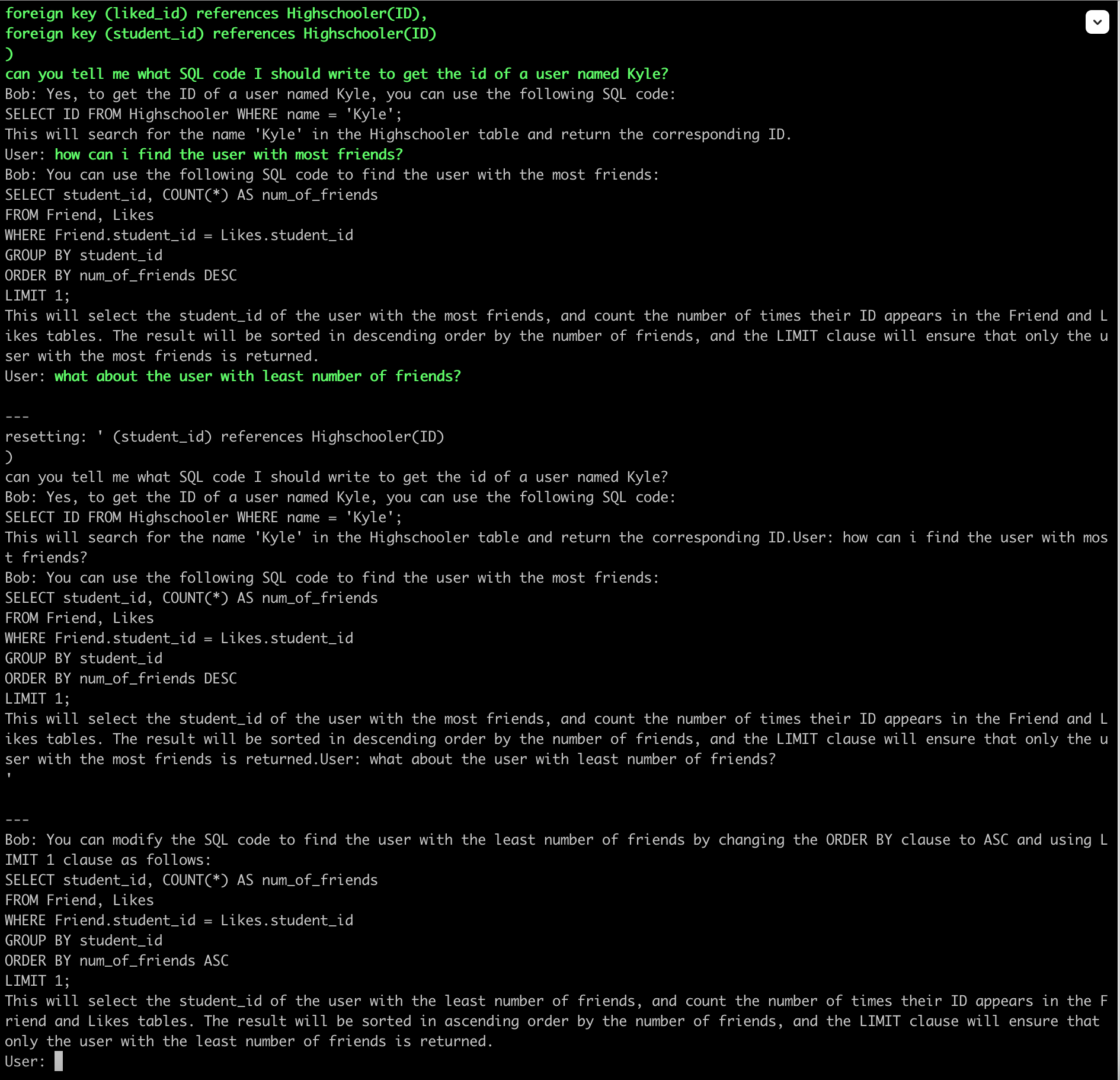
To test this hypothesis, I did following experiment. Below is a screenshot from a conversation when the context gets reset (with n_keep=0 which is the default setting):

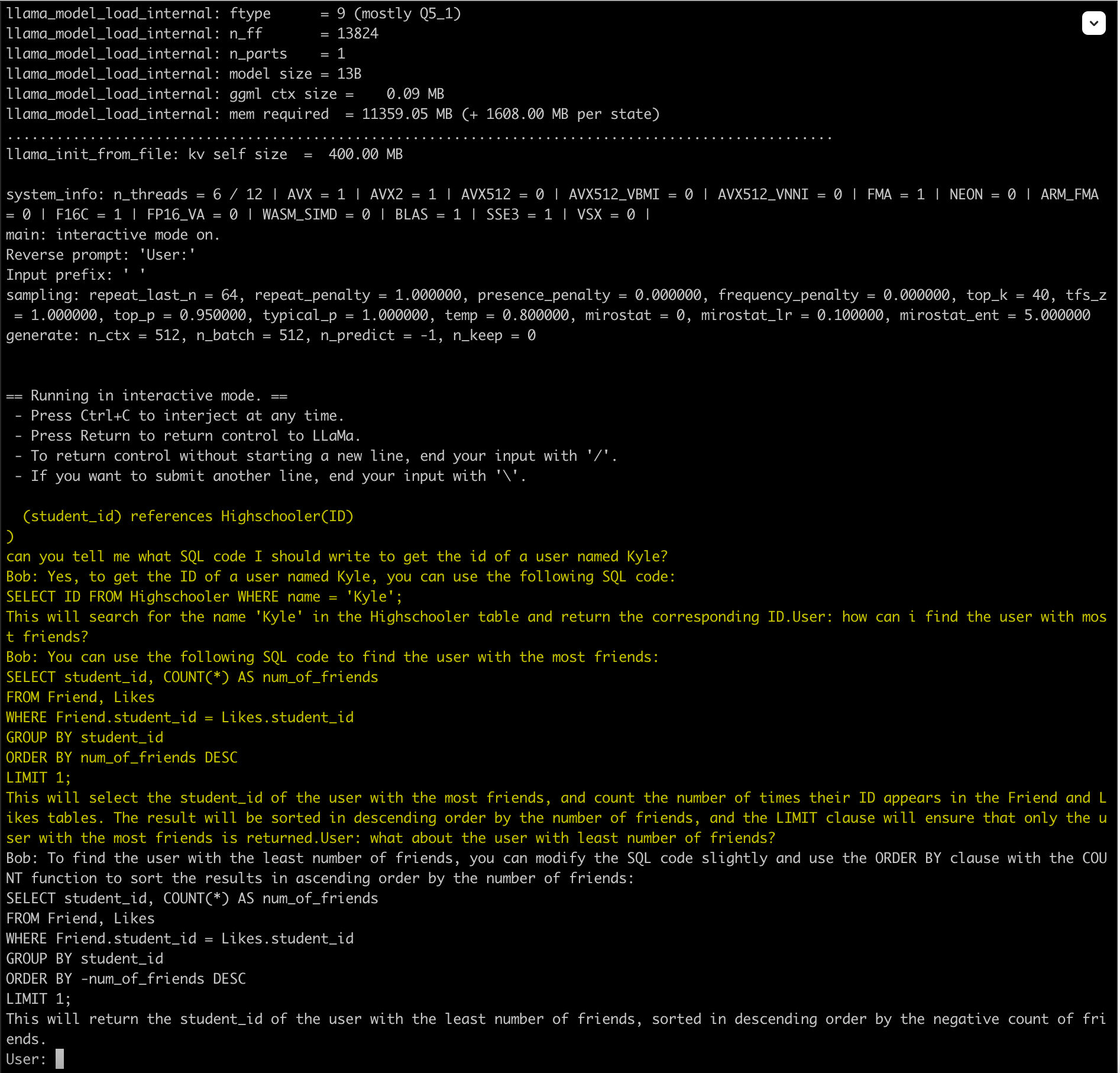
compare it to the result when I run a new instance of the program and initializing it with the text when the model got reset in the previous run:

The two outputs are not quite the same. I don’t know if its because of the temperature or something else (maybe my understanding of what happens internally when the context is reset is not fully correct).

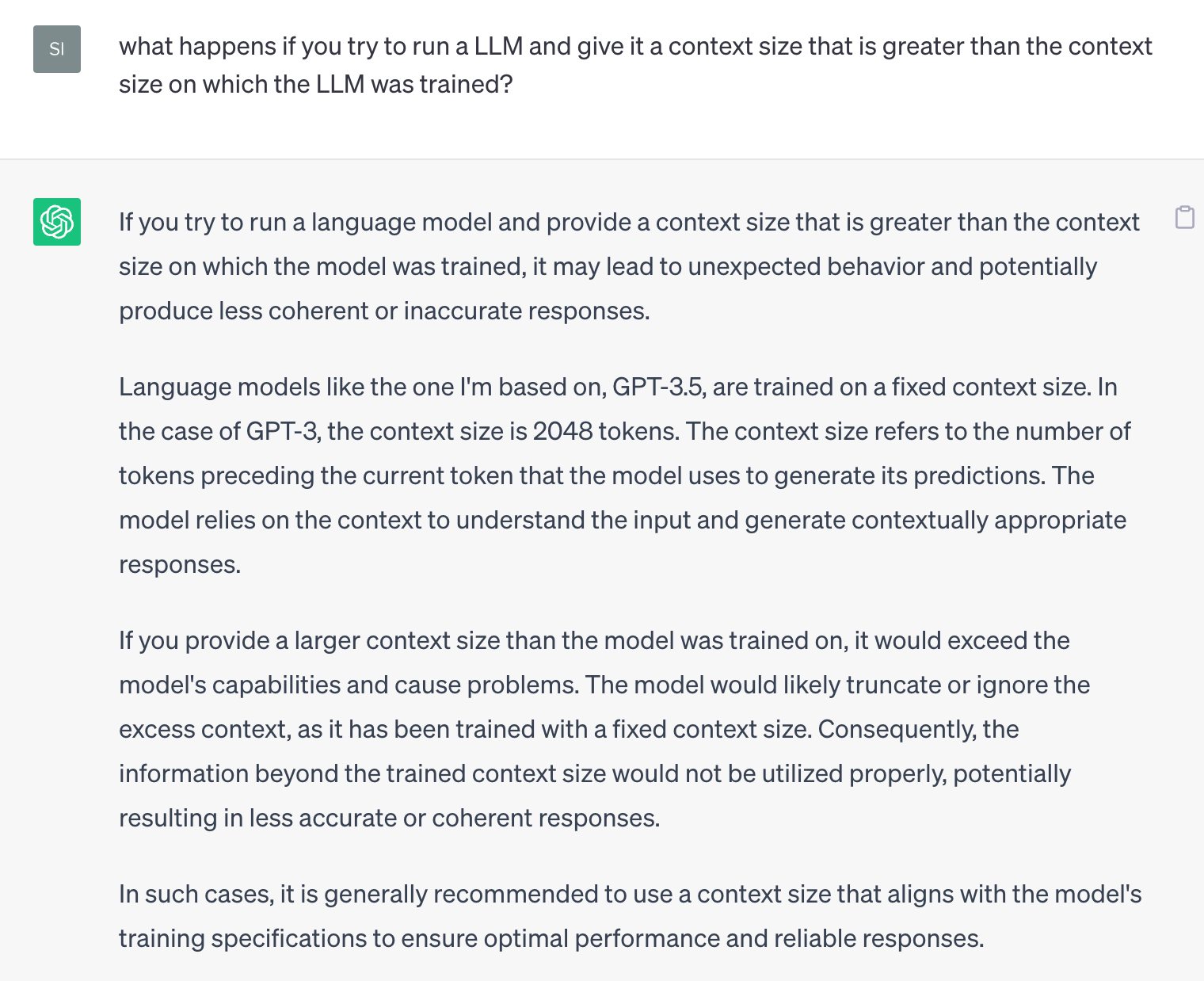
What happens if you run the model with a context size that is greater than the context size on which the model was trained?

How I got it to debug

The only way to understand something is to run and step through the code in a debugger. Below are the steps to debug. Also see this:

create debug build (build/debug directory) followed by below steps in that dir:

cmake -DLLAMA_METAL=ON -DCMAKE_BUILD_TYPE=Debug ../..
cmake --build . --config Debug

DCMAKE_BUILD_TYPE=Debug is the crucial setting. without it, it did not work [1]. I got the tip from here.

After that you can cd to directory of the main executable and from there run:

╰─⠠⠵ lldb main
(lldb) target create "main"
Current executable set to '/llm/llama.cpp/build/debug/bin/main' (x86_64).
(lldb) b /llm/llama.cpp/examples/main/main.cpp:54
Breakpoint 1: where = main`main + 57 at main.cpp:54:26, address = 0x0000000100005799
(lldb) run -m /llm/llama.cpp/models/gpt4-x-vicuna-13B.ggmlv3.q5_1.bin --threads 6 -c 2048 --repeat_penalty 1.0 --color -i -r "User:" -f ../../chat-with-bob.txt --in-prefix " " --verbose-prompt

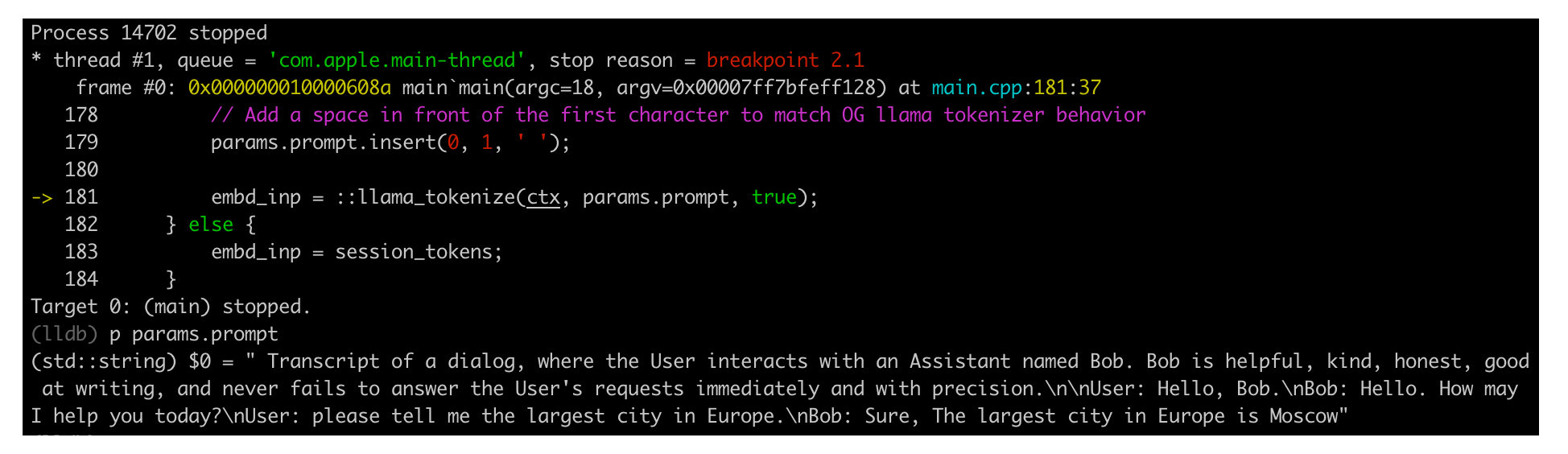
Screenshots:

Search for lldb cheat sheet for a cheat sheet. basic lldb commands:

  • b: set breakpoint
  • c: continue
  • p: print
  • exit: exit
  • run: run the program
Posted in Computers, programming, Software | Tagged , , , | Leave a comment

Setting up Deep Learning VM in GCP – Part 3

Earlier I had setup a deep learning VM in GCP from scratch but it gave me a few issues:

  • Not able to run vicuna with NVIDIA P100 GPU
  • I installed CUDA 12.1 (latest at time of the writing) which was incompatible with GPTQ-for-Llama / AutoGPTQ. The max CUDA version supported by GPTQ-for-LLama / AutoGPTQ is 11.8 (at time of writing)

So I tried installing another VM. Making notes to help me out next time. This time I noted down the shell command which is like this:

#!/bin/bash
#https://cloud.google.com/compute/docs/gpus#a100-gpus
gcloud compute instances create deep-learning-a100 \
    --project=xxx \
    --zone=us-central1-f \
    --machine-type=a2-highgpu-1g \
    --network-interface=stack-type=IPV4_ONLY,subnet=subnet-a,no-address \
    --maintenance-policy=TERMINATE \
    --provisioning-model=STANDARD \
    --service-account=xxx-compute@developer.gserviceaccount.com \
    --scopes=https://www.googleapis.com/auth/cloud-platform \
    --accelerator=count=1,type=nvidia-tesla-a100 \
    --create-disk=auto-delete=yes,boot=yes,device-name=deep-leearning-a100-boot-disk,image=projects/ml-images/global/images/c0-deeplearning-common-cu113-v20230615-debian-11-py310,mode=rw,size=100,type=projects/xxx/zones/us-central1-f/diskTypes/pd-balanced \
    --create-disk=device-name=deep-leearning-a100-data-disk,kms-key=projects/xxx/locations/us-central1/keyRings/compute_keyring_uscentral_1/cryptoKeys/compute_cmek_symmetric_hsm_uscentral-1,mode=rw,name=deep-leearning-a100-data-disk,size=1024,type=projects/xxx/zones/us-central1-f/diskTypes/pd-balanced \
    --no-shielded-secure-boot \
    --shielded-vtpm \
    --shielded-integrity-monitoring \
    --labels=goog-ec-src=vm_add-gcloud \
    --reservation-affinity=any

What it does: provision a a2-highgpu-1g VM that comes with NVIDIA A100 40GB GPU and 85GB RAM. The VM is provisioned in us-central1-f and I also attach a data disk of size 1024GB. The data disk is encrypted with a customer managed encryption key that I created separately. I do not assign any public IP to the VM and use an internal IP. The OS image used to bootstrap the VM is c0-deeplearning-common-cu113-v20230615-debian-11-py310. This gave me Debian 11 with Python 10, git, virtualenv and CUDA 11 pre-installed. I have also given https://www.googleapis.com/auth/cloud-platform scope to the VM which allows applications running on it to access any Google Cloud API.

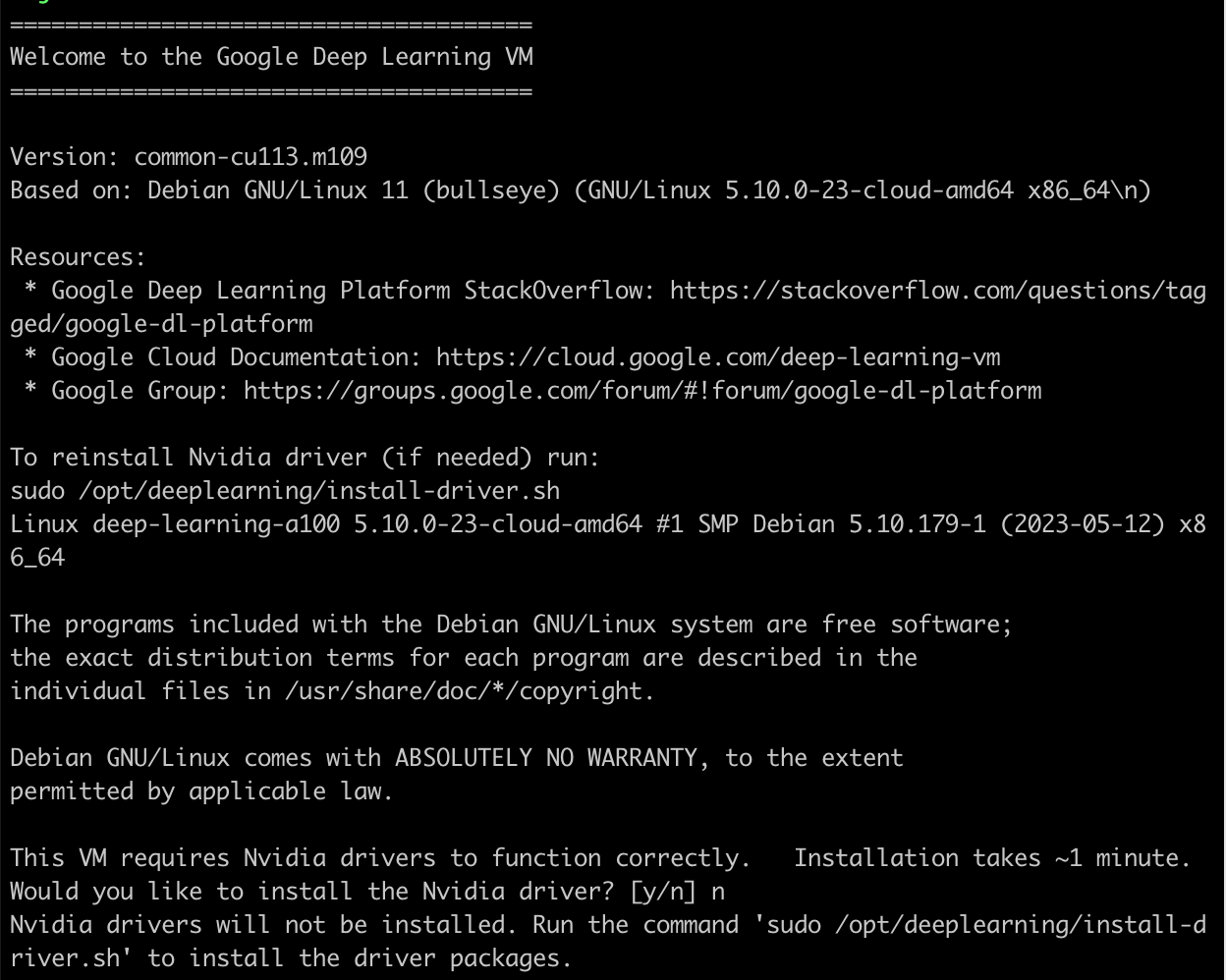
When I ssh-ed to the VM for the first time I saw this message which was misleading:

I did not have to install any drivers. The drivers were already pre-installed in /usr/local/cuda. The nvcc compiler is installed in /usr/local/cuda/bin/nvcc and the nvidia-smi program is installed in /usr/bin/nvidia-smi.

$ nvcc --version
nvcc: NVIDIA (R) Cuda compiler driver
Copyright (c) 2005-2021 NVIDIA Corporation
Built on Mon_May__3_19:15:13_PDT_2021
Cuda compilation tools, release 11.3, V11.3.109
Build cuda_11.3.r11.3/compiler.29920130_0
$ nvidia-smi
Fri Jun 23 17:14:49 2023
+-----------------------------------------------------------------------------+
| NVIDIA-SMI 520.61.05    Driver Version: 520.61.05    CUDA Version: 11.8     |
|-------------------------------+----------------------+----------------------+
| GPU  Name        Persistence-M| Bus-Id        Disp.A | Volatile Uncorr. ECC |
| Fan  Temp  Perf  Pwr:Usage/Cap|         Memory-Usage | GPU-Util  Compute M. |
|                               |                      |               MIG M. |
|===============================+======================+======================|
|   0  NVIDIA A100-SXM...  Off  | 00000000:00:04.0 Off |                    0 |
| N/A   43C    P0    58W / 400W |      0MiB / 40960MiB |     27%      Default |
|                               |                      |             Disabled |
+-------------------------------+----------------------+----------------------+

+-----------------------------------------------------------------------------+
| Processes:                                                                  |
|  GPU   GI   CI        PID   Type   Process name                  GPU Memory |
|        ID   ID                                                   Usage      |
|=============================================================================|
|  No running processes found                                                 |
+-----------------------------------------------------------------------------+

Even with no process consuming GPU I see 27% usage which is a bummer. This did not happen with P100 GPU. Is it because Jupyter is running behind the scenes? I think the error message:

This VM requires Nvidia drivers to function correctly.   Installation takes ~1 minute.
Would you like to install the Nvidia driver? [y/n] n

happens because even though the drivers are installed, they are not there in the PATH. To add them to the PATH, I edited ~/.profile like so:

export TRANSFORMERS_CACHE=/app/.cache
export HF_DATASETS_CACHE=/app/.cache

# https://docs.nvidia.com/cuda/cuda-installation-guide-linux/index.html#environment-setup
export PATH=/usr/local/cuda/bin${PATH:+:${PATH}}
export LD_LIBRARY_PATH=/usr/local/cuda/lib64${LD_LIBRARY_PATH:+:${LD_LIBRARY_PATH}}

In above I am also overriding the default locations which hugging face and transformers will store their assets. This brings me to /app. The data disk I created gets mounted at /home/jupyter automatically. I saw this when I ran:

$ df -h
Filesystem      Size  Used Avail Use% Mounted on
udev             42G     0   42G   0% /dev
tmpfs           8.4G  448K  8.4G   1% /run
/dev/sda1        99G   39G   56G  41% /
tmpfs            42G     0   42G   0% /dev/shm
tmpfs           5.0M     0  5.0M   0% /run/lock
/dev/sda15      124M   11M  114M   9% /boot/efi
/dev/sdb       1007G   18M 1007G   1% /home/jupyter
tmpfs           8.4G     0  8.4G   0% /run/user/1001

so I created a symlink to /home/jupyter:

$ sudo ln -s /home/jupyter /app
$ sudo chown me /app

I have to say this was a much smoother experience for me. After this, I was able to do deep learning programming as usual. Lessons learnt:

  • Do NOT install a version of CUDA that is more recent than what comes with PyTorch. You can see the latest CUDA supported by PyTorch here.
  • The OS image c0-deeplearning-common-cu113-v20230615-debian-11-py310 took a lot of the pain out compared to previous time. This gave me Debian 11 with Python 10, git, virtualenv and CUDA 11 pre-installed. Only thing you need to do is add paths to CUDA in your ~/.profile.

The only suboptimal thing was the additional disk gets automatically mounted at this weird location /home/jupyter. I guess I can live with that.

Posted in Computers, programming, Software | Tagged , , | Leave a comment

Setting up Deep Learning VM in GCP – Part 2

In first part, we provisioned a VM. Today we will go over next steps.

Install latest Python

The VM will come with a version of Python pre-installed. Check if the version is sufficient for your needs. If not, you can install latest version of Python using pyenv. Before using pyenv install its dependencies.

Then install python3-venv and python3-dev:

$ sudo apt install python3-venv
$ sudo apt install python3-dev

Install NVIDIA device drivers

In my case I did this by running this script from here:

$ sudo python3 install_gpu_driver.py

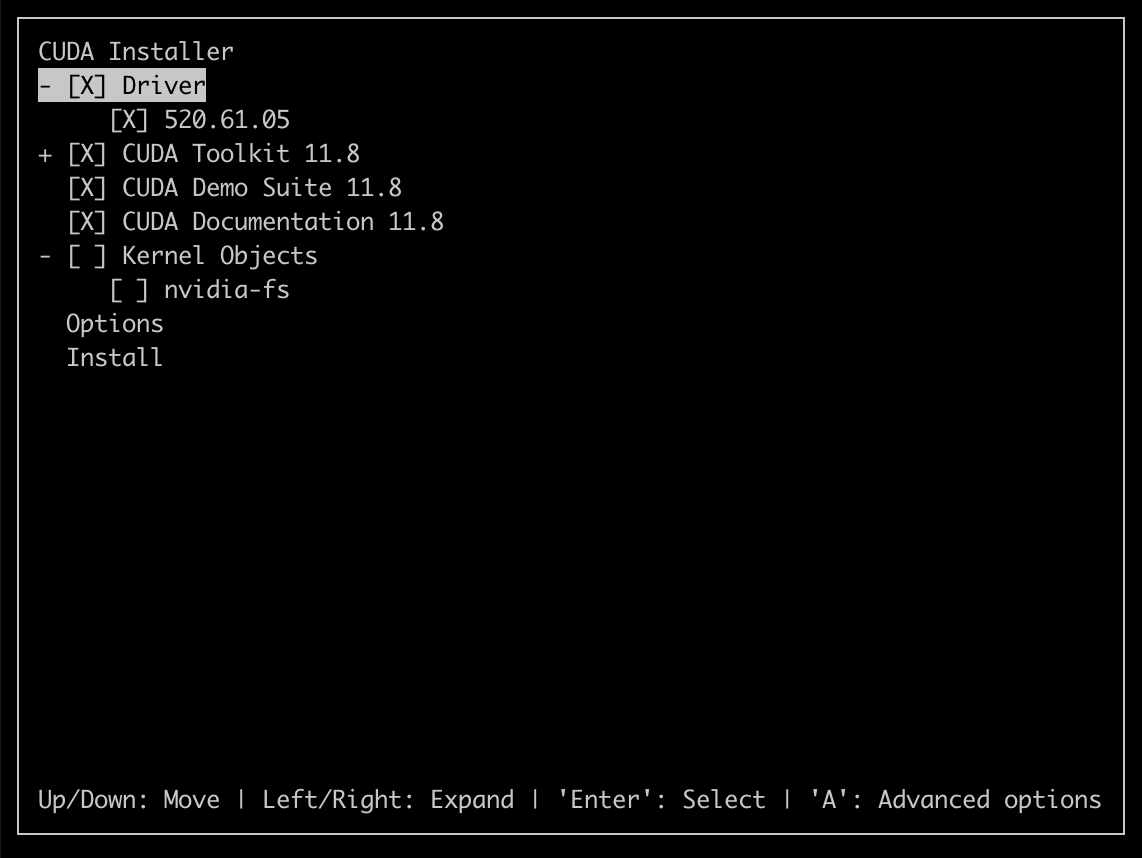
Later on I realized this installs the device drivers but not the development tools such as nvcc – the CUDA compiler. Do NOT make this mistake in future. You only need to install the CUDA Toolkit. It will install the drivers as well. See Screenshot later in the article.

After this I installed libvulkan1:

$ sudo apt install libvulkan1

Verify installation by running:

$ nvidia-smi

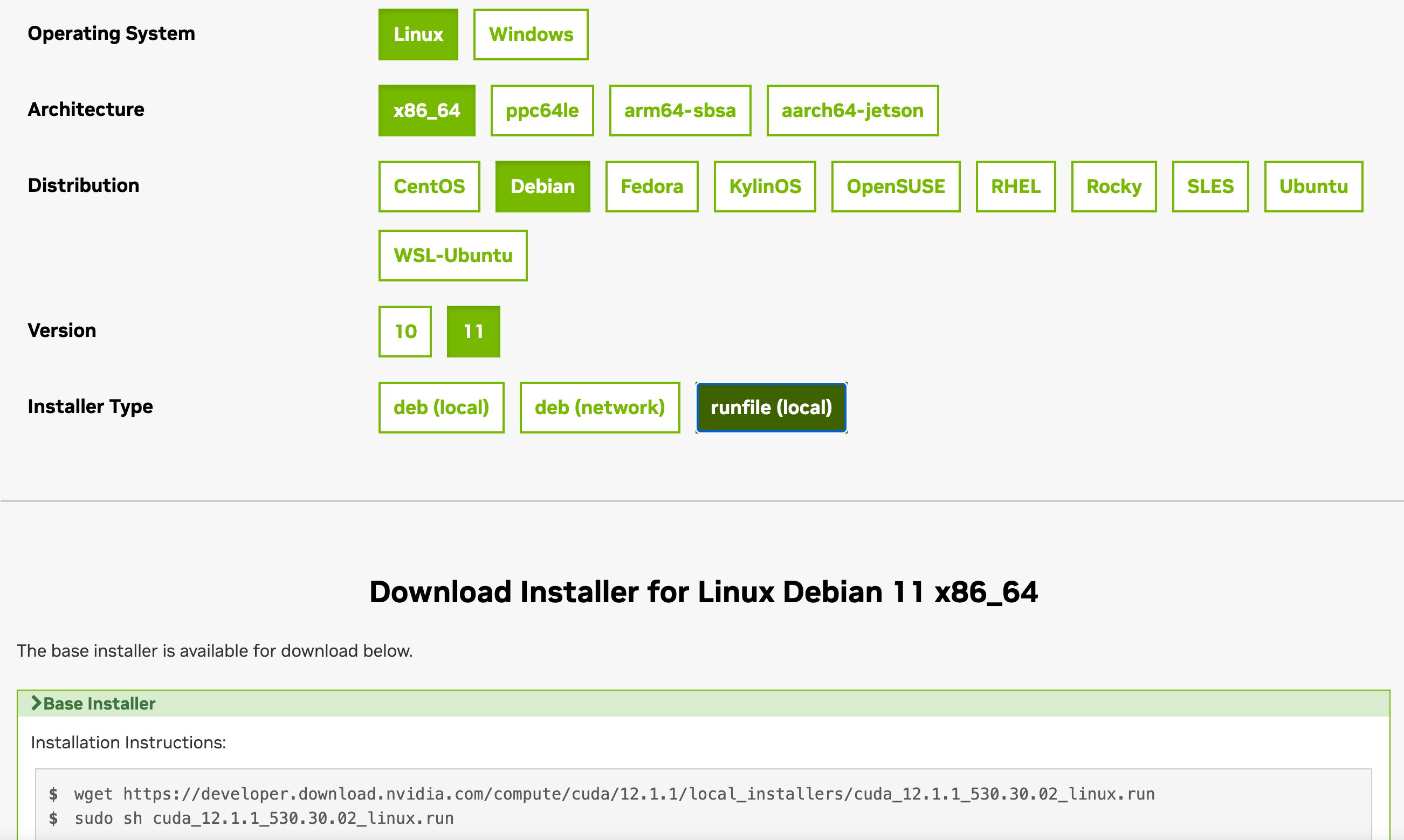
To get nvcc I had to install the CUDA toolkit which I did by following these steps:

The CUDA Toolkit will install drivers as well as NVIDIA compiler tools:

There is an important post-installation step that needs to be done which is to modify your ~./profile (or another file as the case may be) as per the instructions here:

export PATH=/usr/local/cuda-12.1/bin${PATH:+:${PATH}}
export LD_LIBRARY_PATH=/usr/local/cuda-12.1/lib64\
                         ${LD_LIBRARY_PATH:+:${LD_LIBRARY_PATH}}

You can verify your installation by running:

$ nvcc --version

Set Transformers Cache

I have a separate data disk mounted at /app. Set the transformers cache in ~/.profile:

export TRANSFORMERS_CACHE=/app/.cache
Posted in Computers, programming, Software | Tagged , , , , | Leave a comment