ASCII art generation on Mac using FIGlet

FIGlet is a program that creates large characters out of ordinary
screen characters

 _ _ _          _   _     _
| (_) | _____  | |_| |__ (_)___
| | | |/ / _ \ | __| '_ \| / __|
| | |   <  __/ | |_| | | | \__ \_
|_|_|_|\_\___|  \__|_| |_|_|___(_)

These days you can use online websites like this to generate the art for you but if you want to install the program on your computer and run it from a terminal you can do so by following below steps:

  1. Clone the git repo
  2. add #include<getopt.h> to figlet.c
  3. run sudo make install

This will install figlet under /usr/local/bin directory and fonts will be under /usr/local/share/figlet. You can download more from http://www.jave.de/figlet/figletfonts40.zip. Unzip the file and copy the contents to /usr/local/share/figlet.

copy -n *.* /usr/local/share/figlet/.

The -n option prevents overwriting existing files. Once installed you run like this:

/usr/local/bin/figlet -f big

Here big is the font name. Run /usr/local/bin/showfigfonts to see what all the fonts look like.
/usr/local/bin/figlist will list all the installed fonts.

Further Reading: https://www.linkedin.com/pulse/creating-ascii-text-banners-linux-terminal-ali-imran-nagori-ojjbf

Posted in Computers, programming, Software | Tagged | Leave a comment

Spring Boot controller not working

Some tips to help you debug Spring controller not working. There can be many reasons why this can happen. Here is a checklist:

  1. Have you put appropriate annotations on your class(es)? Putting the SpringApplication annotation will enable Spring Boot autowiring on the package and its sub-packages.
  2. If you are building an uber jar, unzip the jar and verify it meets the Spring Boot executable jar format.
  3. If all else fails, there is no option but to step through the code to see why its not behaving as expected. Run the Spring application in debug mode like this:
LOGGING_LEVEL_ROOT=DEBUG \
java -agentlib:jdwp=transport=dt_socket,server=y,suspend=y,address=\*:5005 \
-Dlogging.level.root=debug ...

In separate terminal window type:

jdb -attach 5005

Now you want to set a breakpoint at org.springframework.context.annotation.ClassPathBeanDefinitionScanner.doScan:

stop at org.springframework.context.annotation.ClassPathBeanDefinitionScanner.doScan

Then run the application by typing run:

run

This will start running the application and break when it hits doScan which scans class(es) for bean definitions. A sample call stack looks like this for reference:

[1] org.springframework.boot.loader.net.protocol.jar.JarUrlClassLoader.findResources (JarUrlClassLoader.java:79)
  [2] java.lang.ClassLoader.getResources (ClassLoader.java:1,483)
  [3] org.springframework.core.io.support.PathMatchingResourcePatternResolver.doFindAllClassPathResources (PathMatchingResourcePatternResolver.java:382)
  [4] org.springframework.core.io.support.PathMatchingResourcePatternResolver.findAllClassPathResources (PathMatchingResourcePatternResolver.java:365)
  [5] org.springframework.core.io.support.PathMatchingResourcePatternResolver.getResources (PathMatchingResourcePatternResolver.java:334)
  [6] org.springframework.core.io.support.PathMatchingResourcePatternResolver.findPathMatchingResources (PathMatchingResourcePatternResolver.java:558) -->
  [7] org.springframework.core.io.support.PathMatchingResourcePatternResolver.getResources (PathMatchingResourcePatternResolver.java:330)
  [8] org.springframework.context.support.AbstractApplicationContext.getResources (AbstractApplicationContext.java:1,442)
  [9] org.springframework.context.support.GenericApplicationContext.getResources (GenericApplicationContext.java:262)
  [10] org.springframework.context.annotation.ClassPathScanningCandidateComponentProvider.scanCandidateComponents (ClassPathScanningCandidateComponentProvider.java:422)
  [11] org.springframework.context.annotation.ClassPathScanningCandidateComponentProvider.findCandidateComponents (ClassPathScanningCandidateComponentProvider.java:317)
  [12] org.springframework.context.annotation.ClassPathBeanDefinitionScanner.doScan (ClassPathBeanDefinitionScanner.java:276)
  [13] org.springframework.context.annotation.ComponentScanAnnotationParser.parse (ComponentScanAnnotationParser.java:128)
  [14] org.springframework.context.annotation.ConfigurationClassParser.doProcessConfigurationClass (ConfigurationClassParser.java:289)
  [15] org.springframework.context.annotation.ConfigurationClassParser.processConfigurationClass (ConfigurationClassParser.java:243)
  [16] org.springframework.context.annotation.ConfigurationClassParser.parse (ConfigurationClassParser.java:196)
  [17] org.springframework.context.annotation.ConfigurationClassParser.parse (ConfigurationClassParser.java:164)
  [18] org.springframework.context.annotation.ConfigurationClassPostProcessor.processConfigBeanDefinitions (ConfigurationClassPostProcessor.java:415)
  [19] org.springframework.context.annotation.ConfigurationClassPostProcessor.postProcessBeanDefinitionRegistry (ConfigurationClassPostProcessor.java:287)
  [20] org.springframework.context.support.PostProcessorRegistrationDelegate.invokeBeanDefinitionRegistryPostProcessors (PostProcessorRegistrationDelegate.java:344)
  [21] org.springframework.context.support.PostProcessorRegistrationDelegate.invokeBeanFactoryPostProcessors (PostProcessorRegistrationDelegate.java:115)
  [22] org.springframework.context.support.AbstractApplicationContext.invokeBeanFactoryPostProcessors (AbstractApplicationContext.java:779)
  [23] org.springframework.context.support.AbstractApplicationContext.refresh (AbstractApplicationContext.java:597)
  [24] org.springframework.boot.web.servlet.context.ServletWebServerApplicationContext.refresh (ServletWebServerApplicationContext.java:146)
  [25] org.springframework.boot.SpringApplication.refresh (SpringApplication.java:738)
  [26] org.springframework.boot.SpringApplication.refreshContext (SpringApplication.java:440)
  [27] org.springframework.boot.SpringApplication.run (SpringApplication.java:316)
  [28] org.springframework.boot.SpringApplication.run (SpringApplication.java:1,306)
  [29] org.springframework.boot.SpringApplication.run (SpringApplication.java:1,295)

The best resource I found to learn Spring internals is this talk.

Other Useful Information

Running Spring boot application without Maven

The challenge is how to get the classpath? Today I learned this command from ChatGPT:

tr '\0' ' ' < /proc/<PID>/cmdline

Its an incredibly useful command as it shows the command that launched a Linux process. E.g., when you run a spring boot application using mvn spring-boot:run, above command can reveal the command that Maven runs behind-the-scenes that actually spins up the java process. It looks like this e.g.:

java -classpath /home/ubuntu/apache-maven-3.9.9/boot/plexus-classworlds-2.8.0.jar -Dclassworlds.conf=/home/ubuntu/apache-maven-3.9.9/bin/m2.conf -Dmaven.home=/home/ubuntu/apache-maven-3.9.9 -Dlibrary.jansi.path=/home/ubuntu/apache-maven-3.9.9/lib/jansi-native -Dmaven.multiModuleProjectDirectory=/home/ubuntu/project-dir org.codehaus.plexus.classworlds.launcher.Launcher spring-boot:run -Dspring-boot.run.jvmArguments=-Djava.library.path=lib -DJWT_SECRET_KEY= -Dspring-boot.run.main-class=my.web.WebApplication -Dspring-boot.run.arguments=--server.port=8080 

It looks like there are 2 java processes that are spawned. One is above and there is yet another java process that is like below:

java -XX:TieredStopAtLevel=1 -Djava.library.path=lib -DJWT_SECRET_KEY= -cp <full_class_path> my.web.WebApplication --server.port=8080

This is incredibly useful as it gives you the full classpath you need if you later want to launch without Maven. Many times I have to use Maven just to launch an application as constructing the humungous classpath is impossible manually.

Pro Tip: Btw you do not want -XX:TieredStopAtLevel=1. In pom.xml always set optimizedLaunch=false (yes intuitively it feels wrong but is the right thing to do) under Spring-Boot-Maven-plugin:

<plugin>
				<groupId>org.springframework.boot</groupId>
				<artifactId>spring-boot-maven-plugin</artifactId>
				<configuration>
					<optimizedLaunch>false</optimizedLaunch>                        
                </configuration>
			</plugin>

It will get rid of -XX:TieredStopAtLevel=1 when the spring boot maven plugin launches your application.

Posted in Computers, programming, Software | Tagged , , | Leave a comment

Comparing two methods for uploading a file to a server

This post shows two ways you can upload a file to a Spring web application. I do not show the full code but parts of it.

Method 1 – using multipart/form-data

server code:

@PostMapping("/fileUpload")
public ResponseEntity<String> handleMultipartFileUpload(@RequestPart("file") MultipartFile file) {
    if (file.isEmpty()) {
        return ResponseEntity.badRequest().body("File is empty");
    }

    try {
        long t0 = System.currentTimeMillis();
        // Process the file here
        byte[] bytes = file.getBytes();
        String checksum = Utils.calculateMD5(bytes);
        logger.info("received {} bytes with checksum {} in {} ms", bytes.length, checksum, System.currentTimeMillis() - t0);
        
        return ResponseEntity.ok("File uploaded successfully");
    } catch (Exception e) {
        e.printStackTrace();
        return ResponseEntity.status(HttpStatus.INTERNAL_SERVER_ERROR).body("Error uploading file");
    }
}

client code:

with open('sample_file.txt', 'rb') as f:
    files = {'file': f}
    response = requests.post(file_upload_url, files=files)

# Printing the response
print(response.status_code)
print(response.text)

this method corresponds to following OpenAPI spec:

requestBody:
    required: true
    content:
        multipart/form-data:
        schema:
            type: object
            properties:
            file:
                type: string
                format: binary

Method 2 – using application/octet-stream

server code:

@PostMapping(value = "/binaryUpload",
consumes = MediaType.APPLICATION_OCTET_STREAM_VALUE)
public ResponseEntity<String> handleBinaryUpload(HttpServletRequest httpServletRequest) {
    try {
        long t0 = System.currentTimeMillis();
        var inputStream = httpServletRequest.getInputStream();
        Checksum checksum = Utils.calculateMD5(inputStream);
        logger.info("received {} bytes with checksum {} in {} ms", checksum.length(), checksum.checksum(), System.currentTimeMillis() - t0);
        return ResponseEntity.ok("File uploaded successfully");
    } catch (Exception e) {
        e.printStackTrace();
        return ResponseEntity.status(HttpStatus.INTERNAL_SERVER_ERROR).body("Error uploading file");
    }
}

client code:

with open('sample_file.txt', 'rb') as f:
    response = requests.post(binary_upload_url, data=f, headers={'Content-Type': 'application/octet-stream'})

# Printing the response
print(response.status_code)
print(response.text)

this method corresponds to following OpenAPI spec:

requestBody:
    required: true
    content:
        application/octet-stream:
        schema:
            type: string
            format: binary

Comparison

Method 1 gave me following error when I used a large file:

org.springframework.web.multipart.MaxUploadSizeExceededException: Maximum upload size exceeded

It can be fixed by adding following to application.properties [1]:

spring.servlet.multipart.max-file-size=10MB
spring.servlet.multipart.max-request-size=10MB
server.tomcat.max-swallow-size=100MB

With this I was able to upload my test file:

MainController          : received 5646730 bytes with checksum 715a149541e7cf0995b341a2b18d3bfe in 12 ms

However how big is too big? where should the cap be?

Method 2 works as well:

MainController          : received 5646730 bytes with checksum 715a149541e7cf0995b341a2b18d3bfe in 11 ms

in addition it does not require tweaking maximum file upload limit. It seems superior and better choice for sending very large blobs to a server. On the other hand sending a file as multipart/form-data will allow you to access metadata about the file on the server [1]. Also checkout this question on SO.

This answer re: multipart/form-data on SO says:

It does not split huge files into parts.

With Method 2 I was able to upload 4GB file to the server without errors:

MainController          : received 3848008288 bytes with checksum 8c22ba24008740228b73731969546db8 in 6529 ms

I think this method will also lend itself to the case when the client is NOT uploading a file from disk but rather connecting to a BLOB storage like AWS S3 and wants to ingest a blob from there (i.e., upload the blob to your server without having to save it to local disk). TODO: test it.

Posted in Computers, programming, Software | Leave a comment

Understanding internals of java-llama.cpp

In an earlier article we covered internals of llama.cpp. What if you want to use this library but from a Java application? Luckily you can thanks to java-llama.cpp. In this article we cover some of the internals of java-llama.cpp so you understand how it works.

You can use java-llama.cpp by adding following to your pom.xml:

<dependency>
    <groupId>de.kherud</groupId>
    <artifactId>llama</artifactId>
    <version>2.2.1</version>
</dependency>

How java-llama.cpp works

If you unpack the jar file that comes with the Maven artifact, you will see following files [1]:

> tar -xvf ~/.m2/repository/de/kherud/llama/2.2.1/llama-2.2.1.jar
x META-INF/
x META-INF/MANIFEST.MF
x de/
x de/kherud/
x de/kherud/llama/
x de/kherud/llama/Windows/
x de/kherud/llama/Windows/x86_64/
x de/kherud/llama/Linux/
x de/kherud/llama/Linux/aarch64/
x de/kherud/llama/Linux/x86_64/
x de/kherud/llama/Mac/
x de/kherud/llama/Mac/aarch64/
x de/kherud/llama/Mac/x86_64/
x de/kherud/llama/LlamaModel$Output.class
x de/kherud/llama/OSInfo.class
x de/kherud/llama/Windows/x86_64/jllama.dll
x de/kherud/llama/Windows/x86_64/llama.dll
x de/kherud/llama/LlamaModel$1.class
x de/kherud/llama/LlamaModel$LlamaIterator.class
x de/kherud/llama/InferenceParameters$1.class
x de/kherud/llama/InferenceParameters$MiroStat.class
x de/kherud/llama/LogLevel.class
x de/kherud/llama/ProcessRunner.class
x de/kherud/llama/ModelParameters$Builder.class
x de/kherud/llama/Linux/aarch64/libllama.so
x de/kherud/llama/Linux/x86_64/libllama.so
x de/kherud/llama/Linux/x86_64/libjllama.so
x de/kherud/llama/InferenceParameters.class
x de/kherud/llama/LlamaLoader.class
x de/kherud/llama/LlamaModel.class
x de/kherud/llama/InferenceParameters$Builder.class
x de/kherud/llama/ModelParameters$1.class
x de/kherud/llama/ModelParameters.class
x de/kherud/llama/LlamaException.class
x de/kherud/llama/Mac/aarch64/libllama.dylib
x de/kherud/llama/Mac/aarch64/libjllama.dylib
x de/kherud/llama/Mac/aarch64/ggml-metal.metal
x de/kherud/llama/Mac/x86_64/libllama.dylib
x de/kherud/llama/Mac/x86_64/libjllama.dylib
x de/kherud/llama/Mac/x86_64/ggml-metal.metal
x META-INF/maven/
x META-INF/maven/de.kherud/
x META-INF/maven/de.kherud/llama/
x META-INF/maven/de.kherud/llama/pom.xml
x META-INF/maven/de.kherud/llama/pom.properties

We can see there are two key pre-built dlls (I will use the term dll which stands for dynamic link library irrespective of the platform – Windows, Mac or Linux) which ship with the library. E.g., for MacOS they are:

  • libllama.dylib: This dll is built by compiling llama.cpp source code. The source code has to be compiled differently for different platforms, hence you have separate dlls for each platform. This is the dll which does the heavy lifting.
  • libjllama.dylib: This dll is built by compiling the C++ code in src/main/cpp.

The purpose of the code in src/main/cpp is to provide a JNI wrapper or shim using which C++ code in llama.cpp (in libllama.dylib to be more accurate) can be called from Java. And so this is how it works.

How are the dlls built?

Both dlls are built by this file and you have to run cmake to build the dlls as we are compiling C++ code not Java. The dlls are saved under ${CMAKE_SOURCE_DIR}/src/main/resources/de/kherud/llama/${OS_NAME}/${OS_ARCH}. Most of the code in this file has to do with building src/main/cpp. Where is the code that is building llama.cpp? It is this line:

include(build-args.cmake)

which ends up including this file.

Here you can verify that by default

set(LLAMA_METAL_DEFAULT ON)

so the pre-built dll for Mac has GPU acceleration built into it but not for windows.

Note that when you are using java-llama.cpp you are using a version of llama.cpp built using a CMake file that is different from the original. The original CMake file can be found here. You can compare the two for differences and this will come in handy when debugging any issues related to differences between behavior of official llama.cpp vs. java-llama.cpp.

How are the dlls loaded?

The dlls are loaded at runtime by this code:

static synchronized void initialize() throws UnsatisfiedLinkError {

There are native methods declared here:

private native void loadModel(String filePath, ModelParameters parameters) throws LlamaException;

the native keyword is used to declare a method that is implemented in platform-dependent, non-Java code, typically written in another programming language such as C or C++. Minimal example here.

Getting GPU acceleration

By default this library will not provide GPU acceleration [1]:

We support CPU inference for the following platforms out of the box

If none of the above listed platforms matches yours, currently you have to compile the library yourself (also if you want GPU acceleration, see below)

To get GPU acceleration, you have to build two custom dlls:

  • Linux: libllama.so, libjllama.so
  • MacOS: libllama.dylib, libjllama.dylib, ggml-metal.metal
  • Windows: llama.dll, jllama.dll

[lib]llama.dll|dylib|so is the dll corresponding to llama.cpp which does the actual heavy work. [lib]jllama.dll|dylib|so is a wrapper that provides interop between Java and C++ code

and set de.kherud.llama.lib.path system property to where system can find these dlls when you run your Java application. for example -Dde.kherud.llama.lib.path=/directory/containing/lib.

Not only that, the system should be able to load OpenCL and CLBlast dlls at runtime (we use OpenCL and CLBlast on Windows). So paths to those dlls need to be added to the PATH environment variable [1].

Common Steps for Mac and Windows

  1. clone java-llama.cpp
  2. checkout a tag so you are compiling against a well-known release
git checkout v2.2.1
  1. download llama.cpp source code
git submodule update --init --recursive

In later versions of java-llama.cpp (e.g., 2.3.4) you do not have to run above command. Instead the CMake file has been modified so it will do it for you:

FetchContent_Declare(
	llama.cpp
	GIT_REPOSITORY https://github.com/ggerganov/llama.cpp.git
	GIT_TAG        b1645
)
FetchContent_MakeAvailable(llama.cpp)

Refer this for how it works.

Below we cover individual steps for Mac and Windows.

Windows

  1. Build. When in doubt refer to build instructions of llama.cpp [1]. Below we are building against OpenCL to get GPU acceleration on an Intel GPU.
set CL_BLAST_CMAKE_PKG="C:/Program Files/CLBlast-1.6.1-windows-x64/lib/cmake/CLBlast"
mkdir build
cd build
cmake .. -DBUILD_SHARED_LIBS=OFF -DLLAMA_CLBLAST=ON -DCMAKE_PREFIX_PATH=%CL_BLAST_CMAKE_PKG% -G "Visual Studio 17 2022" -A x64
cmake --build . --config Release

The commands above will change for Mac. That is the only difference between Windows and Mac. For Mac you will perform a Metal build. Refer section on Mac.

Verify:

  jllama.vcxproj -> C:\Users\siddj\code\java-llama.cpp\src\main\resources\de\kherud\llama\Windows\x86_64\jllama.dll
c:\Users\siddj\code\java-llama.cpp\build>ls ..\src\main\resources\de\kherud\llama\Windows\x86_64
jllama.dll  llama.dll

Mac

As mentioned before, for Mac GPU acceleration is enabled by default so you don’t need to do anything but we cover steps for completeness.

In latest code:

On MacOS, Metal is enabled by default.

debug build:

cmake -DLLAMA_METAL=ON -DCMAKE_BUILD_TYPE=Debug ../..
cmake --build . --config Debug

release build:

cmake -DLLAMA_METAL=ON ../..
cmake --build . --config Release
Posted in Computers, programming, Software | Tagged | Leave a comment

Understanding internals of MapDB

MapDB is a popular persistent key-value store written entirely in Java and Kotlin. It is the top choice amongst SO users for a Java based persistent KV store [1], its Github repo has 4.8k stars and it comes with minimal dependencies (mainly Guava, Eclipse Collections and net.jpountz.lz4:lz4) so it definitely has something going for it.

Now lets come to the not-so-rosy facts. AFAICT, you can’t create transactions like you do with MySQL or Postgres. There is only support for a single global transaction. Its mostly developed by just 1 person. He doesn’t answer questions most of the time. I don’t blame him. His business model is to give away MapDB for free and then charge for consulting. He has to monetize somehow. The documentation is not great. More dangerous is the fact that it is not up to date (an euphemistic way of saying its inaccurate). The author made announcements of a v4 in 2017 and after 7 years we have yet to see any code, just empty repos [1]!

In this post I try to unpack what I have learnt about how MapDB works. A MapDB KV store can have two backing implementations:

There is also IndexTreeList (not to be confused with IndexTreeListJava – this is why I don’t like this library as the code is so hacky with confusing names, part Java, part Kotlin and so on) which is supposed to provide persistent AbstractList but its not KV store and we do not cover it here.

An HTreeMap is created using [1]:

db.hashMap

which will make a call to HashMapMaker:

class HashMapMaker<K,V>(
            protected override val db:DB,
            protected override val name:String,
            protected val hasValues:Boolean=true,
            protected val _storeFactory:(segment:Int)->Store = {i-> db.store}
    ):Maker<HTreeMap<K,V>>(){

whereas a BTreeMap is created using [1]:

db.treeMap

which will call TreeMapMaker:

class TreeMapMaker<K,V>(
            protected override val db:DB,
            protected override val name:String,
            protected val hasValues:Boolean=true
    ):Maker<BTreeMap<K,V>>(){

HTreeMap vs. BTreeMap

In my tests, the HTreeMap outperformed the BTreeMap. YMMV depending on the workload and read-write patterns. Later, I provide some arguments why this is so. In below, we will delve more into the HTreeMap. I will try to unpack BTreeMap later if I am able to but basically its a concurrent B-tree implemented according to [1]

HTreeMap takeaways

  • HTreeMap combines the hashing of a HashMap with the tree data structure of a TreeMap. Hence the name HTreeMap.
  • The data does not need to be rehashed as the HTreeMap grows because the capacity of underlying treemap (max # of keys it can contain) is fixed. This requires mapping the potentially infinite universe of keys to a finite set and is the reason for hashing the keys.
  • The “not need to be rehashed” property is NOT because a treemap is used. HTreeMap could have used a fixed size hashtable (array) and keys would not need rehashing as a result.
  • The reason for using a treemap instead of a hashtable (array) is so that we have a sparse data structure where we allocate space only as necessary. Using an array (hashtable) would have meant allocating space for the entire array even if you stored just a handful of values in the HTreeMap.
HashMap TreeMap HTreeMap
keys are hashed keys are not hashed keys are hashed
uses array (the hashtable) uses a tree uses a tree
uses variable height red-black tree uses a fixed height N-ary tree
size is unbounded size is bounded

The HTreeMap is an array of MutableLongLongMaps [1]:

val indexTrees: Array<MutableLongLongMap>

MutableLongLongMap is a Map where both the key and value are long. Note that MutableLongLongMap is an interface. In reality, a sublass of MutableLongLongMap is stored in the array. This subclass is the IndexTreeLongLongMap and when you read index tree in MapDB documentation, it is referring to this class.

The function that seems to do most of the heavy work when a KV pair is inserted into a HTreeMap is this:

protected fun putprotected(hash:Int, key:K, value:V, triggered:Boolean):V?{

Understand this function and you understand how HTreeMap works. There is a documentation page on HTreeMap. It says:

HTreeMap is a segmented Hash Tree. Unlike other HashMaps it does not use fixed size Hash Table, and does not rehash all data when Hash Table grows. HTreeMap uses auto-expanding Index Tree, so it never needs resize. It also occupies less space, since empty hash slots do not consume any space. On the other hand, the tree structure requires more seeks and is slower on access. Its performance degrades with size TODO at what scale?.

The hash table equivalent that powers an HTreeMap is IndexTreeLongLongMap. It is a persistent KV store implemented as a tree map not as a hash table. A hash table has to rehash all the keys when the size of the underlying array changes (this is because the result of the hash function has to be “modded” (a mod b) by the array size to map it to an element in the array) but IndexTreeLongLongMap does not need to rehash the keys which is a win. How come it does not need to rehash? Because the capacity of the tree (max # of nodes it can contain) is fixed. The auto-expanding feature will be understood when we cover internals of IndexTreeLongLongMap. We will revisit this paragraph later when we have fully unpacked IndexTreeLongLongMap.

Concurrency is implemented by using multiple segments, each with separate read-write lock. Each concurrent segment is independent, it has its own Size Counter, iterators and Expiration Queues. Number of segments is configurable. Too small number will cause congestion on concurrent updates, too large will increase memory overhead.

The number of segments is the size of the indexTrees array. It is a fixed-size array not dynamic. The size of the array is controlled by the concShift variable which is the power of 2 to be raised to give the array size. We see that happening here:

indexTrees: Array<MutableLongLongMap> = Array(1.shl(concShift), { i->IndexTreeLongLongMap.make(stores[i], levels=levels, dirShift = dirShift)}),

1.shl(concShift) is how you raise 2 to a power in Kotlin.

HTreeMap uses Index Tree instead of growing Object[] for its Hash Table. Index Tree is sparse array like structure, which uses tree hierarchy of arrays. It is sparse, so unused entries do not occupy any space. It does not do rehashing (copy all entries to bigger array), but also it can not grow beyond its initial capacity.

The Object[] in above is reference to how an in-memory hash table is implemented in Eclipse Collections for example. It uses an object array underneath [1]. HTreeMap on the other hand is powered by a persistent TreeMap like data structure. This difference is key in understanding HTreeMap. It does not use a backing array (we shall see why later on) but instead maintains the keys in a tree (called as the index tree in documentation).

HTreeMap layout is controlled by layout function. It takes three parameters:

concurrency, number of segments. Default value is 8, it always rounds-up to power of two.

we covered this earlier. here he is refering to the concShift variable. The default value is 3 [1] which gives 2**3=8 segments.

maximal node size of Index Tree Dir Node. Default value is 16, it always rounds-up to power of two. Maximal value is 128 entries.

This is reference to HTREEMAP_DIR_SHIFT which is equal to 7 in latest code. I think the node size is given by 2**7 and is 128 now by default. Node size is simply the # of children of a node.

number of Levels in Index Tree, default value is 4

this most-likely refers to HTREEMAP_LEVELS.

Maximal Hash Table Size is calculated as: segment * node size ^ level count. The default maximal Hash Table Size is 8*16^4= 0.5 million entries. TODO too low?

This is indeed too low. But if we use the latest values in the code, we get 8*128^4=2^31=2,147,483,648 or 2 billion. This is likely enough. The take-away here is that there is a pre-defined upper bound on the # of KV pairs that you can store in a HTreeMap. Hopefully, we trust that the actual storage consumed is a function of # of elements in the HTreeMap, not the upper bound. That would be catastrophic.

Note that node size ^ level count formula is approximate. Given a tree with L levels and N children per node (which is what an IndexTreeLongLongMap boils down to), the total number of nodes is given by:

S = N^0 + N^1 + N^2 + ... + N^L
  = (N^(L+1) - 1) / (N - 1)  

With N=128 and L=4 this gives S=270,549,121. N^L is equal to the # of leaf-nodes in the tree and the max # of keys the tree can accommodate as we shall see.

The function that converts an element’s index to position in the tree at given level is given by [1]:

protected static int treePos(int dirShift, int level, long index) {
    int shift = dirShift*level;
    return (int) ((index >>> shift) & ((1<<dirShift)-1));
}

I am not going to try to make sense out of it but try if you can.

We covered a lot but we still don’t know what IndexTreeLongLongMap stores. As I understand it, it stores a mapping of the hash(key) to the record id abbreviated as recid. Think of recid as pointer to where the record is located in a slotted page structure. Once you have the recid, looking up a record in the data file by its recid is an O(1) operation. My guess is that StoreDirect class is an implementation of this slotted page structure or at least the slotted page structure is a good mental model of StoreDirect. This is where my understanding and grasp of MapDB breaks down and not really sure what’s going on. The slotted page structure is just how data is laid out on disk and independent of B-tree data structure. Both the HTreeMap and BTreeMap use StoreDirect to store records (the actual data). The difference between the two is how they determine the recid needed to lookup a record. In case of BTreeMap it uses a B-link tree which is basically a concurrent version of B+ tree, whereas HTreeMap is using a hash tree map provided by IndexTreeLongLongMap. IndexTreeLongLongMap implements org.eclipse.collections.api.map.primitive.MutableLongLongMap. Note BTreeMap does not use IndexTreeLongLongMap.

Understanding IndexTreeLongLongMap

Let’s first do a recap: HTreeMap works by storing key-value pairs (records) in a data file (an instance of StoreDirect class). To lookup a record by its id (an O(1) operation – the record id is simply the record’s offset in the file), it maintains the mapping of hash(key) -> recid in an IndexTreeLongLongMap. Why does it not maintain a mapping of key -> recid instead? we will see.

Consider following questions:

  1. What data is stored in the nodes of this tree?
  2. Is there any well-known data structure that IndexTreeLongLongMap.kt maps to?
  3. How do you manage that the tree only takes up space equal to actual elements in the tree not the upper fixed bound N^L?

As I understand:

  1. IndexTreeLongLongMap stores the mapping from hash(key) to the record id recid. Think of recid as offset or pointer to data corresponding to the key in persistent storage. This is the key information we need to lookup a key-value pair and implement a HashMap.
  2. IndexTreeLongLongMap can be thought of as a persistent TreeMap with a large fanout (it is not a binary tree) whose capacity (the maximum # of elements it can contain) is fixed at time of creation. The keys and values are longs. Because the universe of keys is known in advance, we do not have to use red-black trees as in the TreeMap that comes with JCF. The implementation is much simpler.
  3. By allocating nodes only as necessary. This makes it a sparse tree and this is what he means by auto-expanding. If we had used an array, we would have to allocate space for the entire array at once at time of creation (equal to the capacity of the IndexTreeLongLongMap which can be quite large).

Let’s illustrate with real-world example. MapDB hash function hash(key) produces a 32 bit signed positive integer in the range 0-2,147,483,648 (upper bound is exclusive). This integer becomes the key of the IndexTreeLongLongMap. In subsequent when we use the term key it shall refer to this integer and not the key in hash(key). We divide this range across 8 IndexTreeLongLongMap (the segments in MapDB – he does this for better performance; its a way of partitioning the data). This gives us following ranges (upper bounds are exclusive):

0 - 268,435,456
268,435,456 - 536,870,912
536,870,912 - 805,306,368
805,306,368 - 1,073,741,824
1,073,741,824 - 1,342,177,280
1,342,177,280 - 1,610,612,736
1,610,612,736 - 1,879,048,192
1,879,048,192 - 2,147,483,648

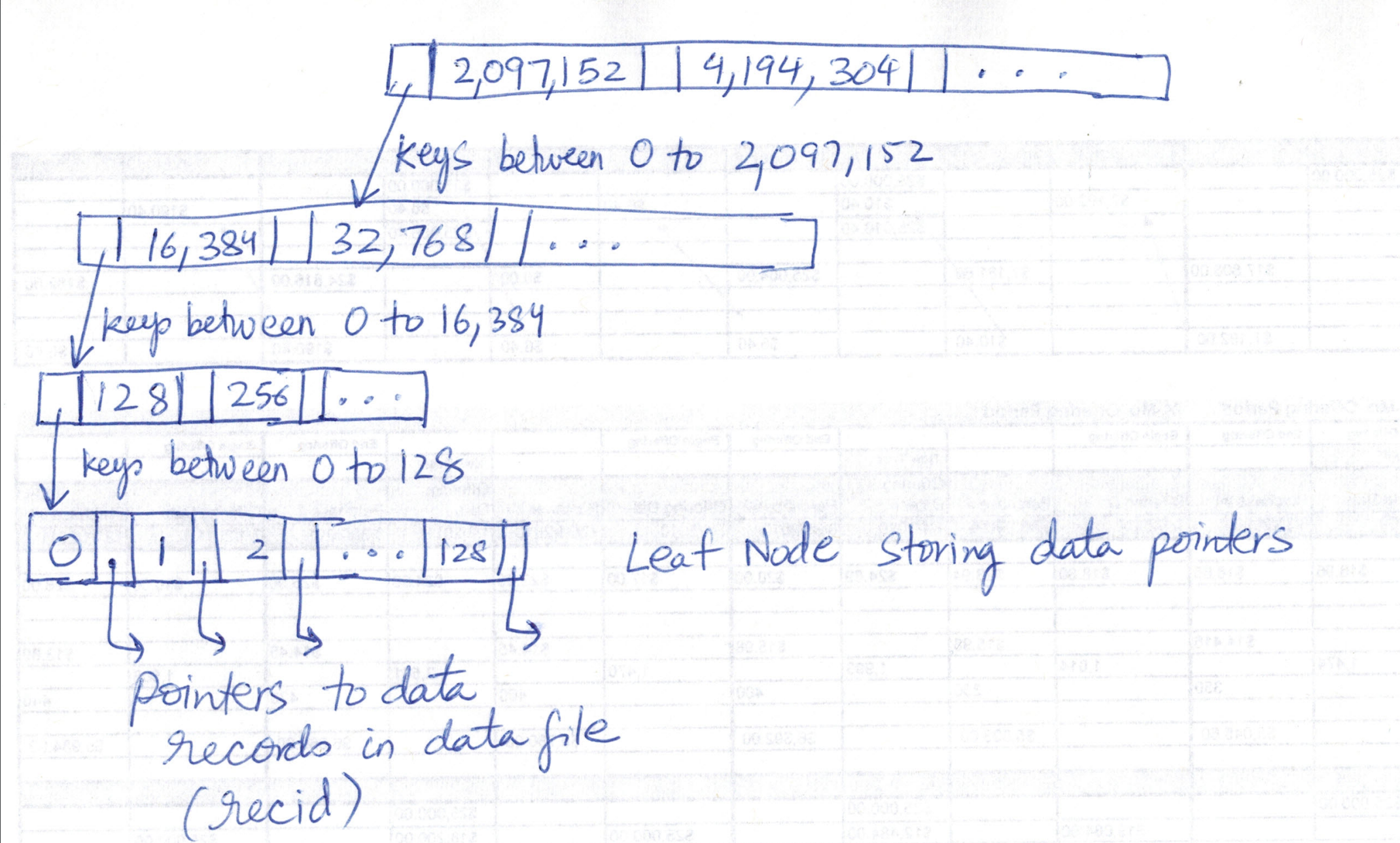
Let’s see how to index the range 0 - 268,435,456. Other ranges are indexed in much the same way. With a branching factor of N=128 (also known as order), the root node (level 0) of the tree will have following key separators in it (given by dividing 268,435,456 into 128 buckets) much like a B+ tree:

2,097,152
4,194,304
...

In your mind or on a piece of paper draw a B+tree node with above keys in it. Do it! Now there will be 128 child pointers emerging from the root node giving the next level of the tree.

The 0 - 2,097,152 range is divided into 128 buckets in level 1 (I have not drawn diagrams but try to visualize the tree structure by drawing on paper yourself):

16,384
32,768
...

The 0 - 16,384 range is divided into 128 buckets in level 2:

0-128
128-256
...

After this we will get to the leaf level (level 3) which will have pointers to data records (the recid). Total levels = 4.

To search for a key, we follow usual search rules in a tree. We start with node and select appropriate child node. If child node pointer is null, key does not exist. To put a KV pair into this tree, we create node(s) as necessary when needed. This is what makes it a sparse tree and this is what auto-expanding refers to.

The keys in this map are integers and the range is fixed a-priori in advance which gives it the performance advantage over BTreeMap I observed in my tests (esp. on inserts) since tree nodes no longer need splitting and merging. BTreeMap implements the more general purpose B+ tree where you can store arbitrary keys and size (range of keys) is not fixed in advance.

Key range of a IndexTreeLongLongMap

The name IndexTreeLongLongMap might lead you to think that the range of keys that can be stored in IndexTreeLongLongMap is Long.MIN_VALUE to Long.MAX_VALUE but that is WRONG. There is a much smaller range of keys a IndexTreeLongLongMap can store. It is given by [0, N^L) (upper bound is exclusive) where N is the branching factor of the underlying B+ tree. N=2^dirShift. L is number of levels. N^L = 1<<(dirShift*levels). Refer the constructor:

fun make(
                store:Store = StoreTrivial(),
                rootRecid:Long = store.put(dirEmpty(), dirSer),
                dirShift: Int = CC.INDEX_TREE_LONGLONGMAP_DIR_SHIFT,
                levels:Int = CC.INDEX_TREE_LONGLONGMAP_LEVELS,
                collapseOnRemove: Boolean = true
        ) = IndexTreeLongLongMap(
                store = store,
                rootRecid = rootRecid,
                dirShift = dirShift,
                levels = levels,
                collapseOnRemove = collapseOnRemove
        )

By default, N=128 and L=4. So the default IndexTreeLongLongMap can only store keys in the range [0, 1<<28) or [0, 268,435,456).

Refer following code where the key is checked to be within eligible range before putting a KV pair into the B+ tree:

if(CC.ASSERT && index<0)
    throw new AssertionError();
if(CC.ASSERT && index>>>(level*dirShift)!=0)
    throw new AssertionError();

Refer following tests to confirm above assertions [1]:

public class IndexTreeLongLongMapTest {
    @Test(expected = java.lang.IllegalArgumentException.class)
    public void keyCannotBeNegative() {
        var store = new StoreTrivial();
        var rootRecId = store.put("hello", Serializer.STRING);
        var dirShift = 3;
        var levels = 3;
        var map = new IndexTreeLongLongMap(store, rootRecId, dirShift, levels, true);
        map.put(-1, 0); // cannot insert -ve keys        
    }    

    @Test
    public void test1() {
        var store = new StoreTrivial();        
        var rootRecId = store.put(IndexTreeListJava.dirEmpty(), IndexTreeListJava.dirSer);
        var dirShift = 3;
        var levels = 3;
        var map = new IndexTreeLongLongMap(store, rootRecId, dirShift, levels, true);
        var maxKey = 1 <<(dirShift * levels);
        map.put(maxKey - 1, 0);
    }

    @Test(expected = java.lang.AssertionError.class)
    public void test2() {
        var store = new StoreTrivial();        
        var rootRecId = store.put(IndexTreeListJava.dirEmpty(), IndexTreeListJava.dirSer);
        var dirShift = 3;
        var levels = 3;
        var map = new IndexTreeLongLongMap(store, rootRecId, dirShift, levels, true);
        var maxKey = 1 <<(dirShift * levels);
        map.put(maxKey, 0);
    }
}

Re-examine some statements

HTreeMap is a segmented Hash Tree. Unlike other HashMaps it does not use fixed size Hash Table,

in above he has the array data structure in mind that is used to implement a hash table.

and does not rehash all data when Hash Table grows.

the array of a hashtable has to be resized as the load factor grows beyond a threshold.

HTreeMap uses auto-expanding Index Tree, so it never needs resize.

as explained above HTreeMap is using a persistent TreeMap data structure underneath. The tree starts out empty and nodes are added as needed.

It also occupies less space, since empty hash slots do not consume any space.

With an array, the empty slots consume space. Space has to be allocated a-priori (whether in main memory or disk) equal to capacity of the hashmap. This is the key reason for not to use an array and use a map powered by a tree instead.

On the other hand, the tree structure requires more seeks and is slower on access. Its performance degrades with size TODO at what scale?.

Array lookup is O(1). Lookup in TreeMap is O(levels).

Why does HTreeMap not maintain a mapping of key -> recid directly?

Because the universe of keys is infinite. The universe of hash(key) is finite. A requirement for IndexTreeLongLongMap. Does it mean HTreeMap cannot handle collisions? (two different keys with same hash(key)) Fortunately, it does handle them. The record stored in the data file is an array of all KV pairs with same hash(K). This enables disambiguating keys with same hash(key) as we will see in the next section.

Note that although the capacity of the IndexTreeLongLongMap is fixed, the size of HTreeMap IIUC can grow beyond that. The # of elements that can be stored is not bounded by the cardinality of the universe of keys. There is guaranteed to be collisions though when # of elements > capacity of the treemap. I haven’t been able to verify this though. I tried creating a HTreeMap with lower values of

int HTREEMAP_CONC_SHIFT = 3;
int HTREEMAP_DIR_SHIFT = 7;
int HTREEMAP_LEVELS = 4;

int INDEX_TREE_LONGLONGMAP_DIR_SHIFT = 7;
int INDEX_TREE_LONGLONGMAP_LEVELS = 4;

but these are defined as constants. We need to compile a new version of MapDB where these variables can be changed. It is an exercise I leave for the reader.

Does HTreeMap handle hash collisions?

The answer is yes, it does. Here is a test-case [1]:

public class HTreeMapTests {

    class MySerializer extends SerializerString {
        @Override
        public int hashCode(String s, int seed) {
            return 8; // return same hash code no matter the input. this will cause collision.
        }
    }

    private final String dbPath = System.getProperty("java.io.tmpdir");
    private final String dbFilename =
        java.nio.file.Path.of(dbPath, StringUtils.generate_random_string(8) + ".bin").toString();
    private DB db;
    private HTreeMap<String, String> hmap;

    @Before
    public void setup() {
        db = DBMaker.fileDB(dbFilename).make();
        var sz = new MySerializer();    
        hmap =
            db.hashMap(
                    "my map",
                    sz,
                    sz) 
                .createOrOpen();
    }

    @After
    public void teardown() throws IOException {
        Files.delete(Path.of(dbFilename));
    }

    @Test
    public void isAbleToHandleHashCollision() {
        hmap.put("hello", "world");
        assertEquals(hmap.get("hello"), "world");
        hmap.put("jack", "jill");
        assertEquals(hmap.get("jack"), "jill");
        assertEquals(hmap.get("hello"), "world");
    }    
}

and the code that resolves collisions is following [1]:

if (keySerializer.equals(oldKey, key)) {

    if (expireGetQueues != null) {
        leaf = getprotectedQueues(expireGetQueues, i, leaf, leafRecid, segment, store)
    }

    return valueUnwrap(segment, leaf[i + 1])
}

This disambiguates keys with same hash code by testing for equality.

Back to BTreeMap

If you are using BTreeMap, be aware of the fine print:

This B-Linked-Tree structure does not support removal well, entry deletion does not collapse tree nodes. Massive deletion causes empty nodes and performance lost. There is workaround in form of compaction process, but it is not implemented yet.

In terms of functionality BTreeMap gives you everything that HTreeMap has to offer and even more (e.g., range queries) since BTreeMap implements ConcurrentNavigableMap whereas HTreeMap implements ConcurrentMap.

Transactions

MapDB docs brag that:

It also provides advanced features such as ACID transactions, snapshots, incremental backups and much more.

This is rubbish. There is no I in MapDB and C mostly has to do with FK constraints and the like provided by relational databases (which MapDB is not). That leaves us with A (provided by a single global transaction) and D (persistence).

AFAICT, there is no transaction isolation with this DB (v. 3.0.10) [1]. A DB instance (when opened with transactionEnabled) has associated with it an implicit single global transaction and you cannot create transactions like you do with MySQL or Postgres. In fact since you cannot create any transactions, the point of transaction isolation does not even arise. I cannot find any TxMaker in v3. In this post dated 2016, author wrote:

TXMaker and concurrent transactions are missing. Will be added latter.

and I have yet to see it more than 8 years later! If I am missing something here, please let me know! (also see this)

Transactions are implemented using a WAL (write-ahead log) to undo and perform a rollback. You enable transactions by turning on transactionEnable:

DB db = DBMaker
        .memoryDB()             //static method
        .transactionEnable()    //configuration option
        .make()                 //opens db

When using a persistent (i.e., off-heap) store, a DB without transactions is implemented using StoreDirect class whereas a DB with transactions uses StoreWAL class. We see that happening here:

if (_transactionEnable.not() || _readOnly) {
    StoreDirect.make(...
} else {...
    StoreWAL.make(...

Note that enabling transactions has a cost associated to it. Also do not confuse transactions with concurrency control. Transactions allow us to perform multiple operations on the database as an atomic commit (all or none). They are not a concurrency control mechanism. Tx isolation (the I in ACID) is what gives us concurrency control but MapDB has none [1]. Check out RocksDB if you need Tx isolation [1]. However, be prepared for a much sharper learning curve as it has more bells-and-whistles (that is what enterprise software is about) and is not implemented in Java.

Memory Mapping

Memory mapping is a nifty technique provided by some operating systems like Linux which allows application code to access storage on disk as if it were heap storage (RAM). The function which makes this possible is the mmap sys call in Linux.

mmap() creates a new mapping in the virtual address space of the calling process. The starting address for the new mapping is specified in addr. The length argument specifies the length of the mapping (which must be greater than 0).

In Java the method that does this magic is java.nio.channels.FileChannel.map:

public abstract MappedByteBuffer map(FileChannel.MapMode mode,
            long position,
            long size)
    throws IOException

and has been in Java since 1.4. Take a look at this code in MapDB:

buffer = raf.getChannel().map(mapMode, 0, maxSize);

Memory mapping is very convenient for an application developer as they can then go about writing application code as if they were working with a large byte buffer in the RAM.

LMDB makes heavy use of this and was probably one of the earliest databases to do so. You can enable it in MapDB as well by turning on fileMmapEnable:

/**
* <p>
* Enables Memory Mapped Files, much faster storage option. However on 32bit JVM this mode could corrupt
* your DB thanks to 4GB memory addressing limit.
* </p><p>
*
* You may experience {@code java.lang.OutOfMemoryError: Map failed} exception on 32bit JVM, if you enable this
* mode.
* </p>
*/

In his blog post, MapDB seems to be going in increasing direction of LMDB.

There is new page based store inspired by LMDB.

from now on focus is on memory mapped files. Memory mapped files in Java are tricky (JVM crash with sparse files, file handles…)

I am not sure if this is a good thing because I also tried benchmarking LMDB against MapDB and LMDB performance was just pathetic (was it due to memory mapping or something else, I do not know).

In this post, the author says:

MapDB uses mmap for file persistence, which I get why data stores would want to do that – let the OS deal with the persistence and abstract the file as memory but I am not a fan of it due to corruption issues and the fact that the storage manager can do a much better job than the OS as to what and when to commit pages. Apart from that, the whole point of building a data store product is to control persistence – why would we outsource that to the OS? MongoDB, when it was first launched, used mmap. Once they acquired wired tiger they got rid of mmap. LevelDB uses mmap and then once Facebook forked it to build Rocksdb the first thing they did was to get rid of mmap.

Looks like RocksDB does use mmap. See this, this and this.

mmap does sound hacky to me but looks like everyone (MapDB, LMDB, RocksDB) is using it. It comes with a danger zone (I said it sounds hacky). Warning: We are going to spend a long time discussing this (its a post unto itself) so as heads up remainder of this section in the post is about this danger zone and you can skip if you need to. A memory mapped file has to be unmapped e.g., using the munmap system call after you are done with it but note there is no unmap method on java.nio.channels.FileChannel.map and neither is there any close or dispose method on MappedByteBuffer. So what gives? Nothing. Its a big bug! As stated here:

Memory mapped files in Java are not unmapped when file closes. Unmapping happens when {@code DirectByteBuffer} is garbage collected. Delay between file close and GC could be very long, possibly even hours. This causes file descriptor to remain open, causing all sort of problems…

and in the documentation of FileChannel.map:

The buffer and the mapping that it represents will remain valid until the buffer itself is garbage-collected.

A mapping, once established, is not dependent upon the file channel that was used to create it. Closing the channel, in particular, has no effect upon the validity of the mapping.

What this means is that closing the db (which closes the file) does not really release all the resources. You might think that you can unmap the file by calling System.gc() which triggers a garbage collection, but even if we make a call to System.gc() e.g., when the db is closed, still we are not guaranteed unmapping because as I understand System.gc() only requests the garbage collector to perform garbage collection; we can only hope it actually happens.

Even though Java provides System.gc(), it is unusual to see it being used in any application. Its not something I have seen in any production code.

btw, there is no call to System.gc() in db.close() or its downstream methods [1, 2]. The way MapDB handles the problem (unmaps memory mapped files) is via this code:

if (cleanerHackEnabled && buffer != null && (buffer instanceof MappedByteBuffer)) {
    ByteBufferVol.unmap((MappedByteBuffer) buffer);
}

Here is ByteBufferVol.unmap:

/**
* Hack to unmap MappedByteBuffer.
* Unmap is necessary on Windows, otherwise file is locked until JVM exits or BB is GCed.
* There is no public JVM API to unmap buffer, so this tries to use SUN proprietary API for unmap.
* Any error is silently ignored (for example SUN API does not exist on Android).
*/
protected static boolean unmap(MappedByteBuffer b){
    if (CleanerUtil.UNMAP_SUPPORTED) {
        try {
            CleanerUtil.freeBuffer((ByteBuffer) b);
            return true;
        } catch (IOException e) {
            LOG.warning("Failed to free the buffer. " + e);
        }
    } else {
        LOG.warning(CleanerUtil.UNMAP_NOT_SUPPORTED_REASON);
    }
    return false;
}

See this for what CleanerUtil does.

This “fix” is guarded behind a cleanerHackEnabled flag which has to be turned on by calling:

dbMaker.cleanerHackEnable()

which brings me to the anti-climax. read the warning before you turn it on:

Please note that this option closes files, but could cause all sort of problems, including JVM crash.

And now the question: would you turn it on after reading this? Is memory mapping worth taking the risk? There is a risk of file corruption no matter whether the flag is on or off.

People have discussed this issue (how to unmap a memory mapped file) on SO as well [1] and here is official JDK bug opened in 2002 and marked won’t fix in 2023 with the last comment saying the functionality we need is in JEP 454: Foreign Function & Memory API (delivered in JDK 22 which is yet to be released at time of this writing). I haven’t had time to look into it. Quoting from this JEP (reinforcing the issue with Javs’s mmap):

More seriously, the memory which backs a direct byte buffer is deallocated only when the buffer object is garbage collected, which developers cannot control.

Indeed has developed a library to make memory mapping easy in Java. Check it out here. It bypasses FileChannel.map and works by utilizing the direct mmap sys call to create a memory mapped file. In particular, now your Java code will be able to unmap a memory mapped file using MMapBuffer.munmap. If you have any insights on pros and cons of FileChannel.map vs. util-mmap, please let me know. I would be curious to hear that.

What about using a vanilla B+ Tree for persistent key value storage?

Why not cut out all the fat and use a B+ tree directly to implement persistent key-value storage? I tried this as well. For starters, there are not many good libraries I could find for a B+ Tree implementation in Java [1]. This itself was surprising.

Here is the TL;DR:

 if(s.length() > conf.getEntrySize()) {
    System.out.println("Satellite length can't exceed " +
            conf.getEntrySize() + " trimming...");
    s = s.substring(0, conf.getEntrySize());

MapDB Best Practices and Lessons

  • Sequential inserts in HTreeMap take same amount of time as random inserts [1] because the key is anyway hashed (and thus effectively randomized) as seen here
  • In fact in my tests [1] the HTreeMap outperforms BTreeMap even for sequential inserts. I would have expected BTreeMap might be faster at least for sequential inserts based on this (since MySQL primary index is backed by a B+ tree; at least that’s what I think)
  • Do not try to open same db from multiple threads (or multiple applications) at same time. it will not work. MapDB is not designed for such use-case [1]. we can do this in MySQL or Postgres and is known as opening multiple connections to the db, but not with MapDB.
  • You can instead multiplex the DB instance across multiple threads but remember there is no Tx isolation (there is only a single global transaction).
  • You may be used to keeping connections to the db short-lived if you have been programming with MySQL or Postgres. The pattern is that a connection is opened in response to a transaction (such as a sales order on an e-commerce website) and is promptly closed once the transaction has been processed. But in case of MapDB, afaict you might be better off opening the db for lifetime of the application. And as I have covered before, if you are using memory map, closing the db does not release the file handle back to the OS anyway so you are not accomplishing anything anyway. I did some tests in which I opened and closed the db in rapid succession and it crashed the OS not just the program (now that I think about it, the most likely cause was the danger zone with memory mapping), so don’t do it! If it helps to understand, in case of MySQL or Postgres the database itself is open and running forever in a separate process; you open and close connections to it (in fact think of multiple applications connecting to same db). But in case of MapDB there is no distinction between “opening the DB and opening a connection to it”.
  • turn on transactionEnable to protect against data corruption in event of a crash.
  • MapDB recommends to turn on fileMmapEnable on 64-bit systems for better performance but read the fine-print and know about the danger zone. Perhaps do a perf test without it. From the standpoint of performance it is generally only worth mapping relatively large files into memory [1].
  • turn on counterEnable if you want HTreeMap to keep track of its size without having to re-calculate it every time the size is requested.
  • It is best to think of MapDB not as a database, but a thread-safe collections library backed by persistent storage. Thus, don’t compare it and think of using it in ways like you do MySQL or Postgres. But think of it more like an alternative to JCF (Java Collections Framework) or EC (Eclipse Collections) where the data is backed by persistent storage instead of main memory which is transient. This is reinforced by the fact that HTreeMap implements ConcurrentMap and BTreeMap implements ConcurrentNavigableMap.

Try some of the experiments above and let me know if you get same results and what you think of MapDB! If you have used both MapDB and RocksDB, please share your experience!

Posted in Computers, programming, Software | Tagged | Leave a comment

जीवन में तू डरना नहीं

जीवन में तू डरना नहीं
सर नीचा कभी करना नहीं
हिम्मत वाले को मरना नहीं

Posted in Uncategorized | Leave a comment

My Thoughts on StackOverflow

I am as addicted to SO as someone is to their favorite social media website. I am not much of a writer but I will try to document my recent quibs with SO in this post.

The SO community is very unfriendly and abound with hate and this is by design. This hate is evidenced in downvoting of questions for no reason and closing them. The reason why there are so many downvotes on questions is because it costs nothing to downvote a question. Downvoting an answer does have a cost [1]. Also the hate on SO percolates from the top. The so called moderators and policemen on SO are zealots who downvote and close questions for no reason. Many moderators on SO have surprisingly little technical knowledge. I have read some posts trying to understand the reason behind all this and it seems it has to do with the very origins of SO and misplaced beliefs of Jeff Attwood (the creator of SO).

SO developer surveys are also continuously degrading in quality. I liked them because they would tell me what technologies are popular, most wanted and dreaded but now the surveys have more and more non-technology related questions and I really don’t know how even SO benefits from those questions.

Finally, SO – by design – does not want people to ask questions that do not have a well defined answer. Such questions are promptly closed and again the moderator community makes up BS reasons for this design. The problem is that its only simple questions that have well-defined answers. As I have moved up in my career, most of my questions now are not something that have a well-defined answer. Most advanced questions need an iterative discussion with a back and forth dialogue. SO realizes this and have launched the discussions feature which is a step in the right direction.

The solution to improve SO is astonishingly simple (but SO does not want to improve and herein lies the opportunity for a new SO like site for developers – what SO should be):

  • ban closing of questions (unless it is spam which should be deleted). Don’t like a question, just navigate somewhere else and downvote it if you must. If the post is spam or offensive, flag it.
  • for every downvote irrespective of whether it is on a question or answer, there should be an equal and opposite reaction i.e., a reciprocal 2 points should be deducted from the profile of the user casting the downvote.

IMO the SO moderator community is useless and there is no need for most of them. They are the cause of the mess not the solution. Google and other search engines are smart enough to know what questions are relevant (just by simply counting the votes – no advanced ML required) and detect comments or answers with offensive language etc. We have come a long way in this area and our emails etc. use such spam and inappropriate content detection everyday – why can’t SO?

latest storm

what do i think about this? OpenAI is going to mine SO data whether SO (and its users) like it or not. They already do so. And there is nothing SO will be able to do about it – OpenAI has deep pockets. So its actually better to strike a deal with them and at least get something in return. I know it doesn’t sound nice but its the sad reality. because of reasons like this i have now stopped posting answers on SO – all these sites benefit at your expense. i continue to post questions but here also i avoid if i can because half of the questions get downvoted for no reason at all – it doesn’t cost anything to downvote a question.

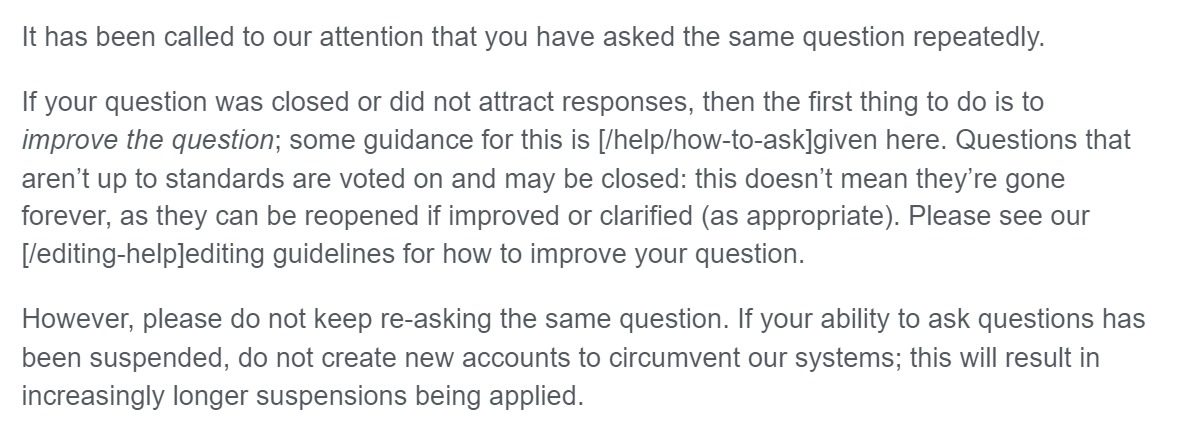
Recently all my questions on SO have been downvoted and closed as if some people are tracking and following what I post. The other day I got this email in my inbox:

So what is this about? The question I had asked was that how do I go about developing a custom voice that I can use with the Narrator app on Windows. And I opened a second question for the same thing on Mac as the two are different platforms. If I had clubbed the two in one question, they would have closed it saying the question needs to be focused and do not ask multiple questions in one. If I ask separate questions, then also they close it saying its a duplicate which if you look closely it is not. And what is wrong about this question to be downvoted?

I hate StackOverflow. I hope it dies a painful death.

A Google search on the query “The rise and fall of StackOverflow” brings several interesting results for further reading. This reddit user summarizes it well:

Now if you ask a question it’s more than likely to either be arbitrarily down voted to hell or you just get made fun of for not knowing. It’s become a toxic learning Q/A board and imo no longer worth logging in to.

Posted in Computers, programming, Software | Leave a comment

Google Drive vs. OneDrive vs. Dropbox vs. Box

Google DriveOneDriveDropboxBox
LAN Sync
Incremental (delta) sync

One advantage of OneDrive compared to Dropbox is that its dirt cheap.

Resources

Posted in Computers, programming, Software | Leave a comment

Running llama.cpp on Windows with GPU acceleration

Objective

Run llama.cpp on Windows PC with GPU acceleration.

Pre-requisites

First, you have to install a ton of stuff if you don’t have it already:

  • Git
  • Python
  • C++ compiler and toolchain. From the Visual Studio Downloads page, scroll down until you see Tools for Visual Studio under the All Downloads section and select the download for Build Tools for Visual Studio 2022.
  • CMake
  • OpenCL SDK. Install this at c:\vcpkg\packages\opencl_x64-windows.
  • CLBlast
  • clinfo.exe – don’t sweat if you are not able to install this one

Add paths to OpenCL and CLBlast lib, bin, include folders to the PATH environment variable. e.g.:

echo %PATH%
C:\Program Files (x86)\Microsoft Visual Studio\2022\BuildTools\VC\Tools\MSVC\14.38.33130\bin\HostX64\x64;C:\Program Files (x86)\Microsoft Visual Studio\2022\BuildTools\Common7\IDE\VC\VCPackages;C:\Program Files (x86)\Microsoft Visual Studio\2022\BuildTools\Common7\IDE\CommonExtensions\Microsoft\TestWindow;C:\Program Files (x86)\Microsoft Visual Studio\2022\BuildTools\MSBuild\Current\bin\Roslyn;C:\Program Files (x86)\Windows Kits\10\bin\10.0.22621.0\\x64;C:\Program Files (x86)\Windows Kits\10\bin\\x64;C:\Program Files (x86)\Microsoft Visual Studio\2022\BuildTools\\MSBuild\Current\Bin\amd64;C:\Windows\Microsoft.NET\Framework64\v4.0.30319;C:\Program Files (x86)\Microsoft Visual Studio\2022\BuildTools\Common7\IDE\;C:\Program Files (x86)\Microsoft Visual Studio\2022\BuildTools\Common7\Tools\;C:\WINDOWS\system32;C:\WINDOWS;C:\WINDOWS\System32\Wbem;C:\WINDOWS\System32\WindowsPowerShell\v1.0\;C:\WINDOWS\System32\OpenSSH\;C:\Program Files\dotnet\;C:\Program Files\apache-maven-3.9.6\bin;C:\Program Files\jdk-21.0.2\bin;C:\Program Files\Git\cmd;C:\Program Files\Git\mingw64\bin;C:\Program Files\Git\usr\bin;C:\Program Files (x86)\GnuWin32\bin;C:\Program Files\HDF_Group\HDF5\1.14.1\bin\;C:\Program Files (x86)\WiX Toolset v3.11\bin;C:\Program Files\CMake\bin;C:\Users\xxx\AppData\Local\Microsoft\WindowsApps;C:\Users\xxx\.dotnet\tools;;C:\Users\xxx\AppData\Local\Programs\Microsoft VS Code\bin;C:\Program Files (x86)\Microsoft Visual Studio\2022\BuildTools\Common7\IDE\CommonExtensions\Microsoft\CMake\CMake\bin;C:\Program Files (x86)\Microsoft Visual Studio\2022\BuildTools\Common7\IDE\CommonExtensions\Microsoft\CMake\Ninja;C:\Program Files (x86)\Microsoft Visual Studio\2022\BuildTools\Common7\IDE\VC\Linux\bin\ConnectionManagerExe

Download source code and Build

Download source code

git clone git@github.com:ggerganov/llama.cpp.git

In my case I am synced to:

commit d2f650cb5b04ee2726663e79b47da5efe196ce00 (HEAD -> master, tag: b1999, origin/master, origin/HEAD)
Author: Paul Tsochantaris <ptsochantaris@icloud.com>
Date:   Sun Jan 28 19:50:16 2024 +0000

    metal : free metal objects (#5161)

    * Releasing MTLFunction references after Metal pipeline construction

    * Keeping the `ggml_metal_kernel` structure

    * Spacing fix

    * Whitespace fix

Build Instructions

From the root of the repository:

set CL_BLAST_CMAKE_PKG="C:/Program Files/CLBlast-1.6.1-windows-x64/lib/cmake/CLBlast"
mkdir build
cd build
cmake .. -DBUILD_SHARED_LIBS=OFF -DLLAMA_CLBLAST=ON -DCMAKE_PREFIX_PATH=%CL_BLAST_CMAKE_PKG% -G "Visual Studio 17 2022" -A x64
cmake --build . --config Release
cmake --install . --prefix C:/LlamaCPP

Verify

c:\Users\xxx\code\llama.cpp\build\bin\Release>ls -al
total 30856
drwxr-xr-x 1 xxx 197609       0 Jan 28 16:13 .
drwxr-xr-x 1 xxx 197609       0 Jan 28 15:45 ..
-rwxr-xr-x 1 xxx 197609  505344 Jan 28 15:45 baby-llama.exe
-rwxr-xr-x 1 xxx 197609  772096 Jan 28 15:45 batched-bench.exe
-rwxr-xr-x 1 xxx 197609  791552 Jan 28 15:45 batched.exe
-rwxr-xr-x 1 xxx 197609  794112 Jan 28 15:45 beam-search.exe
-rwxr-xr-x 1 xxx 197609  422912 Jan 28 15:45 benchmark.exe
-rwxr-xr-x 1 xxx 197609  391680 Jan 28 15:45 convert-llama2c-to-ggml.exe
-rwxr-xr-x 1 xxx 197609  912384 Jan 28 15:45 embedding.exe
-rwxr-xr-x 1 xxx 197609  386048 Jan 28 15:45 export-lora.exe
-rwxr-xr-x 1 xxx 197609  908800 Jan 28 15:46 finetune.exe
-rwxr-xr-x 1 xxx 197609  912896 Jan 28 15:46 imatrix.exe
-rwxr-xr-x 1 xxx 197609 1051648 Jan 28 15:46 infill.exe
-rwxr-xr-x 1 xxx 197609  870912 Jan 28 15:46 llama-bench.exe
-rwxr-xr-x 1 xxx 197609 1079808 Jan 28 15:46 llava-cli.exe
-rwxr-xr-x 1 xxx 197609  987136 Jan 28 15:46 lookahead.exe
-rwxr-xr-x 1 xxx 197609  986624 Jan 28 15:46 lookup.exe
-rwxr-xr-x 1 xxx 197609 1078784 Jan 28 15:46 main.exe
-rw-r--r-- 1 xxx 197609  211380 Jan 28 16:47 main.log
-rwxr-xr-x 1 xxx 197609  999936 Jan 28 15:46 parallel.exe
-rwxr-xr-x 1 xxx 197609  786432 Jan 28 15:46 passkey.exe
-rwxr-xr-x 1 xxx 197609 1023488 Jan 28 15:46 perplexity.exe
-rwxr-xr-x 1 xxx 197609  349696 Jan 28 15:46 q8dot.exe
-rwxr-xr-x 1 xxx 197609  793088 Jan 28 15:46 quantize-stats.exe
-rwxr-xr-x 1 xxx 197609  610304 Jan 28 15:46 quantize.exe
-rwxr-xr-x 1 xxx 197609  917504 Jan 28 15:46 save-load-state.exe
-rwxr-xr-x 1 xxx 197609 1623552 Jan 28 15:46 server.exe
-rwxr-xr-x 1 xxx 197609  774144 Jan 28 15:46 simple.exe
-rwxr-xr-x 1 xxx 197609  991232 Jan 28 15:46 speculative.exe
-rwxr-xr-x 1 xxx 197609  734720 Jan 28 15:46 test-autorelease.exe
-rwxr-xr-x 1 xxx 197609  569344 Jan 28 15:46 test-backend-ops.exe
-rwxr-xr-x 1 xxx 197609    9728 Jan 28 15:46 test-c.exe
-rwxr-xr-x 1 xxx 197609  411648 Jan 28 15:46 test-grad0.exe
-rwxr-xr-x 1 xxx 197609   43008 Jan 28 15:46 test-grammar-parser.exe
-rwxr-xr-x 1 xxx 197609  448000 Jan 28 15:47 test-llama-grammar.exe
-rwxr-xr-x 1 xxx 197609  615424 Jan 28 15:47 test-model-load-cancel.exe
-rwxr-xr-x 1 xxx 197609  349696 Jan 28 15:47 test-quantize-fns.exe
-rwxr-xr-x 1 xxx 197609  360960 Jan 28 15:47 test-quantize-perf.exe
-rwxr-xr-x 1 xxx 197609  352768 Jan 28 15:47 test-rope.exe
-rwxr-xr-x 1 xxx 197609  457216 Jan 28 15:47 test-sampling.exe
-rwxr-xr-x 1 xxx 197609  772096 Jan 28 15:47 test-tokenizer-0-falcon.exe
-rwxr-xr-x 1 xxx 197609  772608 Jan 28 15:47 test-tokenizer-0-llama.exe
-rwxr-xr-x 1 xxx 197609  792064 Jan 28 15:47 test-tokenizer-1-bpe.exe
-rwxr-xr-x 1 xxx 197609  790528 Jan 28 15:47 test-tokenizer-1-llama.exe
-rwxr-xr-x 1 xxx 197609  741376 Jan 28 15:47 tokenize.exe
-rwxr-xr-x 1 xxx 197609  882688 Jan 28 15:47 train-text-from-scratch.exe
-rwxr-xr-x 1 xxx 197609  353280 Jan 28 15:47 vdot.exe

Download llama2

Now we need to get the LLM. In my case I am using llama2. To get the model weights I used following steps from a clean directory:

  1. create a virtual environment
python -m venv venv
  1. activate the virtual environment
venv\Scripts\activate
  1. install huggingface-cli
pip install -U "huggingface_hub[cli]"
  1. Get the model
huggingface-cli download TheBloke/Llama-2-7b-Chat-GGUF llama-2-7b-chat.Q4_K_M.gguf --local-dir . --local-dir-use-symlinks False

Run

Use clinfo to get useful information:

c:\Users\xxx\Downloads\clinfo.exe -l
Platform #0: Intel(R) OpenCL HD Graphics
 `-- Device #0: Intel(R) Iris(R) Plus Graphics 655
Platform #1: OpenCLOn12
 +-- Device #0: Intel(R) Iris(R) Plus Graphics 655
 `-- Device #1: Microsoft Basic Render Driver

cd to llama.cpp\build\bin\Release anf from there run (replace paths as necessary):

set GGML_OPENCL_PLATFORM=0
set GGML_OPENCL_DEVICE=0
main.exe -m c:\Users\xxx\code\models\llama-2-7b-chat.Q4_K_M.gguf -i --gpu-layers 43 -c 2048 -n 400 -r "User:" --in-prefix " " -e --file ..\..\..\prompts\chat-with-bob.txt --color

This is what I get:

Log start
main: build = 1999 (d2f650cb)
main: built with MSVC 19.38.33134.0 for x64
main: seed  = 1706487793
ggml_opencl: selecting platform: 'Intel(R) OpenCL HD Graphics'
ggml_opencl: selecting device: 'Intel(R) Iris(R) Plus Graphics 655'
llama_model_loader: loaded meta data with 19 key-value pairs and 291 tensors from c:\Users\xxx\code\models\llama-2-7b-chat.Q4_K_M.gguf (version GGUF V2)
llama_model_loader: Dumping metadata keys/values. Note: KV overrides do not apply in this output.
llama_model_loader: - kv   0:                       general.architecture str              = llama
llama_model_loader: - kv   1:                               general.name str              = LLaMA v2
llama_model_loader: - kv   2:                       llama.context_length u32              = 4096
llama_model_loader: - kv   3:                     llama.embedding_length u32              = 4096
llama_model_loader: - kv   4:                          llama.block_count u32              = 32
llama_model_loader: - kv   5:                  llama.feed_forward_length u32              = 11008
llama_model_loader: - kv   6:                 llama.rope.dimension_count u32              = 128
llama_model_loader: - kv   7:                 llama.attention.head_count u32              = 32
llama_model_loader: - kv   8:              llama.attention.head_count_kv u32              = 32
llama_model_loader: - kv   9:     llama.attention.layer_norm_rms_epsilon f32              = 0.000001
llama_model_loader: - kv  10:                          general.file_type u32              = 15
llama_model_loader: - kv  11:                       tokenizer.ggml.model str              = llama
llama_model_loader: - kv  12:                      tokenizer.ggml.tokens arr[str,32000]   = ["<unk>", "<s>", "</s>", "<0x00>", "<...
llama_model_loader: - kv  13:                      tokenizer.ggml.scores arr[f32,32000]   = [0.000000, 0.000000, 0.000000, 0.0000...
llama_model_loader: - kv  14:                  tokenizer.ggml.token_type arr[i32,32000]   = [2, 3, 3, 6, 6, 6, 6, 6, 6, 6, 6, 6, ...
llama_model_loader: - kv  15:                tokenizer.ggml.bos_token_id u32              = 1
llama_model_loader: - kv  16:                tokenizer.ggml.eos_token_id u32              = 2
llama_model_loader: - kv  17:            tokenizer.ggml.unknown_token_id u32              = 0
llama_model_loader: - kv  18:               general.quantization_version u32              = 2
llama_model_loader: - type  f32:   65 tensors
llama_model_loader: - type q4_K:  193 tensors
llama_model_loader: - type q6_K:   33 tensors
llm_load_vocab: special tokens definition check successful ( 259/32000 ).
llm_load_print_meta: format           = GGUF V2
llm_load_print_meta: arch             = llama
llm_load_print_meta: vocab type       = SPM
llm_load_print_meta: n_vocab          = 32000
llm_load_print_meta: n_merges         = 0
llm_load_print_meta: n_ctx_train      = 4096
llm_load_print_meta: n_embd           = 4096
llm_load_print_meta: n_head           = 32
llm_load_print_meta: n_head_kv        = 32
llm_load_print_meta: n_layer          = 32
llm_load_print_meta: n_rot            = 128
llm_load_print_meta: n_embd_head_k    = 128
llm_load_print_meta: n_embd_head_v    = 128
llm_load_print_meta: n_gqa            = 1
llm_load_print_meta: n_embd_k_gqa     = 4096
llm_load_print_meta: n_embd_v_gqa     = 4096
llm_load_print_meta: f_norm_eps       = 0.0e+00
llm_load_print_meta: f_norm_rms_eps   = 1.0e-06
llm_load_print_meta: f_clamp_kqv      = 0.0e+00
llm_load_print_meta: f_max_alibi_bias = 0.0e+00
llm_load_print_meta: n_ff             = 11008
llm_load_print_meta: n_expert         = 0
llm_load_print_meta: n_expert_used    = 0
llm_load_print_meta: rope scaling     = linear
llm_load_print_meta: freq_base_train  = 10000.0
llm_load_print_meta: freq_scale_train = 1
llm_load_print_meta: n_yarn_orig_ctx  = 4096
llm_load_print_meta: rope_finetuned   = unknown
llm_load_print_meta: model type       = 7B
llm_load_print_meta: model ftype      = Q4_K - Medium
llm_load_print_meta: model params     = 6.74 B
llm_load_print_meta: model size       = 3.80 GiB (4.84 BPW)
llm_load_print_meta: general.name     = LLaMA v2
llm_load_print_meta: BOS token        = 1 '<s>'
llm_load_print_meta: EOS token        = 2 '</s>'
llm_load_print_meta: UNK token        = 0 '<unk>'
llm_load_print_meta: LF token         = 13 '<0x0A>'
llm_load_tensors: ggml ctx size =    0.22 MiB
llm_load_tensors: offloading 32 repeating layers to GPU
llm_load_tensors: offloading non-repeating layers to GPU
llm_load_tensors: offloaded 33/33 layers to GPU
llm_load_tensors:        CPU buffer size =    70.31 MiB
llm_load_tensors:     OpenCL buffer size =  3820.93 MiB
..................................................................................................
llama_new_context_with_model: n_ctx      = 2048
llama_new_context_with_model: freq_base  = 10000.0
llama_new_context_with_model: freq_scale = 1
llama_kv_cache_init:        CPU KV buffer size =  1024.00 MiB
llama_new_context_with_model: KV self size  = 1024.00 MiB, K (f16):  512.00 MiB, V (f16):  512.00 MiB
llama_new_context_with_model:        CPU input buffer size   =    12.01 MiB
llama_new_context_with_model:        CPU compute buffer size =   167.20 MiB
llama_new_context_with_model: graph splits (measure): 1

system_info: n_threads = 4 / 8 | AVX = 1 | AVX_VNNI = 0 | AVX2 = 1 | AVX512 = 0 | AVX512_VBMI = 0 | AVX512_VNNI = 0 | FMA = 1 | NEON = 0 | ARM_FMA = 0 | F16C = 1 | FP16_VA = 0 | WASM_SIMD = 0 | BLAS = 1 | SSE3 = 1 | SSSE3 = 0 | VSX = 0 |
main: interactive mode on.
Reverse prompt: 'User:'
Input prefix: ' '
sampling:
        repeat_last_n = 64, repeat_penalty = 1.100, frequency_penalty = 0.000, presence_penalty = 0.000
        top_k = 40, tfs_z = 1.000, top_p = 0.950, min_p = 0.050, typical_p = 1.000, temp = 0.800
        mirostat = 0, mirostat_lr = 0.100, mirostat_ent = 5.000
sampling order:
CFG -> Penalties -> top_k -> tfs_z -> typical_p -> top_p -> min_p -> temp
generate: n_ctx = 2048, n_batch = 512, n_predict = 400, n_keep = 0


== Running in interactive mode. ==
 - Press Ctrl+C to interject at any time.
 - Press Return to return control to LLaMa.
 - To return control without starting a new line, end your input with '/'.
 - If you want to submit another line, end your input with '\'.

 Transcript of a dialog, where the User interacts with an Assistant named Bob. Bob is helpful, kind, honest, good at writing, and never fails to answer the User's requests immediately and with precision.

User: Hello, Bob.
Bob: Hello. How may I help you today?
User: Please tell me the largest city in Europe.
Bob: Sure. The largest city in Europe is Moscow, the capital of Russia.
User:

Now start chatting!

User: who is sherlock holmes?
Bob: Sherlock Holmes is a fictional character created by Sir Arthur Conan Doyle. He is a consulting detective who is known for his intelligence, wit, and ability to solve complex crimes.
User: who is dr. watson?
Bob: Dr. John Watson is Sherlock Holmes' trusted friend and partner in crime-solving. He is a medical doctor and serves as the narrator of many of the stories featuring Holmes.
User: how are sherlock holmes and dr. watson related?
Bob: Sherlock Holmes and Dr. John Watson are fictional characters created by Sir Arthur Conan Doyle. They are the main protagonists of the Sherlock Holmes stories, with Holmes being the detective and Watson serving as his narrator and partner in crime-solving.
 where does sherlock holmes live?
Bob: Sherlock Holmes is a fictional character, so he doesn't actually live anywhere. However, the stories often describe his London townhouse at 221B Baker Street as his residence.
 how old is sherlock holmes?
Bob: Sherlock Holmes is a fictional character, so he doesn't have an actual age. However, in the stories, he is often described as being in his early 30s or late 20s.

Let me know how it goes!

Posted in Computers, programming, Software | Tagged | Leave a comment

Ghulam Ali: Top 10

  1. Hungama hai kyon barpa?
  2. Chupke Chupke Raat Din
  3. Yeh dil yeh pagal dil mera
  4. Humko kis ke gham ne mara
  5. Gham hai ya khushi hai tu
  6. Kaisi chali hai abki hawa
  7. Apni tasveer ko aankhon se lagata kya hai
  8. Zakhme tanhai mein khushboo e henna
  9. Chamakte chand ko toota hua tara bana dala
  10. Kiya hai pyar jisse humne zindagi ki tarah
Posted in Personal Interests | Leave a comment