Notes on systemd

courtesy of chatgpt

The sudo systemctl enable command is used to configure a system service to start automatically at boot. It does this by creating symbolic links for the service in the appropriate system directories.


How It Works

When you run:

sudo systemctl enable <service-name>
  1. Locates the Service File:

    • The system searches for the service’s unit file, typically located in /etc/systemd/system/ or /lib/systemd/system/.
  2. Creates Symbolic Links:

    • It creates symbolic links from the unit file to the appropriate directories under /etc/systemd/system/, such as:
      • /etc/systemd/system/multi-user.target.wants/ (for most services).
      • /etc/systemd/system/graphical.target.wants/ (for graphical services).
  3. Ensures Auto-Start:

    • These symbolic links make the service start automatically when the corresponding target is reached during the system boot process.

Key Points

  • Does Not Start the Service: Enabling a service does not start it immediately. To start the service right away, use:

    sudo systemctl start <service-name>
    
  • Persistent Across Reboots: Once enabled, the service will automatically start whenever the system reboots.

  • Reversible: To disable auto-start, run:

    sudo systemctl disable <service-name>
    

Example

  1. Enable a web server (e.g., Apache):

    sudo systemctl enable apache2
    
  2. Verify the symbolic link:

    ls -l /etc/systemd/system/multi-user.target.wants/apache2.service
    
  3. Start the service immediately:

    sudo systemctl start apache2
    

Related Commands

  • Start a Service Immediately:

    sudo systemctl start <service-name>
    
  • Check If a Service Is Enabled:

    systemctl is-enabled <service-name>
    
  • View Service Status:

    sudo systemctl status <service-name>
    
  • Disable a Service:

    sudo systemctl disable <service-name>
    

When to Use enable

Use enable for services you want to start automatically on boot, such as:

  • Web servers (e.g., Apache, Nginx).
  • Databases (e.g., MySQL, PostgreSQL).
  • Background services (e.g., Docker, SSH).

Best practices on creating user account

When creating a user account for a service in Linux, there are several considerations to ensure the account is secure, functional, and follows best practices. Here’s what you should keep in mind:


Key Considerations

1. Non-Interactive Account

  • A service account typically doesn’t need interactive login capabilities.
  • Set the shell to /usr/sbin/nologin or /bin/false to disable login:
    sudo useradd -r -s /usr/sbin/nologin serviceuser
    
    This prevents the service account from being used for interactive logins.

2. System User vs Regular User

  • Use the -r option with useradd to create a system account (UID below 1000 on most systems):
    sudo useradd -r serviceuser
    
    System accounts are intended for system-level services and are typically excluded from login screens.

3. No Password

  • A service account usually doesn’t need a password. Do not set one:
    sudo useradd -r -s /usr/sbin/nologin serviceuser
    
    This avoids potential misuse of the account.

4. Restrict Access

  • Ensure the service account has limited permissions, restricted to what the service needs.
  • If the service requires file access, set appropriate ownership and permissions:
    sudo chown -R serviceuser:servicegroup /path/to/service/files
    sudo chmod -R 750 /path/to/service/files
    

5. Minimal Privileges

  • Follow the principle of least privilege:
    • Only grant the permissions and group memberships that the service needs.
    • Avoid adding the service account to privileged groups like sudo unless necessary.

6. Environment Variables

  • If the service requires specific environment variables, you can define them in a service-specific environment file or the service’s systemd unit file instead of relying on .bashrc or .profile.

Example of setting environment variables in a systemd service file:

[Service]
Environment="VAR_NAME=value"
EnvironmentFile=/etc/serviceuser/envfile

7. Home Directory

  • Service accounts usually don’t need a home directory. Use the -M option with useradd to skip creating one:

    sudo useradd -r -M serviceuser
    
  • If the service needs a home directory for configuration or storage, specify it explicitly:

    sudo useradd -r -d /var/lib/serviceuser serviceuser
    sudo mkdir -p /var/lib/serviceuser
    sudo chown serviceuser:servicegroup /var/lib/serviceuser
    

8. Systemd Integration

  • For services managed by systemd, you can specify the user account in the service unit file:
    [Service]
    User=serviceuser
    Group=servicegroup
    
    This ensures the service runs under the correct account.

9. Logging

  • Ensure the service account has appropriate access to its log directory:
    sudo mkdir -p /var/log/servicename
    sudo chown serviceuser:servicegroup /var/log/servicename
    

10. Audit and Monitoring

  • Keep track of the service account’s activity:
    • Log any changes to the account using audit tools like auditd.
    • Monitor the service process to ensure it doesn’t escalate privileges or behave unexpectedly.

Sample Command to Create a Service Account

sudo useradd -r -M -s /usr/sbin/nologin -d /var/lib/serviceuser -c "Service account for MyService" serviceuser

Explanation:

  • -r: Create a system account.
  • -M: Do not create a home directory.
  • -s /usr/sbin/nologin: Disable shell login.
  • -d /var/lib/serviceuser: Specify a custom home directory (optional).
  • -c: Add a comment describing the account.

Does systemctl stop send a kill -9 signal to stop the process?

No, systemctl stop does not send a SIGKILL (kill -9) by default. Instead, it typically sends a SIGTERM signal to the process to allow it to shut down gracefully. The process has a limited amount of time (defined by the TimeoutStopSec in the unit file, defaulting to 90 seconds) to clean up and exit after receiving the SIGTERM.

If the process does not stop within that time, systemd will escalate by sending a SIGKILL to forcibly terminate it.

Here’s the sequence:

  1. SIGTERM is sent to give the process a chance to stop gracefully.
  2. If the process doesn’t stop within the timeout (TimeoutStopSec), SIGKILL is sent to forcefully terminate it.

You can adjust these behaviors in the service unit file by setting:

  • KillSignal=TERM (or another signal if you want something other than SIGTERM)
  • TimeoutStopSec=30s (or any desired timeout duration)

For example, you can inspect these settings with:

systemctl show your-service-name | grep -i kill

This will display the signal and timeout configurations for the service.

Does spring webflux behave nicely with SIGTERM?

Yes, Spring WebFlux behaves well with SIGTERM signals and can be gracefully shut down when configured properly. Here’s how it works and what you need to do to ensure a smooth shutdown:

Key Points about WebFlux and SIGTERM

  1. Reactive Nature:
    WebFlux is based on a reactive programming model, so it handles requests in a non-blocking, asynchronous manner. This makes it well-suited for environments like Kubernetes or Docker, where SIGTERM is commonly used to signal a graceful shutdown.

  2. Graceful Shutdown Process: When a SIGTERM is received, the application can stop accepting new requests, finish processing in-flight requests, and release resources such as database connections and thread pools.

  3. Steps for Proper Handling of SIGTERM:

    a. Enable Graceful Shutdown in Spring Boot:
    Spring Boot (starting from version 2.3) provides built-in support for graceful shutdown. You need to enable it by setting the following property in your application.properties or application.yml:

    server.shutdown=graceful
    

    b. Customize Shutdown Behavior:
    Implement cleanup logic using DisposableBean or @PreDestroy annotations in your beans. For example:

    @PreDestroy
    public void cleanUp() {
        System.out.println("Releasing resources...");
        // Close connections, stop background tasks, etc.
    }
    

    c. Manage In-Flight Requests:
    When SIGTERM is received, Spring will stop accepting new requests but allow in-flight requests to complete. This ensures no abrupt termination of active requests.

  4. Reactive Components and Cancellation:
    Ensure that reactive components (e.g., Mono or Flux) correctly handle cancellation signals, which may occur during shutdown.

  5. Timeout Considerations:

    • The shutdown timeout is governed by the spring.lifecycle.timeout-per-shutdown-phase property (default is 30 seconds). You can adjust it based on your application’s needs:
      spring.lifecycle.timeout-per-shutdown-phase=60s
      
  6. Deployment Considerations:

    • In containerized environments like Kubernetes, configure proper readiness and liveness probes to ensure that the application isn’t terminated prematurely and has time to shut down gracefully.

Example of Graceful Shutdown

Here’s a complete example:

import org.springframework.stereotype.Component;

import javax.annotation.PreDestroy;

@Component
public class CleanupComponent {

    @PreDestroy
    public void onShutdown() {
        System.out.println("Application is shutting down. Cleaning up resources...");
        // Perform any cleanup logic here
    }
}

By combining these techniques, you can ensure that Spring WebFlux applications handle SIGTERM gracefully and avoid abrupt disruptions during shutdown.

Posted in Uncategorized | Tagged , , , , | Leave a comment

NuVoice.AI – Immortalize Your Voice

NuVoice.AI is offering a voice cloning service. You can clone your voice for free but in return grant us permission to sell your voice elsewhere and to use it in our products and services without any restrictions. This lets us make voice cloning accessible to all and cover our costs. You can install your voice on any Windows PC and use it offline (no internet connection required) with built-in Windows AAC (augmentative and alternative communication) applications such as Microsoft Narrator and Edge. Check out https://www.nuvoice.ai if interested and contact to get started. There is also option to pay for the voice and have exclusive rights and ownership over it.

Posted in programming, Software | Leave a comment

Static vs. Dynamic linking in C++

First, let’s clear up a confusion. The phrases “static linking”, “linking statically”, “dynamic linking”, “linking dynamically” give the impression that you have a library and you can choose whether to link it statically or dynamically. This is NOT true. The more accurate description is that when you build a library, you either build a static (.a in Unix, .lib on Windows) or dynamic (.so on Unix, .dll on Windows) version of the library. Then, when you link against it, you have no choice. Depending on what you built, the linker will do the next steps. For a static library (.a file; also known appropriately as an archive), its contents will be essentially copied and pasted into the target. For a dynamic library (.so or .dll), a function call to the DLL will be inserted into the target and the DLL will be dynamically loaded at runtime. The last two sentences really capture what is meant by static vs. dynamic linking.

  • A static library is built on Windows via the lib.exe command and on Unix via the ar command.
  • A dynamic library is built on Windows via the link.exe command and on Unix via the ld command.

If you run dumpbin /exports on a static library, you should not see any exports. Opening a static library in Dependency Walker should give you an error. Running dumpbin /exports on a dynamic library will show the symbols exported from it and you will be able to open and inspect it in Dependency Walker.

To inspect a static library, run lib /list which will list the object files packaged into the static library.

A file with .lib extension can mean two things on Windows:

  • It could be a static library
  • It could be the import library that is needed by the linker to link against a DLL.

Running lib /list will disambiguate between the two.

Next confusion: The link.exe command is always run when building a DLL or .exe. Again, it is NOT run when building a static library. Running link.exe produces a DLL or .exe. The act of copying-pasting the object files vs. inserting function calls to external DLLs is done by link.exe. This means:

  • If the definition of linking means running link.exe, then you do not link a static library against another library. It does not make any sense.
  • You do have to specify the dependencies a static library may have on other libraries for source code to compile – this is done via the header files and the headers act as stubs.
  • When you run the linker to build the final executable or DLL, then the heavy lifting of either copy-pasting object files or inserting function calls to a DLL will happen.
  • The linker takes input .lib files. As mentioned earlier, the .lib file is different for a static vs. dynamic library.
  • For a static library lib /list will always list only its own object files. It will never list object files of the dependencies.

Now we come to the runtime. The flags MD, MDd, MT, MTd control whether you link against the dynamic vs. static version of the VC++ Runtime (CRT). These flags control only how your project links against the CRT. They don’t control how your project links against its dependencies. And again, there is no flag to be passed to link.exe to tell it whether to link statically or dynamically against your dependencies – it does not make any sense. Given the .lib file, the linker infers whether this is a static vs. import library and performs the next steps (copy-paste vs. dynamic function call) automatically.

Next, consider following table to aid you in deciding how to build dependencies of your project:

Type Flag Advantages Disadvantages
Static MD Solid option. In final stage all static dependencies will be copied into the target and all of them will use the same CRT that is loaded dynamically at runtime. Resulting binary is small and compact. The CRT is loaded dynamically at runtime which means it needs to be available on the system as a pre-requisite (i.e., needs to be installed if not already available). Further, you need to ensure you are installing (and loading) the correct version of CRT.
Static MT Acceptable. In final stage all static dependencies will be copied into the target and all of them will use the same CRT that is also packaged into the final binary. Resulting binary is standalone. Installation is simple. Binary will not be small and compact as it will have a copy of CRT packaged into it.
Dynamic MD OK. The dependencies exist as DLLs and separate from main application and loaded dynamically at runtime. This is ok when the same DLL has to be reused by many applications that you might be distributing. Dynamic loading means there are DLL boundaries and in C++ there are some things you need to be careful about when crossing DLL boundaries.
Dynamic MT Do not do this. Each DLL will have a separate copy of CRT in it. This is a huge wastage and will create technical problems as well.

Translation for Java developers:

  • In the first two rows, you are essentially building the equivalent of a fat jar in C++.
  • In the first row, the JRE is installed separately on the target machine whereas in the second row you are also packing the JRE into your binary itself.

Tips

https://learn.microsoft.com/en-us/cpp/c-runtime-library/potential-errors-passing-crt-objects-across-dll-boundaries?view=msvc-170

>Your code may have errors when you pass C Runtime (CRT) objects such as file handles, locales, and environment variables into or out of a DLL. Function calls across the DLL boundary can cause unexpected behavior if the DLL and any files that call into the DLL use different copies of the CRT libraries.

3 Power Tools You Must Know on Linux to debug DLL (.so) not loading

RPATH vs. RUNPATH

The RPATH and RUNPATH directives are embedded in ELF binaries (executables or shared objects .so on Linux) and tell the dynamic linker (ld.so) the search path(s) to use when loading shared library dependencies at runtime.

If your libraries are not loading, inspect the embedded paths with:

readelf -d /path/to/binary | grep -E 'RPATH|RUNPATH'

and ensure the required .so files exist in one of those directories (or in LD_LIBRARY_PATH, system paths, etc.).

Key Difference

  • RPATH (legacy, DT_RPATH): Searched before LD_LIBRARY_PATH. It cannot be easily overridden by the environment variable.
  • RUNPATH (modern, DT_RUNPATH): Searched after LD_LIBRARY_PATH. The environment variable takes precedence, making overrides possible.

If both tags are present, the dynamic linker ignores DT_RPATH and uses DT_RUNPATH behavior. Another nuance: RPATH entries can influence transitive (indirect) dependencies, while RUNPATH typically applies only to direct dependencies.

What is LD_LIBRARY_PATH?

An environment variable that adds extra directories for the dynamic linker to search. It’s handy when:

  • Embedded paths in the binary are missing or incorrect.
  • You want to override hardcoded paths (e.g., test a different library version without rebuilding).

This override only works reliably with RUNPATH. With legacy RPATH, the embedded path wins. For this reason (and better user/developer control), modern build tools and linkers have switched to RUNPATH by default.

In CMake

Use:

set(CMAKE_INSTALL_RPATH "$ORIGIN")
# or for a relative lib dir:
set(CMAKE_INSTALL_RPATH "$ORIGIN/../lib")

CMAKE_INSTALL_RPATH (and related properties) sets the runtime search path. On modern systems, the linker produces a RUNPATH (not legacy RPATH). Verify with readelf.

To force legacy RPATH behavior instead (rarely recommended):

target_link_options(your_target PRIVATE "-Wl,--disable-new-dtags")

You can also patch binaries after the fact with patchelf --set-rpath ... (or --remove-rpath, etc.).

Posted in Computers, programming, Software | Tagged | Leave a comment

ISideWith 2024

Prediction: Harris will win easily

Posted in Politics | Leave a comment

Installing ImageMagick on WSL

First I just downloaded the pre-built binary as described here

/usr/local/bin$ sudo wget https://imagemagick.org/archive/binaries/magick

but trying to run it gives this:

$ sudo chmod +x magick
$ magick -version
dlopen(): error loading libfuse.so.2

AppImages require FUSE to run.
You might still be able to extract the contents of this AppImage
if you run it with the --appimage-extract option.
See https://github.com/AppImage/AppImageKit/wiki/FUSE
for more information

So the next step is to install FUSE [1]

$ sudo add-apt-repository universe
$ sudo apt install libfuse2

but still no luck:

$ magick -version
/tmp/.mount_magickwccjeB/usr/bin/magick: error while loading shared libraries: libharfbuzz.so.0: cannot open shared object file: No such file or directory

next run this [2]:

$ sudo apt install libharfbuzz0b

after this it works:

$ magick -version
Version: ImageMagick 7.1.1-39 Q16-HDRI x86_64 e339a05ed:20241002 https://imagemagick.org
Copyright: (C) 1999 ImageMagick Studio LLC
License: https://imagemagick.org/script/license.php
Features: Cipher DPC HDRI OpenMP(4.5)
Delegates (built-in): bzlib djvu fontconfig freetype heic jbig jng jp2 jpeg lcms lqr lzma openexr png raqm tiff webp x xml zlib
Compiler: gcc (9.4)
Posted in Computers, programming, Software | Tagged , , | Leave a comment

What is special about entanglement?

If you are new to quantum theory you might wonder what is the big deal about entanglement? You have heard the story – we create two qubits in an entangled state and then separate them spatially. Theoretical physicists sometimes to make their point will exaggerate and say send one qubit to Andromeda galaxy and keep the other with you. Then you measure one qubit and the instant you measure it, you know what the state of the other qubit will be. Your friend can make the measurement in Andromeda and get the opposite result. So what is so special about this? I can have two boxes. Put a coin that is heads up in one box and in another box put a coin that is tails up. Then randomly I send one box to Andromeda. Now I don’t know the state of the coin in the box that I am left with but if I open it I will know and my friend is sure to get the opposite result. So what is the big fuss about?

We made two assumptions here – local realism. Assumption 1 (reality): we assumed the state of the coin (heads or tails) existed independently of our observations. Assumption 2 (locality): observing the state of one coin cannot change the state of the other coin instantaneously (this is what is referred to as spooky action at a distance).

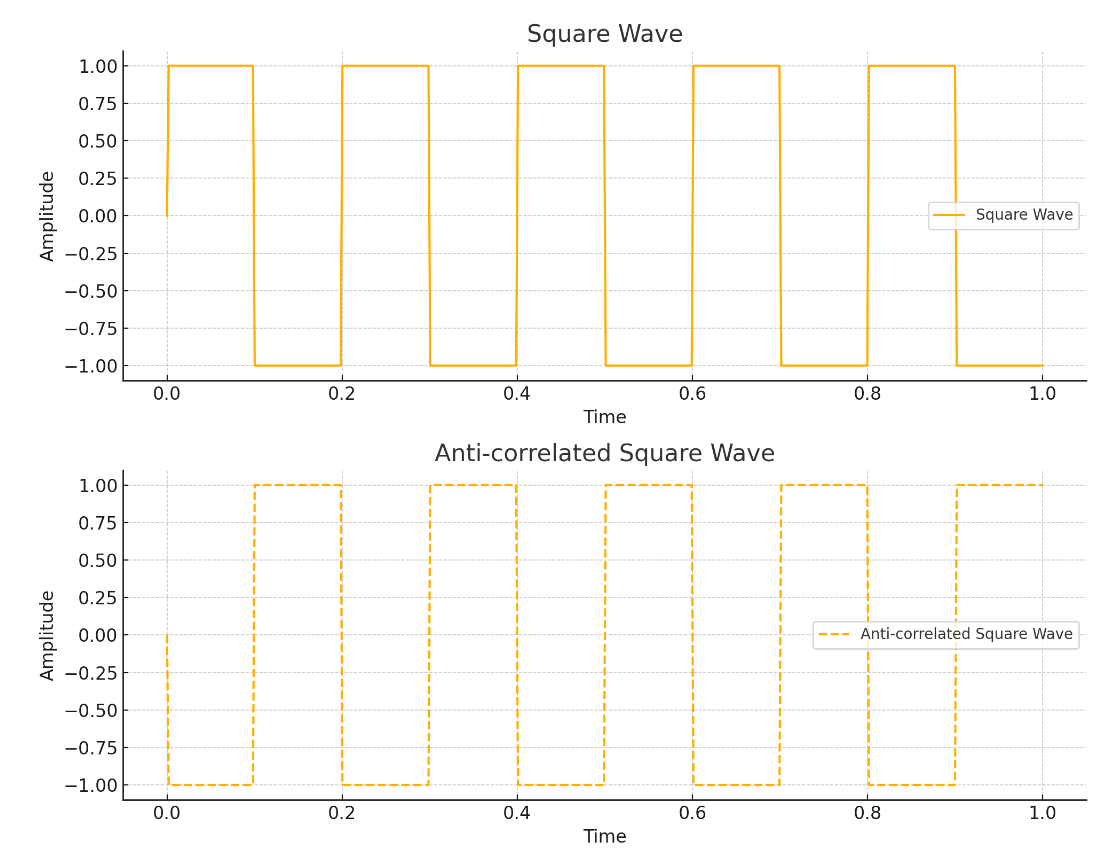
Now to get a little more technical and precise, substitute heads or tails with spin and suppose the spins of the two qubits were governed by anti-correlated waveforms like below:

Again, given this configuration there is no mystery. When we measure one spin, we know what the other would be. There is no paradox. The two spins are related as:

s_a = f(t)

s_b = f(t + T/2)

and herein lies the thesis of the EPR paper – we have to introduce a hidden variable

\lambda = T/2

to explain the observations and

f

is the element of reality that the spin existed whether you choose to measure it or not. But Bell showed that the results of QM – the predictions it makes – are inconsistent with any local hidden variable theory. And that is what is so special about entanglement.

Re: the element of reality, I think the Stern-Gerlach experiments show that the spin does not exist independently of observations. If the spin had a definite direction independent of our observations then measuring the spin along an orthogonal direction would give zero. But as we know you can choose any direction you want you will get +1 or -1 and you can keep on repeating as much as you like (e.g., I measure along Z, then Y, then X, then Z again, then X, then Y and so on ad infinitum), you will keep getting +1s and -1s. Remember when you measure along Z, the spin will collapse to +1 or -1 (assuming it started in the superposition state say |+>). But this state (|0> or |1>) is a superposition in the X basis (what is |0> for Z becomes |+> for X!) so now when you measure in X basis you will again get +1 or -1 with equal probability! Then if you measure along Z or Y you again get +1 or -1 because in those bases the spin is again in superposition! You don’t have to measure along X, Y, Z necessarily. The detector could be oriented along an arbitrary angle theta – but in that case you will not get equal superposition of |0> and |1>.

So SG showed QM violates reality – the spin doesn’t even exist in reality – the act of measurement (observation) materializes the spin. Bell showed QM violates locality. And that is what is so special about QM in a nutshell. It violates both reality and locality. You only need a single qubit to demonstrate violation of reality and you need two qubits in an entangled state to demonstrate violation of locality. A simple way to understand the violation of locality is that in an entangled state the two qubits act logically as a single inseparable entity – their fate is entangled (the joint pdf is not factorizable). But the fact that we can separate them physically is the root cause of the problem.

PS: Susskind in his book (p. 223, Section 7.9) defends locality but I think he does a cheating. He confines himself to unitary evolution and granted in that case nothing that Bob does to his qubit can influence Alice’s density matrix. The problem arises if a measurement is performed and an outcome is known – that instantly changes Alice’s density matrix and that is the violation of locality. Otherwise the whole issue would have been settled long ago and we won’t be having so many debates and YouTube videos on this. If you read the section in his book carefully he extends Alice and Bob’s system to include their apparatus as well to work around the issue so that a measurement can be absorbed in terms of unitary evolution of the combined system.

Disclaimer: Please don’t take anything you read here for granted. I make these notes for myself and I study QM purely as a hobby. By no means I am an expert on this subject. Pick up a good book if you really want to learn QM.

Posted in Science | Leave a comment

Introducing Honeybadger.bot: Java Class Registry

What is the biggest pain point you encounter with Java development? For me, its debugging those ClassNotFound exceptions and not knowing what dependency I need to add to my pom.xml in order to use a class [1,2]. Fortunately there is a solution now – honeybadger.bot. Try it out and let me know your feedback. Please consider donating if you’d like me to keep the website running!

Posted in Computers, programming, Software | Tagged | Leave a comment

Best Investment Advice

From The Intelligent Investor

Posted in Money | Leave a comment

Hive, Spark and Presto

from https://www.uber.com/blog/presto

While batch and ETL jobs run on Hive and Spark, near real-time interactive queries run on Presto.

this is a sentiment I have seen at other places as well – use presto for adhoc, near real-time analytics. My question is:

what is the harm in using Presto for ETL and batch jobs if it can run them faster?

surely if its capable of running adhoc queries then it can also run fixed queries and if it can run adhoc queries in real-time, it should be able to run fixed queries in real-time as well.

My understanding:

  • Use Hive when you want to use SQL for all data processing. If you do use Hive, use Tez as the execution engine instead of MR (mapreduce).
  • use Spark when you want to mix SQL with a programming language. It also has a superior architecture compared to Hive. Hive uses MR (mapreduce) by default which is slow and outdated. Spark uses in-memory processing. From wikipedia: Spark and its RDDs were developed in 2012 in response to limitations in the MapReduce cluster computing paradigm, which forces a particular linear dataflow structure on distributed programs
  • use Presto when you want to do adhoc and near real-time queries. does it put it in the same club as ClickHouse, SingleStore, AlloyDB, Pinot, Druid etc.?

Why am I asking this here and not on SO? I have tried to ask questions like this on SO but such discussion oriented questions receive a lot of downvotes on SO and are closed. So this time I am saving myself the trouble. I did find a very similar question here. Why don’t I ask it on reddit? I don’t like that site very much and don’t have an account on it and don’t want to create one. Similarly with quora. All these sites benefit at your expense.

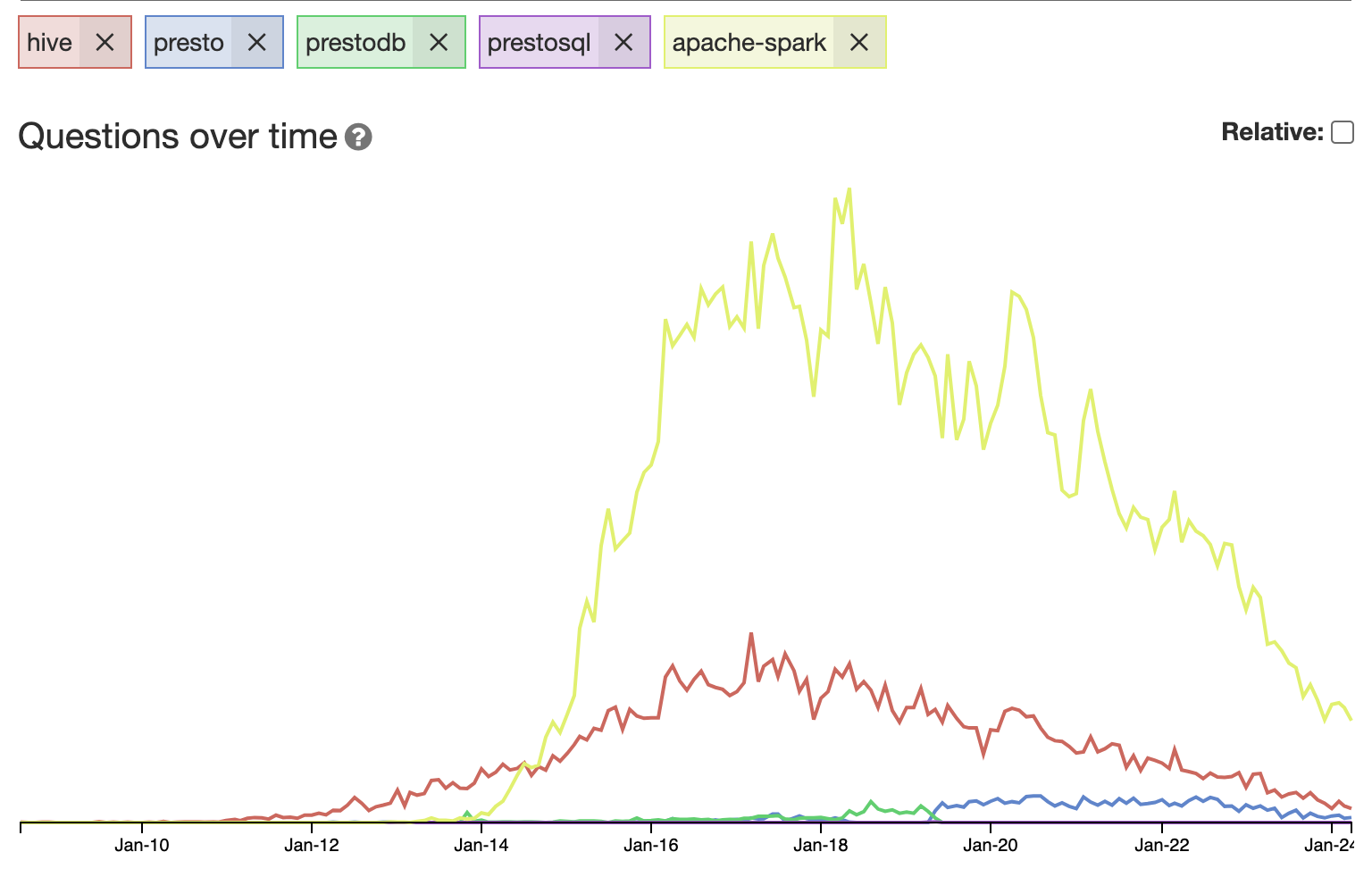
from sotagtrends:

If all these are in decline since 2018 then what’s the next thing that is gaining popularity?

You know what is interesting about all 3? all of them are developed in Java (Spark was/is developed in Scala but Scala and Java are not much different; both run on the JVM and compile to same bytecode). In fact, I started compiling a list of big data and other backend technologies and they use Java quite a lot:

  1. Apache Pinot
  2. Druid
  3. Cassandra
  4. Lucene
  5. ElasticSearch
  6. Neo4J
  7. Kafka
  8. Trino
  9. Presto
  10. Hadoop
  11. Hive
  12. HBase
  13. Zookeeper
  14. Flume
  15. Storm
  16. Impala
  17. Spark
  18. DynamoDB

All these projects are developed in Java and it goes on to show Java’s dominance in the big data and distributed backend landscape. let me know if there are any others I should add to this list.

Posted in Computers, programming, Software | Tagged | Leave a comment

Lucene: Getting Started

Making some notes on how to get started with Lucene. The first step is to clone the repo. The best way to getting started is by running the demo program org.apache.lucene.demo.IndexFiles which indexes files and org.apache.lucene.demo.SearchFiles which searches files. In below we are working from the lucene subdirectory of the project root.

to see all tasks available:

../gradlew tasks

by running:

../gradlew publishJarsPublicationToMavenLocal

I was able to install jars to M2 repository.

../gradlew assemble

is equivalent of mvn compile.

But how do we run the program?

You can run using java but you need to give it the full classpath. How to get it?

Add following to demo/build.gradle:

plugins {
  id 'com.github.johnrengelman.shadow' version '7.1.2'
}

task printClasspath {
  doLast {
    println configurations.runtimeClasspath.asPath
  }
}

Now you can get the classpath by running:

../gradlew printClasspath

In my case this gave me:

/Users/xxx/code/lucene/lucene/facet/build/libs/lucene-facet-9.10.0-SNAPSHOT.jar:/Users/xxx/code/lucene/lucene/queryparser/build/libs/lucene-queryparser-9.10.0-SNAPSHOT.jar:/Users/xxx/code/lucene/lucene/sandbox/build/libs/lucene-sandbox-9.10.0-SNAPSHOT.jar:/Users/xxx/code/lucene/lucene/queries/build/libs/lucene-queries-9.10.0-SNAPSHOT.jar:/Users/xxx/code/lucene/lucene/analysis/common/build/libs/lucene-analysis-common-9.10.0-SNAPSHOT.jar:/Users/xxx/code/lucene/lucene/expressions/build/libs/lucene-expressions-9.10.0-SNAPSHOT.jar:/Users/xxx/code/lucene/lucene/codecs/build/libs/lucene-codecs-9.10.0-SNAPSHOT.jar:/Users/xxx/code/lucene/lucene/core/build/libs/lucene-core-9.10.0-SNAPSHOT.jar:/Users/xxx/.gradle/caches/modules-2/files-2.1/com.carrotsearch/hppc/0.9.1/4bf4c51e06aec600894d841c4c004566b20dd357/hppc-0.9.1.jar:/Users/xxx/.gradle/caches/modules-2/files-2.1/org.antlr/antlr4-runtime/4.11.1/69214c1de1960040729702eb58deac8827135e7/antlr4-runtime-4.11.1.jar:/Users/xxx/.gradle/caches/modules-2/files-2.1/org.ow2.asm/asm-commons/7.2/ca2954e8d92a05bacc28ff465b25c70e0f512497/asm-commons-7.2.jar:/Users/xxx/.gradle/caches/modules-2/files-2.1/org.ow2.asm/asm-analysis/7.2/b6e6abe057f23630113f4167c34bda7086691258/asm-analysis-7.2.jar:/Users/xxx/.gradle/caches/modules-2/files-2.1/org.ow2.asm/asm-tree/7.2/3a23cc36edaf8fc5a89cb100182758ccb5991487/asm-tree-7.2.jar:/Users/xxx/.gradle/caches/modules-2/files-2.1/org.ow2.asm/asm/7.2/fa637eb67eb7628c915d73762b681ae7ff0b9731/asm-7.2.jar

Then you can run the demo program like this:

java \
-cp $CLASSPATH:$CWD/demo/build/classes/java/main \
org.apache.lucene.demo.IndexFiles \
-docs $DOCS_DIR

This will index the files in DOCS_DIR. To search the files run:

java \
-cp $CLASSPATH:$CWD/demo/build/classes/java/main \
org.apache.lucene.demo.SearchFiles

This will just print the filenames of matching files. Normally, you also want to see the matching text. To do that we use following code:

Analyzer analyzer = new StandardAnalyzer();
SimpleHTMLFormatter formatter = new SimpleHTMLFormatter("", "");
Highlighter highlighter = new Highlighter(formatter, new QueryScorer(query))
...
String text = readAllText(path); // reads all text in the file
String highlightedText = highlighter.getBestFragment(analyzer, "contents", text); // get text that matched the query
if (highlightedText != null) {
  System.out.println(highlightedText);
}

we also need to open up the package org.apache.lucene.search.highlight. In demo/src/java/module-info.java:

requires org.apache.lucene.highlighter;
Posted in Computers, programming, Software | Tagged | Leave a comment