ABAC

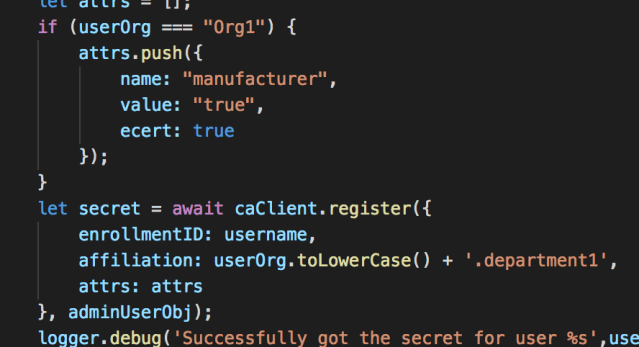
showing how to add an attribute named manufacturer and set its value to true. file helper.js in balance-transfer app. see https://fabric-sdk-node.github.io/release-1.3/FabricCAServices.html#register__anchor

Screen Shot 2018-11-30 at 3.21.06 PM

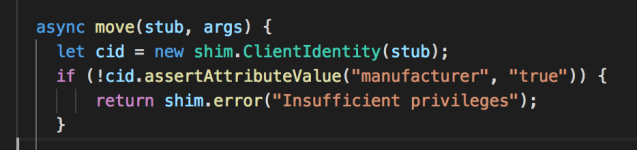
later on you can check this attribute as follows in your chaincode:

Screen Shot 2018-11-30 at 3.20.50 PM

Posted in Software | Leave a comment

Remove annoying tslint errors/warnings in vs code

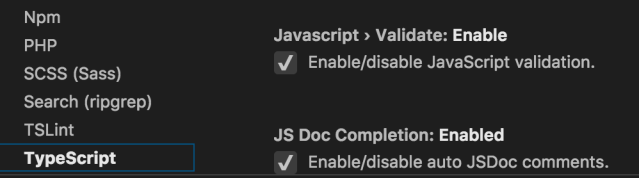
Goto Code -> Preferences -> Settings -> TSLint and uncheck Enable

Screen Shot 2018-11-30 at 10.35.46 AM

for bonus also uncheck Javascript > Validate: Enable

Screen Shot 2018-11-30 at 10.33.21 AM

Posted in Software | Leave a comment

Running the typescript balance-transfer app

There are several problems you will run into. First problem is this

you won’t be able to run ts-node after npm installing it. To fix it modify the PATH environment variable

PATH=$PATH:./node_modules/.bin

Next problem is when you try to run ./runApp.sh it will give

============== node modules installed already =============

cp: cannot create regular file ‘node_modules/fabric-client/index.d.ts’: No such file or directory
cp: cannot create regular file ‘node_modules/fabric-ca-client/index.d.ts’: No such file or directory
/home/siddjain/fabric-samples-v13/balance-transfer/typescript/node_modules/ts-node/src/index.ts:307
        throw new TSError(formatDiagnostics(diagnosticList, cwd, ts, lineOffset))
              ^
TSError: ⨯ Unable to compile TypeScript
Solution to this is to run

npm install before running ./runApp.sh. once you do that, you should now see
============== node modules installed already =============

[2018-11-29 18:56:17.141] [DEBUG] Helper – [crypto_ecdsa_aes]: Hash algorithm: SHA2, hash output size: 256
[2018-11-29 18:56:17.224] [DEBUG] Helper – [utils.CryptoKeyStore]: CryptoKeyStore, constructor – start
[2018-11-29 18:56:17.225] [DEBUG] Helper – [utils.CryptoKeyStore]: constructor, no super class specified, using config: fabric-client/lib/impl/FileKeyValueStore.js
[2018-11-29 18:56:17.234] [DEBUG] Helper – [crypto_ecdsa_aes]: Hash algorithm: SHA2, hash output size: 256
[2018-11-29 18:56:17.235] [DEBUG] Helper – [utils.CryptoKeyStore]: CryptoKeyStore, constructor – start
[2018-11-29 18:56:17.235] [DEBUG] Helper – [utils.CryptoKeyStore]: constructor, no super class specified, using config: fabric-client/lib/impl/FileKeyValueStore.js
[2018-11-29 18:56:17.248] [INFO] SampleWebApp – ****************** SERVER STARTED ************************
[2018-11-29 18:56:17.248] [INFO] SampleWebApp – **************  http://localhost:4000  ******************

(node:714) DeprecationWarning: grpc.load: Use the @grpc/proto-loader module with grpc.loadPackageDefinition instead

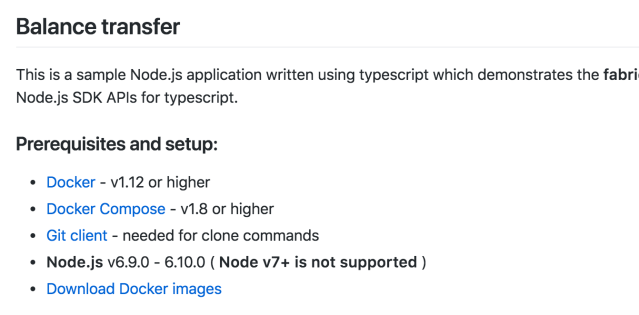
Next note that on their README.md they say

  • Node.js v6.9.0 – 6.10.0 ( Node v7+ is not supported )

Screen Shot 2018-11-30 at 10.17.49 AM

However that is plain wrong. In fact you will need to have Node v8 installed (nothing more and nothing less) since the async-await was introduced only in v8 of Node.

the HL Fabric prerequisites say that
If you will be developing applications for Hyperledger Fabric leveraging the Hyperledger Fabric SDK for Node.js, you will need to have version 8.9.x of Node.js installed.
Posted in Software | Leave a comment

How to get rid off gossip logs in Hyperledger Fabric?

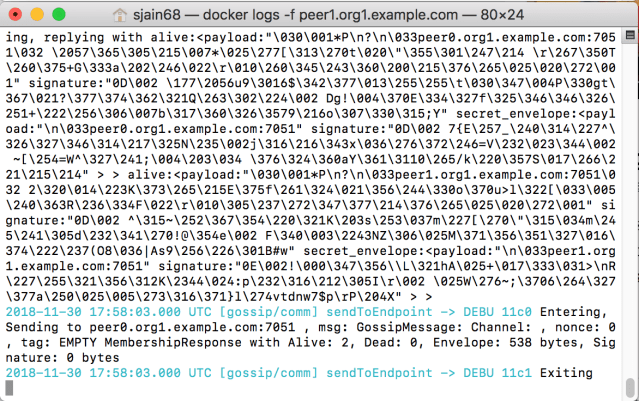
The gossip service outputs very verbose and useless logs in Fabric. These messages can be seen if one tries to view the logs of a peer container.

Screen Shot 2018-11-30 at 9.57.59 AM

How can one get rid of them? Today i tried 2 ways none of which worked.

Method 1: This was based on what I read on the official documentation

Capture

so I added it to the base.yaml file as follows:

command: peer logging setlevel ^gossip error && peer node start

this actually caused some problem at runtime and the container did not start properly. Then somewhere on stackoverflow I read to use bash – c “” so I tried that:

command: bash -c "peer logging setlevel ^gossip error && peer node start"

That also did not work. Then somewhere I read not to use bash but use /bin/bash. So I tried that and no surprise that too did not work. Note to self: try running the command from the docker container of the peer and see if it works then

Method 2: This method is based on what I read here. Accordingly I added CORE_LOGGING_GOSSIP=WARNING in base.yaml and that too did not work.

11/30/18: I have now tried all possible permutations and combinations. using bash, /bin/bash, changing the order of commands, running peer logging setlevel ^gossip error from inside the peer container and none of the options will silence the gossip debug logs. So frustrated with HL Fabric.

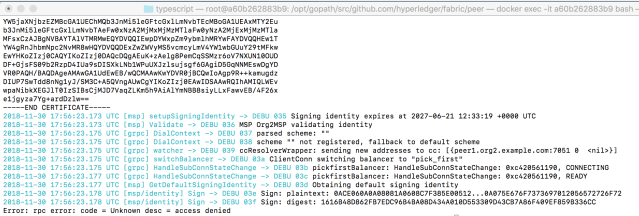
below is error message when I try to run peer logging setlevel ^gossip error from inside the container:

Screen Shot 2018-11-30 at 9.58.10 AM

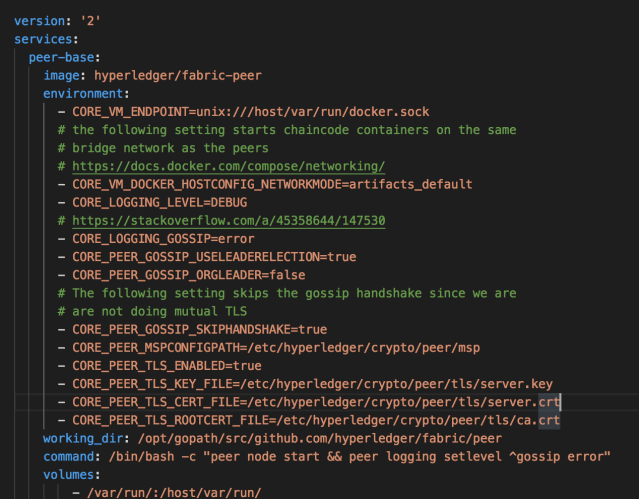
screenshot of base.yaml (have tried all possible permutations)

Screen Shot 2018-11-30 at 10.04.14 AM

Making this note to remind myself of the constant problems I keep running into with HL Fabric. Should have chosen Quorum to develop my blockchain.

Posted in Software | Leave a comment

Hyperledger Fabric: How to debug balance-transfer typescript app in VS Code?

How to debug typescript app in VS Code?

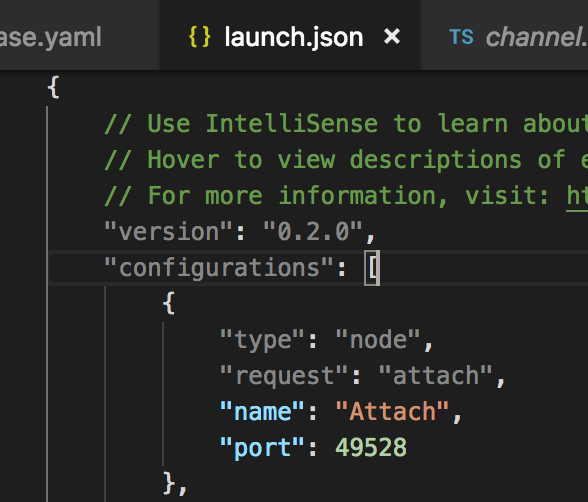
  1. In VS Code goto Debug -> Add Configuration… and add following configuration to launch.json
    Screen Shot 2018-11-29 at 3.48.00 PM

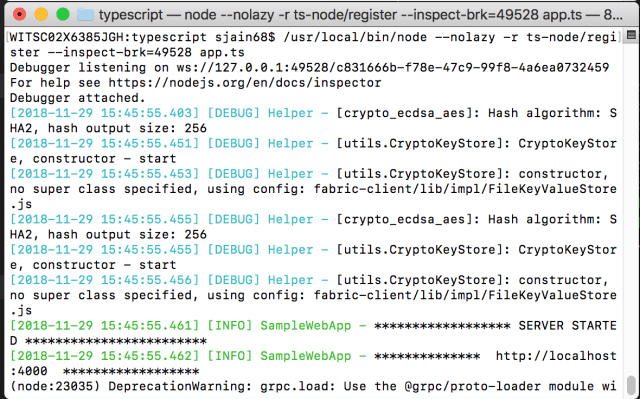
2. cd to the directory where app.ts is located and from there run

$ /usr/local/bin/node --nolazy -r ts-node/register --inspect-brk=49528 app.ts

It should display a message

Debugger listening on ...

3. In VS Code go to View -> Debug and click on green button to launch Attach

4. The terminal should now display a message saying

Debugger Attached.

5. The debugger is attached now but the execution is paused. In VS Code click on the button to continue the execution (or press F5)

Screen Shot 2018-11-29 at 5.08.28 PM

6. That’s it you should be able to debug now

Screen Shot 2018-11-29 at 3.46.52 PM

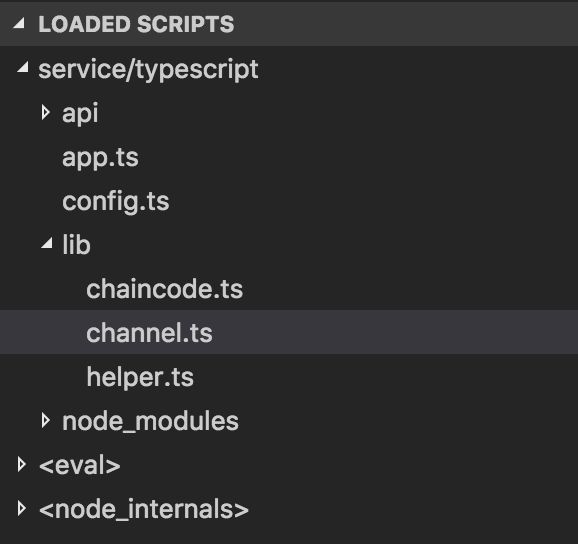
Make sure the loaded scripts window shows your code.

Screen Shot 2018-11-29 at 3.48.54 PM

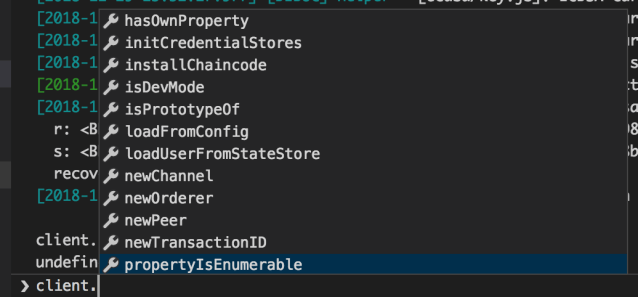
In debug console you should be able to debug variables

Screen Shot 2018-11-29 at 3.56.49 PM

Posted in Software | Leave a comment

Understanding Hyperledger Fabric Installation

Hyperledger Fabric (HL Fabric for short) provides an installation script that be found at https://raw.githubusercontent.com/hyperledger/fabric/master/scripts/bootstrap.sh

Running it like ./bootstrap.sh does 3 things:

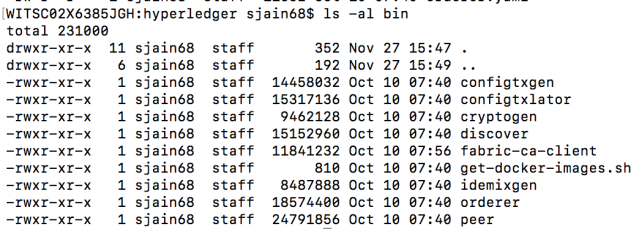
  1. It will create a directory named bin and install Fabric binaries in it
    Screen Shot 2018-11-28 at 2.39.30 PM
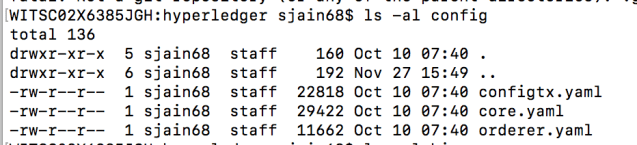
    It will also create a directory named config and store some config files in it
    Screen Shot 2018-11-28 at 2.40.39 PM
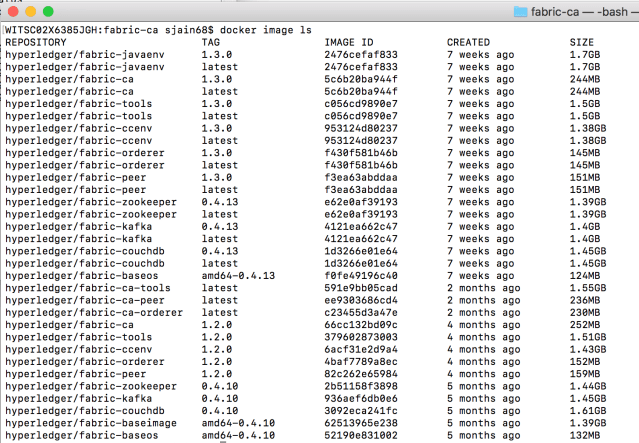
  2. It will download and install docker images for fabric, fabric-ca and 3rd party tools like kafka. You can see all these images by running docker image ls
    Screen Shot 2018-11-28 at 2.42.35 PM
    Note that images corresponding to different versions (e.g., 1.3.0 and 1.2.0) can co-exist and you can explicitly set the version to use in docker-compose.yaml like so image:hyperledger/fabric-ca:1.3.0
  3. It will clone the fabric-samples repository.

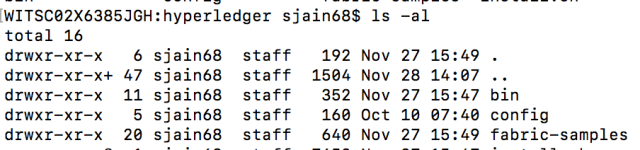
Thus you will end up with a directory that looks like this after running bootstrap.sh

Screen Shot 2018-11-28 at 2.45.51 PM

Further bootstrap provides you ability to do only some of the 3 actions above. The binaries can be skipped using -b flag. The docker images can be skipped using -d flag. The samples can be skipped using -s flag. Thus if you only want to install binaries you can do so like

./bootstrap.sh -sb

Also you can specify what version you want to use

Screen Shot 2018-11-28 at 2.50.41 PM

Posted in Software | Leave a comment

A day in the exciting life of a Software Developer

Woke up yesterday all excited that today I will add a nodejs sample showing how to use ABAC (Attribute Based Access Control) in Hyperledger Fabric and submit a pull request.

Here is how it went.

Things needed to be done:

  1. Step 1: write nodejs chaincode
  2. Step 2: modify the shell scripts to add a command line option to install node chaincode (instead of go)
  3. Test
  4. Submit PR

Step 1 didn’t take much time. Since the chaincode already existed (written in Go), it needed to be converted into NodeJs to accomplish this task. Looking at the Go code I realized its exactly the same chaincode as the balance-transfer app except that it adds a line or two to a method to demonstrate how ABAC works. Luckily a NodeJs version of this chaincode already existed so all I had to do was copy that code and add a if statement which was equivalent of ABAC in NodeJs. I had spent time on a previous day figuring out how to do ABAC in NodeJs.

Step 2 – This is where I got stuck. Bash is definitely the worst programming language. It didn’t help that the editor I was using (VS Code) has no support for Bash. It doesn’t allow you to jump to definition, find references etc in a bash file. So I spend some time searching for a plugin that would add Bash support to VS Code and found this one. Installed it. But got permission error while trying to install

npm i -g bash-language-server

This is because of the -g flag which tries to install it as a global package. So I tried installing it as a non-global package and it gave another error. Today I find out It seems that bash-language-server isn’t compatible with nodejs-lts-carbon version 8.13.0 [link]. Well that’s the version of node that I use and I am not going to change the node version for this plugin. So I cannot use this plugin. I worked hard to make the changes without an IDE experience.

Step3 Test. One area where I got stuck was receiving an error while trying to install NodeJs chaincode.

Screen Shot 2018-11-28 at 10.33.09 AM

The path did exist. I double-checked it. I double-checked my changes

Screen Shot 2018-11-28 at 10.34.32 AM

The test passed if I used Go as the language. Why wouldn’t it work with Node? After some thought I tried to change the path to an absolute

Screen Shot 2018-11-28 at 10.41.12 AM

and that fixed it!

Screen Shot 2018-11-28 at 10.44.32 AM

I think for Go the relative path works because it searches for the location relative to $GOPATH which is set in the docker-compose.yaml file

Screen Shot 2018-11-28 at 10.42.55 AM

Step 4 – Time to push the changes. But before pushing I need to commit them. Before committing I need to do a self-CR. For this I need to view changes against the original. I couldn’t find how to do that in VS Code yesterday. Today as I am writing it I found out that you can do this in VS Code by going to View -> SCM
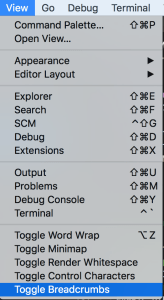
Screen Shot 2018-11-28 at 10.23.24 AM

Yesterday I used SourceTree instead (luckily I had installed it earlier). Committed changes and pushed them after resolving merge conflicts.

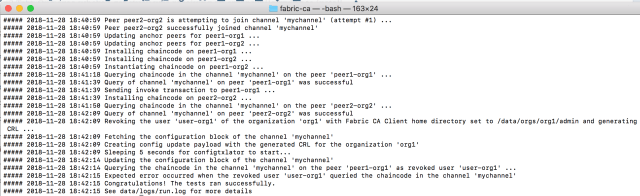
Now when I tried to re-run the code, I got very verbose output and finally an error

Screen Shot 2018-11-28 at 10.50.10 AM

I realized Exec format error sounds like BadImageFormatException on Windows when an executable built for one microprocessor architecture (e.g., ARM) is tried to run on another microprocessor (e.g., Intel). The instruction set is different. So now my fabric-ca-client was corrupt somehow. After some poking I realized I had been working on v1.2.0 of Fabric and in the midst of git push etc. I switched to v1.3.0 of fabric. So now I needed to download 1.3.0 binaries. [Btw using v1.2.0 of binaries still shouldn’t give a Exec format error since the image is in right format; it should error out but not that error] To do that I went to HL Fabric homepage and tried to run the command they tell:

Screen Shot 2018-11-28 at 10.55.59 AM

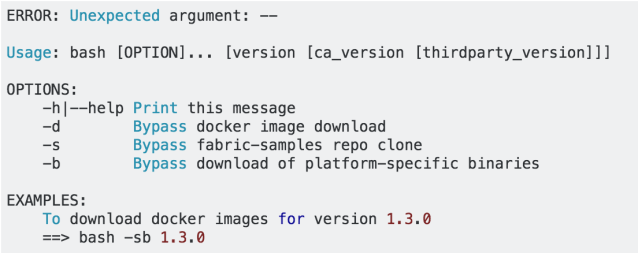
but it gave me this error

Screen Shot 2018-11-28 at 10.58.32 AM

That was highly disappointing. I had to question whether HL Fabric is the right technology for me to use to develop a blockchain. Even their setup script does not work properly. The other day I had left the balance-transfer app running and it maxed out the hard disk after a few days. Anyway I fixed the setup script but the Exec format error did not go away. So I compared what was happening in v1.2.0 against v1.3.0 and realized v1.3.0 tries to dynamically build a docker image

Screen Shot 2018-11-28 at 11.03.53 AM

and in the dockerfile I saw

Screen Shot 2018-11-28 at 11.04.43 AM

this is why it gives the very verbose output as its trying to download docker images. Maybe there is a bug in the script and it downloads the image built for a linux to a mac causing format error? I inspected the binary it downloads

Screen Shot 2018-11-28 at 11.19.20 AM

and it actually matches the v1.3.0 binary of fabric-ca-client on mac that I installed using bootstrap.sh (the official setup script)

Screen Shot 2018-11-28 at 11.22.18 AM

and maybe that’s the problem! In his Docker Deep Dive book Nigel Poulton says:

There is currently no such thing as Mac containers.

However, you can run Linux containers on your Mac using Docker for Mac. This works by seamlessly running your containers inside of a lightweight Linux VM on your Mac.

So even though I am on a Mac, maybe I should be downloading a linux binary? It sounds backwards but just to test it out let’s edit the makeDocker.sh so that it looks like

Screen Shot 2018-11-28 at 11.48.52 AM

Now the start.sh script runs without any errors! Full log can be seen here. This piece of investigation was done today as I was writing this post.

Anyway building a new image every time start.sh is run was not desirable and I found that its possible to get the v1.2.0 behavior by exporting FABRIC_TAG=local before running start.sh. FABRIC_TAG=local tells makeDocker.sh to use the image already installed locally on the machine.
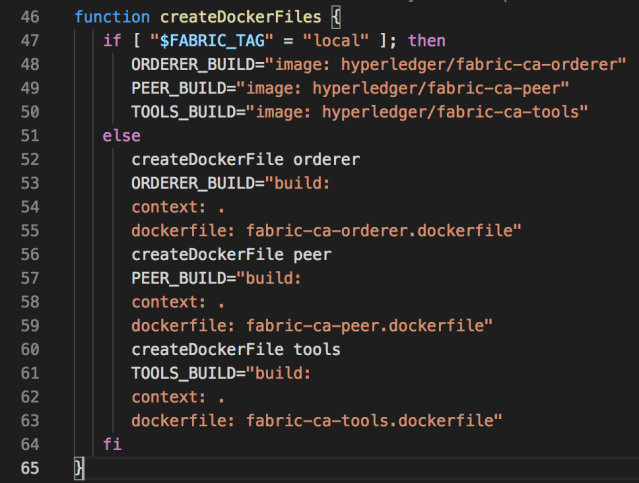
Screen Shot 2018-11-28 at 12.38.50 PM

Once I set FABRIC_TAG=local, test started passing again.

So that I think was my very exciting day and have spent 3 hours writing this up today. I really wanted to write what happens in a day in some detail as I feel I am working very hard but not getting much done. Luckily there were only few meetings yesterday. Reflecting back I think 95% of the time in development is actually spent in debugging issues like above and setting things up (I am ignoring the CR portion completely). The ability to debug is as (or even more) important than the ability to write code. Debugging is very much like solving a crime. It gives great satisfaction when you solve the issue but over time it loses its excitement since it feels like a big waste of time. I have no problem debugging my own code but why should I be wasting time debugging others’ code?

Posted in Software | 1 Comment

How to specify version of docker image to be used when running hyperledger fabric?

By default Fabric will use the version tagged latest. To use another version (known as image_tag in docker parlance) edit the docker-compose.yaml like so

image:hyperledger/fabric-ca-tools:1.3.0

above will tell docker to use the image tagged 1.3.0

see:

https://stackoverflow.com/questions/33816456/how-to-tag-docker-image-with-docker-compose

https://docs.docker.com/compose/compose-file/#image

Posted in Software | Leave a comment

Disk space becomes full when running Hyperledger Fabric

I left the balance-transfer app running on my server for a few days and now the disk space is full.

$ df -h –total
Filesystem Size Used Avail Use% Mounted on
udev 1.7G 0 1.7G 0% /dev
tmpfs 342M 36M 307M 11% /run
/dev/sda1 30G 30G 0 100% /
tmpfs 1.7G 0 1.7G 0% /dev/shm
tmpfs 5.0M 0 5.0M 0% /run/lock
tmpfs 1.7G 0 1.7G 0% /sys/fs/cgroup
/dev/sdb1 50G 52M 47G 1% /mnt
tmpfs 342M 0 342M 0% /run/user/1000
total 84G 30G 53G 36% –

I think its the logs that are filling the disk. line 48 of docker-compose.yaml has:
– ORDERER_GENERAL_LOGLEVEL=debug

change it to warning.

15G of disk space becomes available after shutting down balance-transfer app

siddjain@goldenrwr-ca0:~$ docker-compose -f fabric-samples-v13/balance-transfer/artifacts/docker-compose.yaml down
Stopping peer1.org2.example.com … done
Stopping peer0.org2.example.com … done
Stopping peer0.org1.example.com … done
Stopping peer1.org1.example.com … done
Stopping ca_peerOrg1 … done
Stopping ca_peerOrg2 … done
Stopping orderer.example.com … done
Removing peer1.org2.example.com … done
Removing peer0.org2.example.com … done
Removing peer0.org1.example.com … done
Removing peer1.org1.example.com … done
Removing ca_peerOrg1 … done
Removing ca_peerOrg2 … done
Removing orderer.example.com … done
Removing network artifacts_default

siddjain@goldenrwr-ca0:~$ df -h
Filesystem Size Used Avail Use% Mounted on
udev 1.7G 0 1.7G 0% /dev
tmpfs 342M 35M 308M 11% /run
/dev/sda1 30G 16G 14G 53% /

siddjain@goldenrwr-ca0:~$ docker rm -f $(docker ps -aq)
6c8d8522a2aa
6cbc400671c6
033b6bd2b42f

siddjain@goldenrwr-ca0:~$ df -h
Filesystem Size Used Avail Use% Mounted on
udev 1.7G 0 1.7G 0% /dev
tmpfs 342M 35M 308M 11% /run
/dev/sda1 30G 16G 14G 53% /

siddjain@goldenrwr-ca0:~$ docker rmi -f $(docker images | grep “dev\|none\|test-vp\|peer[0-9]-” | awk ‘{print $3}’)
Untagged: dev-peer0.org2.example.com-mycc-v0-22355527861a6e34150a8bd05d8d30fd2c991d18871620fab4e32394679f19c6:latest
Deleted: sha256:2966a78d9e7c2a6bdf6fa64db9ea0b5b85e56b69e0f1d5bed264da8ad28df073
Deleted: sha256:726634ca793779921764dcf5e675c70d9cc1436479a00611f2fb07e874441fc5
Deleted: sha256:6a4883ff395b4e2069c2d5aa8088b816de6f56ee2e13ef70dabc54fb20de025a
Deleted: sha256:6f077102e0f276a875225dfbd888815d0c60b2d4ff66f00121e19ae3397343f1
Untagged: dev-peer1.org1.example.com-mycc-v0-f76f22af4a360dd2172e04459b1687f933a29d4b8d6c97ea0a4a21144a108361:latest
Deleted: sha256:175d9cfb94f3b5189456237f90eb469ee0d9ea4761f0d25b2e141723104663e0
Deleted: sha256:0484f40037d1af6d0e3b4a883086002dfa25a12c721bc41772842314d3c10d46
Deleted: sha256:dd2bcc15757cc1b61a6b9df196e28e41e5f9847a643e81eaa74d984e69b54641
Deleted: sha256:ad2bd2cba0ef27ad96a9b0060373f68d7407ea1452796e19539d63ffc0ec8c53
Untagged: dev-peer0.org1.example.com-mycc-v0-f021beca29998638e0bb7caa7af8fda7f1e709518214a3181d259abcb2347093:latest
Deleted: sha256:1daf50f0259c3592625226bd48ad9fc319139fab66b3202d9bc58a29b751507c
Deleted: sha256:35869e087559d4168281b7d073f90bd876b6a1186e69388065b0b904cdc318d1
Deleted: sha256:6f960fada83345f85345e01f712fdd02a846f03ff803569ad5b9f92956ebe604
Deleted: sha256:8a72aa32737681e96a3e77aa7bcf6ab86130d10840aec59a44fb290a04ccf76f

siddjain@goldenrwr-ca0:~$ df -h
Filesystem Size Used Avail Use% Mounted on
udev 1.7G 0 1.7G 0% /dev
tmpfs 342M 35M 308M 11% /run
/dev/sda1 30G 15G 15G 52% /

Posted in Software | Leave a comment

The Dark Side of Software Development

This post is meant to outline the sad state of software development in some big corporations. Its hard to put numbers but very roughly speaking for every changeset:

  • Only 10% of the time is spent in coding the actual meat of the changeset
  • 20% of the time is spent on getting compliance with the linter and writing tests. I am not against writing tests as long as they are useful. But here is the sad state of testing I have witnessed. The tests will mock responses of calls made to other services with the result that passing the test doesn’t really tell anything useful – it only tells the code will work correctly subject to the condition that the mocked response matches actual response in production. This condition is often true when the test is written originally but is quickly violated with time (could be within the next day 🙂 as more changesets are made. The test however continues to pass and worse gives a false sense of security and correctness of the code. For this reason I don’t like mocking. Now I know what I have described before is known as unit testing the code and one writes integration tests to test the interface between services. But what happens is enormous emphasis placed on writing the unit tests with 100% code coverage and no integration tests. In such a scenario the tests only serve as a burden with tons of mocks lying everywhere and making the codebase extremely ugly. The tests add no value at all as they only test trivial logic most of the time. Most of the time when there is a bug in production its because the code called an external endpoint and it returned a response not in the format the code was hoping for; and mocking completely hides this problem – again the reason why I don’t like it.
  • Rest of the time (70%, sometimes even 90% or more) spent in CR waiting for feedback, getting in long discussions and making unnecessary changes (think as ransom) just to get someone to sign off. I can’t overstate how stressful and annoying this experience is [example]. These people exist in every company and its hard to avoid them [1]. Imagine doing all the hard work to meticulously test the code is working, linter is passing and then someone asking to make unnecessary changes and often expensive rewrites; because of the pressures of time, in the next iteration the developer would not spend as much time testing as they had done earlier. This actually increases chances of bug creeping in in subsequent iterations. There is a simple remedy to fix this problem which is to allow code to be checked in as long as it has one sign off. If more strictness is required, let it be checked in as long as # of sign-offs > # of rejects. This simple policy keeps the developers who like to bully others in check. But chances are the suggestion would be laughed off in a bureaucratic company where the bully developers use fear tactics to brainwash management into instituting a 100% sign off policy when it comes to checking in code. This is followed up with standard lectures on you should talk to X if there is a deadlock, why didn’t you talk/send a mini-RFC before writing the code etc. Of course the author has already talked to X, and X won’t listen. In such an environment the competency for success shifts from being a solid developer to being someone who is adept at dealing with people.
  • To top it all off, some people have the bad luck of working under a manager who only sees the time required to write the code and cannot understand (or maybe they do, but they want to put pressure and squeeze you to the last drop) why its taking so long to complete tasks on the sprint board.

If you call yourself an Engineering Leader you owe it to your team not to let above happen in your org. Let Builders Build!

Posted in Software | Leave a comment