Dealing with annoying Azure Devops Permissions

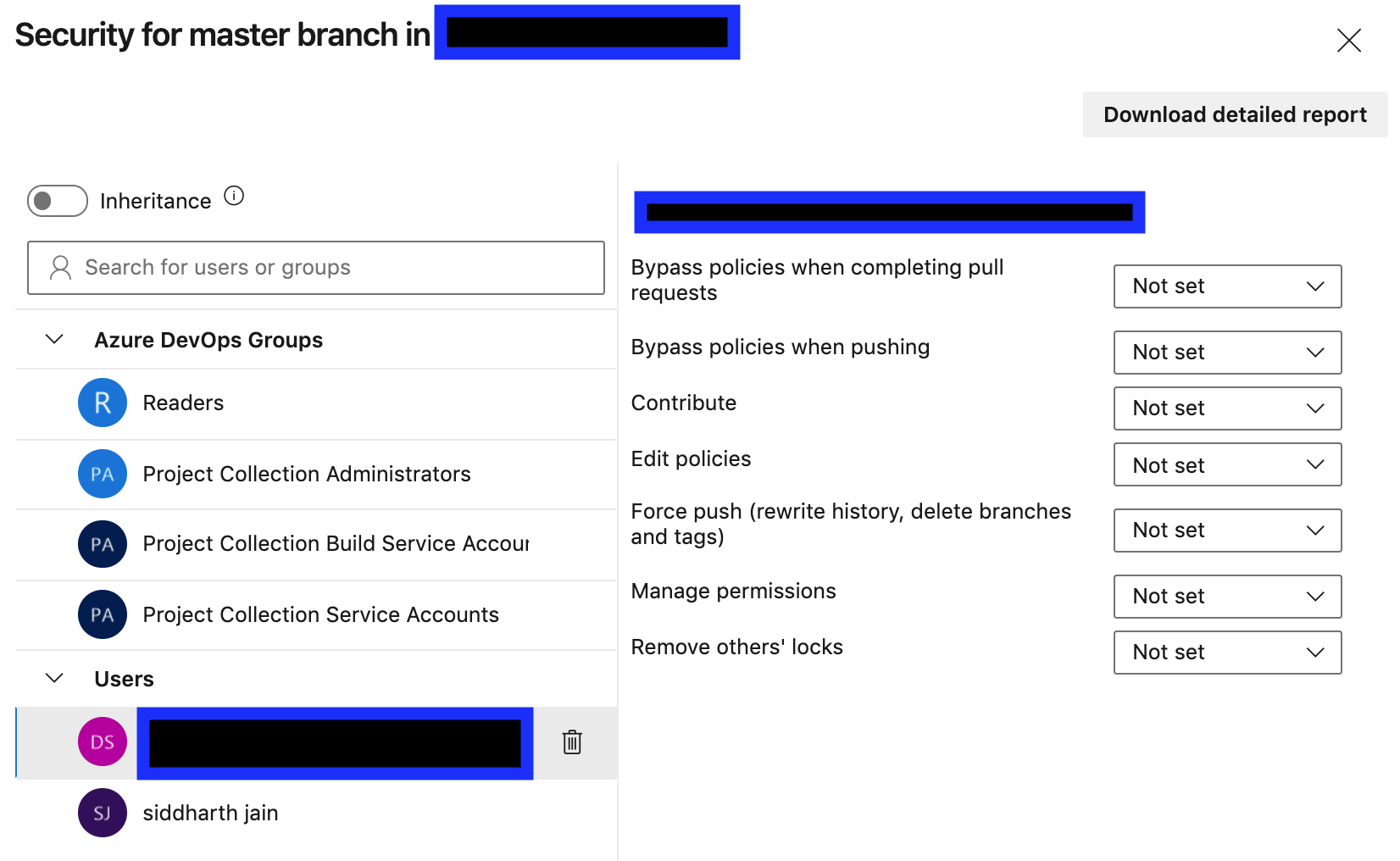
Like many other of its products Azure Devops is over-engineered and a pain to use. Unfortunately you might have to use it in your organization. One of the biggest problems I have run into with it is when it will not allow me to do something (such as bypass the configured policies when completing a pull request) even though I have admin privileges. It literally drives me nuts. I keep on changing the permissions in the UI and nothing happens. I have tried turning off inheritance but nothing happens. The solution is to delete the Contributors (or it could be another group in your case) group under Azure DevOps Groups.

My educated guess as to what is happening here is that Contributors do not have permission to bypass policies. I am a member of the Contributors group. I end up inheriting the privileges associated with that group and there are 2 bugs thanks to the talented engineers at Microsoft:

  • turning off inheritance does not turn it off
  • my own settings do not override the inherited settings

so the only solution is to remove the offending group from the Azure DevOps groups. This does not delete the group from the project. It simply removes it from consideration and having any effect as far as security for the master branch (the screenshot) is concerned. Its better to add the users individually to the Users tab and manually assign permissions to them. For a large project it can be tedious.

Posted in Software | Leave a comment

Sarita – school teacher

😀😀
Sarita was a very good teacher in the school …
*Sarita*: – Tell me where is the Taj Mahal …. 🕌
*Students*:  Agra …  
*Sarita* : Wrong … It’s in Bengaluru…
The students all got into thinking .. and were confused😮😲The students told their parents.  
The very next day, all the parents reached the school and started complaining to Sarita that why are you teaching wrong facts to the children .
*Sarita to all the parents:* 👇🏽👇🏽

.

.

.

.

.

.

.

.

.

.

.

.

First of all, you should deposit the fees of the last six months 💰Till the fees is not deposited, Taj Mahal will remain in *Bengaluru*.🤣😂

Posted in Jokes | Leave a comment

Swoole Notes

First of all you have to understand:

  • the difference between a coroutine and a thread, and
  • the difference between concurrency and parallelism

The TL;DR is that threads are managed by the OS whereas coroutines are managed by the language. OS does not know what a coroutine is. OS preemptively interrupts threads and interleaves them (this is known as concurrent execution) to give the illusion of parallelism. It is an illusion because concurrency is not the same as parallelism . Coroutines run within a thread and are managed entirely by the language.

Just as the OS interleaves threads, a single thread interleaves coroutines running within it. The difference is that whereas threads are preemptively interrupted, coroutines have well-defined points where execution is yielded to another coroutine.

The OS might be running say 30 threads to take an example. Within each thread you may further have 30 coroutines running.

Understand pre-emptive (this is what threads do; a thread has no control over when it will be interrupted; the OS can interrupt it suddenly at any unpredictable point) vs. co-operative (this is what coroutines do) multitasking:

The term preemptive multitasking is used to distinguish a multitasking operating system, which permits preemption of tasks, from a cooperative multitasking system wherein processes or tasks must be explicitly programmed to yield when they do not need system resources.

In simple terms: Preemptive multitasking involves the use of an interrupt mechanism which suspends the currently executing process and invokes a scheduler to determine which process should execute next. Therefore, all processes will get some amount of CPU time at any given time

Read this as this is the essence of Swoole: https://www.swoole.co.uk/docs/modules/swoole-coroutine 

A coroutine can be simply understood as a thread, but this thread is in user mode and does not require the participation of the operating system. The cost of creating, destroying and switching is very low. Unlike threads, the coroutine cannot use multiple CPU core because it operates in user space

Swoole creates one coroutine for each request to the server and switches coroutines based on I/O status automatically, this happens within the coroutine scheduler.

So the beauty is that you write code as if you were programming synchronously but Swoole will automatically switch coroutines based on I/O status thus giving you benefits that come with async execution.

A coroutine context is created using Co\run. The context is created automatically for you for each HTTP request.

A coroutine context is created with the callback function: request, receive, connect in a Swoole\Server or Swoole\HTTP\Server for you, so you can start using coroutines straight away within those callbacks.

A coroutine can then be created within the context using the go function.

inside each go call is a coroutine

Coroutines have access to the same memory space, they can conflict with modifying memory which could be dependent by another coroutine as they are running within user space, on the same thread.

To solve the problem of conflicting memory access we have channels they are used for the communication between coroutines.

$chan->pop(); // Read data from the channel, it will block and wait if the channel is empty
$chan->push(); // Write data into the channel, it will block and wait if the channel is full

Keywords:

  • go, Create a new coroutine. go() is alias of Swoole\Coroutine::create()
  • chan, Create a new channel for message-passing
  • defer, Delay the task until the exit of the coroutine, FIFO

Swoole coroutines are analogous to goroutines in Go with some differences .

More notes from: http://vesko.blogs.azonmedia.com/2019/09/19/coroutines-in-swoole/  (an excellent article)

Each coroutine has its own stack but shares the global state of the PHP process (the Worker) with the rest of the coroutines.

The parent/child relationship of the coroutines does not mean that that they are nested like the function calls/stack. Unlike the functions the child coroutine can end after the parent one and both coroutines are running in parallel (in terms that they can get and yield execution multiple times in between giving the impression of parallel execution, not that they are actually running in parallel as it is explained further down).

The coroutines yield the control to the scheduler only at certain points. In Swoole these are requests that can be served asynchronously[2] like database queries, file operations, etc. By saying asynchronous I do not mean that these are using callbacks, but instead that at the point of a database query being sent the coroutine gives the control back to the scheduler to run another coroutine. The first coroutine will be resumed once the data is received from the DB and the currently running coroutine gives up the control.

It is very important to note that the core PHP libraries and DB extensions are blocking and do not allow for coroutine switching. This means that if you execute mysqli_connect() the Swoole Worker will wait (block) for the result of the operations instead of yielding the control to another coroutine. Thus running an existing PHP code in Swoole will make no use at all of the coroutines.

On the contrary – the global shared state allows for a pool of database connections to be created and connections from this pool to be obtained by the coroutines as needed and then released. Because of the persistent nature of Swoole, these connections do not have to be opened and closed for each request but instead once they are opened when the Swoole Server is started these only need to be pinged to keep them alive. The connection pool provides a speedup compared to the traditional setup as it saves time for opening the DB connection.

Another good read: http://swoft.io/docs/2.x/en/ready/swoole.html 

How does Swoole Work?

The essence of Swoole is its coroutines which are very similar to Go. But how do the Swoole coroutines work internally? They work by tapping into the epoll  I/O event notification facility of Linux. This is how all the magic happens ref . And this is also the reason why Swoole does not work on Windows since epoll is specific to Linux.

Gotchas

  • Xdebug must be disabled when using Swoole and Yasd does not work. So debugging is going to be harder.
  • Also can’t use xhprof, Blackfire ref . Also can’t use zendtraceuopz ref 
  • Can’t just edit and save php files for changes to take effect like you can do with PHP-FPM. Have to restart the server (just like you have to do with Node.js) or send SIGTERM or USR signal to worker process.

Posted in Software | Tagged | Leave a comment

A comparison of Swoole and ReactPHP

I am a newcomer to PHP. I never used it in my career but recently we developed some very successful projects using WordPress and it was WordPress that provided an entry point into the PHP world for me. I found WordPress to be great for low to medium traffic web applications. Its secret power is the rich ecosystem of plugins that come with it. All plugins come with the source code and as long as you are not going to distribute your product, you can hack and modify the plugins no matter what the license associated with them. As I increased my knowledge of WordPress, I came to know about its shortcomings related to being a PHP application and how all PHP apps work. All calls to MySQL and all HTTP requests are synchronous. The whole execution context is recreated on every single incoming request and torn down in the end.

There is a lot of exciting stuff the PHP community has done to make it more performant. Gradually I came to know about Swoole and ReactPHP. I summarize them side-by-side in below table:

Swoole ReactPHP
Aims to be like Go (multiple workers, coroutines)Aims to be like Node.js (single threaded, non-blocking event loop)
Documentation is not very goodMuch better documentation and videos on YouTube
Not compatible with XdebugCompatible with Xdebug
Yasd debugger has issuesN/A
Can use nodemon for “hot code reloading”
More performantGood enough (node.js like performance)
Excellent architecture. Uses all the learnings and features from Node.js – streams, promises etc.
Very comfortable for a Node.js developer
Comparing Swoole with ReactPHP

Both libraries run in CLI mode and you don’t need any webserver like Apache or NGINX. In the end if I were to pick, ReactPHP is my choice. One thing I have noticed is that there are hardly any questions related to Swoole or ReactPHP on StackOverflow. What does that tell us?

References:

Posted in Software | Leave a comment

Common programming mistakes

  • Probably the most common and embarrassing programming mistake: Not testing the code in the catch block. And when it gets executed in production it throws and crashes the application.
Posted in Software | Leave a comment

docker stop does not send SIGTERM to node app

One of the things they mention in Express docs is to add support for graceful shutdown of your application:

The process manager you’re using will first send a SIGTERM signal to the application to notify it that it will be killed. Once the application gets this signal, it should stop accepting new requests, finish all the ongoing requests, clean up the resources it used, including database connections and file locks then exit.

The Express docs also point to the http-terminator library for adding graceful shutdown to your applications. Their code sample is in TypeScript but you can use the library from JavaScript like this:

const { createHttpTerminator } = require('http-terminator');
const httpTerminator = createHttpTerminator({ server: httpsServer });
process.on('SIGTERM', async () => {
  debug('SIGTERM signal received: closing HTTP server')
   await httpTerminator.terminate();
});

I tried this but nothing happened when I stopped the container running my Node.js app using docker stop. The callback never gets invoked.

What’s happening?

What’s going on here is that the entrypoint or CMD of my docker container was a shell script called run-server.sh. And within that shell script I had following line of code that actually runs the node program:

node server.js

Now the way Bash shell works is that it spawns a child process to run node and signals sent to the parent process are not forwarded to the child processes – the cause of the problem. The child process can be seen here:

bash-5.0# ps aux
PID   USER     TIME  COMMAND
    1 root      0:00 bash ./run-server.sh
   18 root      0:00 node /usr/local/bin/npx nodemon main.js
   30 root      0:00 /usr/local/bin/node main.js
   41 root      0:00 /bin/bash
   46 root      0:00 ps aux

Fortunately there is an easy way to fix this and is to use the exec command provided by Bash.

The exec() family of functions replaces the current process image
       with a new process image.

So in our run-server.sh we simply make following change:

exec node server.js

Now Bash will NOT spawn a child process to execute node and the SIGTERM sent by docker stop will make its way to the Node application.

There is one catch to this solution which is that your node command must be the last command in your shell script. This would likely be the case since the node command will run forever listening for requests from clients.

References:

Posted in Software | Leave a comment

Why I hate Docker?

  • Many things are broken out of the box. New versions released without testing.
  • Poor documentation
  • Many times I am not able to download image from DockerHub. It does not exist.
  • Given image, no command to know the Dockerfile that generated it
  • A proposal filed in 2014 asking to support wildcards in docker cp is still pending [moby/7710]
  • docker rename broken when using overlay network [moby/42351]
  • DNS lookup fails on alpine 3.11, 3.12, 3.13 – that’s 3 versions [docker-alpine/539]. without this your container cannot communicate over internet. i ran into this when i got this error DNS resolution failed for api.github.com while trying to install something in my container.

docker build hangs

this happens time to time on WSL2 (I think any unhandled exception causes the docker engine to stop running). Open the docker desktop and at the very bottom check if Docker Engine is running. If its not running there will be a play button to start it.

Click on it.

Posted in Software | 2 Comments

Sardarji in bar

_*This joke apparently won an award for the best joke in a competition held in Britain*_ _*Mr Singh walks into a bar in London , orders 3 glasses of beer and sits in the backyard of the room, drinking a sip out of each one in turn.*_

_*When he finishes, he comes back to the bar counter and orders 3 more. The bartender asks him, “You know, beer goes flat after I fill it in the glass; it would taste better if you buy one at a time.”*_

_*Mr. Singh replies, “Well, you see, I have two brothers. One is in Dubai , the other in Canada and I’m here in London . When they left home, we promised that we’ll drink this way to remember the days when we drank together.”*_

_*The bartender admits this is a nice custom and leaves it there.*_

_*Mr. Singh became a regular in the bar and would always drink the same way. He’d order 3 Beers and drink them in turn.*_

_*One day, he came in and ordered only 2 Beers. All the other regulars notice and fall silent.*_

_*When he comes back to the bar for the second round, the bar tender says, “I don’t want to intrude on your grief, but I wanted to offer my sincere condolences on your great loss.”*_

.

.

.


_*Mr. Singh looked confused for a moment, and then he laughs…. “Oh, no,”*_
_*He said, “Everyone’s fine; both my brothers are alive. The only thing is…*_
_*I have quit drinking”!!!*_
😄😄Try Beating this 😜

Posted in Jokes | Leave a comment

Modifying owner of a file on Mac

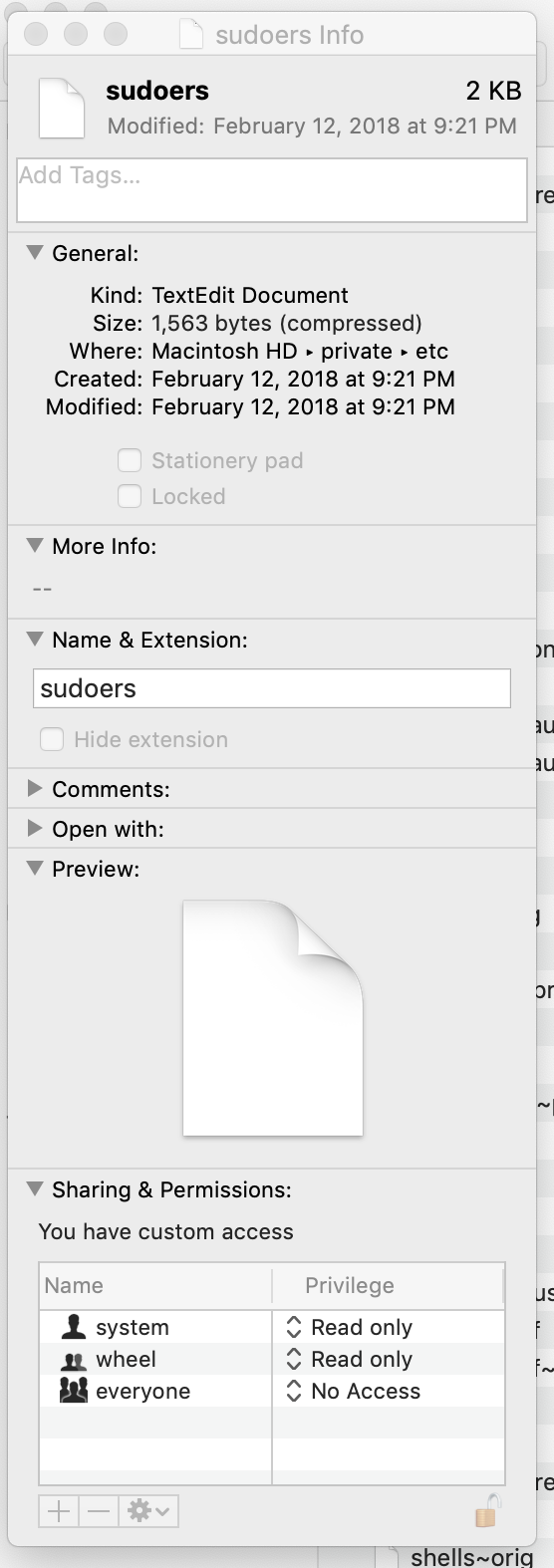
The chown command allows one to change the owner of a file. If you can’t run the command due to insufficient privileges, another way to change the owner is through Finder – this also requires elevated privileges. Here are the steps on how to do it from Finder:

Step 1: Open Finder and from the Menu click on Go -> Go to Folder…

Step 2: Select the file then from the Menu click on File -> Get Info

Step 3: Click on the lock icon at bottom right to unlock. This step requires elevated privileges. Screenshot below:

Now you can edit ownership and permissions. Adding this line to the sudoers file will give you same privileges as root on your machine:

<your-user-name> ALL = (ALL) ALL
Posted in Computers | Tagged , , | Leave a comment

Azure Pipeline gets stuck in Queued state

Background & Assumptions: This post assumes you know how to install an azagent on your VM and applies to self-hosted agents on Linux VMs. See this for how to install a self-hosted agent on Linux VM. The azagent runs as a service on your Linux VM and pulls jobs from Azure Devops to be executed. Note the agent pulls jobs. Jobs are not pushed to the agent. The diagnostic logs of the agent can be found under the _diag directory of the agent’s root folder. Further the post is specific to a pipeline that used to work, but will stop running after a while. If your pipeline does not work to begin with, chances are you have some other problem with it. E.g., this bit me when I wrote my first pipeline and took quite a while to figure out.

From time to time your azure pipeline will get stuck in Queued state and eventually time out after 1 hour.

You can try checking the logs but they will be empty. You can try stopping and restarting the agent, but no luck. If you contact Microsoft you will get a canned response from them saying this happens because you exceeded your quota of max parallel jobs which is BS. And they will pester you for logs and ask to re-run the pipeline with System.Debug:true. You do all this but they still can’t resolve the issue. The reality is that they are clueless. The only known fix (AFAIK) to this problem is to uninstall and re-install the agent again. You can do this by following below steps (all run as root user):

Step 1: Stop the agent

#-> ./svc.sh stop

Step 2: Uninstall the agent

#-> ./svc.sh uninstall

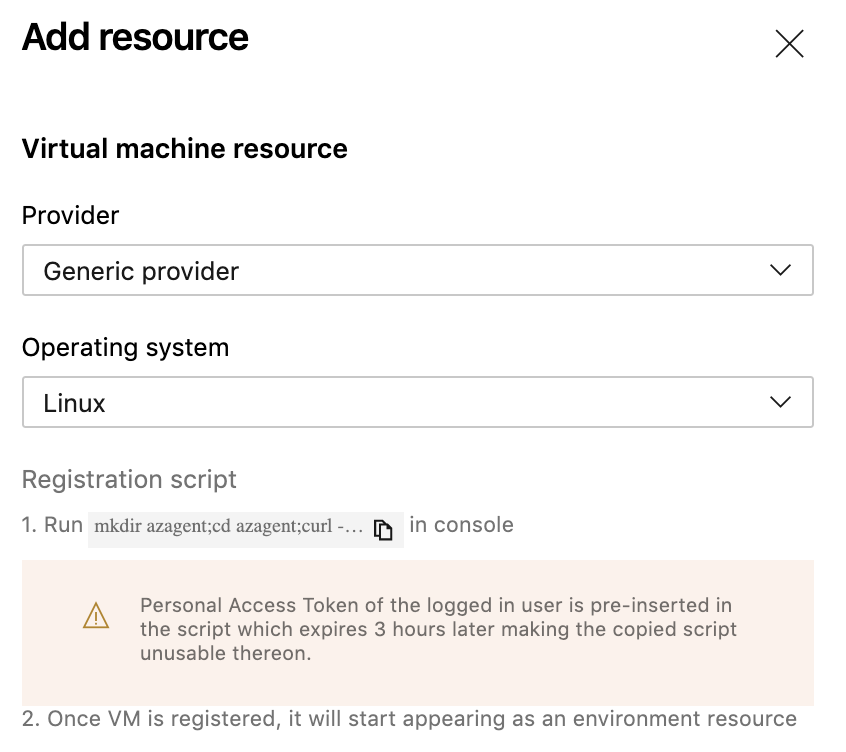
Step 3: Obtain a new PAT you will need to unregister the agent

You obtain this from following screen that you must have used earlier when you setup your agent. (Tip: Removing the agent from Azure Devops UI will not work. You will get errors in next step.)

Step 4: Unregister the agent

#-> AGENT_ALLOW_RUNASROOT=true ./config.sh remove

You will be prompted for PAT. Provide it the PAT from previous step.

Step 5: Reinstall the agent

Do this using the same steps that you followed to provision your original agent. The commands should look like following where you substitute PAT and other strings as appropriate

AGENT_ALLOW_RUNASROOT=true ./config.sh --environment --environmentname "QA" --acceptteeeula --agent $HOSTNAME --url https://dev.azure.com/myorganization/ --work _work --projectname 'myproject' --auth PAT --token mytoken --runasservice
./svc.sh install
./svc.sh start

Now the pipeline should work again.

Posted in Software | Tagged | Leave a comment