How to quickly tell if a person is intelligent?

When you ask them a question, they provide an answer that answers the question or perhaps say I don’t know. They don’t go off on a long speech that never answers the question you asked in the first place.

Posted in General | Leave a comment

Maven: 10 things you need to know

  1. The order of dependencies in pom.xml can matter because when there are multiple versions of a dependency in the dependency tree, the nearest one wins and when there are multiple nearest ones, the first declaration wins. See this SO answer. Best Practice: Don’t rely on the order of dependencies to resolve a version. Use dependencyManagement section in pom.xml to directly specify the versions of artifacts to be used when they are encountered in transitive dependencies or in dependencies where no version has been specified.
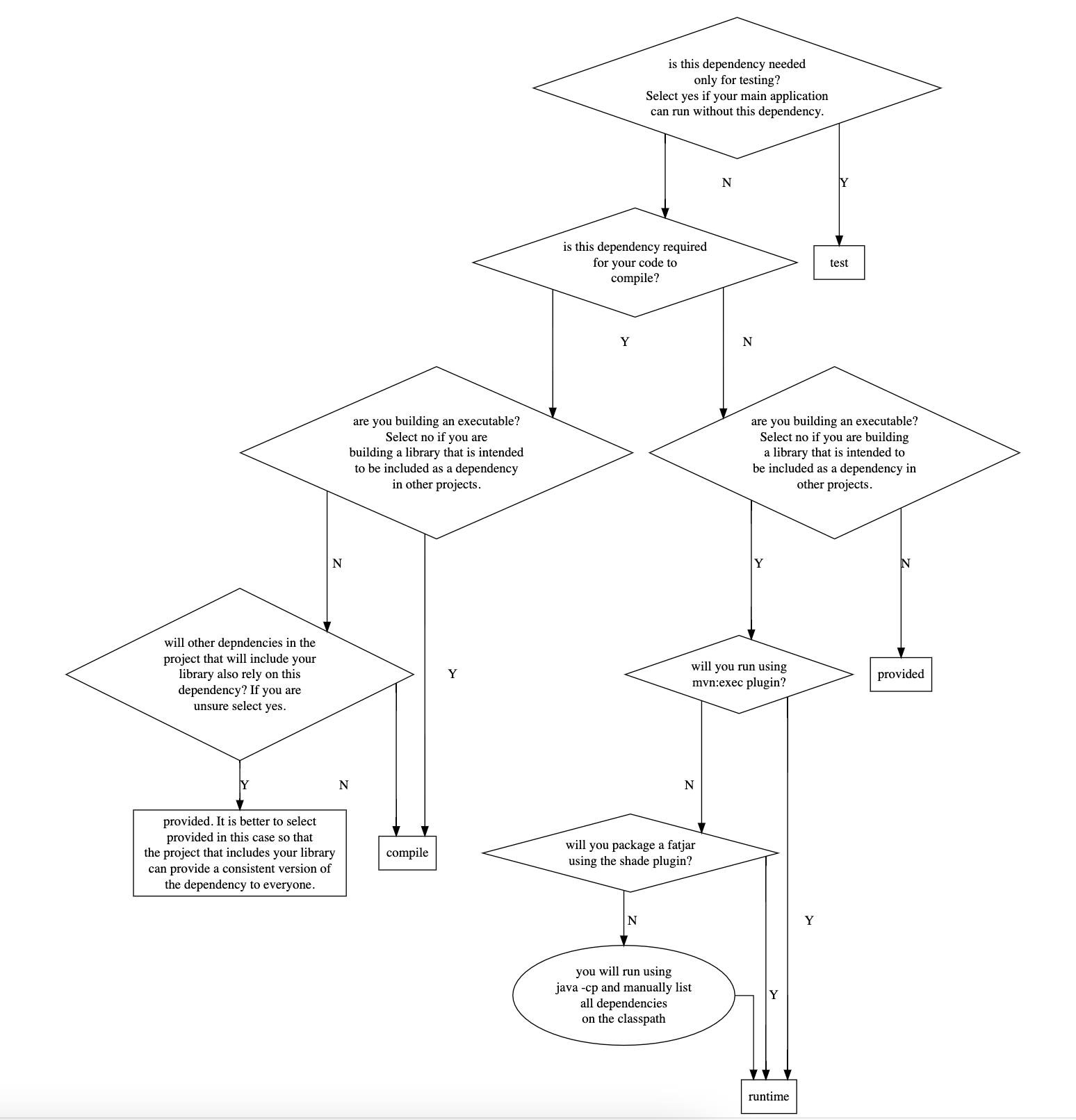
  2. Understand dependency scopes. When you read compilation, test and runtime in the official documentation, make a mental substitution with mvn compile, mvn test and mvn exec commands respectively. I found that to be helpful. There are 6 scopes defined out of which 1 is deprecated (system) and I haven’t used 2 in my work (runtime and import). That leaves compile, test and provided which are the 3 scopes you are most likely to use and they correspond to dependencies, devDependencies and peerDependencies of Node.js. In my own words:
    • Compile: Easiest to understand and works the way you would expect. This dependency will be available at compile time (i.e., when running mvn compile or mvn package) and also runtime. Note that runtime means when executing your project with mvn exec plugin. If you are executing via java command then you are responsible for declaring the full classpath and much of the discussion doesn’t apply. Also Maven will import the dependencies of a compile dependency during build and run.
    • Test: The dependency is available during compile and during testing (mvn test). However, it is not added to the classpath when you run mvn exec. This scope is intended to be used for dependencies like junit that you need while testing but are not part of your main application.
    • Provided: This is the one which is difficult to understand and causes issues like ClassNotFoundException. If you are familiar with Node.js, provided is just like peerDependencies of Node.js. The (only) use-case I am familiar with is when you are developing libraries, modules or plugins which are expected to be imported by other projects i.e., your project is not the final executable. You will never run mvn exec on your project. Having a provided dependency in your pom.xml and running mvn exec on your project is a sure way to generate a ClassNotFoundException. The project that imports your project in its pom.xml should also import your project’s provided dependencies (e.g., if A is declared as provided in your pom.xml, then the project that imports your project should import A with scope compile). Then, when mvn exec is run on that project everything will work. Any dependency declared as provided is available to you at compile time (and even test) so that your code compiles (and you can test it) but it won’t be included if you run mvn exec or in the packaged jar when you run mvn package. Note that even compile dependencies by default are not included in a jar file. We have to create a fat-jar using special plugins (Maven Shade or Maven Assembly plugin) and they will skip over provided dependencies.
    • Runtime: Say your project contains code that calls classes and methods from A. Then you definitely need A during the compile phase of your program otherwise code won’t compile. Now let’s say A calls methods from B but your project never directly calls classes or methods from B. Thus your project has an indirect dependency on B. You don’t necessarily need B to be added to the classpath when compiling your code (i.e, mvn compile). But you will need B to be available when running your program. In this case, you could add a reference to B in pom.xml and mark it with runtime scope. Or as most of us do, why bother? Maven includes a dependency with runtime scope in the runtime and test classpaths, but not the compile classpath.
    • System: Deprecated but still used. The use-case for this that I am most familiar with is to be able to reference a jar that you downloaded from somewhere (such as GitHub for example). The dependency is not available (published) on Maven Central or another repo. In that case system allows one to specify the local file path to the assembly. A better alternative is to download the file and then run mvn install:install-file (see full command here) to install it into local Maven repository and then reference it just like any other dependency with compile scope.
    • Import: I have never used this one.
  3. When things aren’t working as expected w.r.t. dependencies look at the source code. Exec plugin source code is here. And the code for core Maven which does dependency resolution is here. Look at the methods getCompileClasspathElements(), getTestClasspathElements(), getRuntimeClasspathElements() here to see the dependency scopes in action. The code is the ultimate documentation.
  4. Become familiar with mvn dependency:tree, mvn dependency:analyze, mvn dependency:list and much more. See this for full list. These will help debugging dependency issues.
  5. When there are multiple versions of a dependency in your dependency tree, only one will end up being actually used. This is what we mean by dependency resolution. Most of the time things will work but sometimes your project has reference to A and B and A must use a different version of C than B (i.e., both A and B depend on C but must use different versions of C). When this happens you will get runtime errors because only one version of C will ultimately end up in the classpath and either A or B will break. To fix this, use the Shade plugin which will basically rename all the classes in an assembly to something else. Think of it as if you had clicked on refactor and rename class in VS Code. This allows the different versions of C to co-exist in your final jar.
  6. See Maven lifecycles.
  7. To get the complete classpath (path to all the dependency jars your project uses) run mvn dependency:build-classpath. You can then use this classpath as argument to -cp flag of java command.
  8. To install a dependency from maven central to your M2 repository run (as example): mvn dependency:get -DremoteRepositories=https://mvnrepository.com/ -Dartifact=com.oracle.database.jdbc:ojdbc10:19.15.0.0.1
  9. The M2_HOME variable is deprecated and no longer used by recent Maven versions. If you want to set the path of Maven repository, the correct way to do it is to edit /path/to/maven/conf/settings.xml e.g., as:
<localRepository>/your/custom/path/.m2/repository</localRepository>

Flowchart to help in deciding Maven dependency Scope

This is just my version. I myself get very confused at times deciding the dependency scope (code for the flowchart is here).

  1. Last thing I will mention is how to execute a different main class using the maven exec plugin. The best way is to specify whatever mainClass you want to execute using the -Dexec.mainClass variable on the command-line but you can also set different main classes in pom.xml. If you want to choose this option, then you define multiple execution elements in your pom.xml. E.g.:
<execution>
                <id>some-execution-id</id>
                    <goals>
                        <goal>java</goal>
                    </goals>
                    <configuration>
                <mainClass>py4j.Py4jWrapper</mainClass> 
            </configuration>
                </execution>

and on the command-line you will use following command:

mvn exec:java@some-execution-id
  1. How do you use preview features just as Vector API with Maven? There are 2 things you need to do: first, is configuring maven compiler plugin as follows:
<plugin>
                <groupId>org.apache.maven.plugins</groupId>
                <artifactId>maven-compiler-plugin</artifactId>
                <version>3.8.1</version>
                <configuration>
                    <source>20</source>
                    <target>20</target>
                    <compilerArgs>
                        <arg>--enable-preview</arg>
                        <arg>--add-modules</arg>
                        <arg>jdk.incubator.vector</arg>
                    </compilerArgs>
                    
                </configuration>
            </plugin>

You are not done yet. You also need to enable the same flags during execution using MAVEN_OPTS:

MAVEN_OPTS="--enable-preview --add-modules jdk.incubator.vector" \
mvn exec:java

Attempts to enable the flags using any other way will be futile as I learned painfully. It has to be done through MAVEN_OPTS.

  1. How do you run the main method in a static inner class using Maven? Use below syntax:
mvn exec:java -Dexec.mainClass='my.package.OuterClass$InnerClass'

The inner class has to be marked public or there will be an error.

  1. Sometimes you need to use --add-opens ${module}/${package} to open up the internals of a package in a Java module. You can add it to MAVEN_OPTS but as I learnt painfully while adding it to MAVEN_OPTS works for mvn exec:java, it does NOT work for mvn test [1]. mvn test ignores any --add-opens directives specified in MAVEN_OPTS. To get around the limitation, run your tests that require --add-opens using the java command like below (shown using JUnit4 test runner as example):
java \
-cp $CLASSPATH \
--add-opens java.base/sun.nio.ch=ALL-UNNAMED \
--add-opens java.base/java.nio=ALL-UNNAMED \
--add-opens java.base/java.util.concurrent=ALL-UNNAMED \
--add-opens java.base/java.util.concurrent.atomic=ALL-UNNAMED \
--add-opens java.base/java.util.concurrent.locks=ALL-UNNAMED \
--add-opens java.base/java.util=ALL-UNNAMED \
org.junit.runner.JUnitCore \
com.mycompany.app.BdbTest

If you like watching a video, I recommend this.

  1. While using Maven, take care not to set any properties/flags in the <configuration> section of a plugin e.g., see this. The reason is that if you do this, you will not be able to override the settings from command-line. Instead of having the command-line override pom.xml, Maven overrides the command-line with pom.xml. How infinitely stupid!
  2. If you use mvn exec:java to run a program, understand how it operates as it introduces some nuances and may create unexpected warnings due to the fact that your program is not executed on the main thread. e.g., see this.

Basics

Maven has concept of lifecycles -> phases -> goals. Plugins bind to phases. To execute a phase Maven delegates the execution to a plugin. When you run a Maven command e.g. when you run:

mvn install

You are executing the install phase. Running install will also run all the previous phases in the lifecycle its associated with.

<phases>
  <phase>validate</phase>
  <phase>initialize</phase>
  <phase>generate-sources</phase>
  <phase>process-sources</phase>
  <phase>generate-resources</phase>
  <phase>process-resources</phase>
  <phase>compile</phase>
  <phase>process-classes</phase>
  <phase>generate-test-sources</phase>
  <phase>process-test-sources</phase>
  <phase>generate-test-resources</phase>
  <phase>process-test-resources</phase>
  <phase>test-compile</phase>
  <phase>process-test-classes</phase>
  <phase>test</phase>
  <phase>prepare-package</phase>
  <phase>package</phase>
  <phase>pre-integration-test</phase>
  <phase>integration-test</phase>
  <phase>post-integration-test</phase>
  <phase>verify</phase>
  <phase>install</phase>
  <phase>deploy</phase>
</phases>

Here you can see what plugin Maven executes to execute a phase for the jar packaging:

<phases>
  <process-resources>
    org.apache.maven.plugins:maven-resources-plugin:2.6:resources
  </process-resources>
  <compile>
    org.apache.maven.plugins:maven-compiler-plugin:3.1:compile
  </compile>
  <process-test-resources>
    org.apache.maven.plugins:maven-resources-plugin:2.6:testResources
  </process-test-resources>
  <test-compile>
    org.apache.maven.plugins:maven-compiler-plugin:3.1:testCompile
  </test-compile>
  <test>
    org.apache.maven.plugins:maven-surefire-plugin:2.12.4:test
  </test>
  <package>
    org.apache.maven.plugins:maven-jar-plugin:2.4:jar
  </package>
  <install>
    org.apache.maven.plugins:maven-install-plugin:2.4:install
  </install>
  <deploy>
    org.apache.maven.plugins:maven-deploy-plugin:2.7:deploy
  </deploy>
</phases>

As I understand mvn command has two forms:

mvn phase
mvn plugin:goal

e.g. when we run mvn compile we are invoking the well-defined compile phase and this phase maps to compile goal of org.apache.maven.plugins:maven-compiler-plugin by default. In contrast, when we run

mvn spring-boot:run

we are telling directly the goal and plugin to execute.

Each goal is a MOJO – Maven Old Java Object. To debug with Maven use mvndebug (alternatively use jdb to debug directly without Maven).

How to override the default plugin associated with a phase?

When we declare a plugin in pom.xml under:

<build>
  <plugins>
    <plugin>

we are essentially overriding the default plugin associated with a phase. You can use this to e.g., use the shade plugin to package your jar instead of the default maven-jar-plugin.

Homework

Think you know Maven? How about filling this table with a ✔ or ×

scopemvn compilemvn testmvn execmvn packagemvn test-compilemvn dependency:build-classpath
compile
test
runtime
provided

re: mvn package, the question is to tell whether a dependency will be included in the fat jar or not when running mvn package with the shade plugin. I don’t recommend using assembly plugin and for spring boot you should use spring-boot-maven-plugin for building a fat jar.

Other Tips

Today I learned this command from ChatGPT:

tr '\0' ' ' < /proc/<PID>/cmdline

Its an incredibly useful command as it shows the command that launched a Linux process. E.g., when you run a spring boot application using mvn spring-boot:run, above command can reveal the command that Maven runs behind-the-scenes that actually spins up the java process. It looks like this e.g.:

/home/ubuntu/jdk-21.0.6/bin/java -classpath /home/ubuntu/apache-maven-3.9.9/boot/plexus-classworlds-2.8.0.jar -Dclassworlds.conf=/home/ubuntu/apache-maven-3.9.9/bin/m2.conf -Dmaven.home=/home/ubuntu/apache-maven-3.9.9 -Dlibrary.jansi.path=/home/ubuntu/apache-maven-3.9.9/lib/jansi-native -Dmaven.multiModuleProjectDirectory=/home/ubuntu/project-dir org.codehaus.plexus.classworlds.launcher.Launcher spring-boot:run -Dspring-boot.run.jvmArguments=-Djava.library.path=lib -DJWT_SECRET_KEY= -Dspring-boot.run.main-class=my.web.WebApplication -Dspring-boot.run.arguments=--server.port=8080 

It looks like there are 2 java processes that are spawned. One is above and there is yet another java process that is like below:

/home/ubuntu/jdk-21.0.6/bin/java -XX:TieredStopAtLevel=1 -Djava.library.path=lib -DJWT_SECRET_KEY= -cp <full_class_path> my.web.WebApplication --server.port=8080

This is incredibly useful as it gives you the full classpath you need if you later want to launch without Maven. Many times I have to use Maven just to launch an application as constructing the humunguous classpath is impossible manually.

Posted in Computers, programming, Software | Tagged | Leave a comment

How to debug java.lang.ClassNotFoundException

java.lang.ClassNotFoundException is probably the most dreaded and difficult exception you can run into when doing Java development. What does it mean? Simply put, the class could not be found on the classpath. If you reached this far, the class was available during compile time, but mysteriously is not available during runtime. If you are using Maven, dependencies with provided scope are perfect candidates for this problem. From documentation:

A dependency with this scope is added to the classpath used for compilation and test, but not the runtime classpath.

If:

  • You have dependency on A in your pom.xml
  • A has dependency on B in its pom.xml
  • B is declared with a scope of provided in A’s pom.xml
  • Your pom.xml does not import B (with scope compile or runtime)

then you will get this error.

The classpath defines all the paths or places where the ClassLoader looks to load a class.

Step 1: inspect the classpath

if you ran your program using java, the -cp option defines the classpath. So check what you specified in -cp. Further this classpath is available in the java.class.path system property. Print it out and verify the result is what you’d expect.

Out of habit, I run my programs using Maven using mvn exec:java plugin. Among other things, it adds all the dependencies to the classpath so that I don’t have to manually list all of them using -cp (the list can become quite large). However, from what I understand Maven adds dependencies to the classpath at runtime whereas the java.class.path system property returns the classpath when JVM was invoked. This means if you print java.class.path and the program was run via mvn exec:java you don’t get the full classpath. You only get:

/Library/Downloads/apache-maven-3.8.5/boot/plexus-classworlds-2.6.0.jar

or something related and not the classpath you would expect. Run mvn and specify the -X switch. Now you will see the classpath in the output of mvn. e.g.:

[DEBUG] Collected project classpath [/Users/xxx/java/memory-measurer-test/target/classes]
[DEBUG] Adding to classpath : /Users/xxx/java/memory-measurer-test/target/classes
[DEBUG] Adding project dependency artifact: memory-measurer to classpath
[DEBUG] Adding project dependency artifact: jsr305 to classpath
[DEBUG] Adding project dependency artifact: guava to classpath

Also look into mvn dependency:build-classpath. To get the full classpath at runtime you can try using the ClassGraph library like so:

        List<URI> classpath = new ClassGraph().getClasspathURIs();
        for (URI uri : classpath) {
            System.out.println(uri.toString());
        }

This way I was able to get full classpath of a program that is run via mvn exec:java plugin.

Step 2: Check if your jar dependency really has the class in it

If you have verified the classpath is not the problem i.e., your dependency exists in the classpath, a good idea is to unpack the dependency (assuming its a jar file) using tar -xvf and verify that the class is indeed contained in the jar file. A lot of times when we have a complex dependency graph, there are version conflicts and the version of the dependency that ends up in the classpath does not have some class you need. When this happens use the maven-shade-plugin to provide multiple versions of the same dependency to your application (some libraries will need version X and other will need version Y. maven-shade-plugin gives you a way to package both versions in your application).

One time when it never worked

When using a javaagent and running using Maven, I got a java.langClassNotFoundException and was never able to fix it. more here. Only conclusion I could draw is that when program is run through mvn exec:java the classpath does not propagate to the javaagent maybe because Maven adds dependencies to the classpath at runtime and by then the javaagent has already started (just my guess). So beware of this gotcha.

I confirmed my hunch by inspecting the source code of the mvn exec plugin. It can be found here. It is instructive to see how it modifies the classpath at runtime. The code that does this is:

public class ExecJavaMojo # the main class that runs when mvn exec:java is used

    public void execute() # the main function within the class
        URLClassLoader classLoader = getClassLoader();

            private URLClassLoader getClassLoader()
                this.addRelevantPluginDependenciesToClasspath( classpathURLs );
                this.addRelevantProjectDependenciesToClasspath( classpathURLs );
                this.addAdditionalClasspathElements( classpathURLs );

But this classpath does not propagate to the javaagent. In fact the exec plugin does not even start (or know anything about) the javaagent. I could not find any reference to javaagent in the exec plugin. The javaagent seems to be invoked and handled by core Maven. Studying the source code of the exec plugin is very valuable if you run into difficult problems while executing your Java programs. It is the ultimate way to debug. We have to get inside the code.

The problem could be Maven

Maven is a notoriously buggy tool [1]. I have run into all sorts of issues with it ranging from irreproducible to incorrect behavior. Don’t believe me? See this:

Long story short, if you have exhausted all other resources and are running into the exception while executing your application via Maven, try executing the application via java command.

java $JAVA_OPTS -cp ./target/classes:$CLASSPATH <your-main-class>

replace $CLASSPATH with the output from mvn dependency:build-classpath.

Below I try to document real-world cases when I ran into the exception and how I fixed it as it is excruciatingly painful to debug this and happens all the time.

Real world example #1

Sequence of steps:

  1. I ran mvn clean install on a multi-module project (module = maven modules not JPMS) and it ran successfully
  2. Then I tried to run a module using mvn exec:java and got Caused by: java.lang.ClassNotFoundException: xxx

This ought to be impossible but still has happened to me. Steps followed to troubleshoot the problem:

  1. Re-run mvn exec with -X switch (or use mvn dependency:build-classpath) and verify the dependency that contains the class is being added to the classpath. ✓
  2. Unzip the dependency jar file and verify it contains the class. ✓
  3. I then ran the program without using Maven and the exception still reproed. ❌ At this point I was at end of my wits.
  4. I then replaced ./target/classes with path to jar file in .m2 repository and now it passed! ✓ On closer inspection I observed when I got the error java.lang.ClassNotFoundException: xxx the class was missing the namespace prefix.

I cannot explain this any other way except that this is bug in Maven. I was using exec:3.1.0:java

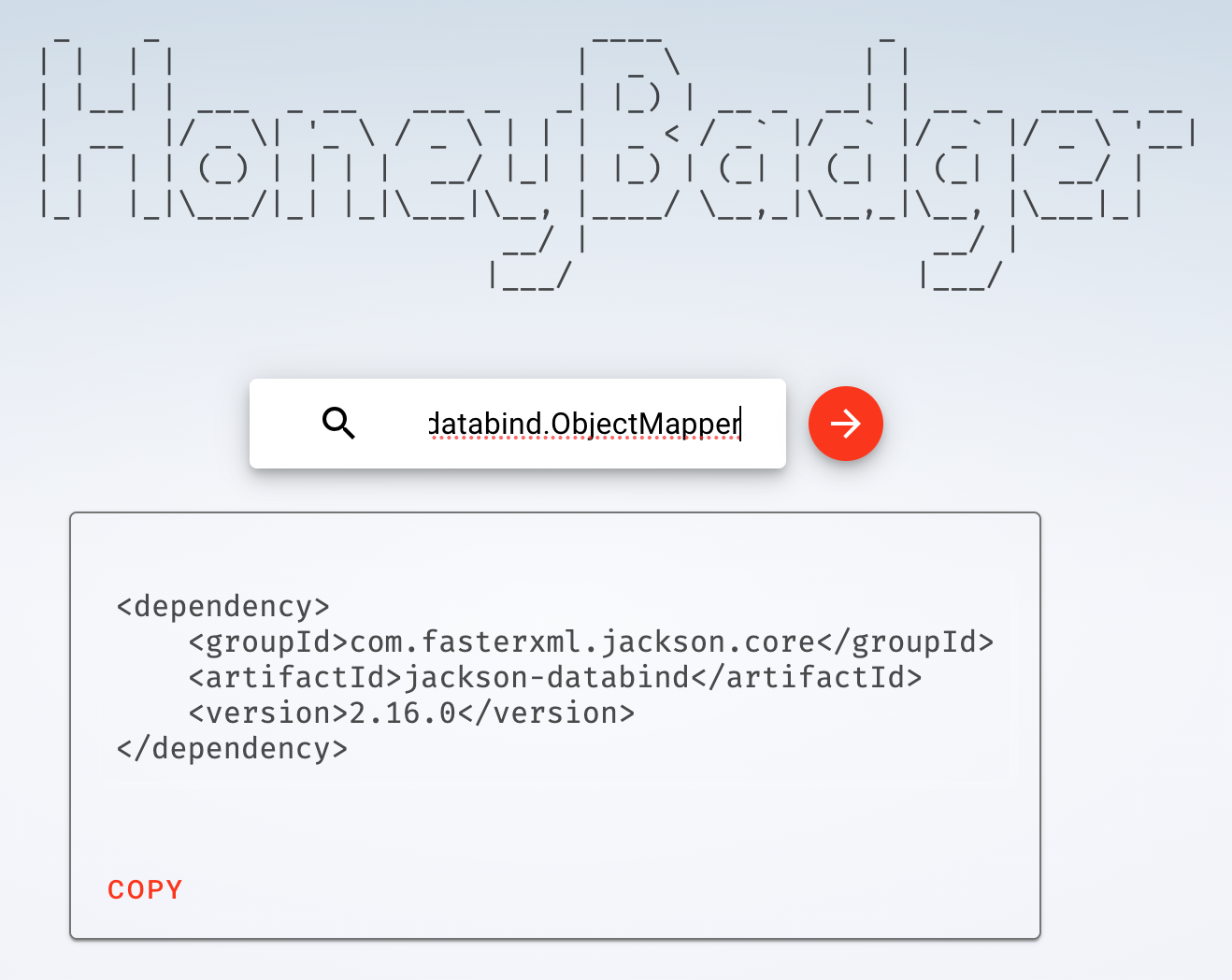
Sometimes you just don’t know the dependency that contains the ClassNotFound

What to do in that case? Checkout honeybadger.bot


I hope you find some of the tips in this article useful in your debugging of java.lang.ClassNotFoundException

Posted in Computers, programming, Software | Tagged | Leave a comment

Oracle Cheat Sheet

1. get version of oracle database

SELECT * FROM "V$VERSION"

2. get timestamp of last commit

SELECT ORA_ROWSCN FROM schema.table

3. get name of the database

select name, db_unique_name,log_mode from v$database

4. get create table statement

select dbms_metadata.get_ddl( 'TABLE', 'name_of_table', 'schema' ) FROM dual

5. select rowid (base64 encoded pseudocolumn)

SELECT rowid FROM schema.table WHERE rownum <= 100

6. Query all_tables

SELECT *FROM all_tables WHERE  num_rows > 1

7. Get information about a table:

SELECT* FROM ALL_TABLES WHERE TABLE_NAME = 'your_table'

8. Query all_views

select * FROM all_views

9. Pagination using offset ... fetch (do a google search for seek pagination method which is supposed to be faster)

SELECT* FROM ALL_ALL_TABLES OFFSET M ROWS FETCH NEXT N ROWS ONLY

10. To know when a row was last updated you can try using the ORA_ROWSCN pseudo-column together with SCN_TO_TIMESTAMP. Read the fine-print.

Posted in Computers, programming, Software | Tagged | Leave a comment

Helpful GCP commands

  1. Get/Set current project
gcloud config get-value project
gcloud config set project XXX

2. Login using a service account

gcloud auth activate-service-account --key-file=keyfiles/gcp.json

You shouldn’t do this however. Quoting best practices:

Don’t use service accounts during development. During your daily work, you might use tools such as the Google Cloud CLI, gsutil, or terraform. Don’t use a service account to run these tools. Instead, let them use your credentials by running gcloud auth login (for the gcloud CLI and gsutil) or gcloud auth application-default login (for terraform and other third-party tools) first.

3. Get access token of currently logged in user:

gcloud auth application-default print-access-token

You can also see the application default credentials by opening $HOME/.config/gcloud/application_default_credentials.json. Get the identity token by running:

gcloud auth print-identity-token

Refer this for the difference between access token and identity token.

4. Get metadata about compute projects:

gcloud compute project-info describe --format=json

5. Add metadata to compute project:

gcloud compute project-info add-metadata \
    --metadata enable-oslogin=FALSE \
    --project=xxx

6. Add ssh key to os-login

gcloud compute os-login ssh-keys add \
    --key-file=/Users/me/.ssh/id_rsa.pub \
    --project=xx \
    --ttl=999d

Although os-login is recommended, I couldn’t get it to work.

7. To update ssh config

gcloud compute config-ssh --project=xxx

8. Create service account and assign bigquery.dataEditor and bigquery.jobUser roles:

gcloud iam service-accounts create ${ACCTNAME} --description="Service Account"
gcloud iam service-accounts keys create keyfile.json \
  --iam-account ${ACCTNAME}@${PROJECT}.iam.gserviceaccount.com

for role in roles/bigquery.dataEditor roles/bigquery.jobUser; do
  gcloud projects add-iam-policy-binding ${PROJECT} \
    --member serviceAccount:${ACCTNAME}@${PROJECT}.iam.gserviceaccount.com --role ${role}
done

9. To update gcloud SDK to latest version, run:

$ gcloud components update

10. To install or remove specific components, run:

  $ gcloud components install COMPONENT_ID
  $ gcloud components remove COMPONENT_ID

11. Run gcloud cheat-sheet to see a roster of go-to gcloud commands. Also refer this.

12. To setup a Python development environment see this. Google recommends that you always use a per-project virtual environment when developing locally with Python. When the gcloud SDK is installed, it sets up its own venv which can be found at ~/.config/gcloud/virtenv

13. scp files from a VM to local computer using gcloud:

$ gcloud compute scp --project=xxx INSTANCE_NAME:/path/to/location/\*.sh /path/to/local

Above will copy all files ending in .sh. We have to escape the asterisk using backslash otherwiese you get an error. see this.

14. create a secret

gcloud secrets create my-database-password --replication-policy="automatic" --project=my-gcp-project

echo -n "xxx" | gcloud secrets versions add my-database-password --data-file=- --project=my-gcp-project

verify:

gcloud secrets versions access 1 --secret="my-database-password" --project=my-gcp-project

15. Get path of google cloud sdk

$ gcloud info --format="value(installation.sdk_root)"
/usr/lib/google-cloud-sdk

16. Who am I? What identity are you using to authenticate against GCP?

$ gcloud config list account --format "value(core.account)"

Best Practices

  • When your code is running in a local development environment, such as a development workstation, the best option is to use credentials associated with your Google Account, also called user credentials. You should NOT set the GOOGLE_APPLICATION_CREDENTIALS environment variable during local development because: Make sure that the GOOGLE_APPLICATION_CREDENTIALS environment variable is set only if you are using a service account key or other JSON file for ADC. The credentials pointed to by the environment variable take precedence over other credentials, including for Workload Identity.
  • Never set GOOGLE_APPLICATION_CREDENTIALS as an environment variable on a Cloud Run service. Always configure a user-managed service account instead.

Adding disks to a VM using command line

Step 1: add the disk (here we are adding a 300GB disk):

gcloud compute disks create disk-1 --project=xxx --type=pd-balanced --size=300GB --zone=us-central1-a

Step 2: Attach the disk to the VM:

gcloud compute instances attach-disk instance-1 --disk disk-1 --project=xxx

Step 3: Format and Mount

Use instructions available here

Step 4 (Optional): Create backup policy. Here we are setting up a policy to perform daily backups (snapshots). Snapshots will be retained for 14 days:

gcloud compute resource-policies create snapshot-schedule default-schedule-1 --project=xxx --region=us-central1 --max-retention-days=14 --on-source-disk-delete=keep-auto-snapshots --daily-schedule --start-time=14:00

It will respond with a message:

Created [https://www.googleapis.com/compute/v1/projects/xxx/regions/us-central1/resourcePolicies/default-schedule-1]

Step 5 (Optional): Enforce the policy:

gcloud compute disks add-resource-policies disk-1 --project=xxx --zone=us-central1-a --resource-policies=default-schedule-1

Be careful to use the same qualifier (label) that you used in Step 4. In above the qualifier is default-schedule-1.

How to I login to Cloud SQL using my GCP user account (xyz@yahoo.com)?

Pre-requisites (one-time setup): First you need to setup SSL authentication on the server (steps for this are not covered here). Then:

gcloud sql instances patch $INSTANCE_NAME \
--database-flags=cloudsql.iam_authentication=on

gcloud sql users create $YOUR_EMAIL_ADDRESS \
--instance=$INSTANCE_NAME \
--type=cloud_iam_user

After that to login using your GCP account:

PGPASSWORD=$(gcloud sql generate-login-token) psql \
"sslmode=verify-ca \
sslrootcert=/path/to/server.pem \
sslcert=/path/to/client-cert.pem \
sslkey=/path/to/client-key.pem \
hostaddr=x.x.x.x \
user=$YOUR_EMAIL_ADDRESS \
dbname=$DATABASE"

How do I see all the settings of Cloud SQL Postgres server?

PGPASSWORD=xxx psql \
"sslmode=verify-ca \
sslrootcert=/path/to/server.pem \
sslcert=/path/to/client-cert.pem \
sslkey=/path/to/client-key.pem \
hostaddr=x.x.x.x \
user=$USER \
dbname=$DATABASE" -c "SELECT name, setting FROM pg_settings" | cat

There are some settings above does not cover. You can get those by running:

gcloud sql instances describe $INSTANCE_NAME

Posted in Computers, programming, Software | Tagged , , | Leave a comment

How to iterate over all rows of a table in Oracle db

Recently I was writing a program to copy data from Oracle to Big Query. This program needs to fetch all rows in a given table (aka a table scan) and then write them to the destination. We should not fetch all the rows in one call since the table may have millions of rows in it corresponding to gigabytes of data. We want to batch the reads and read maybe a thousand records at a time. So how do we do this?

How not to do it

I was familiar with the offset ... limit technique of paging in MySQL. The equivalent syntax in Oracle is offset N rows fetch next M rows only. So we could do this as example:

select * from table offset 0 rows fetch next 1000 rows only;
select * from table offset 1000 rows fetch next 1000 rows only;
select * from table offset 2000 rows fetch next 2000 rows only;
...

The first query will be very fast (offset is 0) but if you run this on a table with more than a million rows you will notice the query time steadily increases as you progress to higher and higher offset. This is because when we do offset N rows fetch next M rows only the database still reads N+M rows. It just discards the N rows before returning to client. The effect might be unnoticeable on small tables but with tables containing more than a million records, we could clearly see the difference.

Using Seek Pagination

Searching online I came across the method of seek pagination. The idea is to use the where clause to quickly seek to a position in the database and then fetch next M rows only. Here is what the queries would look like:

select * from table order by col offset 0 rows fetch next 1000 rows only;
select * from table order by col where col > last_read fetch next 1000 rows only;
...

The first query gets the first batch of records. You have to keep track of the last value read and store it in a variable last_read. Replace last_read in above with the actual value. For this method to work, it requires that col (or a combination of columns) is indexed with a B-tree index and has a unique constraint on it (meaning no two rows can have same value of col). Unfortunately we could not satisfy this requirement in many of our tables.

Also whereas this is supposed to work in theory, in practice as soon as we added an order by clause to our queries the query time jumped by 10x! even though we were ordering on an indexed column. select * from table order by col offset 0 rows fetch next 1000 rows only; was 10x slower than select * from table offset 0 rows fetch next 1000 rows only;

So we went back to the offset ... fetch method.

However …

When we don’t order the rows

select * from table offset 0 rows fetch next 1000 rows only;
select * from table offset 1000 rows fetch next 1000 rows only;
select * from table offset 2000 rows fetch next 2000 rows only;
...

it is possible (in theory) that above queries may return some rows more than once and some rows may never be returned. In practice, I found that does not happen (almost). To test this, I fetched the rowid pseudocolumn as follows:

select rowid from table offset 0 rows fetch next 1000 rows only
select rowid from table offset 1000 rows fetch next 1000 rows only
select rowid from table offset 2000 rows fetch next 1000 rows only
...

I put the rowid in a HashSet

Object obj = resultSet.getObject("rowid");
                    set.add(obj.toString());

and we can see if the rowids we are getting are distinct. What I found was surprising. I was getting distinct rowids until I reached the end of the database. Then strange things started happening and I started getting duplicate rowids. This is because – if you have a database that is being written onto as you are making the queries – the different queries are running on different snapshots of the database.

The Right Way

Turns out the right way to iterate over all the rows is much simpler. Just do:

select * from table

It is the simplest SQL query of all. You do not need to order the rows. Above will return each row once and only once. When we run above query using the Oracle JDBC Driver, it does not fetch all the rows all at once – the original concern which set me off in wrong direction. The rows are fetched in batches as we iterate over the ResultSet – it happens invisibly to the programmer. The JDBC driver allows the programmer to set the batch size. This is done using the all important setFetchSize method. So the right way is to fetch all the rows in a single query select * from table and make use of setFetchSize to control the number of rows you want to fetch in a batch. The JDBC driver will make multiple calls but all those calls are tied to the single query. The best part is that when we used this method it was 100x faster! than seek pagination using order by. The seek pagination method also suffers from the multiple snapshots problem as we are making multiple queries to the database.

One problem

There is one problem you might run into when doing a select * from table on a big table (i.e., if you have a long running query). It is the error oracle.jdbc.OracleDatabaseException: ORA-01555: snapshot too old:

Caused by: oracle.jdbc.OracleDatabaseException: ORA-01555: snapshot too old: rollback segment number 50 with name "_SYSSMU50_3232338357$" too small

	at oracle.jdbc.driver.T4CTTIoer11.processError(T4CTTIoer11.java:513) ~[ojdbc10-19.15.0.0.1.jar:19.15.0.0.1]
	at oracle.jdbc.driver.T4CTTIoer11.processError(T4CTTIoer11.java:461) ~[ojdbc10-19.15.0.0.1.jar:19.15.0.0.1]
	at oracle.jdbc.driver.T4C8Oall.processError(T4C8Oall.java:1104) ~[ojdbc10-19.15.0.0.1.jar:19.15.0.0.1]
	at oracle.jdbc.driver.T4CTTIfun.receive(T4CTTIfun.java:553) ~[ojdbc10-19.15.0.0.1.jar:19.15.0.0.1]
	at oracle.jdbc.driver.T4CTTIfun.doRPC(T4CTTIfun.java:269) ~[ojdbc10-19.15.0.0.1.jar:19.15.0.0.1]
	at oracle.jdbc.driver.T4C8Oall.doOALL(T4C8Oall.java:655) ~[ojdbc10-19.15.0.0.1.jar:19.15.0.0.1]
	at oracle.jdbc.driver.T4CStatement.doOall8(T4CStatement.java:229) ~[ojdbc10-19.15.0.0.1.jar:19.15.0.0.1]
	at oracle.jdbc.driver.T4CStatement.fetch(T4CStatement.java:1037) ~[ojdbc10-19.15.0.0.1.jar:19.15.0.0.1]
	at oracle.jdbc.driver.OracleStatement.fetchMoreRows(OracleStatement.java:3456) ~[ojdbc10-19.15.0.0.1.jar:19.15.0.0.1]
	at oracle.jdbc.driver.InsensitiveScrollableResultSet.fetchMoreRows(InsensitiveScrollableResultSet.java:742) ~[ojdbc10-19.15.0.0.1.jar:19.15.0.0.1]
	at oracle.jdbc.driver.InsensitiveScrollableResultSet.absoluteInternal(InsensitiveScrollableResultSet.java:698) ~[ojdbc10-19.15.0.0.1.jar:19.15.0.0.1]
	at oracle.jdbc.driver.InsensitiveScrollableResultSet.next(InsensitiveScrollableResultSet.java:412) ~[ojdbc10-19.15.0.0.1.jar:19.15.0.0.1]
	at com.example.App.doTableScan(App.java:69) ~[classes/:?]
	at java.util.concurrent.CompletableFuture$AsyncRun.run(CompletableFuture.java:1736) ~[?:?]
	... 3 more

Btw from this callstack we can see that internally the JDBC driver calls oracle.jdbc.driver.OracleStatement.fetchMoreRows to fetch the next batch of rows as we iterate over a ResultSet.

Posted in Computers, programming, Software | Tagged | Leave a comment

Guide to visiting Mt. Rainier

Of all the fire mountains which, like beacons, once blazed along the Pacific Coast, Mount Rainier is the noblest.

John Muir, 1901

Following are the most important things when visiting Mt Rainier:

  • Make sure weather is clear
  • Make sure to stay inside the park. Paradise Inn is the best followed by National Park Inn
  • Assuming you are going on a clear hot day when there will be lots of tourists, get to the gate either before 12pm or after 3pm.

It is hard to simultaneously satisfy the first two constraints – consider yourself very lucky if you happen to do so. we don’t have any control over weather but we can control where we stay – so advise to make reservation at Paradise Inn well in advance. July and August are the hottest months and best time to visit. I would recommend visiting in August over July so that most of the snow has melted. I have visited in July and there is still significant snow and flowers have not bloomed completely. However July is still not a bad time to visit.

I recently visited Mt Rainier when it was 35 degrees plus in Puget Sound. I was lucky to get a reservation on Sat morning, booked it and decided to leave spontaneously. I reached the gate at 1:50pm and had to spend more than 1.5 hours in line (more than 2 mi long). So again either arrive before 12pm or after 3pm when lines should be shorter.

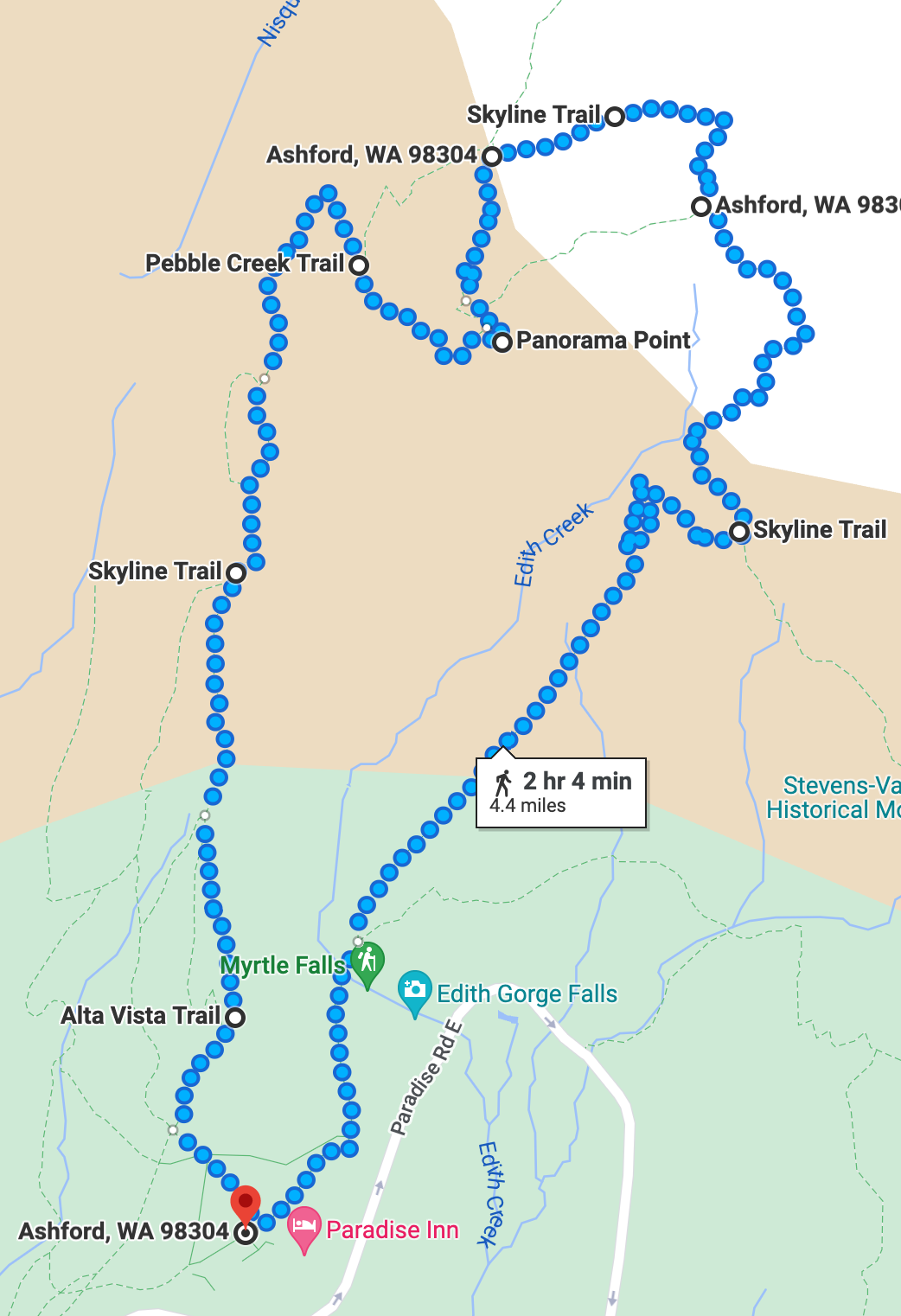
Skyline Trail

The full trail is about 4.5 hours hike which is too much for me so I do the following shortcut which can be completed in 3 hours with 30 minutes time to rest and take in the views.

Panorama Point via the Skyline and Golden Gate Trails. 4 miles round-trip. 1700′ elevation gain. Average hiking time: 3 hours. The trailhead is located on the north side of the upper parking lot, next to the visitor center. Alternatively, you may take the Deadhorse Creek Trail from the north end of the lower parking lot, and intersect the Skyline Trail near Glacier Vista.

Posted in Travel | Leave a comment

BigQuery Cheat Sheet

  1. List all datasets in a project
bq ls bigquery-public-data

2. List all tables within a dataset

select table_name from `bigquery-public-data`.samples.INFORMATION_SCHEMA.TABLES

3. List schema of a table

select * from `bigquery-public-data`.samples.INFORMATION_SCHEMA.TABLES where table_name = 'natality'

aliter:

bq show bigquery-public-data:samples.shakespeare

to get as json:

$ bq --format=json show publicdata:samples.natality

4. Create a dataset:

$ bq mk babynames

5. Get job details. Two ways of doing this. Method1: use bq show command:

$ bq --project_id=xxx --location=${LOCATION} show --job=true ${JOB_ID}

Method2: use REST endpoint. This will display much more data than bq show command:

JOBID=$1   # CHANGE

access_token=$(gcloud auth application-default print-access-token)
PROJECT=$(gcloud config get-value project)

curl --silent \
    -H "Authorization: Bearer $access_token"  \
    -X GET \
    "https://www.googleapis.com/bigquery/v2/projects/$PROJECT/jobs/${JOBID}?location=${LOCATION}"
Posted in Computers, programming, Software | Tagged | Leave a comment

Measuring performance of BigQuery Java vs Python connector

While experimenting with Apache Beam, I noticed there is a big difference in the performance of Java vs. Python SDK when reading from BigQuery. See this. So I thought it would be good to measure the performance of the Java vs. Python client libraries that ship with BQ. Let’s jump right in:

Java

I downloaded java-bigquery repo and modified $/java-bigquery/samples/snippets/src/main/java/com/example/bigquery/Query.java as follows:

public static void main(String[] args) {
    // TODO(developer): Replace these variables before running the sample.
    String projectId = "bigquery-public-data";
    String datasetName = "samples";
    String tableName = "natality";
    String query =
        "SELECT weight_pounds\n"
            + " FROM `"
            + projectId
            + "."
            + datasetName
            + "."
            + tableName
            + "`"
            + " LIMIT 1000000";
    query(query);
  }

  public static void query(String query) {
    try {
      // Initialize client that will be used to send requests. This client only needs to be created
      // once, and can be reused for multiple requests.
      BigQuery bigquery = BigQueryOptions.getDefaultInstance().getService();

      QueryJobConfiguration queryConfig = QueryJobConfiguration.newBuilder(query).setUseQueryCache(false).build();

      TableResult results = bigquery.query(queryConfig);
      System.out.println("total rows = " + results.getTotalRows());
   
      results
        .iterateAll()
        .forEach(row -> row.forEach(val -> {}));
      System.out.println("Query performed successfully.");
    } catch (BigQueryException | InterruptedException e) {
      System.out.println("Query not performed \n" + e.toString());
    }
  }

In above we are fetching 1 million rows from bigquery-public-data.samples.natality. Next run (from $/java-bigquery/samples/snippets):

$ mvn compile
$ gcloud config set project PROJECT_ID
$ gcloud auth application-default login

and then run:

$ time mvn exec:java -Dexec.mainClass=com.example.bigquery.Query
...
total rows = 1000000
Query performed successfully.
[INFO] ------------------------------------------------------------------------
[INFO] BUILD SUCCESS
[INFO] ------------------------------------------------------------------------
[INFO] Total time:  19.915 s
[INFO] Finished at: 2022-06-23T18:06:25-07:00
[INFO] ------------------------------------------------------------------------
mvn exec:java -Dexec.mainClass=com.example.bigquery.Query  23.89s user 1.10s system 119% cpu 20.992 total

We see total time of 20.992s

Python

Begin by doing:

$ virtualenv myenv
$ source myenv/bin/activate
$ myenv/bin/pip install google-cloud-bigquery
$ gcloud config set project PROJECT_ID
$ cd myenv

Create following python file test.py:

from google.cloud import bigquery

client = bigquery.Client()
job_config = bigquery.QueryJobConfig(use_query_cache=False)

# Perform a query.
QUERY = (
    'SELECT weight_pounds FROM `bigquery-public-data.samples.natality` '
    'LIMIT 100000')
query_job = client.query(QUERY, job_config=job_config)  # API request
rows = query_job.result()  # Waits for query to finish

for row in rows:
    pass
print("Got {} rows.".format(rows.total_rows))

Execute:

$ time python test.py
Got 1000000 rows.
python test.py  7.92s user 0.91s system 36% cpu 24.216 total

So a little worse than Java but nowhere as bad as the Python BQ connector that ships with Apache Beam and should not cause one to prefer Java over Python.

In both cases the total time includes the time to stream the data from BQ to my computer over my network. We read 1M records. Each record is a FLOAT64 or 8 bytes so total payload is 8MB.

>>> 8000.0/20.992
381.0975609756097
>>> 8000.0/24.216
330.3600925008259

How to get just the time spend in BigQuery?

It is possible to get just the time spend in BigQuery. This time is agnostic of the language one is using i.e., doesn’t matter if you use Java or Python. There are couple of ways you can do this.

Method 1

Retrieve the job details using below script. Make sure to change the Job ID. You can get the Job ID by viewing your request history in BQ on console.cloud.google.com. Look for the Personal History or Project History in BQ console.

#!/bin/bash

# Copyright 2019 Google LLC.
# SPDX-License-Identifier: Apache-2.0

JOBID=XXX   # CHANGE

access_token=$(gcloud auth application-default print-access-token)
PROJECT=$(gcloud config get-value project)

echo "$request"
curl --silent \
    -H "Authorization: Bearer $access_token"  \
    -X GET \
    "https://www.googleapis.com/bigquery/v2/projects/$PROJECT/jobs/${JOBID}"

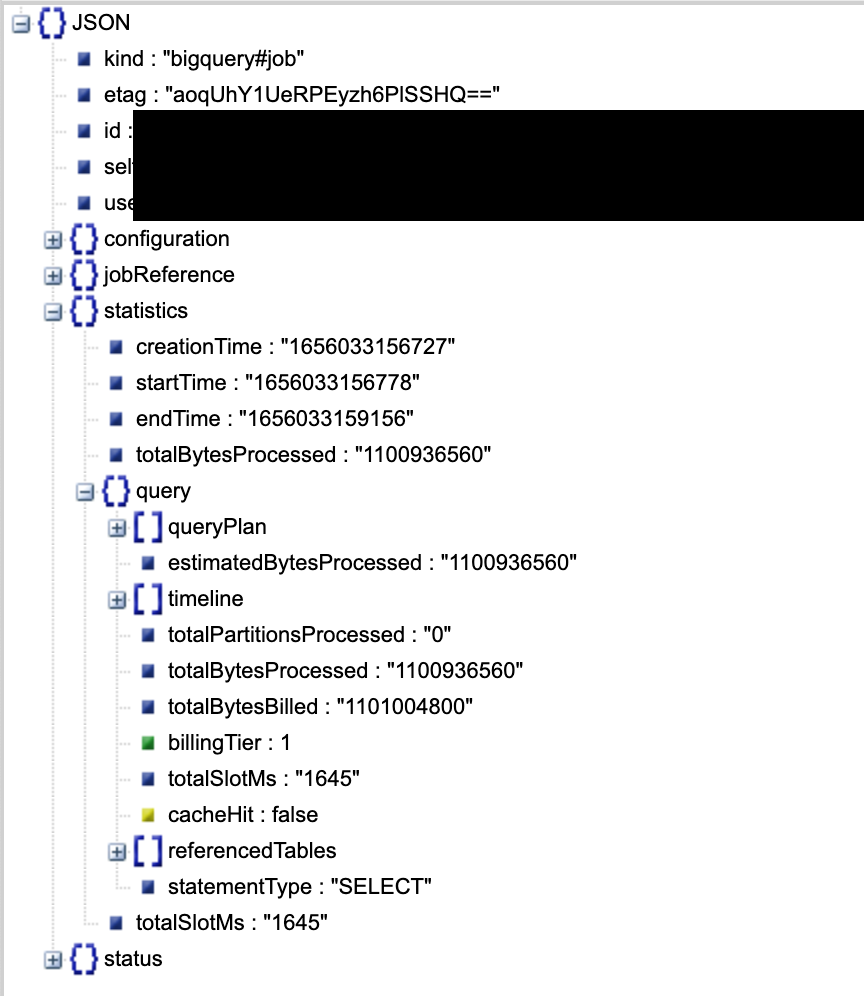
This gives a wealth of information a subset of which is shown below

The total slot time is 1645ms.

Method 2

Run the query with cache enabled.

job_config = bigquery.QueryJobConfig(use_query_cache=True)

In first run, it should give total time without any caching. In second run, results will be retrieved from the cache. The difference of two is the time spent in BigQuery. This is what I got:

(python-venv) python-venv ❯ time python test.py
Got 1000000 rows.
python test.py  7.96s user 0.96s system 35% cpu 25.240 total
(python-venv) python-venv ❯ time python test.py
Got 1000000 rows.
python test.py  7.93s user 0.86s system 40% cpu 21.867 total

A difference of about 3.3s

Method 3 – Use BigQueryWorkloadTester (Advanced)

Refer this. There are many issues though. Looks like the program is outdated. It won’t compile on latest version of Gradle and even if you got it to compile, it gave me runtime errors. Fixing it took the better half of a day. The runtime errors was because I was using a config.yaml under project root. In summary to use the tool:

  • If you are on Gradle 7.x, you will need to edit the build.gradle files to upgrade from 6.x to 7.x. This includes among other things:
    • replace compile with implementation
    • replace testCompile with testImplementation
    • replace http with https in repositories
    • comment out apply plugin: "maven" in the build.gradle under pontem directory
    • add a annotationProcessor group: 'com.google.auto.value', name: 'auto-value', version: '1.6.3' to get rid of error otherwise
  • And after that note the program takes input a config.yaml and will always look for it under src/main/resources. Similarly if you are passing any query files, the program will look for them under src/main/resources
  • There should be one query per line in the query file. Thus, you cannot split a query into multiple lines.

Here is sample config.yaml

# The number of times a Workload will be executed in parallel.
# Our Concurrency Level limit is 50
concurrencyLevel: 1

# Whether to run several instances of the same Workload at different percentages of the provided
# Concurrency Level.
isRatioBasedBenchmark: true

# Which ratios of the concurrencyLevel to use with in a Ratio Based Benchmark.
# If no ratios are provided and Ratio Based Benchmark is used the Workload Execution will fail.
# Please remember that the concurrencyLevel limit is 50, the first ratio to surpass this limit will
# be swapped for 50 and all others will be ignored.
benchmarkRatios: [0.01, 0.1, 0.25, 0.5, 1.0, 1.5, 2.0]

# The folder where to save the results file.
outputFileFolder: /Users/xxx/pontem/BigQueryWorkloadTester/results

# The Workloads and their associated query files.
#
# If the Credentials file is empty the tool will attempt to load the default Credentials
# The Workload Tester expects the query file to contain one query per line.
# The Workload Tester can read queries from files via 'queryFiles' or you can produce a query / list
# of queries with 'queries'.
workloads:
- name: "Natality"
  projectId: "xxx"
  cloudCredentialsFile: ""
  queryFiles:
  # the program will look for natality.sql under src/main/resources
   - natality.sql
  #queries:
  # - ""
  outputFileName: natality.json

Here are results of running the program. There are two times reported by the program:

  • Walltime: The time, in milliseconds, that it took for the query to be executed since we issued the BigQuery request until we received the response. Do note that Walltime will include the time for the network roundtrip and any scheduling / processing BigQuery may perform before running your query.
  • Runtime: The processing time, in milliseconds, that BigQuery took to execute your query.

This method gives us approx. 2.1s to execute the query.

Posted in Computers, programming, Software | Tagged | Leave a comment

Adding Logging to your Java application

Recently I had the “pleasure” to add logging to a Java application. It was the most difficult thing to do in the whole program. There is so much documentation available and no two web pages are alike. Which is correct and which is not?

SLF4J provides a facade and common API that can used to log to popular backends such as Log4J, Logback, java.util.logging etc. java.util.logging comes in-built with Java but is not recommended. Using SLF4J is recommended because then you can easily swap out the actual implementation without making a change to a single line of code. Log4J is the most popular logging library used in Java so we’ll use that in this article.

There are two difficulties I encountered in attempt to add logging:

  • what is the exact set of dependencies to be added in pom.xml?
  • how to add the config file? what should it look like? what should it contain? where should it be stored? this part is most difficult

To begin add following to your Maven dependencies:

<!-- https://mvnrepository.com/artifact/org.slf4j/slf4j-api -->
<dependency>
    <groupId>org.slf4j</groupId>
    <artifactId>slf4j-api</artifactId>
    <version>1.7.36</version>
</dependency>

<!-- https://mvnrepository.com/artifact/org.apache.logging.log4j/log4j-slf4j-impl -->
<dependency>
    <groupId>org.apache.logging.log4j</groupId>
    <artifactId>log4j-slf4j-impl</artifactId>
    <version>2.18.0</version>    
</dependency>

  <!-- https://github.com/eugenp/tutorials/blob/master/logging-modules/log4j/pom.xml -->
<!--log4j2 dependencies -->
        <dependency>
            <groupId>org.apache.logging.log4j</groupId>
            <artifactId>log4j-api</artifactId>
            <version>2.18.0</version>
        </dependency>
        <dependency>
            <groupId>org.apache.logging.log4j</groupId>
            <artifactId>log4j-core</artifactId>
            <version>2.18.0</version>
        </dependency>
        <!--disruptor for log4j2 async logging -->
        <!-- this is required by log4j-core to perform async logging. see https://logging.apache.org/log4j/2.x/runtime-dependencies.html -->
        <dependency>
            <groupId>com.lmax</groupId>
            <artifactId>disruptor</artifactId>
            <version>${disruptor.version}</version>
        </dependency>

The hardest part was adding the configuration file. When using v2 of log4j this config file is now named log4j2.properties and should be saved under src/main/resources. See this and this to understand its format and content.


I can’t believe it. Tried it today and still doesn’t work. If you don’t care about logging to a file just add following:

<dependency>
	<groupId>org.slf4j</groupId>
	<artifactId>slf4j-simple</artifactId>
	<version>2.0.16</version>
</dependency>	

Further Reading

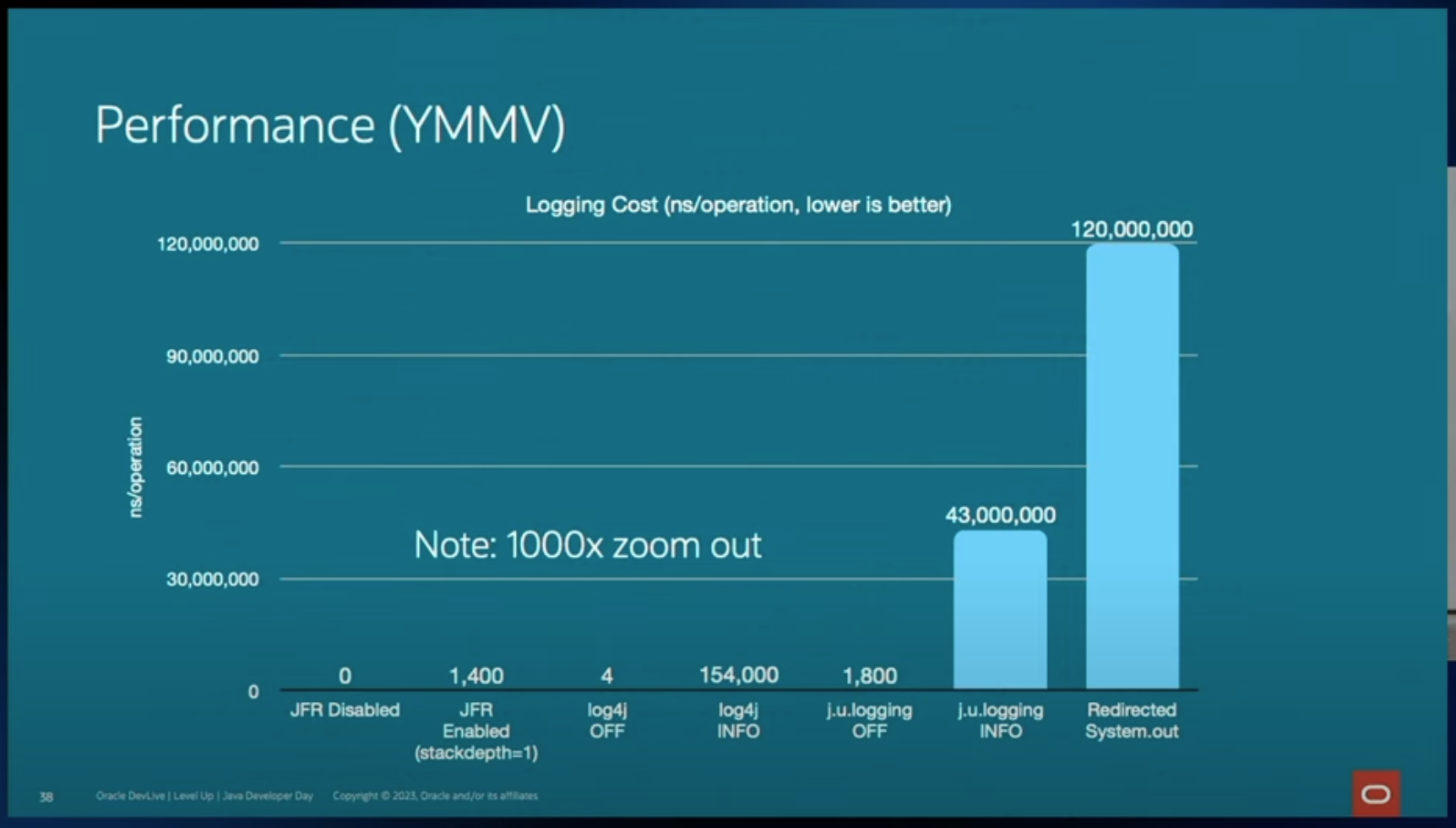
Performance comparison of various logging frameworks (mainly log4j vs. java.util.logging) (source):

Posted in Computers, programming, Software | Tagged , , , | Leave a comment