How not to generate deterministic random numbers in Swift

Deterministic and random are opposites but sometimes we want a way to generate and reproduce the same sequence of random numbers when a program is run. Swift language is now more than 8 years in the making but still does not provide a seedable PRNG (pseudo random number generator) out of the box. There is no way for a programmer to set the seed of the PRNG that comes with Swift. So we have to resort to other methods. One of the top results that came in my search to create a seedable random number generator was this link:

struct RandomNumberGeneratorWithSeed: RandomNumberGenerator {
    init(seed: Int) {
        // Set the random seed
        srand48(seed)
    }
    
    func next() -> UInt64 {
        // drand48() returns a Double, transform to UInt64
        return withUnsafeBytes(of: drand48()) { bytes in
            bytes.load(as: UInt64.self)
        }
    }
}

It works by using the drand48 system function to get a random number and calls srand48 to set drand48‘s seed. So far so good. We can wrap it in a class like so:

class Random {

var rnd: RandomNumberGeneratorWithSeed

init(_ seed: Int) {
    // Set the random seed
    rnd = RandomNumberGeneratorWithSeed(seed)
}    

func nextFloat() -> Float {
    return Float.random(in: 0..<1, using: &rnd)
}

func nextDouble() -> Double {
    return Double.random(in: 0..<1, using: &rnd)
}

func next(_ x: UInt) -> UInt {
    return UInt.random(in: 0..<x, using: &rnd)
}

func nextInt() -> Int {
    return Int.random(in: Int.min..<Int.max, using: &rnd)
}
}

There are at least 3 problems with this class:

1. Try following code:

let seed = Int.random(in: Int.min..<Int.max)
let random = Random(seed)
for i in 0..<10 {
    print(random.next(4))
}

You just get a sequence of 0s. Why?

2. Create instances of more than one Random in your app and see how it goes. Since both instances depend on the same drand48 they are not isolated.

3. The third problem is this:

Note

The algorithm used to create random values may change in a future version of Swift. If you’re passing a generator that results in the same sequence of integer values each time you run your program, that sequence may change when your program is compiled using a different version of Swift.

I won’t give out the solution here but this not how you should be generating deterministic random numbers in Swift.

Posted in Computers, programming, Software | Tagged | Leave a comment

Basic File I/O in Swift

In this post we learn how to do basic file I/O in Swift. We will create a file and write some text to it. All code here is w.r.t. Swift 5.7.2. First we need to import Foundation:

import Foundation

Then we create a URL:

let fileManager = FileManager.default
let url = URL(fileURLWithPath: filename)
let filePath = url.path        

Now we can create a file:

guard (fileManager.createFile(atPath: filePath, contents:nil)) else {
    throw Errors.fileIOException
}

Next we get a FileHandle:

let file = FileHandle(forWritingAtPath : filename)!

and now we can start writing to the file:

file.write(Data("Hello World\n".utf8))

When you are done, remember to close the file like so:

try file.close()

That’s it! Some tips:

  • You will get an error if you attempt to fetch a FileHandle without creating the file first
  • We see the API is different from what you would expect coming from Java or C#. You don’t create any BufferedStreamWriter.
  • Some code samples write to file using the write method on the String object and passing it a TextOutputStream. Try it if you like and let me know if it works.
Posted in Computers, programming, Software | Tagged | Leave a comment

Basic 2D Drawing in Swift

It’s quite hard to find any Swift examples on the web. It took me hours to write a simple program that draws a rectangle in Swift and saves it to a file. 50% of the code that comes up in search results uses old APIs and Objective C in some cases. The other 50% uses Swift UI and I am not making a GUI app. I am making a CLI app. Let’s see how to do it. All code here is w.r.t. Swift 5.7.2.

First, we have to download and install Swift. You don’t need to download Xcode to use Swift but you won’t be able to run any unit tests without Xcode.

Next cd to an empty directory and create a new executable project (i.e., a Console or command-line application):

$ swift package init --type executable

You will see a Package.swift file generated. The good thing is that you don’t need to add any dependencies to Package.swift to do 2D drawing in Swift. 2D drawing is made possible by the CoreGraphics library which is automatically loaded on MacOS for an executable app. I don’t know about other platforms. Everything here is w.r.t. Mac OS. Think of CoreGraphics as the equivalent of GDI+ if you have done 2D Drawing or Graphics on .NET platform.

The first step we will do is to create an empty bitmap of a certain size. First we import CoreGraphics:

import CoreGraphics

and then in a function we create an object of type CGContext:

let sRGB = CGColorSpace(name: CGColorSpace.sRGB)!
let ctx = CGContext(data: nil, width: 100, height: 100, bitsPerComponent: 8, bytesPerRow: 100*4, space: sRGB, bitmapInfo: CGImageAlphaInfo.premultipliedFirst.rawValue)!

For those familiar with GDI+, think of CGContext as the equivalent of System.Drawing.Graphics. The CG stands for CoreGraphics. It took me hours to figure out the two line code above and was the hardest part. After this we will draw the rectangle and fill it with a color. It can be done like this:

let origin = CGPoint(x: 20, y: 40)
let size = CGSize(width: 30, height: 15)
let rect = CGRect(origin: origin, size: size)
ctx.setFillColor(red: 1.0, green: 0, blue: 0, alpha: 0.5)
ctx.fill(rect)

Compared to GDI+ we don’t create any Brush. To draw a rectangle without filling it with a color you would call:

ctx.setStrokeColor(cgColor)
ctx.stroke(cgRect, width: strokeWidth)

Again if you compare to GDI+, we don’t create any Pen object.

Next, all that remains is to save the image to a file. But before we do that, hold on. Where is the image? We don’t have any image yet. We can get it from CGContext as follows:

let img = ctx.makeImage()!

Again, if you compare to GDI+, you will notice its backwards. In GDI+, we first create a Bitmap or Image and then get a Graphics object from it. In Swift we first create CGContext and then get CGImage from it. Now to save this image in a file we use following function:

import Foundation
import ImageIO
import CoreGraphics
import UniformTypeIdentifiers

// https://gist.github.com/KrisYu/abf3d03a76b781ffc2a26848d713b11e
@discardableResult static func writeCGImage(_ image: CGImage, to destinationURL: URL) throws -> Bool {
    guard let destination = CGImageDestinationCreateWithURL(destinationURL as CFURL, UTType.jpeg.identifier as CFString, 1, nil) else {
        throw Errors.fileIOException
    }
    CGImageDestinationAddImage(destination, image, nil)
    return CGImageDestinationFinalize(destination)
}

This function can be called like:

writeCGImage(img, to: URL(fileURLWithPath: "test.jpg"))

And now we have a complete program that draws a rectangle and saves it to a file.

Compared to GDI+, I feel GDI+ API is slightly better as it uses intuitive objects like Brush and Pen for drawing.


Trivia: Swift language is very annoying and you have to prefix arguments with their labels. E.g., if you write:

let origin = CGPoint(20, 40)

You will get a compile time error. To be able to write:

let origin = CGPoint(20, 40)

The CGPoint function has to be declared like:

func CGPoint(_ x: Float, _ y: Float)
Posted in Computers, programming, Software | Tagged | Leave a comment

Getting Started with Swift

I decided to use some holidays I had to learn the Swift programming language. Below are the steps I followed to get started (and some gotchas I ran into) which is often the hardest part. I did not want to install Xcode so I only downloaded the Universal .pkg file from this link. I installed it without any issues but when I tried to run a sample program, I immediately got this error:

`PackageDescription` could not be found

After lot of debugging and searching online (answers to Swift problems are very hard to find because compared to Java, Python etc. it has much smaller user base), it seems this problem happens when you had a version of Swift that you unwittingly installed previously when you installed Xcode command line tools. E.g., in my case before installing Swift I had installed git which required me to install the Xcode c.l.t. Now I had two versions of Swift on my system.

Binary downloaded from Swift website:

% /Library/Developer/Toolchains/swift-5.7.2-RELEASE.xctoolchain/usr/bin/swift --version
Apple Swift version 5.7.2 (swift-5.7.2-RELEASE)
Target: arm64-apple-macosx13.0

Binary that got installed with Xcode Command Line Tools:

% /usr/bin/swift --version
Apple Swift version 5.7.2 (swiftlang-5.7.2.135.5 clang-1400.0.29.51)
Target: arm64-apple-darwin22.2.0

By default I was running /usr/bin/swift which I think came with Xcode c.l.t. When I changed to /Library/Developer/Toolchains/swift-5.7.2-RELEASE.xctoolchain/usr/bin/swift the problem went away. Its going to be tedious to have to type that long string every time you want to run Swift so you can add following line to your ~/.zshrc to use a shortcut:

alias swift=/Library/Developer/Toolchains/swift-5.7.2-RELEASE.xctoolchain/usr/bin/swift

The nasty problem I found out later is that if you do NOT download Xcode, you won’t be able to run any tests using the xctest command. See this. I was actually trying to download Xcode initially but before I could do so Apple wanted to know my address and other information. In all their setup screens they say they take your privacy very seriously and then force you to disclose your private information to them for no reason. Why should I have to tell Apple my address when all I wanted to do was download Xcode?

It doesn’t end here. To run the REPL swift repl, I had to use the Swift that comes with Xcode c.l.t. Using the other Swift gave me error. Hope it helps someone else who ends up with a setup like mine.

Posted in Computers, programming, Software | Tagged | Leave a comment

The correct way to authenticate your app against GCP

Summary:

  • there are two types of credentials: user credentials (associated with a person) and service credentials (not associated with any person)
  • Service credentials are stored in a JSON keyfile and can be downloaded from GCP console
  • User credentials are obtained by running gcloud auth login and stored in a SQLite database ~/.config/gcloud/credentials.db
  • It is also possible to generate user credentials by running gcloud auth application-default login. These are stored in ~/.config/gcloud/application_default_credentials.json and known as ADC (application default credentials)
  • All in-built Command line tools that ship with Google Cloud SDK will attempt to use ADC if they can. You can override this by setting the GOOGLE_APPLICATION_CREDENTIALS environment variable or the --account flag.
  • If your users are authenticating using SA, you lose the auditability of who is actually doing what unless that is tracked somewhere else. E.g., someone deleted a database. If they used a SA, you can’t tell who did it – unless its tracked somewhere else.
  • For applications that are deployed in managed infrastructure such as Cloud Run, always run them under a SA that you set using the --service-account flag.

There are many ways you can authenticate your application against GCP. Applications that run in managed GCP services such as Cloud Run should run under a service account’s identity. They will automatically authenticate themselves against GCP with the permissions and privileges associated with the service account. You don’t have to write any authentication code in your app. You should create a service account and assign it appropriate permissions. Then when you deploy the application, use the --service-account flag to set the SA:

--service-account=SERVICE_ACCOUNT Service account associated with the revision of the service. The service account represents the identity of the running revision, and determines what permissions the revision has. For the managed platform, this is the email address of an IAM service account. For the Kubernetes-based platforms (gke, kubernetes), this is the name of a Kubernetes service account in the same namespace as the service. If not provided, the revision will use the default service account of the project, or default Kubernetes namespace service account respectively.

In rest of this post, I focus on how applications that are NOT deployed in GCP should authenticate themselves against GCP. Think of a command-line tool you develop e.g., I developed a tool that copies data from on-prem database to BigQuery. This tool is not deployed in GCP. You run it from a on-prem VM. There are actually many ways the application could authenticate against GCP.

First of all, you need to decide if you want to authenticate as the user who runs the tool or as a service account (SA). Authenticating with User credentials will allow you to audit who was the person that ran the tool. With SA credentials you lose that auditability – unless its tracked somewhere else e.g., the app uses a SA proxy to authenticate against GCP but you keep track of who is running the app – perhaps user logs in to a portal or website and then they click on a button which runs the tool under the covers for them on their behalf (that is what a proxy means). This is a perfectly acceptable and well-designed system.

SA authentication is always done through a keyfile. It is a JSON file. You should download the keyfile from GCP console and your application should have access to it. If you open a SA keyfile, you will see following line in it:

"type": "service_account"

User authentication can be done through a keyfile or dynamically (OAuth2) where user is presented with a screen and asked to sign in on Google’s website using their Google ID and password. Here I focus on authenticating using a keyfile. A user should NEVER share their keyfile with anyone as it represents their identity. If you share your keyfile, you are willingly giving away your identity to someone else. So you would NOT use a keyfile that contains your user credentials on a shared computer (more accurately you could but it should be accessible only to you). But its okay to use a keyfile that contains your user credentials on your private PC.

To generate this keyfile, run following command:

gcloud auth application-default login

You will be prompted to enter your username (Google account email) and password. Then you will be presented with a consent screen and if you provide consent, your keyfile will get saved on the system under ~/.config/gcloud/application_default_credentials.json. All the built-in GCP commands such as gcloud, bq etc. will attempt to use ADC if you do not override that by setting GOOGLE_APPLICATION_CREDENTIALS or the --account flag. From the docs:

After running gcloud auth commands, you can run other commands with --account=ACCOUNT to authenticate the command with the credentials of the specified account.

If you open a keyfile that belongs to a user such as the one above, you will see following line in it:

"type": "authorized_user"

Contrast this to the type we saw for a SA. This is how we can distinguish between user credentials and service account credentials. The Java code to implement this logic would look like:

    private static enum CREDENTIAL_TYPE { User, Service };

    private static CREDENTIAL_TYPE getCredentialType(String file) throws IOException {
        try (FileInputStream fs = new FileInputStream(file)) {
            JSONTokener tokener = new JSONTokener(fs);
            JSONObject root = new JSONObject(tokener);
            String type = root.getString("type").toLowerCase();
            if (type.equals("service_account")) {
                return CREDENTIAL_TYPE.Service;
            } else if (type.equals("authorized_user")) {
                return CREDENTIAL_TYPE.User;
            } else {
                throw new IllegalStateException("don't know how to classify " + type + " account");
            }
        }
    }

You can also acquire user-credentials by running:

gcloud auth login

The credentials acquired in this way are stored in a SQLite database which can be found at ~/.config/gcloud/credentials.db. The --account flag that comes with gcloud reads credentials from this file.

Let us now see how your application can authenticate against GCP similar to how tools like gcloud do. For starters, you can use the built-in authentication that comes with GCP client libraries. You don’t have to do anything special in your code if you use the built-in authentication. E.g., you can just call:

BigQueryOptions.newBuilder()
                .setProjectId(projectId)
                .build()
                .getService();

What it does: It will attempt to authenticate using ADC unless the GOOGLE_APPLICATION_CREDENTIALS environment variable is set. I am very confident but not 100% sure of it so take it with a grain of salt. In fact, that’s why I like to explicitly specify the credentials file in my code so there is no confusion about what credentials are being used for authentication. One you have the path to a keyfile, you can build the authentication credentials as follows:

public static GoogleCredentials createCredentials(String path) throws IOException {        
        path = new StringSubstitutor(System.getenv()).replace(path);
        logger.info("initializing GCP credentials from {}", path);
        CREDENTIAL_TYPE type = getCredentialType(path);
        try (FileInputStream fs = new FileInputStream(new File(path))) {
            if (type == CREDENTIAL_TYPE.Service) {
                return ServiceAccountCredentials.fromStream(fs);
            } else if (type == CREDENTIAL_TYPE.User) {
                return UserCredentials.fromStream(fs);
            } else {
                throw new IllegalStateException("unable to create GCP credentials");
            }
        }                
    }

and use them in call to setCredentials on BigQueryOptions.The

path = new StringSubstitutor(System.getenv()).replace(path);

takes care of handling a path that has environment variables like $HOME in it. E.g., the path could be ${HOME}/path/to/something. Refer this for more.

Posted in Computers, programming, Software | Tagged , | Leave a comment

Troubleshooting Windows Blue Screen of Death

First, we need to determine if its a software (bad drivers or a buggy update – most common cause) or hardware (RAM or SSD corruption) issue. I recommend following below steps in order:

  1. Undo last update. A buggy update is the most common cause of blue screen in my experience.
  2. Run chkdsk c: /f
  3. Run sfc /scan
  4. Run Windows Memory Diagnostics if you are able to boot in. This will check if RAM is corrupted. Do not use memtest86 utility. It just gave me a blank screen and maxed out CPU for hours.
  5. Restore the PC to a previous restore point if you have one.
  6. Reset the PC

In my case it was a bad Windows update that caused the error (thanks Microsoft). Resetting the PC fixed it.

Btw Mac is not any better. 2023-09-15: My M2 Mac Mini refused to boot and just died within three months of use. Thanks Apple.

Posted in Uncategorized | Leave a comment

Hyperledger Fabric: 10 things you should know

[This post assumes some familiarity with Hyperledger Fabric. You can use it to test your understanding of HF.]

What are the top ten things I would tell someone about Hyperledger Fabric?

  1. What is Hyperledger Fabric (HF)? HF is a strongly consistent decentralized database. If you are familiar with distributed databases like Cassandra, a decentralized database can be thought of as a distributed database where each node is an equal master. There are no followers or slaves. Further nodes are independently owned and operated by separate companies.
  2. When to use HF? When you want to establish a system of record with other companies without giving up control of the database in hands of a single organization (or 3rd party intermediary / escrow). Every company has their independent copy of the database that remains in sync with other copies.
  3. Above (#2) does assume a few things. That you will not make out of band changes to your copy of the database (ledger). Every change must go through the approved process (next bullet point).
  4. All changes to the database happen after going through a formal process of propose, collect votes, commit. This is similar to how decisions are made in a board meeting by a board of directors in a company or organization.
  5. In terms of CAP theorem, HF provides consistency at expense of availability in case of a network partition (one or more endorsing nodes becomes unreachable). An endorsing node is a node whose vote is necessary for a transaction to be committed.
  6. The ordering service in HF establishes a global (i.e., total) order on transactions. It can be run on a single node (solo) or can be run on a cluster of multiple nodes to make it Crash Fault Tolerant (CFT). When run on a cluster, the Raft protocol is used to decide which node will be the next leader if the leader goes down (crashes). At any time, only one node is the leader. Rest are just followers.
  7. Establishing a global order on transactions ensures all peer nodes commit them in same order. In this way the peer nodes always remain in sync. This assumes there are no undeterministic side effects in the chaincode producing a transaction.
  8. There is no consensus protocol running on peer nodes. The consensus protocol (Raft) runs on nodes making up the ordering service.
  9. Digital signatures and X.509 certificates are used throughout for proving identity (authentication) and access control (authorization).
  10. You don’t know what version of the chaincode is running on peer nodes owned by other organizations. It may not be identical to the code you are running on your peer node. This is more of a security bug than a feature IMO.
  11. Bonus: As consequence of above, when it comes to security and privacy you have to be wary of not just what data is stored on the ledger, but any data you are sending to the chaincode can be inspected by your peers.

For more tips, you can checkout my book.

Posted in Computers, programming, Software | Tagged | Leave a comment

Understanding Dataflow – what it can and cannot do

Google Cloud Dataflow is a popular technology these days to build streaming data pipelines. However it would be useful to remember what it can and cannot do.

What Dataflow can do:

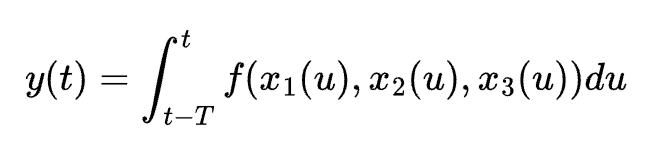
In above x1, x2, x3 are 3 streaming inputs. T is the time window. f cannot be any function. there are constraints on what f can be.

What Dataflow cannot do:

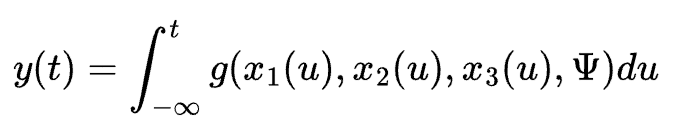
\Psi is reference data in an external database. It is not available as streaming and also evolves with t. g is an arbitrary function.

Posted in Computers, programming, Software | Tagged | Leave a comment

Can Postgres scale to billions of rows and TB of data?

It turns out that with proper indexing and partitioning it can! even if the index is so big that it cannot fit in the memory (RAM). To test, I started with a table with 2B rows, 172 cols, 26 partitions and 5 TB logical size in BigQuery. This table was copied to Postgres using Dataflow. The copy job itself took 19+ hrs. Here are the numbers showing Postgres query performance and comparing to BigQuery. I used Postgres 14 running as Cloud SQL in GCP (8 vCPU, 32 GB RAM):

BigQueryPostgres (full table w/ all 172 cols)Postgres slimmed table w/ 7 cols
Partitioned but not clustered or indexed850 ms94,141 ms (1min 34s)13,950 ms
Partitioned + clustered (BQ) or indexed (Pg)560 ms98 ms101 ms

Take a moment to appreciate these results and let the numbers sink in. With partitioning, we are able to improve performance by approx. 26x (equal to the # of partitions; the query only has to look for data inside the relevant partition now). With proper indexing on top of partitioning, we have been able to speed up the query (middle column) by 1000x – 3 orders of magnitude. The total improvement is 26,000x.

Of course, all this was possible only because we were able to create appropriate index that can handle the query being performed here. I don’t show the query as that is not relevant. Only thing that is relevant is that the query could be served from the index in above. Here it is anyway (it is basically a lookup query):

SELECT
SUM(sales) TOTAL_sales
FROM sales_table
WHERE dealer = "michael's toyota of seattle"
AND product = "toyota corolla"
AND quarter = "Q3FY2019";

the sales_table is partitioned on quarter and indexed on (quarter, dealer, product).

In some ways, by creating an index, we precompute the answer to a query (the values of query parameters can change from time to time like the arguments to a function but the query format is fixed; the more accurate statement is that we create a data structure for fast lookups). But this is possible only if you know what query you will be hit with. If you don’t know a-priori the query that’s going to come your way (I take this as the definition of an ad-hoc query), then you will be out of luck on Postgres (since you don’t know what index to create) and that’s why we have databases like BigQuery.

There are no indexes in BigQuery for good reason: it is designed for ad-hoc queries. There is only one index – the order in which data is stored in the database – a.k.a clustering. BigQuery achieves its performance via massive parallelism. Although a difference of 850 ms vs. 560 ms in above might make it appear that BigQuery does not benefit much from clustering, that conclusion would be wrong. Behind the scenes BigQuery parallelized the job across 1,000 workers when data was not clustered vs. 387 when data was clustered. And it had to process 4,805,618,480 bytes of data for the unclustered case vs. 14,828,424 when the table was clustered.

Before you get excited about indexing in Postgres, note that indexes don’t come for free. They are additional data structures (B-tree in this case) that have to be constantly updated when new records are inserted or old ones are updated or deleted. So be very careful not to go overboard with index creation. What is a good rule of thumb on max. # of indexes you should have? I don’t know. But I feel it should definitely be in single digits.

What about the effect of # of cols on Postgres query performance? For a column store like BigQuery, it doesn’t matter how many columns are there in the table. What about Postgres? The results are summarized below:

Full table with 172 columnsSlimmed table with 7 columns
Time to load from BigQuery to Postgres19 hr 42 minnot available
Table size w/o index1462 GB152 GB
Query time w/o index94,141 ms13,950 ms
Time to build index03:01:37 (3hr)02:01:22 (2hr)
Index Size93 GB93 GB
Query time w/ index98 ms101 ms

These results were a bit unexpected for me as I was hoping to see a big difference in the last row as well. What is reassuring is that even when the index size (93 GB) was clearly out of bounds of the machine’s RAM (32 GB), indexing still helped. It is a B-tree on the disk.

To wrap up, when Postgres is given a query, the execution planner checks if the query is something that can be served from the index (B-tree is the most common type of index). If yes, it uses the index which gives O(log n) performance (n is # of rows in the table). Think of using the index as doing a binary search that you learned in school. You can do it only if the data is sorted according to the key you are searching for – if data is sorted by date of birth but you are querying by name it does not help. If no index can be found, the database has to do a full table scan and this gives O(n) performance.

What about MySQL? Try it out and let me know.

Posted in Computers, programming, Software | Tagged | Leave a comment

How to make the bloody C# program run?

Has it happened to you that you wrote a C# program (a Console Application) but it did nothing when you ran it?

  • Running it from VS Code works
  • Running it using dotnet run works
  • But if you run the .exe it does nothing. There is no error. It just exits.

It happened to me. The issue was this: in the .csproj file I had:

<OutputType>WinExe</OutputType>

change it to:

<OutputType>Exe</OutputType>

and then it will work!

Posted in Computers, programming, Software | Tagged | Leave a comment