
Frequently we download binaries from the internet. How do we know they are genuine and not been tampered with? (Genuine as in genuine auto parts). This post illustrates the process using the JMeter library as example and downloading to MacOS. Steps on Linux should be similar. The download page for JMeter is here. It stresses not once, but twice that you must verify the integrity of the file.

and then again

This is how the process works. In below it is assumed you have wget and gpg programs installed on your computer. If you don’t, install them first before moving on. There are three files you will need to download. Refer below for convenience:
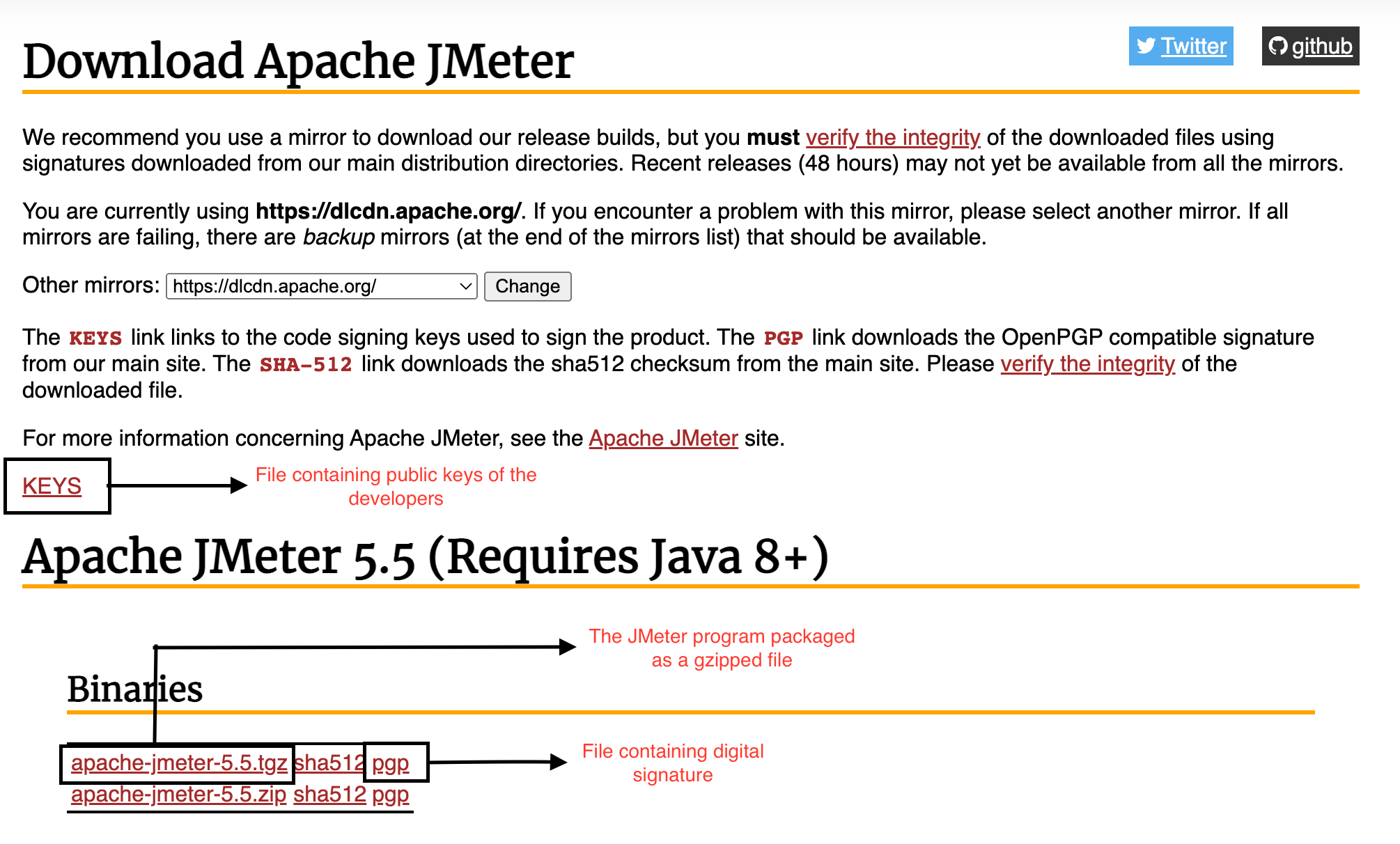
Step 1: Download the binary
➜   wget https://dlcdn.apache.org//jmeter/binaries/apache-jmeter-5.5.tgz
--2022-06-22 10:51:40--  https://dlcdn.apache.org//jmeter/binaries/apache-jmeter-5.5.tgz
Resolving dlcdn.apache.org (dlcdn.apache.org)... 2a04:4e42::644, 151.101.2.132
Connecting to dlcdn.apache.org (dlcdn.apache.org)|2a04:4e42::644|:443... connected.
HTTP request sent, awaiting response... 200 OK
Length: 85476161 (82M) [application/x-gzip]
Saving to: ‘apache-jmeter-5.5.tgz’

apache-jmeter-5.5.tgz             100%[==========================================================>]  81.52M  10.4MB/s    in 8.0s

2022-06-22 10:51:48 (10.2 MB/s) - ‘apache-jmeter-5.5.tgz’ saved [85476161/85476161]
Step 2: Download the signature file
In case of JMeter it is under the PGP link. Tip: PGP signature file ends in .asc
➜   wget https://www.apache.org/dist/jmeter/binaries/apache-jmeter-5.5.tgz.asc
--2022-06-22 10:55:41--  https://www.apache.org/dist/jmeter/binaries/apache-jmeter-5.5.tgz.asc
Resolving www.apache.org (www.apache.org)... 2a04:4e42::644, 151.101.2.132
Connecting to www.apache.org (www.apache.org)|2a04:4e42::644|:443... connected.
HTTP request sent, awaiting response... 302 Found
Location: https://downloads.apache.org/jmeter/binaries/apache-jmeter-5.5.tgz.asc [following]
--2022-06-22 10:55:41--  https://downloads.apache.org/jmeter/binaries/apache-jmeter-5.5.tgz.asc
Resolving downloads.apache.org (downloads.apache.org)... 88.99.95.219, 135.181.214.104, 2a01:4f9:3a:2c57::2, ...
Connecting to downloads.apache.org (downloads.apache.org)|88.99.95.219|:443... connected.
HTTP request sent, awaiting response... 200 OK
Length: 853 [text/plain]
Saving to: ‘apache-jmeter-5.5.tgz.asc’

apache-jmeter-5.5.tgz.asc         100%[==========================================================>]     853  --.-KB/s    in 0s

2022-06-22 10:55:42 (407 MB/s) - ‘apache-jmeter-5.5.tgz.asc’ saved [853/853]
Step 3: Download the file containing the public keys
The authenticity of a file is established by verifying the digital signature associated with it. To verify the digital signature we downloaded in previous step, you also need the public key. The public key decrypts the signature. The JMeter page says:
The KEYS link links to the code signing keys used to sign the product.
Download the keys:
➜   wget https://downloads.apache.org/jmeter/KEYS
--2022-06-22 10:54:50--  https://downloads.apache.org/jmeter/KEYS
Resolving downloads.apache.org (downloads.apache.org)... 2a01:4f8:10a:201a::2, 135.181.214.104, 88.99.95.219, ...
Connecting to downloads.apache.org (downloads.apache.org)|2a01:4f8:10a:201a::2|:443... connected.
HTTP request sent, awaiting response... 200 OK
Length: 13665 (13K)
Saving to: ‘KEYS.1’

KEYS.1                            100%[==========================================================>]  13.34K  70.5KB/s    in 0.2s

2022-06-22 10:54:51 (70.5 KB/s) - ‘KEYS.1’ saved [13665/13665]
In my case I had downloaded some keys previously into a file named KEYS so this file got downloaded as KEYS.1 on my computer
Step 4: Import the keys into gpg
➜   gpg --import KEYS.1
gpg: key 5A72D515FE99D106: public key "Mike Stover <mstover1@apache.org>" imported
gpg: key D5334E75B1313DE2: public key "Robert Burrell Donkin (CODE SIGNING KEY) <rdonkin@apache.org>" imported
gpg: key 2CDF847D3A01713B: public key "Michael Stover (APACHE CODE_SIGNING KEY) <mstover1@apache.org>" imported
gpg: key 95E965D25DB8AC0F: public key "Peter Lin (Peter Lin JMeter committer) <woolfel@apache.org>" imported
gpg: key 3FE0C161BCA973AC: public key "Sebastian Bazley (ASF Signing Key) <sebb@apache.org>" imported
gpg: key 7A8860944FAD5F62: public key "Sebastian Bazley (ASF CODE SIGNING KEY) <sebb@apache.org>" imported
gpg: key AC214CAA0612B399: public key "Milamber (ASF) <milamber@apache.org>" imported
gpg: Total number processed: 7
gpg:               imported: 7
gpg: no ultimately trusted keys found
The message gpg: no ultimately trusted keys found means none of the keys are in the web of trust. The web of trust is central to how security works in PGP. Read about it in further reading section.
Step 5: Now verify the signature
➜   gpg --verify apache-jmeter-5.5.tgz.asc apache-jmeter-5.5.tgz
gpg: Signature made Fri Jun 10 09:52:06 2022 PDT
gpg:                using RSA key C4923F9ABFB2F1A06F08E88BAC214CAA0612B399
gpg: Good signature from "Milamber (ASF) <milamber@apache.org>" [unknown]
gpg: WARNING: This key is not certified with a trusted signature!
gpg:          There is no indication that the signature belongs to the owner.
Primary key fingerprint: C492 3F9A BFB2 F1A0 6F08  E88B AC21 4CAA 0612 B399
What this means? The signature is valid. Its coming from Milamber (ASF) milamber@apache.org whose public key we imported in Step 4. But since that key is not trusted (why? because its not in our web of trust), we get this message gpg: WARNING: This key is not certified with a trusted signature! What is warning is saying is that there is no path in our web of trust that leads to milamber. Let’s take example of LinkedIn. Have you viewed a profile and noticed LinkedIn say’s its a 3rd degree connection? What that means is that you know someone who knows someone who knows the person you are viewing. You -> know someone (1st degree connection) -> knows someone (2nd degree connection) -> 3rd degree connection. Well in case of milamber there is no chain – no matter how long – that starts from us and ends at milamber. So milamber is not in our web of trust.
Step 6: Verify the fingerprint – Don’t skip this
➜   gpg --fingerprint C4923F9ABFB2F1A06F08E88BAC214CAA0612B399
pub   rsa4096 2010-08-14 [SC]
      C492 3F9A BFB2 F1A0 6F08  E88B AC21 4CAA 0612 B399
uid           [ unknown] Milamber (ASF) <milamber@apache.org>
Verify the fingerprint you get C492 3F9A BFB2 F1A0 6F08 E88B AC21 4CAA 0612 B399 matches the fingerprint in Step 5.
We are done now – but read the full article for a caveat emptor. To add the key to our web of trust, we can either sign it ourselves (equivalent to self-endorsement – see this for details) or we will have to find someone in our web of trust who trusts that key. Left as exercise.
What happens if file is not genuine?
Imagine a hacker were to replace the genuine file with a tampered version in which they have injected some malicious code (e.g., a virus). In that case the command
➜ gpg --verify apache-jmeter-5.5.tgz.asc apache-jmeter-5.5.tgz
will fail as the signature in .asc file will no longer be valid. Try for yourself as exercise – tamper the file apache-jmeter-5.5.tgz ever so slightly and run the command. What do you get? This is layer 1 of security. So if the hacker somehow manages to replace the genuine file with a tampered version, they also need to update the .asc signature file. Well, what if someone succeeded in that? This is what happens in that case:
$ gpg --verify apache-jmeter-5.5.tgz.asc apache-jmeter-5.5.tgz
gpg: Signature made Fri Jun 10 09:52:06 2022 PDT
gpg:                using RSA key C4923F9ABFB2F1A06F08E88BAC214CAA0612B399
gpg: Can't check signature: No public key
The signature fails to validate again. This is layer 2 of security. So to fully pass the security checks, the hacker has to succeed in modifying all three files on the server – the main file (apache-jmeter-5.5.tgz), the signature file (apache-jmeter-5.5.tgz.asc) and the file containing the public keys (KEYS) – they have to add their public key to the KEYS file. As best practice, these three files should be hosted on different servers because if they are hosted on the same server and the hacker gets access to that server with sufficient privileges, then its not a big challenge to modify all three files.
Suppose a hacker is able to modify all three files. In that case, this is your warning that not all may be well. Call it layer 3 of security:
gpg: WARNING: This key is not certified with a trusted signature!
gpg:          There is no indication that the signature belongs to the owner.
What this is saying is that the signature is by a person who is not in your web of trust – imagine receiving a signed paper document from someone you don’t know or trust. At this point most people assume everything is well – who’s going to bother with this:


When we ignore above warning, in essence we are assuming the KEYS file is bullet-proof and cannot be hacked. Is this a good assumption? This is your caveat emptor.
 siddharth's space