
In this post we discuss some of the ways the data in BigQuery can be processed. First, for those unfamiliar with it, what is BigQuery? BigQuery is Google’s OLAP (Online Analytics Processing) database. In my previous company, we used Hive – maybe you have used that. If so, BQ is very similar. Its implementation might be different but it serves the same purpose. From Hive documentation:
The Apache Hive ™ data warehouse software facilitates reading, writing, and managing large datasets residing in distributed storage using SQL.
BQ is just that. It does not use HDFS and separates compute from storage (one key innovation behind its performance). This also allows Google to charge separately for storage vs. compute. Its storage is based on Google’s proprietary Colossus file system which is successor to GFS and underlying technology behind GCS (thus, Colossus = Google Cloud Storage). Below is a graph comparing BQ to Hive (as well as Amazon Redshift and Azure Synapse) on sotagtrends:
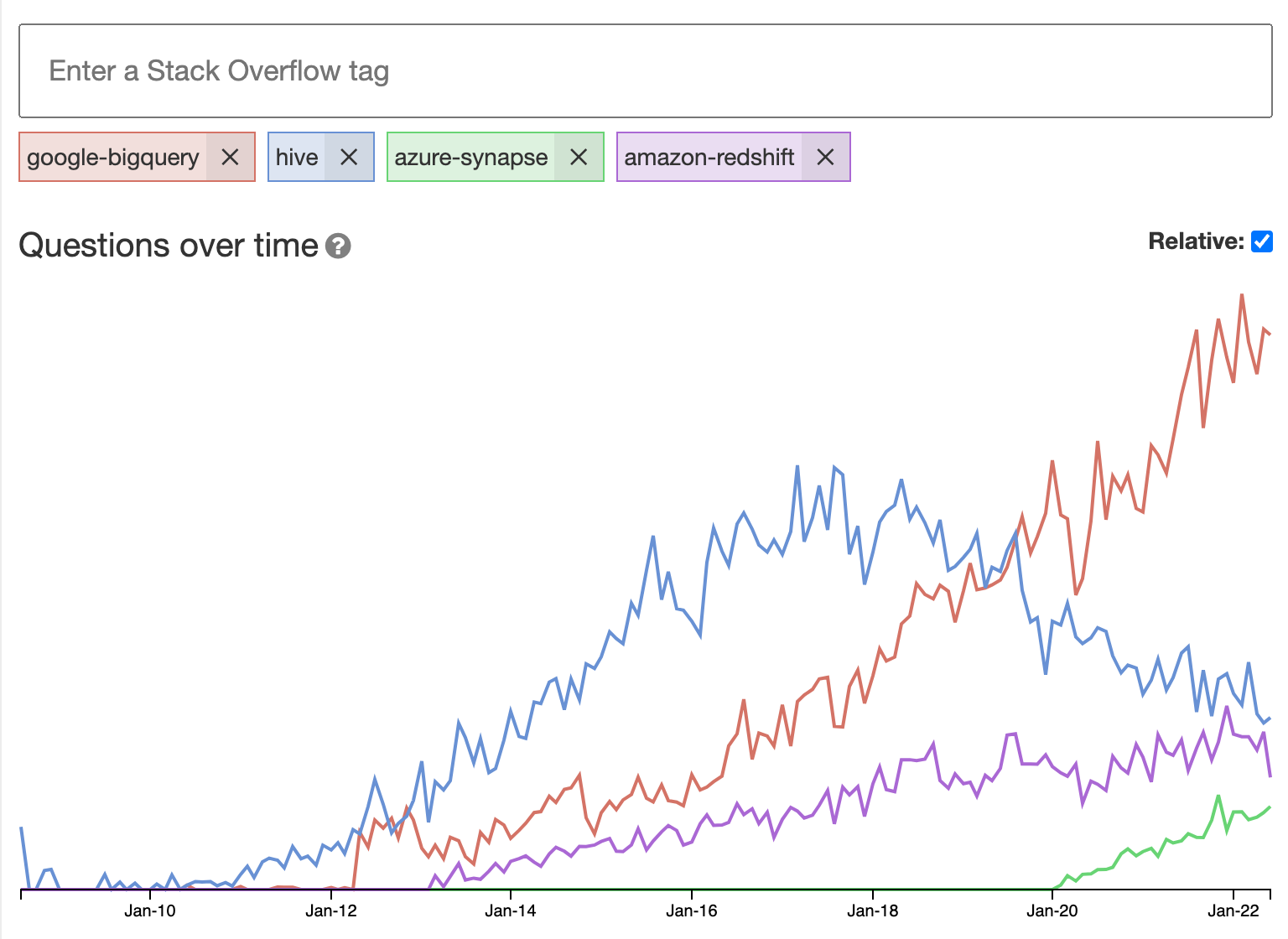
We can see more companies are now using BQ and usage of Hive is slowing down (BQ launched in 2010 btw). This is because BQ is a Platform as a Service which means you don’t have to maintain and fine-tune any infrastructure. Google handles all of that for you and you continue to benefit from continuous improvements to the software.
BQ is fully compliant with ANSI standard SQL:2011 and adds additional features on top of that. The BQ SQL dialect is also known as ZetaSQL. Anyway once you have data in BQ, how do you process it further? Below summarizes the options IMO:
Option 1: Process the data in BigQuery itself
Pros: Processing is fast, no additional technology to be used
Cons: all computation has to be expressed in SQL. Writing, refactoring and modularizing SQL is hard. Not everything can be expressed in SQL. Just because you can do something in SQL, doesn’t mean you should.
When to Use: You are comfortable with SQL. All data is in BQ. dbt is a popular tool that can help with running the SQL code, auto-persisting the query results and other tasks.
Option 2: Console Application
Pros: Hybrid approach. You decide what you want to do in SQL and what not. You don’t have to jump to advanced technologies like Spark or DataFlow which take time to learn. This option is familiar to developers who are experienced with querying MySQL as example from PHP. Its the same design. BQ provides client libraries in 7 languages – Java, Python, Node.js, Go, C#, PHP, Ruby.
Cons: IMO – There is little in terms of cons because you decide how much you want to do in SQL vs. Java or Python. You decide how much computation you want to push to the database and how much computation you want to do on the client. With Option 1, all computation is pushed to the database.
When to Use: Not all data is in BQ. In that case you can’t process in BQ itself. Or use when SQL is not your strong forte and you want to build a traditional application written in Java/Python etc. with CI/CD pipeline.
Option 3: Dataflow
Pros: Massively parallel distributed computation
Cons: Another technology to learn and master. Performance might not be better than if you had done your processing in BigQuery itself.
When to Use: When console app will not be able to give the desired performance. All data is not in BQ.
Let me know what option you are using in your organization and what you think.
 siddharth's space