
Objective
How can we query Google BigQuery from a Scala console app?
Step 1 – Create project on Google CLoud, enable billing, Install Google Cloud SDK, initialize and authenticate
Refer to online documentation for how to do all this. You need to have a project and enable billing to use BigQuery. You may also need to enable BigQuery API. To initialize the SDK and obtain an access token run:
$ gcloud init
$ gcloud auth application-default login
gcloud init will set the project for you. If you want to change it later, you can do so using:
$ gcloud config set project PROJECT_ID
You can also create a service account if you want. The code to do that from a bash script is as follows (credit to Lak):
gcloud iam service-accounts create ${ACCTNAME} --description="My Service Account"
gcloud iam service-accounts keys create keyfile.json \
  --iam-account ${ACCTNAME}@${PROJECT}.iam.gserviceaccount.com

for role in roles/bigquery.dataEditor roles/bigquery.jobUser; do
  gcloud projects add-iam-policy-binding ${PROJECT} \
    --member serviceAccount:${ACCTNAME}@${PROJECT}.iam.gserviceaccount.com --role ${role}
done
This will create a service account and a file keyfile.json on your computer.
Step 2: Install sbt and all its dependencies (JVM etc.)
Details outside scope of this article. Refer online documentation
Step 3: Create empty folder and initialize it with a build.sbt
Create and empty folder and create a build.sbt file in it with following contents:
name := "Sid's project"

scalaVersion := "2.12.16"

libraryDependencies ++= Seq(
	// If you use organization %% moduleName % version rather than organization % moduleName % version (the difference is the double %% after the organization), sbt will add your project’s binary Scala version to the artifact name.
	// https://www.scala-sbt.org/1.x/docs/Library-Dependencies.html
	"org.apache.spark" %% "spark-sql" % "3.3.0",
	// https://github.com/GoogleCloudDataproc/spark-bigquery-connector
	"com.google.cloud.spark" % "spark-bigquery-with-dependencies_2.12" % "0.25.1"
)
Step 4: Write Scala code to query BigQuery
A minimal code is as follows. Save it in a file named SimpleApp.scala:
/* SimpleApp.scala */
import org.apache.spark.sql.SparkSession
import org.apache.spark.sql.functions._
import com.google.cloud.spark.bigquery._

object SimpleApp {
  def main(args: Array[String]) {
    val spark = SparkSession.builder.appName("Simple Application").config("spark.master", "local").getOrCreate()
    val df = spark.read.option("parentProject", "XXX").bigquery("bigquery-public-data.samples.shakespeare")
    df.show()
    val x = df.groupBy("word").agg(sum("word_count").alias("count")).orderBy(col("count").desc)
    x.show(100)
    spark.stop()
  }
}
Replace XXX with your project ID. df is a Spark SQL DataFrame. In above we are querying table shakespeare from the public dataset samples under project bigquery-public-data. Ideally we shouldn’t have to run Spark as our objective is to develop a console application, but the Scala library I found for reading from BQ is coupled to Spark. Assignment: decouple it from Spark. After reading the data we do some processing to determine the count of every word and sort in descending order of the count.
Step 5: Run sbt
We are now ready to run the code. Start by launching the sbt server:
$ sbt
You should get an output like below:
[info] welcome to sbt 1.6.2 (Oracle Corporation Java 11.0.14)
[info] loading project definition from /Users/XXX/bigquery-scala/project
[info] loading settings for project bigquery-scala from build.sbt ...
[info] set current project to Sid's project (in build file:/Users/XXX/bigquery-scala/)
[info] sbt server started at local:///Users/XXX/.sbt/1.0/server/93733b8d4d1bbdc577aa/sock
[info] started sbt server
Step 6: Compile the code
Run
sbt:Sid's project> compile
[info] compiling 1 Scala source to /Users/XXX/bigquery-scala/target/scala-2.12/classes ...
[success] Total time: 4 s, completed Jun 19, 2022, 12:15:58 PM
Step 7: Run the code
sbt:Sid's project> runMain SimpleApp
Truncated output:
+------+-----+
|  word|count|
+------+-----+
|   the|25568|
|     I|21028|
|   and|19649|
|    to|17361|
|    of|16438|
|     a|13409|
|   you|12527|
|    my|11291|
|    in|10589|
|    is| 8735|
|  that| 8561|
|   not| 8395|
|    me| 8030|
|   And| 7780|
|  with| 7224|
|    it| 7137|
|   his| 6811|
|    be| 6724|
|  your| 6244|
|   for| 6154|
|  this| 5803|
|  have| 5658|
|    he| 5411|
|   him| 5407|
|  thou| 4890|
|  will| 4737|
|    as| 4516|
|    so| 4319|
|   her| 4131|
|   The| 4070|
|   but| 3994|
|   thy| 3876|
|   all| 3681|
|    To| 3592|
|    do| 3433|
|  thee| 3370|
| shall| 3282|
|   are| 3268|
|    by| 3165|
|    on| 3027|
|    no| 2934|
Verify against BQ:
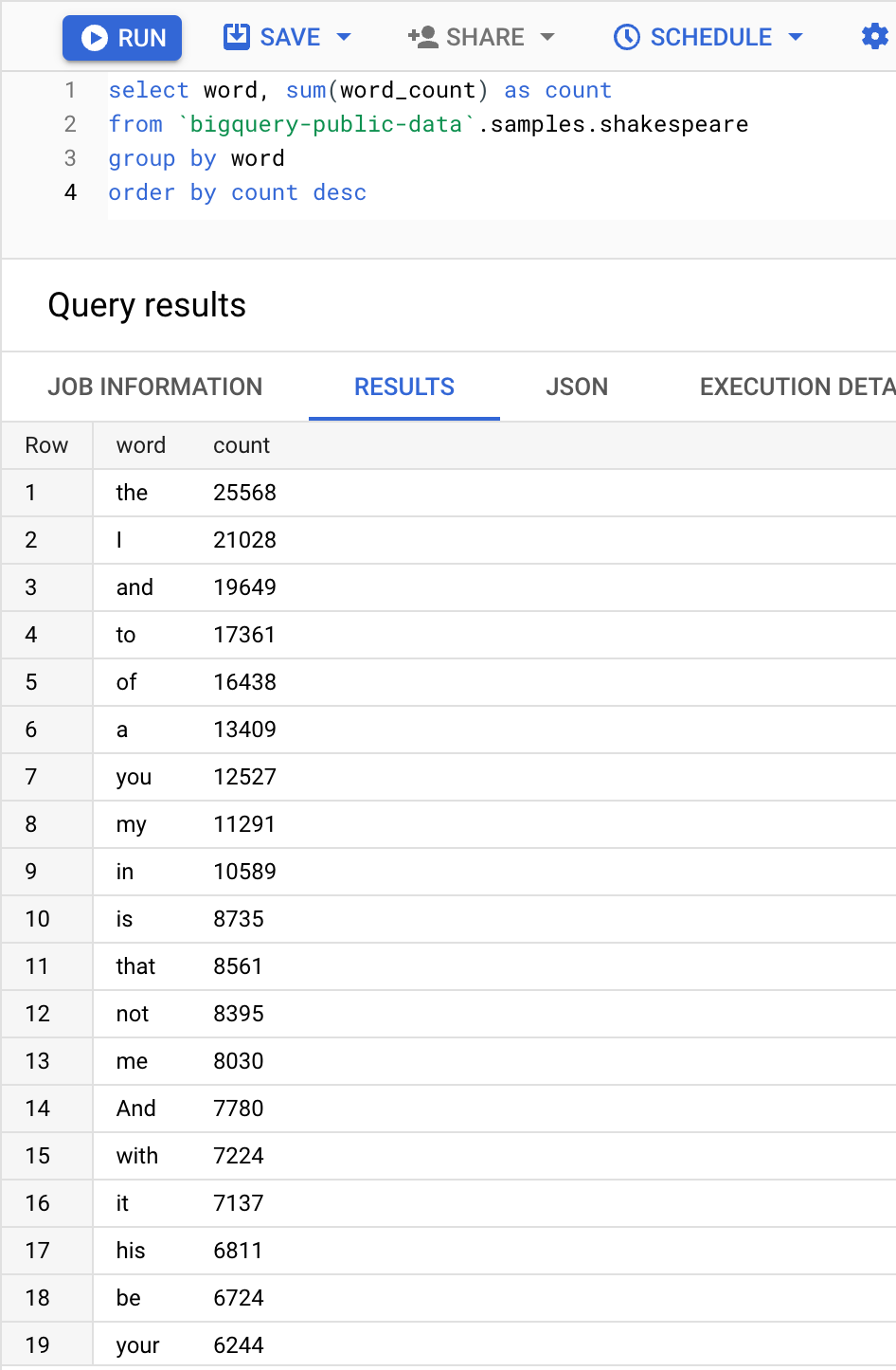
This finishes the reading from BQ part. What if you want to store results to BQ?
Writing to BigQuery
I wasn’t able to get it to work. In theory the code to write to BQ is:
x.write.format("bigquery").option("writeMethod", "direct").save("sample.scala_word_count")
However this gave me following error:
[error] java.lang.IllegalArgumentException: Either temporary or persistent GCS bucket must be set
It looks like the library we are using first stages the data to GCS (Google Cloud Storage) and then loads it into BQ i.e., option("writeMethod", "direct") does not work. There are a number of steps you have to do (at least I tried doing) to get it to work:
Need to create a GCS bucket and add this code to SimpleApp.scala:
val conf = spark.sparkContext.hadoopConfiguration
conf.set("fs.gs.impl", "com.google.cloud.hadoop.fs.gcs.GoogleHadoopFileSystem")
conf.set("fs.AbstractFileSystem.gs.impl", "com.google.cloud.hadoop.fs.gcs.GoogleHadoopFS")
val bucket = spark.sparkContext.hadoopConfiguration.get("fs.gs.system.bucket")
spark.conf.set("temporaryGcsBucket", "your-gcs-bucket")
Need to add following dependency to build.sbt:
"com.google.cloud.bigdataoss" % "gcs-connector" % "hadoop3-2.2.7"
Even with these changes, I got following error after which I gave up:
22/06/19 17:24:29 WARN FileSystem: Failed to initialize fileystem gs://my-gcs-bucket/.spark-bigquery-local-1655684190889-861d7ac8-c4c6-4e20-a2b0-c0f356445c72: java.io.IOException: Error getting access token from metadata server at: http://169.254.169.254/computeMetadata/v1/instance/service-accounts/default/token
Caused by: java.net.SocketTimeoutException: connect timed out
I then tried using another version of the library based on what I read here.
The Spark 2.4 dedicated connector supports writing directly to BigQuery without first writing to GCS, using the BigQuery Storage Write API to write data directly to BigQuery. In order to enable this option, please set the
writeMethodoption todirect
here are details:
"org.apache.spark" %% "spark-sql" % "2.4.0",
	// https://github.com/GoogleCloudDataproc/spark-bigquery-connector
	// https://repo1.maven.org/maven2/com/google/cloud/spark/spark-2.4-bigquery/0.25.1-preview/spark-2.4-bigquery-0.25.1-preview.pom
	"com.google.cloud.spark" % "spark-2.4-bigquery" % "0.25.1-preview"
and this gave me this. After this it was clearly too much. To see the internals of write implementation refer this.
Running from Scala shell (REPL)
You can also run the code from the interactive shell. This is useful when you are prototyping. To do that run:
$ sbt console
This will launch scala interpreter (REPL) instead of the sbt server. See this for the difference between scala and sbt console.
SBT is tied to a specific project defined by a build.sbt file in a way that
sbt consolewill load up the same REPL environment asscalabut with the addition of all of the project code and dependencies defined in the build available for import. Also, it will use the version of Scala defined bybuild.sbt
What I learnt
It is possible to write a console app to query BQ from Scala but the code is coupled to Spark which is undesirable (or maybe it is because that’s the only way to get the data as a DataFrame) and I wasn’t able to write to BQ. Scala is a powerful language but difficult to learn and not for the average developer. The difficulty is compounded by the fact that there are less examples than you can find for languages like Python or Java and a smaller community to help you out. If you are bent on using Scala for something, you can find libraries but I would describe them as indie (as in indie movies. The term indie is used with the meaning “Independent” to refer to movies, music and video games created without financial backing from major companies.) – use at your own risk, lack of examples, not feature complete, may be buggy. Let me know what you think.
 siddharth's space