
TL;DR: In a Dockerized setup this can happen if the Docker port forwarding stops working as it did in our case (all of a sudden). That caused the ELB (elastic load balancer) health probe to fail and the load balancer stopped sending traffic to the machine resulting in 522 error (unresponsive application). docker info showed that IPv4 forwarding was disabled (an uncommon scenario) and running sysctl -w net.ipv4.ip_forward=1 (requires root privileges) fixed the problem. Rest of this post contains the steps that shows how I diagnosed the problem.
Ran into CloudFlare 522 error with a website that was working fine before. First I checked docker container was running (use docker ps). The ELB (elastic load balancer) was not able to connect to backend pool and said:
Some of your load balancing endpoints may be unavailable. Please see the
metrics blade for availability information and troubleshooting steps for
recommended solutions.
The metrics blade showed health probe stopped responding all of a sudden:
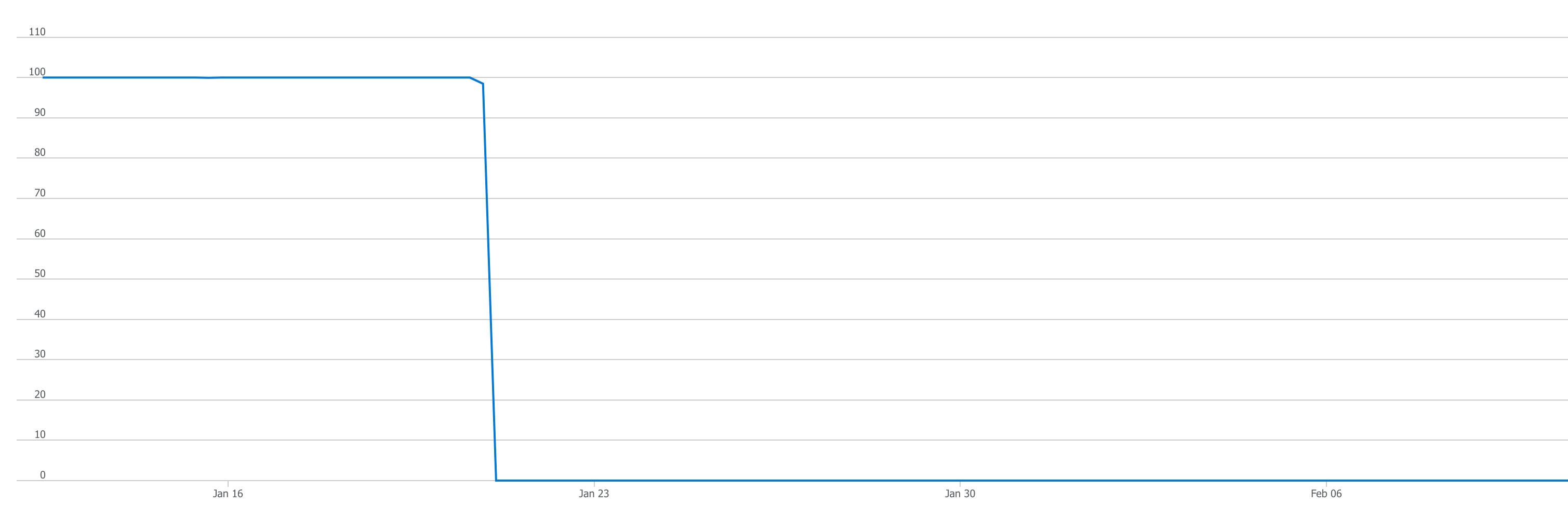
Docker logs showed no more incoming requests after health probe stopped working. But I was able to make request to the health probe:
$ curl -k https://XX.YY.ZZZ.AA/health-check
OK
Turns out I was running the command from the VM that was hosting the Docker container. When I ran the same command from another VM it failed:
$ curl -k https://X.Y.Z.A/health-check
curl: (7) Failed to connect to X.Y.Z.A port 443: Connection refused
The other VM was able to ping the VM running the docker container:
$ ping X.Y.Z.A
PING X.Y.Z.A (X.Y.Z.A): 56 data bytes
64 bytes from X.Y.Z.A: icmp_seq=0 ttl=55 time=86.271 ms
64 bytes from X.Y.Z.A: icmp_seq=1 ttl=55 time=86.213 ms
64 bytes from X.Y.Z.A: icmp_seq=2 ttl=55 time=86.876 ms
64 bytes from X.Y.Z.A: icmp_seq=3 ttl=55 time=86.002 ms
64 bytes from X.Y.Z.A: icmp_seq=4 ttl=55 time=85.977 ms
64 bytes from X.Y.Z.A: icmp_seq=5 ttl=55 time=85.636 ms
64 bytes from X.Y.Z.A: icmp_seq=6 ttl=55 time=85.822 ms
^C
--- X.Y.Z.A ping statistics ---
7 packets transmitted, 7 packets received, 0.0% packet loss
This shows a machine can connect to the VM. But can it connect to the port on the VM where the health probe is listening?
$ nc -zv X.Y.Z.A 443
nc: connectx to X.Y.Z.A port 443 (tcp) failed: Operation timed out
What about other ports? Run netstat -tpln to see a list of all ports in use:
$ netstat -tpln
(Not all processes could be identified, non-owned process info
 will not be shown, you would have to be root to see it all.)
Active Internet connections (only servers)
Proto Recv-Q Send-Q Local Address           Foreign Address         State       PID/Program name
tcp        0      0 127.0.0.1:25            0.0.0.0:*               LISTEN      -
tcp        0      0 X.Y.Z.A:17472      0.0.0.0:*               LISTEN      -
tcp        0      0 127.0.0.1:17473         0.0.0.0:*               LISTEN      -
tcp        0      0 127.0.0.1:199           0.0.0.0:*               LISTEN      -
tcp        0      0 127.0.0.1:29131         0.0.0.0:*               LISTEN      -
tcp        0      0 0.0.0.0:22              0.0.0.0:*               LISTEN      -
tcp6       0      0 :::443                  :::*                    LISTEN      -
tcp6       0      0 :::2377                 :::*                    LISTEN      -
tcp6       0      0 :::7946                 :::*                    LISTEN      -
tcp6       0      0 :::80                   :::*                    LISTEN      -
tcp6       0      0 :::4118                 :::*                    LISTEN      -
Note that 443 and 80 (the ports where health probes are running) are bound to 0.0.0.0 (::: is alias for 0.0.0.0) so this is not the problem. Now try connecting to other ports:
$ nc -zv X.Y.Z.A 2377
Connection to X.Y.Z.A port 2377 [tcp/*] succeeded!
$ nc -zv X.Y.Z.A 7946
Connection to X.Y.Z.A port 7946 [tcp/*] succeeded!
$ nc -zv X.Y.Z.A 4118
Connection to X.Y.Z.A port 4118 [tcp/netscript] succeeded!
The fact that other ports are reachable indicates the problem is with Docker. Run ps aux | grep docker-proxy:
$ ps aux | grep docker-proxy
root      56498  0.0  0.0 190896  2640 ?        Sl   12:54   0:00 /usr/bin/docker-proxy -proto tcp -host-ip 0.0.0.0 -host-port 443 -container-ip 172.18.0.4 -container-port 443
root      56511  0.0  0.0 117164  2636 ?        Sl   12:54   0:00 /usr/bin/docker-proxy -proto tcp -host-ip 0.0.0.0 -host-port 80 -container-ip 172.18.0.4 -container-port 80
This shows port forwarding has been setup correctly (The docker ps command also shows if port forwarding has been setup). Again note we are using 0.0.0.0 so this is not the problem. docker inspect did not show us anything abnormal and I was just about to post a question on Docker forums asking for help when I ran docker info and what do we see?
WARNING: IPv4 forwarding is disabled
WARNING: bridge-nf-call-iptables is disabled
WARNING: bridge-nf-call-ip6tables is disabled
I enabled IPv4 forwarding by running (requires root privileges):
$ sysctl -w net.ipv4.ip_forward=1
net.ipv4.ip_forward = 1
and the application was up again! The health probe starting working, the load balancer started forwarding traffic and CloudFlare 522 error went away! I did not have to enable bridge-nf-call-iptables (maybe because I was running a swarm network?) so didn’t mess with it.
The ability to debug is the most important skill to have in a developer.
 siddharth's space