
Today I learned that VS Code has a pretty good extension for AsciiDoc:
https://marketplace.visualstudio.com/items?itemName=asciidoctor.asciidoctor-vscode
It can even export to PDF using wkhtmltopdf. There is also the option to have it use the Ruby based asciidoctor-pdf to do the conversion.
How to Use
The extension activates automatically when opening an AsciiDoc file (.adoc, .ad, .asc, .asciidoc).
Preview
To show the preview you can use the same commands as the Markdown extension:
- Toggle Preview –
ctrl+shift+v(Mac:cmd+shift+v) - Open Preview to the Side –
ctrl+k v(Mac:cmd+k v)
The preview refreshes automatically, but it can also be forced with the AsciiDoc: Refresh Preview command.
The preview supports setting attributes through the asciidoc.preview.attributes option.
By default the preview style follows the VSCode theme (workbench.colorTheme). To use Asciidoctor’s style set option asciidoc.preview.useEditorStyle to false. It is also possible to set your own preview stylesheet with the asciidoc.preview.style option.
(See more details under Options)
Export as PDF
The extension provides a quick command to export your AsciiDoc file as PDF.
- Open the command palette –
ctrl+shift+porF1(Mac:cmd+shift+p) - Select AsciiDoc: Export document as PDF
- Choose the folder and filename for the generated PDF
By default a separate binary is downloaded and used to render the document in PDF format. To use Asciidoctor PDF set option asciidoc.use_asciidoctorpdf to true.
(See more details under Options)
To change the settings first open the extensions tab. then select Asciidoc extension. click on gear icon as shown below
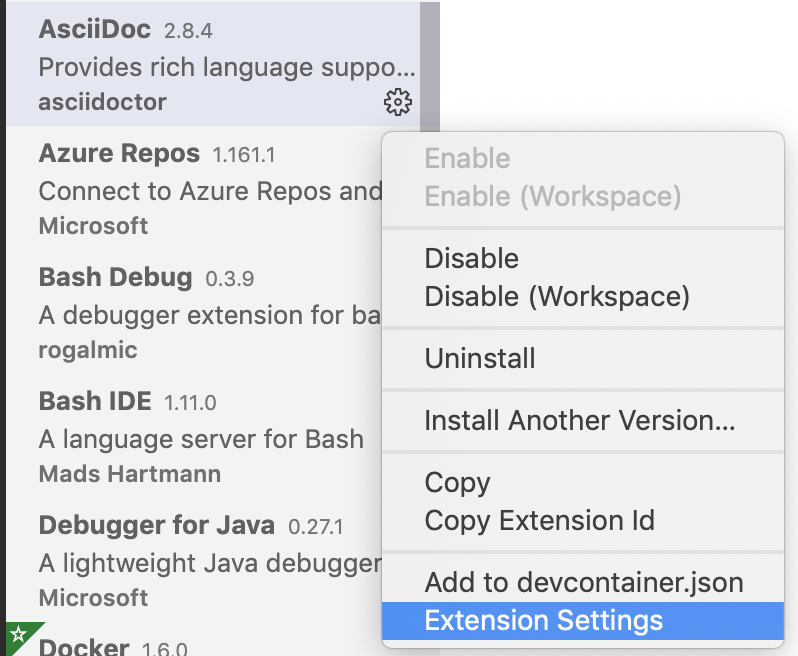
also see https://stackoverflow.com/questions/50477523/how-to-convert-asciidoc-to-pdf/50709725
 siddharth's space