
Woke up yesterday all excited that today I will add a nodejs sample showing how to use ABAC (Attribute Based Access Control) in Hyperledger Fabric and submit a pull request.
Here is how it went.
Things needed to be done:
- Step 1: write nodejs chaincode
- Step 2: modify the shell scripts to add a command line option to install node chaincode (instead of go)
- Test
- Submit PR
Step 1 didn’t take much time. Since the chaincode already existed (written in Go), it needed to be converted into NodeJs to accomplish this task. Looking at the Go code I realized its exactly the same chaincode as the balance-transfer app except that it adds a line or two to a method to demonstrate how ABAC works. Luckily a NodeJs version of this chaincode already existed so all I had to do was copy that code and add a if statement which was equivalent of ABAC in NodeJs. I had spent time on a previous day figuring out how to do ABAC in NodeJs.
Step 2 – This is where I got stuck. Bash is definitely the worst programming language. It didn’t help that the editor I was using (VS Code) has no support for Bash. It doesn’t allow you to jump to definition, find references etc in a bash file. So I spend some time searching for a plugin that would add Bash support to VS Code and found this one. Installed it. But got permission error while trying to install
npm i -g bash-language-server
This is because of the -g flag which tries to install it as a global package. So I tried installing it as a non-global package and it gave another error. Today I find out It seems that bash-language-server isn’t compatible with nodejs-lts-carbon version 8.13.0 [link]. Well that’s the version of node that I use and I am not going to change the node version for this plugin. So I cannot use this plugin. I worked hard to make the changes without an IDE experience.
Step3 Test. One area where I got stuck was receiving an error while trying to install NodeJs chaincode.

The path did exist. I double-checked it. I double-checked my changes

The test passed if I used Go as the language. Why wouldn’t it work with Node? After some thought I tried to change the path to an absolute

and that fixed it!
I think for Go the relative path works because it searches for the location relative to $GOPATH which is set in the docker-compose.yaml file

Step 4 – Time to push the changes. But before pushing I need to commit them. Before committing I need to do a self-CR. For this I need to view changes against the original. I couldn’t find how to do that in VS Code yesterday. Today as I am writing it I found out that you can do this in VS Code by going to View -> SCM
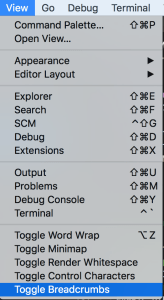
Yesterday I used SourceTree instead (luckily I had installed it earlier). Committed changes and pushed them after resolving merge conflicts.
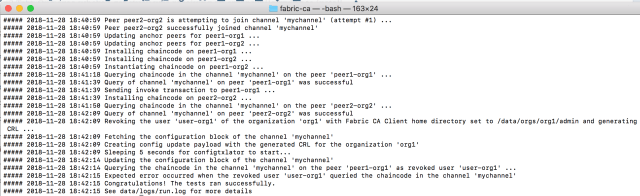
Now when I tried to re-run the code, I got very verbose output and finally an error

I realized Exec format error sounds like BadImageFormatException on Windows when an executable built for one microprocessor architecture (e.g., ARM) is tried to run on another microprocessor (e.g., Intel). The instruction set is different. So now my fabric-ca-client was corrupt somehow. After some poking I realized I had been working on v1.2.0 of Fabric and in the midst of git push etc. I switched to v1.3.0 of fabric. So now I needed to download 1.3.0 binaries. [Btw using v1.2.0 of binaries still shouldn’t give a Exec format error since the image is in right format; it should error out but not that error] To do that I went to HL Fabric homepage and tried to run the command they tell:

but it gave me this error
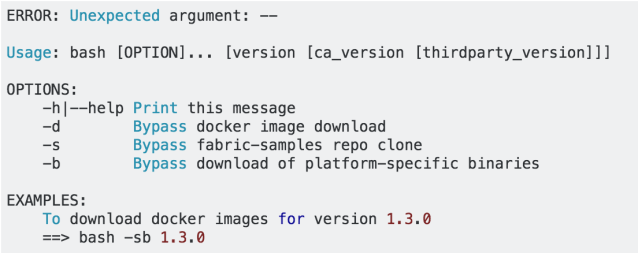
That was highly disappointing. I had to question whether HL Fabric is the right technology for me to use to develop a blockchain. Even their setup script does not work properly. The other day I had left the balance-transfer app running and it maxed out the hard disk after a few days. Anyway I fixed the setup script but the Exec format error did not go away. So I compared what was happening in v1.2.0 against v1.3.0 and realized v1.3.0 tries to dynamically build a docker image

and in the dockerfile I saw

this is why it gives the very verbose output as its trying to download docker images. Maybe there is a bug in the script and it downloads the image built for a linux to a mac causing format error? I inspected the binary it downloads

and it actually matches the v1.3.0 binary of fabric-ca-client on mac that I installed using bootstrap.sh (the official setup script)

and maybe that’s the problem! In his Docker Deep Dive book Nigel Poulton says:
There is currently no such thing as Mac containers.
However, you can run Linux containers on your Mac using Docker for Mac. This works by seamlessly running your containers inside of a lightweight Linux VM on your Mac.
So even though I am on a Mac, maybe I should be downloading a linux binary? It sounds backwards but just to test it out let’s edit the makeDocker.sh so that it looks like

Now the start.sh script runs without any errors! Full log can be seen here. This piece of investigation was done today as I was writing this post.
Anyway building a new image every time start.sh is run was not desirable and I found that its possible to get the v1.2.0 behavior by exporting FABRIC_TAG=local before running start.sh. FABRIC_TAG=local tells makeDocker.sh to use the image already installed locally on the machine.
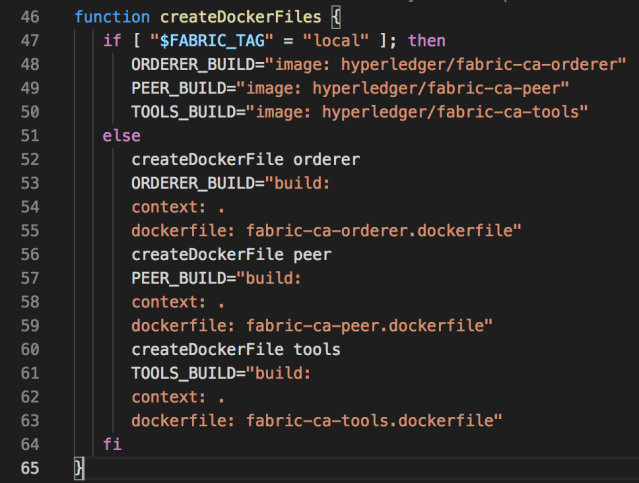
Once I set FABRIC_TAG=local, test started passing again.
So that I think was my very exciting day and have spent 3 hours writing this up today. I really wanted to write what happens in a day in some detail as I feel I am working very hard but not getting much done. Luckily there were only few meetings yesterday. Reflecting back I think 95% of the time in development is actually spent in debugging issues like above and setting things up (I am ignoring the CR portion completely). The ability to debug is as (or even more) important than the ability to write code. Debugging is very much like solving a crime. It gives great satisfaction when you solve the issue but over time it loses its excitement since it feels like a big waste of time. I have no problem debugging my own code but why should I be wasting time debugging others’ code?
 siddharth's space
Having read this I believed it was very informative.
I appreciate you finding the time and energy to put this informative article together.
I once again find myself personally spending a lot of time both reading and posting comments.
But so what, it was still worthwhile!