
Contents of .theanorc (has to be stored under %USERPROFILE% which is c:\users\myname on my machine):
c:\theano\Theano>type %USERPROFILE%\.theanorc
[global]
device = gpu
floatX = float32
[nvcc]
flags = –use-local-env –cl-version=2013
in above, set cl-version to the version of VS you have installed. On my machine cl.exe corresponding to VS2013 is installed under D:\Program Files (x86)\Microsoft Visual Studio 12.0\VC\bin\x86_amd64 and the vcvarsall.bat is under D:\Program Files (x86)\Microsoft Visual Studio 12.0\VC
if you want to specify libpaths to nvcc in .theanorc do it like this:
flags = -Lc:\path1 -Lc:\path2 etc.
Contents of C:\Program Files\NVIDIA GPU Computing Toolkit\CUDA\v7.0\bin\nvcc.profile:
TOP = $(_HERE_)/..
NVVMIR_LIBRARY_DIR = $(TOP)/nvvm/libdevice
PATH += $(TOP)/open64/bin;$(TOP)/nvvm/bin;$(_HERE_);$(TOP)/lib;
INCLUDES += “-I$(TOP)/include” $(_SPACE_)
LIBRARIES =+ $(_SPACE_) “/LIBPATH:$(TOP)/lib/$(_WIN_PLATFORM_)”
CUDAFE_FLAGS +=
PTXAS_FLAGS +=
C:\Program Files\NVIDIA GPU Computing Toolkit\CUDA\v7.0\lib\Win32>dir
Volume in drive C is OSDisk
Volume Serial Number is 5AB3-9155
Directory of C:\Program Files\NVIDIA GPU Computing Toolkit\CUDA\v7.0\lib\Win32
03/28/2015 05:20 PM <DIR> .
03/28/2015 05:20 PM <DIR> ..
02/18/2015 04:09 AM 91,522 cuda.lib
02/18/2015 04:09 AM 200,226 cudadevrt.lib
02/18/2015 04:09 AM 67,552 cudart.lib
02/18/2015 04:09 AM 1,599,654 cudart_static.lib
02/18/2015 04:09 AM 7,602 nvcuvid.lib
02/18/2015 04:09 AM 20,886 OpenCL.lib
6 File(s) 1,987,442 bytes
2 Dir(s) 31,310,540,800 bytes free
Directory of C:\Program Files\NVIDIA GPU Computing Toolkit\CUDA\v7.0\lib\x64
03/28/2015 05:20 PM <DIR> .
03/28/2015 05:20 PM <DIR> ..
02/18/2015 04:09 AM 90,028 cublas.lib
02/18/2015 04:10 AM 27,968,386 cublas_device.lib
02/18/2015 04:09 AM 84,866 cuda.lib
02/18/2015 04:09 AM 393,410 cudadevrt.lib
02/18/2015 04:09 AM 63,114 cudart.lib
02/18/2015 04:09 AM 2,257,428 cudart_static.lib
02/18/2015 04:09 AM 15,582 cufft.lib
02/18/2015 04:09 AM 15,838 cufftw.lib
02/18/2015 04:09 AM 8,320 curand.lib
02/18/2015 04:09 AM 83,370 cusolver.lib
02/18/2015 04:09 AM 166,806 cusparse.lib
02/18/2015 04:09 AM 4,014 nppc.lib
02/18/2015 04:09 AM 1,295,064 nppi.lib
02/18/2015 04:09 AM 214,486 npps.lib
02/18/2015 04:09 AM 11,250 nvblas.lib
02/18/2015 04:09 AM 6,814 nvcuvid.lib
02/18/2015 04:09 AM 3,492 nvrtc.lib
02/18/2015 04:09 AM 19,370 OpenCL.lib
to fix the missing cublas.lib under Win32 folder I installed 32bit toolkit from https://developer.nvidia.com/cuda-toolkit-32-downloads#Windows:
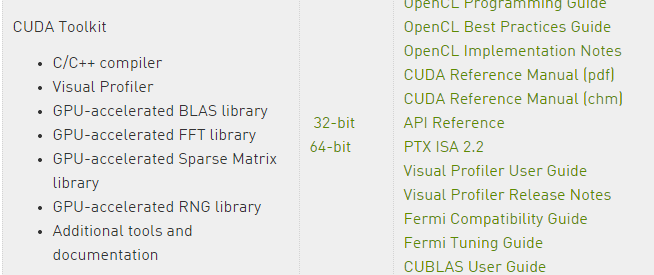
it installed the 32bit cublas.lib under:
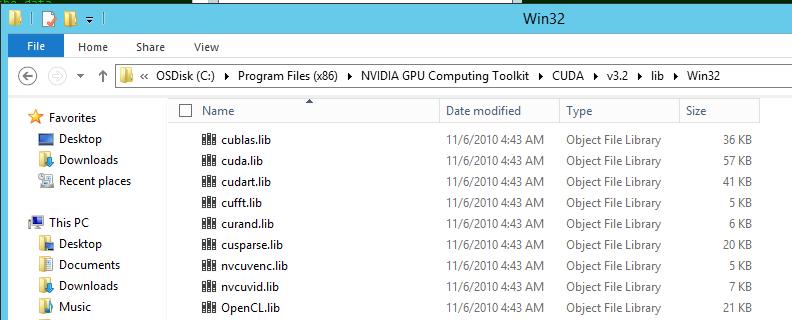
I then copied the extra files to:
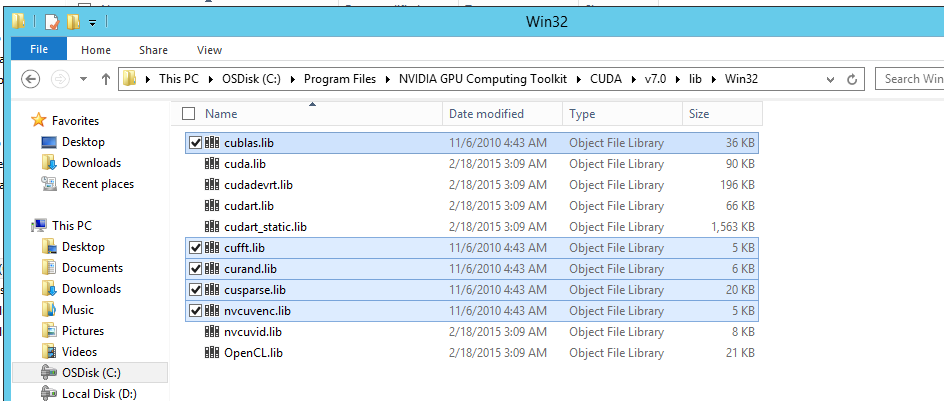
after this getting unresolved external symbol errors:
tmpxft_0000787c_00000000-25_mod.obj : error LNK2019: unresolved external symbol
_cublasCreate_v2@4 referenced in function “int __cdecl cublas_init(void)” (?cubl
tmpxft_000065f0_00000000-25_mod.obj : error LNK2019: unresolved external symbol
_cublasDestroy_v2@4 referenced in function “struct _object * __cdecl CudaNdarray
Looks like the github branch is using a v2 version of cublas.lib that is not available on windows?
Tried cloning 0.7 stable branch of theano under d:\theano:
git clone https://github.com/Theano/Theano.git --branch rel-0.7

Now that error has gone away but getting new ones - unable to find include files...enough for today

To specify compiler-bindir in nvcc.profile see http://stackoverflow.com/questions/2760374/why-cant-nvcc-find-my-visual-c-installation
I tried both:
compiler-bindir = C:\Program Files (x86)\Microsoft Visual Studio 9.0\VC\bin
and
CUDA_NVCC_FLAGS += --compiler-bindir = "C:\Program Files (x86)\Microsoft Visual Studio 9.0\VC\bin"
but not sure if any of them worked. also tried \\ instead of \

Made a mistake installing v3.2 toolkit. shouldn't have installed it.  cause of
tmpxft_0000787c_00000000-25_mod.obj : error LNK2019: unresolved external symbol
_cublasCreate_v2@4 referenced in function “int __cdecl cublas_init(void)” (?cubl
error is because this method does not exist in v3.2 toolkit (v3.2 toolkit is pretty old circa 2010). And the latest v7 does not haveany 32bit cublas.lib. Now I understand why the docs say:
1.1.1. x86 32-bit Support
 Native development using the CUDA Toolkit on x86_32 is unsupported. Deployment and execution of CUDA applications on x86_32 is still supported, but is limited to use with GeForce GPUs. To create 32-bit CUDA applications, use the cross-development capabilities of the CUDA Toolkit on x86_64. Support for developing and running x86 32-bit applications on x86_64 Windows is limited to use with:
‣ GeForce GPUs
‣ CUDA Driver
 ‣ CUDA Runtime (cudart)
‣ CUDA Math Library (math.h)
 ‣ CUDA C++ Compiler (nvcc)
‣ CUDA Development Tools

so the only solution is to compile in 64bit mode. After making changes to theano\cuda\sandboc\nvcc_compile.py so that it recognises -m64 flag in .theanorc getting this error now:
mod.cu(735): warning: conversion from pointer to smaller integer

mod.cu(1019): warning: statement is unreachable

mod.cu(735): warning: conversion from pointer to smaller integer

mod.cu(1019): warning: statement is unreachable

mod.cu
 Creating library C:/Users/siddjain/AppData/Local/Theano/compiledir_Windows-20
12Server-6.2.9200-Intel64_Family_6_Model_45_Stepping_7_GenuineIntel-2.7.5-32/cud
a_ndarray/cuda_ndarray.lib and object C:/Users/siddjain/AppData/Local/Theano/com
piledir_Windows-2012Server-6.2.9200-Intel64_Family_6_Model_45_Stepping_7_Genuine
Intel-2.7.5-32/cuda_ndarray/cuda_ndarray.exp
tmpxft_000022a8_00000000-25_mod.obj : error LNK2019: unresolved external symbol
__imp_PyType_IsSubtype referenced in function "int __cdecl CudaNdarray_init(stru
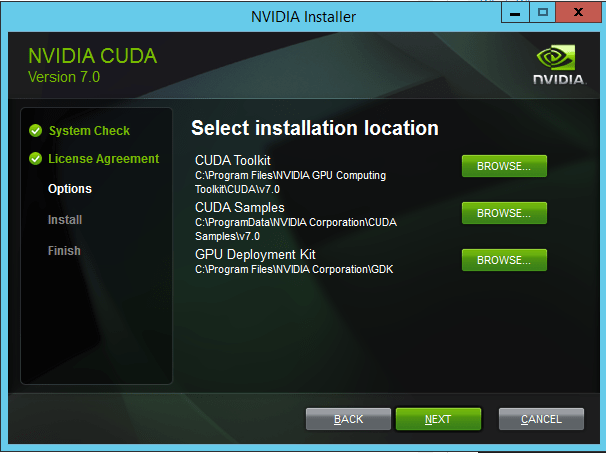
 siddharth's space