
Understanding Canvas Transformations
Test your understanding. WAP (write a program) to display circular text:
http://jsfiddle.net/Keuy6/
http://jsfiddle.net/3cKN3/
Draw text along a curved path:
http://jsfiddle.net/ymrdb/
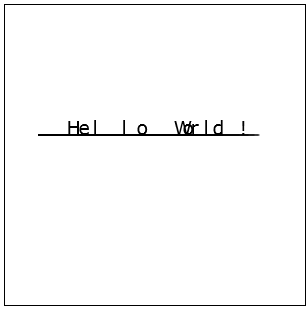
Problems:
1. The characters are not equidistant. This is because the points on the polyline are not equidistant.
2. There can be too much variation in orientation from character to character
The fix is to interpolate or resample the polyline along equidistant points. This should fix both problems above. Here is the new code:
http://jsfiddle.net/siddjain/6X3An/ (also see this fiddle which also displays the bounding box)
I also added rotating animation to above fiddle. The line and text need to be redrawn each frame. If we just have a single line and label, this is ok, but if we have many labels and lines, the many draw operations can slow down the performance. The fix will be to copy the zeroth frame into an offscreen canvas, and in order to animate draw the offscreen canvas onto onscreen one and set a transform on the onscreen canvas. Below code does this:
http://jsfiddle.net/siddjain/LQ4Uy/
Note the use of drawImage method in this code. Some important points:
- To set the size of the offscreen canvas, the code has to be exactly like this:
cvs = document.createElement('canvas'); // in memory canvas for animation

                    cvs.width = 300;

                    cvs.height = 300;
If you try to set the width and height on the canvas context or try to set width and height using css or style.width and style.height, you will see problems.
Next step, is to do the same thing using SVG. This sample renders text using SVG. The textPath used is same as path of the polyline traced by the user:
http://jsfiddle.net/DFKav/1/
We can see similar issues as we had with canvas. To fix it, again I interpolated the polyline along equispaced points and use this as the new textPath. The result is as shown by this sample:
http://jsfiddle.net/bJgs9/1/
Note the difference in text rendering between this and the canvas. In case of canvas, we render character by character and the whole text ends up occupying the full path. In case of SVG, the path gives the path of the text, but the text does not necessarily fill the whole path.
Problem with SVG fiddle:
1. text is rendered below the curve, not above it
2. when i animate, the text and the polyline rotate about their respective centers, not wrt center of the drawing
following sample fixes these problems:
http://jsfiddle.net/siddjain/DFKav/3/
Appendix: this is the code that does interpolation to convert user traced polyline into an equispaced polyline:
function doTextDrawCalculations()
{
    var e = document.getElementById('input');
    text = e.value || 'Hello World!';
    text = ' ' + text + ' ';
    var x = [];
    var y = [];
    var N = path.length;
    var M = text.length;
    for(var i = 0; i < path.length; i++)
    {
        x[i] = path[i][0];
        y[i] = path[i][1];
    }
    var d = [0];
    for(var ctr = 1; ctr < N; ctr++)
    {
        var x1 = x[ctr - 1];
        var y1 = y[ctr - 1];
        var x2 = x[ctr];
        var y2 = y[ctr];
        var dx = (x2 - x1);
        var dy = (y2 - y1);
        d[ctr] = d[ctr - 1] + Math.sqrt(dx * dx + dy * dy);
    }
    var j = scale(d[N - 1] / (M - 1), range(0, M - 1));
    var ans = [];
    ans.push(interpolate(x, d, j));
    ans.push(interpolate(y, d, j));
    return ans;
}

function scale(k, x)
{
    var y = [];
    for(var i = 0; i < x.length; i++)
    {
        y.push(k * x[i]);
    }
    return y;
}

    function range(start, end) {
    var foo = [];
    for (var i = start; i <= end; i++) {
        foo.push(i);
    }
    return foo;
}

// this method interpolates f. it can also be thought of as resampling f.
// f: the function to interpolate e.g. f = [10, -10, 10]
// x: the points at which function values are known. it is assumed that x is sorted e.g. [0, 1, 5]
// y: the points at which the function value is desired. it is assumed that y is sorted e.g. [0, 1, 2, 3, 4, 5]. it is further assumed that y[0] >= x[0] and y[end] <= x[end]; these conditions mean we will be interpolating f, not extrapolating it
// returns f interpolated along y
function interpolate(f, x, y)
{
    var ans = [];
    var k = 0;
    for(var i = 0; i < y.length; i++)
    {
        var w = y[i];
        var m = 0;
        var n = x.length - 1;
        for(var j = k; j < x.length; j++)
        {
            if (x[j] <= w)
            {
                m = j;
            }
            if (x[j] >= w)
            {
                n = j;
                break;
            }
        }
        k = m;
        if (x[m] === x[n])
        {
            ans.push((f[m] + f[n]) / 2);
        }
        else
        {
            ans.push(f[m] + (f[n] - f[m])/(x[n] - x[m]) * (w - x[m]));
        }
    }
    return ans;
}
canvas code to draw curved text:
function drawText()
{
    var M = text.length;
    for(var k = 1; k < M - 1; k++)
    {
        var du = u[k + 1] - u[k - 1]; // u & v are obtained after call to interpolation method
        var dv = v[k + 1] - v[k - 1];
        var angle = Math.atan2(dv, du);
        context.save();
        context.translate(u[k], v[k]);
        context.rotate(angle);
        context.fillText(text[k], 0, 0);
        context.restore();
    }
}
some perf optimizations are possible. Math.atan2(dv, du) this will result in a trig call, followed by another trig call to calculate sines and cosines when context.rotate is called. we can directly compute sines and cosines using the tangent, and call setTransform to set the transform directly.
Measuring text width & height in canvas:
http://jsfiddle.net/siddjain/6vURk/
 siddharth's space