
This is an exception that I dread and that has cost me countless hours of debugging.
If this exception is happening in context of a web app, and your web app is 64 bit application, check that Enable 32 bit is set to false in IIS Manager.
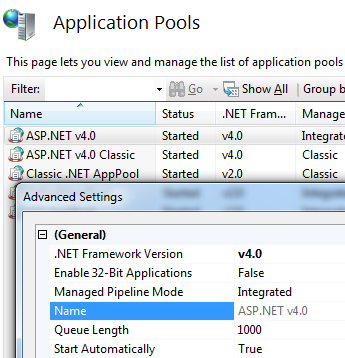
from this page http://blogs.msdn.com/b/rakkimk/archive/2007/11/03/iis7-running-32-bit-and-64-bit-asp-net-versions-at-the-same-time-on-different-worker-processes.aspx:
Most of you may already know how to see if the process is really spun in a 32-bit mode in 64-bit OS. Yes, simple way is to open the Task Manager and go to Processes tab – you would see the below:

To know exactly what is happening, enable following registry keys (see http://stackoverflow.com/a/1527249/147530):
HKEY_LOCAL_MACHINE\SOFTWARE\Microsoft\Fusion
Add:
DWORD ForceLog set value to 1
DWORD LogFailures set value to 1
DWORD LogResourceBinds set value to 1
String LogPath set value to folder for logs (e.g. C:\FusionLog\)

Now you will see what is going on.
Some more links:
http://www.hanselman.com/blog/BackToBasicsUsingFusionLogViewerToDebugObscureLoaderErrors.aspx
http://msdn.microsoft.com/en-us/library/e74a18c4(v=vs.110).aspx
http://msdn.microsoft.com/en-us/library/ms164699(v=vs.110).aspx
 siddharth's space